Khelo WordPress Theme
by rs-theme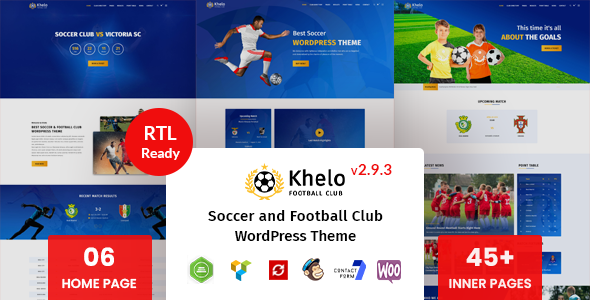
Stuck on your Khelo WordPress theme? Let's fix it.
No endless back-and-forth. Just send us the details and we'll get it done.
No obligation · Replies within 1 hour · Quote within 1 day
Setup · Customization · Bug fixes · WooCommerce integration
About Khelo WP Theme
Khelo is a WordPress theme built by rs-theme, designed specifically for sports clubs, fitness centers, and athletic organizations. It ships with a clean layout focused on event listings, team rosters, and match results — the core content types sports sites actually need.
The theme uses a bold visual style with high-contrast sections, making it well suited to football clubs, basketball teams, martial arts academies, and similar organizations. It includes pre-built page templates, widget areas, and basic WooCommerce compatibility for selling merchandise or memberships.
Khelo is built on a standard WordPress theme framework, so it works with common page builders and plugins without much friction. If you want a sports-focused theme that does not require extensive setup out of the box, Khelo is a practical starting point.
Get matched with a Khelo developer in under one day
Tell us about your Khelo project. Small fixes, Khelo theme customization, or a full website build, whatever you need, we've got it covered.
We'll connect you to the right Khelo developers, define the scope, and get everything 100% clear.
You'll get one estimate, hire your preferred developer, and start collaborating.
Khelo is a solid base, but getting it to do exactly what your sports club or fitness business needs takes real WordPress development knowledge. Generic freelancers often waste time learning the theme structure before writing a single line of code.
Through Codeable, you get matched with vetted WordPress developers who have worked with sports themes and know what they are doing. No bidding wars, no guesswork. Post your project and get a free estimate within 24 hours.
Pros
- Purpose-built for sports and fitness sites with relevant content types pre-configured
- Includes custom post types for teams, players, and matches without needing extra plugins
- Bold, high-contrast design works well for clubs and athletic brands out of the box
- WooCommerce compatible for selling kits, memberships, or event tickets
- Works with major page builders so you are not locked into a proprietary editor
Cons
- Documentation is limited, making advanced customization harder without developer help
- Default typography and color options are fairly restricted in the customizer
- Theme updates from rs-theme have been infrequent, which raises long-term compatibility concerns
- Mobile performance on image-heavy pages needs optimization work before going live
- No dedicated support forum or active community, so troubleshooting often means digging into the code
Who is Khelo for?
Football and Soccer Clubs
Khelo fits football clubs well. The match results layout, squad pages, and league table sections map directly to what a club website needs. A developer can extend these with live score widgets or club history timelines without restructuring the whole theme.
Martial Arts Academies
Martial arts schools need class schedules, instructor profiles, and belt progression info. Khelo’s team and event post types can be repurposed for this. With some customization, it becomes a clean, professional site for dojos and MMA gyms without starting from scratch.
Fitness and CrossFit Gyms
Gyms and CrossFit boxes need class timetables, membership sign-ups, and coach bios. Khelo’s structure supports this with WooCommerce for memberships and a booking plugin for class registration. The bold visual style suits the high-energy branding most fitness businesses want.
Basketball and Volleyball Teams
Basketball and volleyball teams have similar needs to football clubs. Khelo handles player rosters, game schedules, and results displays well. Statistics tracking and sponsor recognition sections can be added by a developer familiar with the theme’s template structure.
Sports Event Organizers
Sports event organizers running tournaments or leagues can use Khelo as a base for bracket displays, participant registration, and results publishing. Combined with The Events Calendar and some custom development, it handles multi-event sites without requiring a completely bespoke theme build.

Customizing Khelo
Out of the box, Khelo covers the basics. But most sports clubs and fitness businesses need something more specific — custom match result displays, membership portals, booking systems, or sponsor sections that match their branding.
That is where a Khelo expert makes the difference. A developer familiar with the theme can modify its template files, extend its custom post types, and integrate third-party plugins without breaking the existing structure.
Common customization requests include custom color schemes per team, adding a player statistics section, building a match schedule with filtering, and setting up WooCommerce for kit sales. These changes are straightforward for an experienced Khelo developer but time-consuming and risky if you are doing it yourself without theme knowledge.
Recommended plugins for Khelo
Khelo works well alongside several popular WordPress plugins. For event and match scheduling, The Events Calendar integrates cleanly. WooCommerce handles merchandise or membership sales. Contact Form 7 or Gravity Forms can power registration and inquiry forms.
If your site needs to rank in local or national search results, pairing Khelo with proper SEO work is worth the effort — see our WordPress SEO service for details. For sites expecting high traffic on match days, caching and server optimization matter — our WordPress performance service can help with that.
Not sure which plugins to use? This WordPress plugins directory covers the most popular options with reviews and setup guides.
Khelo common issues
Khelo theme not displaying match results correctly
Match result display issues in Khelo are usually caused by incorrect data entry in the match custom post type fields, or a conflict with a caching plugin serving stale content. Check the custom fields are populated correctly first. If the layout itself is broken, inspect the template file responsible — usually single-match.php. A persistent issue often points to a plugin conflict or a theme file that was accidentally overwritten. Our WordPress bug fixing service can diagnose and resolve this quickly.
Khelo WordPress theme broken after update
A broken Khelo site after an update usually means a PHP version incompatibility or a conflict with a plugin that updated at the same time. Start by switching to a default WordPress theme temporarily to confirm the issue is theme-side. Then check your server’s PHP version against what Khelo requires. If you updated via FTP or a zip file, verify the upload completed without corrupting any files. If the site is inaccessible, enable WP_DEBUG to get a specific error message before attempting any further fixes.
Khelo theme slow loading on mobile
Khelo can be slow on mobile because it loads full-size images without lazy loading enabled by default on older versions. Start by running a PageSpeed Insights test to identify the specific bottlenecks. Enable lazy loading, compress images using a plugin like ShortPixel, and make sure a caching plugin is active. Minifying CSS and JavaScript through a performance plugin also helps. For deeper optimization work, our WordPress performance service covers all of this in a structured way.
Khelo custom post types not showing on front end
If Khelo’s custom post types for players, teams, or matches are not showing on the front end, the most common cause is a permalink flush issue. Go to Settings > Permalinks and click Save Changes without changing anything — this resets the rewrite rules. If that does not fix it, check whether the post type is set to public in the theme’s registration code. A plugin conflict can also suppress custom post types if it registers conflicting slugs.
Khelo FAQ
Yes, Khelo is specifically built for sports clubs. It includes custom post types for matches, players, and teams, which saves setup time compared to adapting a generic theme. It works best for football, basketball, and similar team sports. More complex features like live scores or league management will need additional plugins or custom development on top of the base theme.
Khelo is compatible with Elementor in most cases. The theme’s standard WordPress template structure allows Elementor to take over page layout. However, some theme-specific template pages like single player or match result pages are controlled by Khelo’s own files and cannot be edited directly in Elementor without custom development work or Elementor Pro’s theme builder feature.
Khelo includes a Players custom post type. To add a player, go to the Players section in your WordPress dashboard, create a new entry, and fill in the custom fields for position, number, and bio. The player will then appear in the squad or roster template automatically. If you need custom fields beyond what Khelo provides by default, a developer can extend the post type using Advanced Custom Fields.
Update frequency from rs-theme has been inconsistent. The theme has seen limited releases in recent periods, which is worth factoring in if you are building a long-term site. It still functions on current WordPress versions, but you should test carefully before each WordPress core update. Having a developer on hand for maintenance reduces the risk of compatibility issues going unnoticed. Our WordPress maintenance service covers this.
Yes, Khelo works reasonably well for gyms and fitness centers. The bold design suits fitness branding, and the event and team templates can be adapted for class schedules and instructor profiles. WooCommerce compatibility means you can sell memberships or personal training packages. Some repurposing of the default post types is needed, which is straightforward for a developer familiar with the theme.
Hire a Khelo WordPress Developer
Whether you need a small tweak or a full custom build on top of Khelo, working with a developer who knows the theme saves time and avoids mistakes. Our team delivers clean, well-structured work through Codeable’s vetted network.
Get a free estimate — no obligation, no upfront cost. Describe your project and we will come back to you within 24 hours with a clear scope and price.
You'll need a free Codeable account so developers can ask questions and send their quotes.