Kiddie WordPress Theme
by zoutula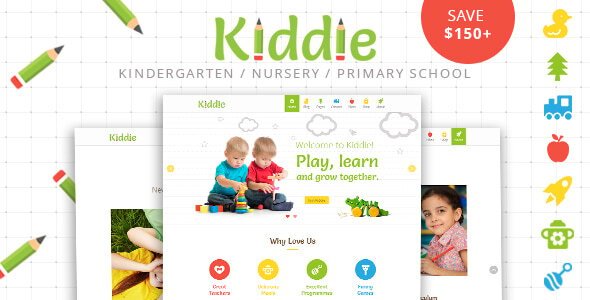
Stuck on your Kiddie WordPress theme? Let's fix it.
No endless back-and-forth. Just send us the details and we'll get it done.
No obligation · Replies within 1 hour · Quote within 1 day
Setup · Customization · Bug fixes · WooCommerce integration
About Kiddie WP Theme
Kiddie is a WordPress theme by zoutula built for children-focused websites. It ships with a bright, playful design that works well for kindergartens, daycare centers, schools, and kids’ activity businesses. The layout is clean and structured, with colorful section blocks, readable typography, and a family-friendly aesthetic that communicates trust and warmth at a glance.
Out of the box, Kiddie includes homepage sections for services, team members, galleries, and testimonials. It is built on a widgetized architecture, so most content areas can be managed without touching code. The theme is compatible with popular page builders, which makes rearranging content straightforward. It is also responsive, meaning it adapts to phones and tablets without extra configuration.
For parents browsing on mobile or staff updating event schedules, Kiddie covers the basics well. It is a focused theme with a specific audience in mind, and that focus keeps it simple to set up.
Get matched with a Kiddie developer in under one day
Tell us about your Kiddie project. Small fixes, Kiddie theme customization, or a full website build, whatever you need, we've got it covered.
We'll connect you to the right Kiddie developers, define the scope, and get everything 100% clear.
You'll get one estimate, hire your preferred developer, and start collaborating.
Kiddie is straightforward for a basic setup, but real business requirements add complexity fast. Custom class schedules, enrollment workflows, multilingual content, and booking integrations all require developer involvement. FoxyConcept connects you with vetted Kiddie specialists through Codeable, a platform that pre-screens every WordPress developer before they can take on client work. You get a fixed estimate upfront, no bidding wars, and no risk. If you have specific requirements that go beyond what the theme handles out of the box, getting a professional involved early saves rework later. Explore your options with our WordPress development services.
Pros
- Bright, child-friendly design that builds trust with parents immediately
- Widgetized homepage sections make content updates manageable without a developer
- Fully responsive layout that holds up well on mobile devices
- Compatible with WooCommerce and major form plugins without conflicts
- Focused scope means less bloat compared to multipurpose themes
Cons
- Limited layout flexibility without a page builder or custom development
- No built-in booking or enrollment system, requires third-party plugins
- Design style is very niche, not suitable outside children-focused contexts
- Theme updates from zoutula can be infrequent, which may create compatibility gaps
- Documentation is minimal, which makes troubleshooting harder for beginners
Who is Kiddie for?
Kindergartens and Preschools
Kiddie suits kindergartens and preschools well. The colorful sections map directly to what parents look for: program descriptions, staff introductions, contact details, and a gallery of the physical space. The warm visual tone communicates a safe environment without requiring custom design work. A developer can add a class schedule block and an inquiry form to complete the package.
After-School Activity Centers
Activity centers offering art classes, sports, drama, or coding clubs for kids need a site that communicates energy and fun. Kiddie’s section-based layout works well for listing activities, showing instructor profiles, and publishing term timetables. Combined with The Events Calendar plugin, it handles weekly schedules cleanly without custom development.
Children's Birthday Party Venues
Birthday party venues need to show packages, pricing, and availability clearly. Kiddie’s gallery sections display venue photos well, and WooCommerce or a booking plugin can handle deposits and reservations. The playful theme aesthetic matches what parents expect when searching for party spaces, reducing the visual gap between the site and the service.
Daycare Facilities
Daycare facilities need to convey reliability and warmth to anxious parents. Kiddie’s layout supports testimonials, staff bios, operating hours, and a contact form in a structure parents can scan quickly. Adding a secure parent portal or daily update system requires a developer, but the base theme handles the marketing site layer well.
Online Kids' Educational Resources
Educational resource sites for children, whether worksheets, videos, or interactive content, need a clean, accessible design. Kiddie’s readable typography and structured layout support content-heavy pages without overwhelming young users. A developer can extend it with membership plugin integration for gated content or a custom resource library with category filtering.

Customizing Kiddie
Kiddie’s built-in customizer lets you swap colors, upload a logo, adjust fonts, and modify header and footer settings. Most visual changes can be made without writing a single line of CSS. That said, there are limits. If you want a non-standard layout, custom post types for things like staff profiles or class schedules, or integration with booking plugins, you will likely need a developer.
A Kiddie expert can configure child themes to protect your changes during updates, build custom template parts that match the theme’s style, and wire up plugins like WooCommerce for merchandise or event ticketing. They can also handle things like adding multi-language support for schools serving diverse communities.
If your customization list goes beyond color and copy, working with someone who knows the Kiddie theme structure saves time and prevents layout breakage. The theme’s code is approachable for developers, which keeps custom work affordable.
Recommended plugins for Kiddie
Kiddie works well with several plugin categories. Contact Form 7 or WPForms handles enrollment inquiries and parent contact forms. WooCommerce adds online payment for class registrations or school merchandise. The Events Calendar plugin is a natural fit for scheduling open days, holiday programs, and weekly class timetables.
For performance, image-heavy children’s sites benefit from lazy loading and a caching layer. Poor load times hurt both user experience and search rankings. A WordPress performance audit can identify what is slowing your site down.
If you want parents to find your site through local search, structured WordPress SEO work around location and service keywords makes a real difference for childcare businesses competing in local results.
Not sure which plugins to use? This WordPress plugins directory covers the most popular options with reviews and setup guides.
Kiddie common issues
Kiddie theme homepage sections not showing correctly
Homepage sections in Kiddie are widget-driven. If sections are blank or out of order, check that the correct widgets are assigned to the right sidebar areas in Appearance > Widgets. A fresh install sometimes leaves sidebar zones empty. If sections are misaligned visually, a CSS conflict from a plugin is the most likely cause. Deactivate plugins one at a time to isolate it. For persistent layout issues, a WordPress bug fixing service can diagnose and resolve it quickly.
Kiddie theme not displaying correctly on mobile
Kiddie is built to be responsive, but plugin-injected content or custom CSS can break the mobile layout. First, test in your browser’s device emulation mode and check which element is overflowing. Inline width values set in the customizer or a page builder are common culprits. If the header menu is the problem, check that your mobile menu settings are configured in the customizer. Persistent mobile issues usually require a CSS audit by a developer.
Kiddie theme slider not working after WordPress update
Slider issues after a WordPress update often come from a JavaScript conflict or a deprecated function in the theme or a slider plugin. Check the browser console for JS errors first. If the slider plugin itself is outdated, update it independently of the theme. If Kiddie uses a bundled slider rather than a plugin, the theme may need an update from zoutula. If no update is available, replacing the slider with a supported plugin is the most stable fix.
Kiddie theme fonts or colors reset after update
If fonts or colors revert after a Kiddie update, your changes were likely stored in the active theme rather than a child theme. Any update overwrites the parent theme files. The fix going forward is to create a child theme and move your customizations there. Recover your previous settings from a site backup if available. For WordPress maintenance including regular backups and safe update processes, a managed service prevents this problem from recurring.
Kiddie FAQ
Kiddie by zoutula is available as a premium theme. It is not listed on the free WordPress.org theme directory. Pricing and licensing details are managed directly through zoutula’s distribution channel, typically ThemeForest or a similar marketplace. Check the purchase page for what is included with a regular license, particularly regarding support duration and update access.
Kiddie is generally compatible with Elementor and WPBakery, but compatibility is not always guaranteed on all template areas. The theme’s own widget-based sections may conflict visually with page builder output on the same page. The cleanest approach is to choose one method and stick with it. A developer can set up a child theme that integrates your preferred builder without breaking the Kiddie design system.
Kiddie does not include a native class schedule feature. The most common approach is to use The Events Calendar plugin with a weekly view, or a dedicated timetable plugin like School Timetable or TimeTable Responsive Schedule. These embed via shortcode into any page. A developer can style the output to match Kiddie’s color palette so it does not look like a plugin dropped in from outside.
Support activity for Kiddie from zoutula varies. Check the theme’s marketplace page for the last update date and support forum activity before purchasing or committing to a project. If updates are infrequent, factor that into your decision. An older theme without recent updates may develop compatibility issues with new WordPress versions. A developer can patch specific problems if official support is limited.
Yes, migrating an existing school or childcare site to Kiddie is straightforward in principle. Content migration involves moving pages, posts, images, and forms. What takes more care is rebuilding the layout to match Kiddie’s section structure. A WordPress migration service handles both the technical transfer and the layout rebuild, so your existing content looks correct in the new theme without manual copy-pasting.
Hire a Kiddie WordPress Developer
Whether you need a full site build, custom feature development, or fixes to an existing Kiddie installation, FoxyConcept can match you with a developer who knows this theme. Work is delivered through Codeable, so every developer is vetted and every project starts with a clear scope and estimate. No surprise invoices, no offshore guesswork. Get a free estimate and describe what you need. You are under no obligation to hire.
You'll need a free Codeable account so developers can ask questions and send their quotes.