Kids Planet WordPress Theme
by AncoraThemes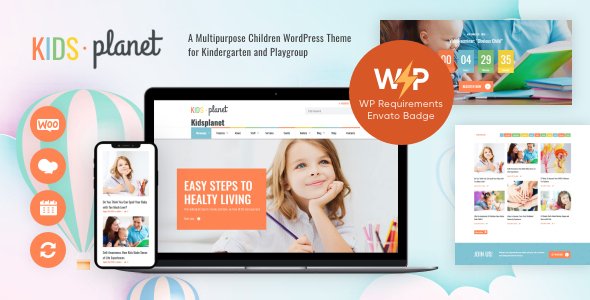
Stuck on your Kids Planet WordPress theme? Let's fix it.
No endless back-and-forth. Just send us the details and we'll get it done.
No obligation · Replies within 1 hour · Quote within 1 day
Setup · Customization · Bug fixes · WooCommerce integration
About Kids Planet WP Theme
Kids Planet is a WordPress theme by AncoraThemes built specifically for children-focused websites. It targets kindergartens, daycare centers, schools, and child activity businesses that need a colorful, welcoming online presence without sacrificing usability.
The theme ships with multiple homepage layouts, a drag-and-drop page builder, and pre-built sections for staff profiles, class schedules, event listings, and galleries. It uses bright color schemes and playful typography that appeal to parents browsing for their children’s activities.
Kids Planet is WooCommerce compatible, so you can sell merchandise or enrollment packages directly from the site. It also integrates with popular plugins like The Events Calendar and Contact Form 7. Built on clean, well-structured code, it loads reasonably fast out of the box and is fully responsive across mobile, tablet, and desktop.
Get matched with a Kids Planet developer in under one day
Tell us about your Kids Planet project. Small fixes, Kids Planet theme customization, or a full website build, whatever you need, we've got it covered.
We'll connect you to the right Kids Planet developers, define the scope, and get everything 100% clear.
You'll get one estimate, hire your preferred developer, and start collaborating.
Kids Planet has enough moving parts that generic WordPress help often misses the mark. AncoraThemes builds their themes with specific customizer panels, shortcode systems, and child theme structures that require familiarity to modify correctly.
FoxyConcept connects you with vetted WordPress developers through Codeable, a professional network where every developer is screened before being allowed to take projects. You get a developer who has worked with education and children’s site builds, not someone learning on your project. Work is scoped clearly, priced fairly, and delivered without surprises.
Pros
- Multiple pre-built homepage layouts designed specifically for schools and daycare centers
- Built-in sections for staff profiles, class schedules, and event listings reduce setup time
- WooCommerce compatibility allows direct enrollment payments and merchandise sales
- Fully responsive design with mobile-first layouts suited for parent browsing habits
- Active support from AncoraThemes with regular updates and documentation
Cons
- Heavy reliance on shortcodes makes content harder to migrate away from the theme later
- Default color schemes are fixed and require CSS or child theme work to fully rebrand
- Page builder dependency means layout changes need familiarity with the specific builder used
- WooCommerce enrollment features are basic and need plugin additions for complex registration workflows
- Limited third-party reviews and community resources compared to more widely adopted education themes
Who is Kids Planet for?
Kindergartens and Preschools
Kids Planet suits kindergartens and preschools well. The theme’s pre-built class schedule section, staff profile layouts, and event calendar integration cover the core pages a school website needs. Enrollment forms connect via Contact Form 7, and WooCommerce handles fee payments. Parents get a clear, welcoming site that communicates program details without clutter.
After-School Activity Centers
After-school centers need to display multiple programs across different age groups and days. Kids Planet’s flexible homepage sections let you organize activities clearly. The events system handles weekly schedules, and the gallery layouts showcase what kids actually do at the center. WooCommerce covers session bookings if needed.
Children's Sports Clubs
Children’s sports clubs benefit from Kids Planet’s colorful layouts and team or coach profile sections. You can structure pages around age groups, seasons, or sport types. The theme handles photo galleries well for match days and training sessions. Contact forms manage inquiries and trial session requests without needing additional booking plugins.
Daycare Providers
Daycare providers need a site that builds trust quickly with parents. Kids Planet’s warm visual style, staff profile sections, and testimonial layouts serve that purpose directly. The theme supports clear calls to action for inquiries, and WooCommerce can handle deposit payments for enrollment. A clean contact page reduces the friction between browsing and booking.
Kids Art and Music Schools
Art and music schools for children need to communicate program variety, teacher credentials, and scheduling clearly. Kids Planet’s flexible content sections cover all three. Gallery pages work well for showcasing student work and recital photos. Class schedule sections keep term dates visible, and WooCommerce handles class pack purchases or individual lesson bookings.

Customizing Kids Planet
Kids Planet gives you a solid starting point, but most school and daycare sites need customization beyond what the default settings offer. That might mean adjusting the color palette to match your brand, restructuring the homepage layout, adding a custom enrollment form, or building out a parent portal section.
A Kids Planet expert can handle these changes without breaking the theme’s existing structure. AncoraThemes uses a mix of native WordPress customizer options and shortcodes, so knowing exactly where to make changes without creating technical debt matters.
Common customization requests include custom post types for staff or programs, modified class schedule displays, and WooCommerce tweaks for enrollment pricing. If you need changes that go beyond what the theme panel allows, working with a developer familiar with Kids Planet specifically saves a lot of back-and-forth time.
Recommended plugins for Kids Planet
Kids Planet works well with several plugins that extend its core functionality. The Events Calendar adds a proper scheduling system for classes and activities. WooCommerce handles enrollment payments and merchandise sales. WPML or Polylang can make the site multilingual, which is useful for communities with diverse language needs.
For performance, caching plugins like WP Rocket or LiteSpeed Cache pair well with the theme. If search visibility matters, pairing Kids Planet with a solid WordPress SEO setup helps parents find your site locally. For speed improvements beyond basic caching, a WordPress performance audit can identify specific bottlenecks in how the theme loads assets.
Not sure which plugins to use? This WordPress plugins directory covers the most popular options with reviews and setup guides.
Kids Planet common issues
Kids Planet theme not displaying class schedule correctly
Schedule display issues in Kids Planet usually come from incorrect shortcode parameters or a conflict with a caching plugin serving a stale version of the page. Start by clearing your cache completely and checking the shortcode syntax against the theme documentation. If you added a custom CSS rule targeting the schedule module, that can collapse the layout. Deactivating plugins one at a time helps isolate the conflict. If the issue persists after updates, a WordPress bug fixing service can trace the root cause faster.
Kids Planet homepage layout broken after WordPress update
WordPress core or WooCommerce updates occasionally break Kids Planet homepage layouts, particularly when the update changes how scripts or stylesheets are enqueued. First, check if the theme itself has a pending update from AncoraThemes. If the theme is current and the layout is still broken, open your browser’s console for JavaScript errors. A plugin conflict is the most common cause. Disable all plugins except essentials and re-enable them one at a time to find the conflict.
Kids Planet contact form not sending emails
Kids Planet uses Contact Form 7 for its built-in forms. Email delivery failures in Contact Form 7 are almost always a server mail configuration issue, not a theme bug. Your hosting provider’s default PHP mail function is frequently blocked or marked as spam. Install WP Mail SMTP and configure it with an SMTP provider like Gmail, Brevo, or Postmark. This routes emails through a verified sender and fixes delivery for the majority of cases without touching the theme files.
Kids Planet theme slow to load on mobile
Kids Planet loads several image assets, fonts, and scripts that can slow mobile performance. Start by running the site through Google PageSpeed Insights to identify the specific bottlenecks. Large uncompressed images in gallery sections are a common culprit. Install a lazy loading plugin and compress existing images using Imagify or ShortPixel. If the theme is loading unused CSS or JavaScript on mobile, a WordPress performance review can identify which assets to defer or remove.
Kids Planet FAQ
Yes. Kids Planet is purpose-built for schools, kindergartens, and child-focused businesses. It includes pre-designed sections for class schedules, staff profiles, event listings, and enrollment inquiries. The layouts and typography are chosen specifically for school sites, which reduces the amount of customization needed to get a professional result. It works well for both small daycare providers and larger multi-class primary schools.
Yes, Kids Planet is WooCommerce compatible. You can use it to sell enrollment packages, class credits, merchandise, or digital downloads directly from the site. Basic product pages and cart functionality work out of the box. For more complex enrollment workflows, such as age-group filtering or recurring payments, you will need additional WooCommerce extension plugins on top of what the theme provides natively.
Kids Planet provides color options through the WordPress Customizer, which covers primary palette changes. For deeper rebranding, like adjusting secondary colors, button styles, or specific module backgrounds, you will need to add custom CSS through a child theme. Editing the parent theme’s CSS directly is not recommended because updates will overwrite your changes. A developer can set up a child theme and apply your brand colors cleanly.
Kids Planet includes a class schedule section built with shortcodes. You populate it through the theme’s custom settings panel or a dedicated custom post type depending on your version. The theme documentation from AncoraThemes covers the exact shortcode parameters. If you need a more dynamic schedule with filtering by age group or day of week, integrating a plugin like The Events Calendar gives you more control than the built-in option.
Kids Planet has its own page builder system rather than being built specifically around Elementor. Some users do run Elementor alongside it, but this can create conflicts with the theme’s native sections and slow the site down by loading two builder systems simultaneously. If you want to use Elementor for your Kids Planet site, it is worth having a developer check compatibility first to avoid layout issues or performance problems.
Hire a Kids Planet WordPress Developer
Whether you need a full site build, specific customizations, or ongoing support, FoxyConcept matches you with a Kids Planet developer who knows the theme inside out. Work is delivered through Codeable, so you get a vetted professional, a clear scope, and no wasted time on trial and error.
Get a free estimate with no obligation to hire. Most projects receive developer matches within 24 hours.
You'll need a free Codeable account so developers can ask questions and send their quotes.