Kids WordPress Theme
by cmsmasters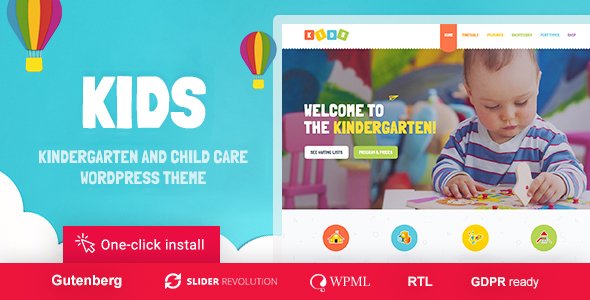
Stuck on your Kids WordPress theme? Let's fix it.
No endless back-and-forth. Just send us the details and we'll get it done.
No obligation · Replies within 1 hour · Quote within 1 day
Setup · Customization · Bug fixes · WooCommerce integration
About Kids WP Theme
Kids is a WordPress theme built by CMSMasters, designed for children-focused websites such as schools, daycare centers, toy shops, and family blogs. It ships with a bright, playful design that appeals to parents and kids alike, while keeping the backend straightforward for site owners to manage.
The theme includes multiple homepage layouts, custom post types for staff and courses, WooCommerce support for selling products, and a drag-and-drop page builder integration. Color schemes are easy to switch, and the typography choices are legible and fun without sacrificing usability.
Built on a solid CMSMasters framework, Kids handles responsive layouts cleanly across mobile, tablet, and desktop. If you run a nursery, after-school program, children’s charity, or educational platform, this theme gives you a strong starting point without needing to build from scratch.
Get matched with a Kids developer in under one day
Tell us about your Kids project. Small fixes, Kids theme customization, or a full website build, whatever you need, we've got it covered.
We'll connect you to the right Kids developers, define the scope, and get everything 100% clear.
You'll get one estimate, hire your preferred developer, and start collaborating.
CMSMasters themes use a proprietary framework that behaves differently from standard WordPress setups. If you’ve hit a wall customizing Kids, or you need features the theme doesn’t include by default, working with a vetted developer is the faster path. Through Codeable, every developer is screened and reviewed, so you’re not taking a gamble on quality. Post your project, get an estimate within 24 hours, and only proceed if you’re happy. No obligation, no risk.
Pros
- Bright, well-structured design built specifically for children's brands and educational sites
- Multiple pre-built homepage layouts reduce initial setup time significantly
- WooCommerce integration is included, making it viable for toy shops or school merchandise stores
- Custom post types for staff profiles and courses are built in, not bolted on
- Responsive layout works reliably across mobile devices, which parents use heavily
Cons
- The CMSMasters page builder is proprietary, making it harder to switch themes later without losing content
- Plugin compatibility can be unpredictable with newer WordPress and WooCommerce versions
- Theme updates have slowed down, raising questions about long-term active development
- The shortcode system adds technical debt that non-developers can find difficult to manage
- Limited third-party documentation means troubleshooting often requires developer involvement
Who is Kids for?
Primary School Website
Kids gives primary schools a structured starting point with staff profiles, class or year-group pages, and an events section for term dates and school trips. The bright color palette fits without feeling cheap. A developer can extend it with parent login areas, homework download sections, and newsletter integrations tied to the school calendar.
Daycare and Nursery Center
Nurseries and daycare centers need to build trust with parents quickly. Kids supports photo galleries, age-group activity listings, and team profile pages that show caregivers’ qualifications. With custom form integration, you can add online enrollment or waiting list requests directly to the site without redirecting parents to a third-party tool.
Children's Toy or Clothing Shop
The WooCommerce integration in Kids makes it a workable base for children’s product stores. You can sell toys, books, clothing, or educational kits with category pages styled to match the playful theme aesthetic. A developer can add age-range filtering, gift wrapping options, or subscription box functionality to increase order value and repeat purchases.
After-School Activity Program
Sports clubs, art classes, coding camps, and music lessons all fit the Kids theme structure well. The course or activity post type handles scheduling and descriptions, while a booking plugin layered on top handles registrations. Parents can browse activities by age group, check availability, and sign up without leaving the site.
Family and Parenting Blog
Parenting blogs and family lifestyle sites benefit from Kids’ clean content layout and category structure. The theme supports standard blog formats well, and the design communicates warmth without being cluttered. Monetization through WooCommerce digital downloads or affiliate product pages can be added without major structural changes to the theme.

Customizing Kids
Out of the box, Kids covers the basics well. But most real projects need adjustments: custom enrollment forms, event calendars synced to a school schedule, multilingual support for bilingual families, or a private parent portal with login-protected content.
A Kids expert can handle these without breaking the theme’s existing structure. Common customization work includes restructuring the homepage layout to match a specific brand, connecting WooCommerce to a booking system, and adding age-group filtering to course or activity listings.
CMSMasters themes use their own framework and shortcode system, so knowing how it behaves under the hood matters. A developer who has worked with Kids specifically will save you time and avoid the trial-and-error that comes with unfamiliar theme architectures. Custom child themes are always recommended before touching core files.
Recommended plugins for Kids
Kids pairs well with several plugins that extend its core functionality. WooCommerce adds a full shop for selling merchandise, uniforms, or learning materials. The Events Calendar plugin slots in cleanly for school terms and activity schedules. WPML or Polylang handle multilingual needs for international or bilingual schools.
For performance, image optimization and caching plugins are essential given how image-heavy children’s sites tend to be. Learn more about WordPress performance optimization to keep load times fast. If you need to improve search visibility for local parents, dedicated WordPress SEO services can make a real difference in how the site ranks.
Not sure which plugins to use? This WordPress plugins directory covers the most popular options with reviews and setup guides.
Kids common issues
Kids theme not displaying correctly after WordPress update
WordPress core updates can conflict with older CMSMasters theme files, particularly around template hierarchy changes and block editor compatibility. The first step is checking whether the issue appeared immediately after the update. Disable plugins one by one to rule out conflicts, then compare your theme version against the latest available from CMSMasters. If the theme hasn’t been updated in over a year, a developer may need to patch compatibility manually rather than waiting for an official fix. Our WordPress bug fixing service handles exactly this kind of post-update breakage.
Kids theme WooCommerce shop page layout broken
WooCommerce releases frequent updates that can override theme template files. Kids includes WooCommerce template overrides in its own folder, and when WooCommerce updates those base templates, the theme’s versions fall out of sync. Check the WooCommerce system status page for outdated template warnings. The fix involves updating the theme’s WooCommerce templates to match the current version, which requires PHP editing. This is not something to attempt without developer experience. Our bug fixing service can resolve this cleanly without losing your customizations.
CMSMasters Kids theme slow loading on mobile
Children’s sites tend to be image-heavy, and Kids doesn’t include aggressive performance optimizations out of the box. Start by auditing page weight using Google PageSpeed Insights or GTmetrix. Common culprits are uncompressed images, render-blocking scripts from the CMSMasters framework, and unminified CSS. Installing a caching plugin and an image optimization tool will help. For deeper gains, a developer can defer non-critical scripts and optimize the theme’s asset loading order. See our WordPress performance services for a full audit and fix.
Kids theme custom fonts or colors not saving
If font or color changes made in the Kids theme options panel aren’t persisting, the most common cause is a caching layer serving old CSS. Clear your browser cache, then clear any server-side or plugin cache. If the issue continues, check whether a child theme is active and whether custom CSS is being overridden by inline styles from the CMSMasters framework. Theme option values are stored in the WordPress options table, so a database connection issue or plugin conflict can also prevent saves. A developer can trace the exact failure point quickly. Contact us through our WordPress bug fixing service for a diagnosis.
Kids FAQ
CMSMasters continues to sell the Kids theme, but update frequency has slowed compared to earlier years. The theme works on current WordPress versions, but some compatibility patches may require manual intervention, especially around WooCommerce and the block editor. If long-term support matters to your project, a developer can maintain and patch the theme independently of the original vendor.
Yes. Kids includes WooCommerce support and its shop, product, and cart pages are styled to match the theme. It works well for toy shops, children’s clothing, books, or school supplies. For more complex setups like subscriptions, bookings, or variable pricing, you’ll likely need a developer to integrate additional plugins cleanly without breaking the theme’s layout.
Kids doesn’t include a built-in enrollment form beyond basic contact options. You can use plugins like WPForms, Gravity Forms, or Ninja Forms to build custom enrollment, registration, or inquiry forms. These integrate cleanly with the theme in most cases. For complex multi-step forms or forms tied to a backend CRM, developer configuration is recommended to ensure data flows correctly.
Yes, the Kids theme itself is portable. Migrating involves moving the database, files, and updating URLs. The CMSMasters framework stores some settings in serialized database fields, so URL replacement needs to handle that carefully to avoid breaking theme options. Using a reliable migration plugin or a developer reduces the risk of post-move issues. Learn more about our WordPress migration service.
Yes, always use a child theme. Any direct edits to the Kids parent theme files will be overwritten when the theme updates, losing your changes completely. A child theme inherits the parent’s styles and templates while keeping your customizations safe. Setting one up takes minutes but saves significant rework later. A developer can create and configure a child theme as part of any project.
Hire a Kids Theme Expert or WordPress Developer
Whether you need a quick fix or a full build, our WordPress developers have hands-on experience with CMSMasters themes including Kids. Work is handled through Codeable, a vetted developer network trusted by thousands of businesses worldwide. You get a free estimate first, with no obligation to hire. Get your free estimate today and have a developer matched to your project within 24 hours.
You'll need a free Codeable account so developers can ask questions and send their quotes.