Kimono WordPress Theme
by Bravis-Themes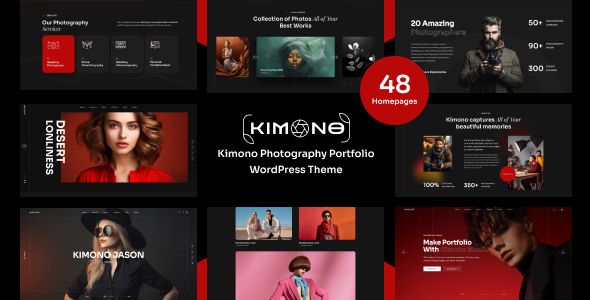
Stuck on your Kimono WordPress theme? Let's fix it.
No endless back-and-forth. Just send us the details and we'll get it done.
No obligation · Replies within 1 hour · Quote within 1 day
Setup · Customization · Bug fixes · WooCommerce integration
About Kimono WP Theme
Kimono is a WordPress theme built by Bravis-Themes, designed with a clean aesthetic that suits lifestyle brands, fashion boutiques, and editorial-style websites. It ships with a visual page builder, multiple header layouts, and a grid-based portfolio system that makes it a practical choice for creative professionals who want a polished look without writing code from scratch.
The theme supports WooCommerce, making it usable for small to mid-size online stores. Typography options are extensive, and the demo content can be imported in one click. Kimono is responsive across devices and built on a solid framework that keeps load times reasonable out of the box. If you need something beyond the defaults, a developer can extend or modify it fairly quickly due to its well-structured template files.
Get matched with a Kimono developer in under one day
Tell us about your Kimono project. Small fixes, Kimono theme customization, or a full website build, whatever you need, we've got it covered.
We'll connect you to the right Kimono developers, define the scope, and get everything 100% clear.
You'll get one estimate, hire your preferred developer, and start collaborating.
Most Kimono customisation work is straightforward for an experienced developer, but finding the right one matters. FoxyConcept works through Codeable, a vetted network of WordPress specialists. Every developer on the platform has passed a strict screening process, so you are not guessing about quality. Whether you need a one-hour fix or a full custom build on top of Kimono, you get matched with someone who knows what they are doing and can deliver quickly.
Pros
- Clean, minimal design that suits editorial and lifestyle brands without heavy visual clutter
- One-click demo import gets a site looking like the preview in under ten minutes
- WooCommerce support built in, covering basic store functionality without additional setup
- Multiple header and footer layout options available through the Customizer, no coding needed
- Well-structured template files make it straightforward for a developer to customise or extend
Cons
- Page builder is proprietary, which can create lock-in if you want to switch to Gutenberg or Elementor later
- Demo content looks great but replicating it exactly for your own content takes time and attention
- Advanced WooCommerce features like custom checkout flows require developer-level template overrides
- Limited third-party documentation outside the official theme support, so troubleshooting can take longer
- Theme update history is inconsistent, which means compatibility with newer WordPress versions should be tested before updating
Who is Kimono for?
Fashion and Apparel Boutiques
Kimono’s grid layouts and clean typography make it a natural fit for fashion retailers. Product images take center stage, and the WooCommerce integration handles catalogue and checkout without needing a separate shop theme. A developer can extend product pages with custom fields, size guides, or lookbook-style galleries that align with how fashion brands typically sell online.
Photography and Creative Portfolios
Photographers and creatives benefit from Kimono’s portfolio system and full-width image support. The minimal frame keeps attention on the work itself. Gallery pages load quickly, and the layout options let you present projects in a structured way. For studios that also sell prints or digital downloads, the WooCommerce support covers that without needing a second theme.
Lifestyle and Wellness Brands
Wellness brands, yoga studios, and lifestyle coaches can use Kimono’s warm aesthetic and flexible homepage sections to build a site that feels personal without feeling cluttered. Blog layouts support long-form content, and the design holds up well for services pages and booking integrations. Custom fonts and color palettes allow strong brand alignment.
Independent Online Stores
Small independent stores selling physical or digital products can run efficiently on Kimono with WooCommerce active. The theme handles product archives, single product pages, and cart flows out of the box. For stores needing custom functionality like subscription products or custom shipping rules, a developer can layer in the right plugins without visual conflicts.
Editorial and Magazine Blogs
Content-heavy sites and blogs benefit from Kimono’s editorial grid and category-based layouts. Posts are well-presented with featured images and flexible typography settings. For publishers running display ads or managing large content archives, performance tuning and caching setup will be important to keep reading experiences fast and smooth across devices.

Customizing Kimono
Out of the box, Kimono gives you a good starting point. You can adjust colors, fonts, header styles, and layout options through the WordPress Customizer without touching code. The built-in page builder handles most layout needs for standard pages.
Where things get more specific, you may need a Kimono expert. Custom post type integration, WooCommerce template overrides, advanced mega menus, or performance tuning require hands-on development work. The same applies if you want to extend the theme with custom widgets, restructure the homepage beyond what the builder allows, or match exact brand guidelines that the theme options panel cannot replicate. A developer familiar with Kimono will know exactly which template files and hooks to target without breaking updates.
Recommended plugins for Kimono
Kimono integrates with several common plugins without friction. WooCommerce works for product listings and checkout. Contact Form 7 and WPForms both drop in cleanly. WPML is supported if you need multilingual content.
For performance, image lazy loading and caching plugins like WP Rocket or LiteSpeed Cache pair well with the theme. On the SEO side, Yoast and Rank Math both work without conflicts. If you plan to push the site further, review our WordPress performance services or WordPress SEO optimisation to get more out of the foundation Kimono provides.
Not sure which plugins to use? This WordPress plugins directory covers the most popular options with reviews and setup guides.
Kimono common issues
Kimono theme homepage not matching demo after import
This usually happens because the demo import did not pull in all required plugins or the page builder content is missing its shortcodes. First, confirm all required plugins listed in the theme documentation are active and up to date. Re-run the demo importer if available. If specific sections are missing, check the page builder editor for broken modules. In persistent cases, a developer can rebuild the affected sections manually using the correct builder components. See our WordPress bug fixing service if you need hands-on help.
Kimono WooCommerce product page layout broken
Broken WooCommerce layouts in Kimono typically result from a plugin conflict, a missed theme update, or a customisation that overwrote a core template file. Start by deactivating plugins one at a time to isolate the conflict. Check if the issue appeared after a WooCommerce or theme update. If a template file was edited directly, it may need to be rebuilt using WooCommerce’s template override folder structure. A developer can diagnose and fix this without affecting the rest of the site. Visit our bug fixing service for fast resolution.
Kimono theme slow loading on mobile
Kimono is reasonably lean, but mobile performance can drop if large images are not compressed, scripts are not deferred, or a caching plugin is absent. Start by running a PageSpeed Insights check to identify the specific bottlenecks. Compress images with ShortPixel or Imagify, enable lazy loading, and install a caching plugin like WP Rocket. If the theme is loading unused CSS or JS from inactive page builder modules, a developer can clean those up. For deeper work, our WordPress performance service covers full audits and fixes.
Kimono header menu not displaying correctly
Menu display problems in Kimono usually trace back to a header layout setting that does not match the assigned menu location, or a custom CSS conflict introduced by another plugin or child theme. Check Appearance > Menus to confirm the correct menu is assigned to the primary location. If using a custom header layout, verify the menu widget or block is placed correctly inside that layout. On mobile, test the hamburger menu trigger separately. A developer can identify whether the issue is CSS, JavaScript, or a configuration problem quickly.
Kimono FAQ
Update frequency from Bravis-Themes has been inconsistent. Before installing or upgrading, check the theme’s changelog on ThemeForest and test compatibility with your current WordPress and WooCommerce versions in a staging environment. If the theme has not been updated recently, a developer can patch specific compatibility issues without needing a full theme replacement.
Kimono ships with its own page builder. Elementor can be installed alongside it, but mixing two builders on the same site creates unnecessary overhead and potential conflicts. If Elementor is your preferred builder, a developer can transition the site to Elementor-based templates while preserving the Kimono design aesthetic, or recommend a theme better suited to Elementor workflows.
Yes. Kimono includes WooCommerce support for product listings, archives, single product pages, and the cart and checkout flow. Basic store functionality works without extra setup. For advanced needs like custom product tabs, subscription products, or custom checkout fields, you will need additional plugins and likely some developer configuration to keep everything styled consistently.
Create a folder in wp-content/themes/ named kimono-child. Inside it, add a style.css file with the correct theme header referencing Kimono as the template, and a functions.php file that enqueues the parent theme stylesheet. Activate the child theme from Appearance > Themes. Any customisations go into the child theme to survive parent theme updates safely.
Migrating an existing site to Kimono involves rebuilding pages using the theme’s layouts and builder, transferring content, and restyling to match the new design. It is not a simple theme swap if your current site has custom layouts. A developer can handle the migration cleanly, including redirects and SEO preservation. See our WordPress migration service for a structured approach to this process.
Hire a Kimono WordPress Developer
Need changes made to your Kimono theme? Whether it is a layout issue, a WooCommerce customisation, or a full site build, FoxyConcept can handle it. Work is delivered through Codeable, so you get a vetted developer, not a freelancer lottery. Post your project, get a free estimate within 24 hours, and decide from there with no obligation. Get your free estimate today and see exactly what your project will cost before committing.
You'll need a free Codeable account so developers can ask questions and send their quotes.