Kingster WordPress Theme
by GoodLayers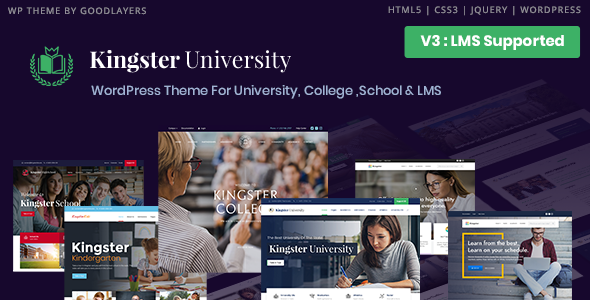
Stuck on your Kingster WordPress theme? Let's fix it.
No endless back-and-forth. Just send us the details and we'll get it done.
No obligation · Replies within 1 hour · Quote within 1 day
Setup · Customization · Bug fixes · WooCommerce integration
About Kingster WP Theme
Kingster is a WordPress theme built by GoodLayers, targeting universities, colleges, and educational institutions. It ships with a dedicated education-focused page builder, course listings, event management, and a faculty directory system built in. The theme is structured around the needs of academic websites: department pages, admission sections, campus maps, and news feeds.
GoodLayers built Kingster on their own GoodLayers Page Builder before later adding WPBakery support. The result is a theme with a lot of built-in structure, but one that requires careful setup to get right. Out of the box, it handles most of what an education site needs without heavy plugin additions. For institutions that need something beyond the defaults, a Kingster developer can extend it significantly.
Get matched with a Kingster developer in under one day
Tell us about your Kingster project. Small fixes, Kingster theme customization, or a full website build, whatever you need, we've got it covered.
We'll connect you to the right Kingster developers, define the scope, and get everything 100% clear.
You'll get one estimate, hire your preferred developer, and start collaborating.
Kingster’s architecture is specific enough that general WordPress developers often lose time figuring out the GoodLayers Page Builder and its custom post types. A Kingster expert already knows where the friction points are: the shortcode-heavy layout system, the theme options that override Customizer settings, and the template hierarchy for course and faculty pages. Through Codeable, you get access to vetted Kingster developers who have shipped real education sites with this theme, not developers learning it on your project’s budget.
Pros
- Built specifically for education sites with course, event, and faculty post types included
- Multiple pre-built page templates for departments, admissions, and campus life sections
- Supports WPBakery and the native GoodLayers Page Builder for flexible layout control
- Extensive Theme Options panel gives global control over typography, colors, and headers
- Compatible with major LMS plugins including LearnDash and LifterLMS
Cons
- GoodLayers Page Builder creates shortcode dependency that makes switching themes difficult
- Theme Options panel is not intuitive for non-technical site owners
- Documentation is thin in places, particularly around custom post type configuration
- Page load times can suffer on content-heavy department pages without performance tuning
- Update history from GoodLayers has been inconsistent in recent years
Who is Kingster for?
Universities and Colleges
Kingster was designed for higher education. Its department page templates, faculty directory, and event calendar map directly to how universities structure their web presence. A Kingster developer can configure multi-campus layouts, integrate an admissions portal, and set up program-specific landing pages that match the institution’s internal structure without rebuilding from scratch.
Private Schools and K-12 Institutions
Private schools benefit from Kingster’s clean visual style and built-in news and events functionality. Admissions pages, school calendar, and faculty profiles all have dedicated templates. A Kingster specialist can adapt the color scheme and typography to match school branding while keeping the content management straightforward for non-technical administrative staff.
Online Course Providers
Paired with LearnDash or LifterLMS, Kingster works as a front-end for online course platforms. Course listing pages, instructor bios, and curriculum pages can all be built using Kingster’s native components. A Kingster developer can connect the LMS data to these templates and configure checkout flows through WooCommerce for paid course enrollment.
Training Centres and Bootcamps
Coding bootcamps and professional training centres need clear program pages, intake schedules, and application forms. Kingster’s event and course post types handle scheduling well, and its layout flexibility suits the more marketing-focused design these sites typically need. A Kingster expert can build out landing pages optimized for paid traffic and conversion alongside the informational content.
Educational Nonprofits
Educational nonprofits often need to communicate programs, impact data, and fundraising calls to action alongside standard school content. Kingster’s page builder handles mixed-content layouts well. A Kingster developer can set up donation integrations, program overview pages, and annual report sections without needing a secondary theme or custom build.

Customizing Kingster
Kingster’s Theme Options panel controls fonts, colors, header layouts, and footer structure globally. Most visual changes live here rather than in the WordPress Customizer, which can catch new users off guard.
The theme includes multiple header styles, a sticky nav option, and support for a mega menu. Department and faculty page templates are built in, but customizing them to match a specific institution’s branding typically requires touching template files or CSS. A Kingster expert can restructure page layouts, rework the course listing display, and integrate custom post types without breaking the theme’s update path. If you need custom admission forms, a branded campus map section, or modified event archive templates, that work is best handed off to a Kingster specialist who knows the GoodLayers framework well.
Recommended plugins for Kingster
Kingster works with WooCommerce for selling courses or merchandise, and integrates with popular LMS plugins like LearnDash and LifterLMS for full course management. Contact Form 7 and Gravity Forms both work cleanly within its page templates.
For institutions focused on search visibility, pairing Kingster with Yoast or Rank Math is straightforward, though schema for courses and events benefits from additional configuration. See our WordPress SEO services for help with that. If page load times are a concern on media-heavy department pages, our WordPress performance service covers caching, image optimization, and script management specific to GoodLayers themes.
Not sure which plugins to use? This WordPress plugins directory covers the most popular options with reviews and setup guides.
Kingster common issues
Kingster page builder content not displaying after update
This usually happens when the GoodLayers Page Builder shortcodes break during a WordPress core or theme update. Open the affected page in the backend editor and check for raw shortcode strings displaying as text. The fix typically involves re-saving page content through the GoodLayers interface or restoring from a pre-update backup. If multiple pages are affected, a WordPress bug fixing service can audit and restore them systematically.
Kingster mega menu not working on mobile
Kingster’s mega menu relies on specific JavaScript that can conflict with caching plugins or minification tools. First, disable JS minification in your caching plugin and test. If the menu still breaks on mobile, check that the theme’s gdlr-core plugin is active and up to date. A version mismatch between Kingster and gdlr-core is the most common cause. Clear all caches after any plugin update.
Kingster course page template showing blank layout
A blank course page template usually means the Kingster Education plugin or gdlr-core is inactive or outdated. Go to Plugins, confirm both are active, and check for available updates. If the template was working before a WordPress update, there may be a PHP compatibility issue. Check your error logs for deprecated function warnings and update PHP to a version the current Kingster release supports.
Kingster theme options not saving changes
If Theme Options changes are not saving, the most common causes are a file permission issue on wp-config.php, a PHP memory limit that’s too low, or a caching layer writing stale options. Increase PHP memory to at least 256MB, clear all caches including any server-level cache, and re-test. If the issue persists, a WordPress bug fix specialist can trace the exact failure point in the options API.
Kingster slider not loading images on homepage
Kingster’s homepage slider failing to load images is often tied to a lazy loading plugin interfering with the slider’s JavaScript initialization. Disable lazy loading for the slider container in your image optimization plugin settings. Also check that the slider images are assigned correctly in Theme Options and that the featured images on selected posts are properly set. Regenerating thumbnails via WP-CLI can resolve size mismatch issues.
Kingster faculty directory page showing wrong layout
Faculty directory layout issues are usually caused by a mismatch between the selected page template and the custom post type configuration. In the page editor, confirm the correct Kingster Faculty template is selected from the Page Attributes panel. Then check that Faculty posts have the required custom fields filled in. If the layout still breaks, inspect the template file in your child theme for outdated code that conflicts with the current Kingster version.
Kingster WPBakery conflict causing broken page layout
WPBakery conflicts in Kingster typically show as broken column layouts or missing row separators. This happens when WPBakery is updated independently of Kingster. Check the GoodLayers changelog for the WPBakery version Kingster was tested against and match it. Avoid running the WPBakery auto-updater without checking Kingster compatibility first. If you need both at their latest versions, a WordPress bug fixing service can reconcile the conflict.
Kingster custom fonts not applying in theme options
Custom fonts failing to apply in Kingster Theme Options usually means the Google Fonts API request is being blocked or the font name is entered with incorrect spelling. Check your browser console for blocked external requests. If you are using a self-hosted font, confirm the font files are enqueued correctly in your child theme’s functions.php. Kingster’s font field expects the exact font family name as it appears in Google Fonts, including correct capitalization.
Kingster events calendar not showing upcoming dates
When Kingster’s events calendar skips upcoming dates, first check the timezone setting in WordPress Settings under General. A mismatch between server timezone and WordPress timezone is the most frequent cause. Also confirm the event custom post type from Kingster Education plugin is active. If events were entered without an end date, some calendar views will exclude them. Re-enter at least one test event with a full date range and verify it displays correctly.
Kingster child theme not inheriting parent styles correctly
Kingster child themes can fail to inherit parent styles if the child theme’s functions.php enqueues the parent stylesheet incorrectly. Do not use @import in style.css. Instead, use wp_enqueue_style in functions.php with get_template_directory_uri() pointing to the parent theme. Also confirm the child theme’s style.css header includes the correct Template field matching the parent theme’s folder name. A mismatch here causes WordPress to not recognize the parent-child relationship.
Kingster FAQ
GoodLayers has released updates to Kingster, but the cadence has slowed compared to earlier years. The theme still works on current WordPress versions, but you should verify compatibility before updating WordPress core on a live site. Running a staging environment and testing updates before pushing to production is the safest approach for any Kingster-based institution site.
Yes. Kingster and LearnDash can run on the same WordPress install without major conflicts. Kingster handles the visual front end while LearnDash manages course logic, quizzes, and user progress. You will need to style the LearnDash templates to match Kingster’s design, which typically requires custom CSS or a LearnDash template plugin configured by a Kingster developer.
Elementor can run alongside Kingster, but mixing Elementor with the GoodLayers Page Builder on the same pages causes layout conflicts. Most developers pick one builder and apply it consistently. Elementor works well for new pages, but pages already built in the GoodLayers builder need to be rebuilt if you switch. A Kingster specialist can advise on the cleanest migration path.
Create a new folder in wp-content/themes with your child theme name. Add a style.css with the correct header including Template: kingster and a functions.php that enqueues the parent stylesheet using wp_enqueue_style. Activate the child theme from the WordPress Themes panel. All custom code and template overrides go into the child theme to survive Kingster updates.
Kingster requires the GoodLayers Core plugin and the Kingster Education plugin for its custom post types and shortcodes to work. WPBakery Page Builder is bundled with the theme. Without these active, course pages, faculty directories, and event templates will not function. Additional recommended plugins include a contact form plugin and an SEO plugin like Yoast or Rank Math.
Kingster runs on WordPress 6.x, but you should test your specific configuration before updating on a live site. Some older shortcode structures from the GoodLayers Page Builder can behave unexpectedly after major core updates. Check the GoodLayers support forum for reported issues with the WordPress version you are targeting before updating production.
Yes. A Kingster developer can handle migrating an existing university site to a Kingster-based WordPress build, including content migration, URL structure mapping, and redirect setup. For complex migrations involving a CMS switch or a large number of pages, see our WordPress migration service for a scoped approach to moving the site without traffic loss.
Department pages in Kingster use standard WordPress pages with a specific Kingster page template assigned. Create a new page, set the template to your desired department layout from Page Attributes, then build the content using the GoodLayers Page Builder or WPBakery. Add it to your navigation menu manually. For consistent styling across departments, duplicate an existing department page and modify the content.
Kingster sites run slow mainly due to unoptimized images on faculty and department pages, uncached database queries from multiple custom post types, and render-blocking scripts from the page builder. Start with a caching plugin, compress images, and defer non-critical scripts. For a deeper fix, our WordPress performance service handles Kingster-specific optimizations including query caching and asset management.
Kingster developer rates through Codeable typically range from $70 to $120 per hour depending on the scope and complexity. Fixed-price project quotes are also available for defined work like a full site build or a specific customization. Post your project to get an estimate with no obligation. Pricing is transparent and agreed before any work starts.
Hire a Kingster Developer for Your Education Website
Whether you need a full Kingster build for a university site, a customization to an existing setup, or a specific fix that’s been sitting in your backlog, a vetted Kingster developer can scope and deliver it cleanly. Post your project and get matched within 24 hours. Get a Free Estimate with no obligation to hire.
You'll need a free Codeable account so developers can ask questions and send their quotes.