KiviCare WordPress Theme
by iqonicdesign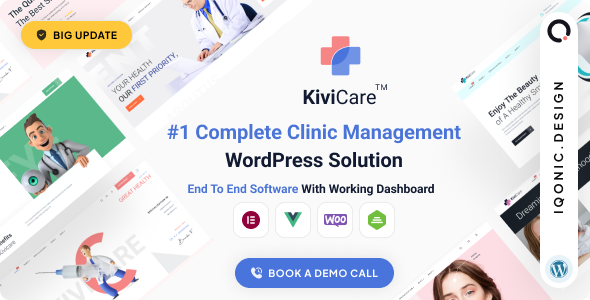
Stuck on your KiviCare WordPress theme? Let's fix it.
No endless back-and-forth. Just send us the details and we'll get it done.
No obligation · Replies within 1 hour · Quote within 1 day
Setup · Customization · Bug fixes · WooCommerce integration
About KiviCare WP Theme
KiviCare is a medical clinic and patient management WordPress theme built by iqonic design. It ships with a purpose-built appointment booking system, doctor profile pages, patient records, and an EMR (Electronic Medical Records) module. The theme targets private clinics, multi-doctor practices, hospitals, and telehealth providers who need more than a generic business template.
Out of the box you get role-based dashboards for doctors, receptionists, and patients. Appointment scheduling, invoicing, prescription management, and payment gateway integration are all included. The design is clean and clinical without feeling dated. It works as a standalone theme or alongside the free KiviCare plugin, which handles most of the backend logic. If you run a health-related business on WordPress, KiviCare is one of the most complete starting points available.
Get matched with a KiviCare developer in under one day
Tell us about your KiviCare project. Small fixes, KiviCare theme customization, or a full website build, whatever you need, we've got it covered.
We'll connect you to the right KiviCare developers, define the scope, and get everything 100% clear.
You'll get one estimate, hire your preferred developer, and start collaborating.
KiviCare looks straightforward during setup, but medical workflows are not. Appointment logic, patient data privacy, role permissions, and payment flow all need careful configuration. Mistakes in any of those areas affect real patients and real revenue. Developers on Codeable have worked across clinic types and know where KiviCare’s defaults fall short. Instead of spending days in documentation, you get a working, correctly configured site built by someone who has done it before.
Pros
- Built-in appointment booking, patient records, prescriptions, and invoicing in one theme
- Role-based dashboards for doctors, receptionists, and patients reduce admin overhead
- Elementor-based layout makes front-end visual changes accessible without code
- Active add-on ecosystem covers telehealth, SMS notifications, insurance, and mobile apps
- Regular updates from iqonic design with good documentation and a dedicated support forum
Cons
- Many essential features like Zoom, WooCommerce payments, and SMS require paid add-ons on top of the theme cost
- The admin dashboard can feel cluttered for practices that only need basic appointment booking
- Customizing invoice templates or patient form fields requires PHP knowledge
- No built-in HIPAA or GDPR compliance configuration — you must handle data security separately
- Stacking multiple add-ons without performance tuning can noticeably slow down the site
Who is KiviCare for?
Private Medical Clinics
A single-location private clinic can use KiviCare to replace a basic contact form with a real appointment system. Patients book slots, receive confirmations, and log in to view their history. Reception staff manage the calendar from a dedicated dashboard. It covers the core operational needs without requiring a custom-built system.
Multi-Doctor Practices
Practices with multiple doctors need individual scheduling, separate patient lists, and role-based access. KiviCare handles this through its multi-doctor setup, where each doctor manages their own availability and patient records. The receptionist role sits above individual doctors and can view and manage the full schedule across the practice.
Telehealth Providers
With the Zoom or Google Meet add-on installed, KiviCare becomes a functional telehealth platform. Patients book video appointments, receive an auto-generated meeting link, and join directly from their patient dashboard. This setup suits online GPs, mental health practitioners, and any clinic offering remote consultations alongside in-person visits.
Dental and Specialist Clinics
Dental clinics and specialists like physiotherapists or dermatologists benefit from KiviCare’s service and department structure. You can define treatment types, assign them to specific practitioners, and set different durations and prices per service. The invoicing module handles billing after each appointment without needing a separate tool.
Wellness and Therapy Centers
Wellness centers, psychologists, and therapy practices need appointment booking and client confidentiality without the full complexity of a hospital system. KiviCare scales down cleanly for these use cases. Patient records stay private per practitioner, and the front-end booking form can be kept minimal to suit a non-clinical feel.

Customizing KiviCare
KiviCare is built on top of Elementor, so most visual changes happen in the page builder without touching code. You can adjust colors, typography, and section layouts through the Elementor editor and the WordPress Customizer. The theme also includes pre-built demo templates you can import and modify as a starting point.
Deeper work is different. Customizing appointment workflows, adding custom patient fields, modifying the invoice template, or integrating a third-party CRM requires developer knowledge. A KiviCare expert understands how the plugin hooks, REST API endpoints, and role-based permission system interact, which saves significant debugging time. If you need something beyond what the settings panel offers, working with a KiviCare expert through a structured brief will get you further faster than trial and error.
Recommended plugins for KiviCare
KiviCare has a paid add-on ecosystem sold through iqonic design. Key extensions include Zoom and Google Meet telehealth integrations, WooCommerce payments, SMS and WhatsApp notifications, an insurance management module, and a holiday and break-time scheduler. There is also a dedicated iOS and Android mobile app add-on.
Each add-on connects directly to the core KiviCare plugin. Stacking multiple extensions can affect load times, so reviewing your WordPress performance setup before going live is worth the effort. If you need help configuring extensions without slowing down the front end, that is a common request handled during custom development.
Not sure which plugins to use? This WordPress plugins directory covers the most popular options with reviews and setup guides.
KiviCare common issues
KiviCare appointment not sending confirmation email
Confirmation emails in KiviCare depend on your WordPress mail configuration. The default PHP mail function fails on most shared hosts. Install a dedicated SMTP plugin like WP Mail SMTP and connect it to a transactional email service such as Mailgun, SendGrid, or Postmark. Also check that email notifications are enabled inside the KiviCare settings panel under the notification tab. If the problem persists, a WordPress bug fixing review can isolate whether it is a plugin conflict or server-level block.
KiviCare payment gateway not working with WooCommerce
KiviCare’s WooCommerce payment integration is handled through a separate paid add-on, not the core theme. If payments are failing, verify the add-on version matches your current KiviCare plugin version. Mismatched versions are the most common cause. Also confirm WooCommerce currency settings match your payment gateway’s accepted currencies. Clear all caches after any update. If the checkout still fails, check the WooCommerce system status log for the specific error before escalating to support.
KiviCare doctor availability not showing correctly
Doctor availability problems usually come from timezone mismatches or incorrect break-time configuration. Check that the timezone in WordPress general settings matches the timezone the doctor used when setting availability. If you have the break-time add-on installed, ensure breaks do not overlap with defined working hours, which causes the system to block the entire slot. Also disable any caching on the booking page, as cached availability data will show outdated slot information to patients.
KiviCare Zoom integration not generating meeting link
When KiviCare’s Zoom add-on fails to generate a meeting link, the issue is almost always an expired or incorrectly scoped Zoom API credential. Log into the Zoom Developer Portal, confirm the app is still active, and check that the required OAuth scopes include meeting write permissions. Reconnect the API credentials inside KiviCare’s Zoom settings after any token refresh. If the add-on was recently updated, deactivate and reactivate it after updating to force a fresh API handshake.
KiviCare FAQ
KiviCare has a free plugin version on WordPress.org with basic appointment booking. The premium theme and most advanced features, including telehealth, WooCommerce payments, and SMS notifications, require purchasing the theme and individual paid add-ons separately through iqonic design. Costs add up if you need several add-ons.
Yes. KiviCare supports multiple doctors within a single installation, each with their own availability, patient lists, and dashboards. Location support is available but more limited natively. Multi-location setups with separate scheduling per branch typically require custom development to work cleanly. A developer can configure this without needing a separate site per location.
Yes, KiviCare is built on Elementor. All front-end page layouts are editable through the Elementor page builder. The booking forms and patient dashboards are plugin-generated and not Elementor components, so those areas require configuration through the KiviCare settings rather than the visual editor.
KiviCare is not HIPAA compliant out of the box. The theme and plugin do not include built-in encryption for patient data, signed Business Associate Agreements, or audit logging at the level HIPAA requires. If you are handling protected health information in the US, you need additional server-level security, legal agreements with your host, and possibly custom development. Consult a compliance specialist before going live.
You can migrate your existing WordPress site to KiviCare, but it is not a simple theme swap. Patient data, appointment history, and any existing booking system records need to be mapped to KiviCare’s database structure. This requires developer work. If you are moving from a non-WordPress system, a WordPress migration specialist can handle the data transfer and setup together.
Hire a KiviCare Developer
Need a KiviCare developer to set up your clinic site, configure appointments, or build a custom workflow? FoxyConcept works through Codeable, where vetted WordPress specialists handle KiviCare projects daily. You describe what you need, get a clear estimate, and decide if you want to proceed. There is no obligation and no risk. Get a free estimate and have a developer matched to your project within 24 hours.
You'll need a free Codeable account so developers can ask questions and send their quotes.