Kloe WordPress Theme
by Select-Themes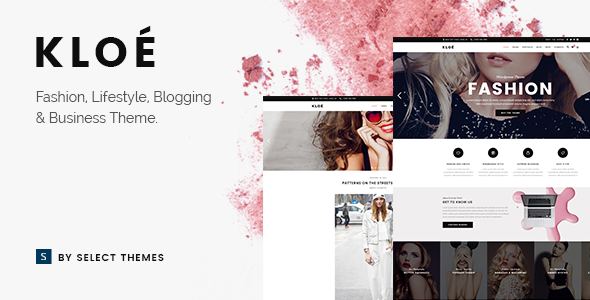
Stuck on your Kloe WordPress theme? Let's fix it.
No endless back-and-forth. Just send us the details and we'll get it done.
No obligation · Replies within 1 hour · Quote within 1 day
Setup · Customization · Bug fixes · WooCommerce integration
About Kloe WP Theme
Kloe is a minimalist WordPress theme from Select-Themes, built for portfolio and creative agency sites. It uses a clean grid-based layout with smooth scroll effects and a strong focus on visual presentation. The theme ships with multiple homepage demos, a drag-and-drop page builder integration, and pre-built inner page templates that reduce setup time considerably.
Kloe supports WooCommerce for simple shop setups and includes custom post types for portfolio projects and team members. Typography controls are solid, and the theme handles retina displays well out of the box. It targets designers, photographers, and small creative studios who want a polished, image-forward site without heavy plugin dependencies. Performance depends heavily on how many parallax sections and full-width images are loaded, so configuration matters.
Get matched with a Kloe developer in under one day
Tell us about your Kloe project. Small fixes, Kloe theme customization, or a full website build, whatever you need, we've got it covered.
We'll connect you to the right Kloe developers, define the scope, and get everything 100% clear.
You'll get one estimate, hire your preferred developer, and start collaborating.
Most Kloe issues come down to WPBakery conflicts, slow portfolio pages, or layout breaks after a plugin update. These are not problems you want to troubleshoot alone. A vetted Kloe developer on Codeable can diagnose the issue quickly, handle the fix properly, and make sure nothing else breaks in the process. Codeable only works with screened WordPress specialists, so you’re not rolling the dice on who picks up your project.
Pros
- Clean, minimal design that works well for creative portfolios without heavy visual noise
- Multiple pre-built demo templates covering different creative niches, importable in one click
- Good WooCommerce compatibility for photographers or designers selling prints or products
- Retina-ready and responsive across devices with no extra configuration needed
- Custom portfolio post type with category filtering built into the theme
Cons
- Heavy reliance on WPBakery Page Builder makes switching to Gutenberg or Elementor difficult later
- Portfolio grid options are limited without custom development or additional plugins
- Parallax sections can hurt page speed scores significantly if not properly optimized
- Select-Themes' support response times can be slow, especially for complex issues
- Theme updates occasionally break customizations made directly in WPBakery modules
Who is Kloe for?
Photographer Portfolio
Kloe’s full-width image layouts and portfolio grid make it a practical choice for photographers. You can organize work by category, display project galleries cleanly, and link to an integrated WooCommerce shop for print sales. A Kloe specialist can configure lightbox settings and optimize image delivery to keep load times fast even with large files.
Creative Agency Website
Small agencies use Kloe to present services, case studies, and team pages with a structured but visually strong layout. The multi-demo library covers agency-style setups well. A Kloe developer can tailor the service section, add custom animations, and wire up lead capture forms so the site actually generates inquiries.
Freelance Designer Site
Freelancers working in branding, UX, or illustration find Kloe’s minimal aesthetic matches their work without competing with it. The theme handles project detail pages well and supports custom typography choices. A Kloe expert can refine the layout to match a specific visual identity and add a booking or contact flow.
Interior Design Studio
Interior designers need high-impact imagery and project storytelling. Kloe’s before/after section support and portfolio filtering by room type or style make it a solid fit. A Kloe specialist can build out custom project templates that include material lists, project scope details, and client testimonials in a structured format.
Online Print Shop
With WooCommerce active, Kloe can serve as the base for a small print or merchandise shop. Product pages inherit the theme’s clean styling, and the cart and checkout integrate without major design conflicts. A Kloe developer can customize the shop archive layout and optimize the checkout flow for conversion.

Customizing Kloe
Kloe gives you a decent amount of control through the WordPress Customizer, covering colors, fonts, header layout, and footer columns. The theme also integrates with WPBakery Page Builder, which most of the demo content relies on. That adds flexibility but also makes it harder to swap builders later without rebuilding pages from scratch.
Custom CSS is straightforward to add, and child theme support works cleanly. However, more complex changes like restructuring the portfolio grid, modifying the project single-post layout, or adjusting scroll behavior typically require PHP or JavaScript edits. That is where a Kloe expert saves time. A developer familiar with Select-Themes’ codebase can modify templates without breaking update compatibility or introducing layout conflicts.
Recommended plugins for Kloe
Kloe works with the usual WordPress plugin stack without major conflicts. For contact forms, WPForms or Contact Form 7 both integrate cleanly. WPML is supported for multilingual setups, and WooCommerce drops in for basic shop functionality.
Where extra attention helps is performance. Full-width sections, parallax effects, and large portfolio images can slow load times noticeably. A proper WordPress performance setup with image optimization, caching, and lazy loading makes a real difference. If you’re relying on Kloe for client acquisition, pairing it with a solid WordPress SEO strategy is worth the effort from day one.
Not sure which plugins to use? This WordPress plugins directory covers the most popular options with reviews and setup guides.
Kloe common issues
Kloe theme portfolio grid not displaying correctly after update
Portfolio grid display issues after a Kloe update usually point to a CSS conflict or a change in how the theme registers post types. Check whether the portfolio custom post type is still active under Settings and flush rewrite rules. If the grid columns or filter tabs are broken, inspect the theme’s portfolio template files for changes introduced in the update. If you’re not comfortable digging through PHP, our WordPress bug fixing service can identify the root cause and restore the layout without affecting your content.
WPBakery Page Builder conflict with Kloe breaking layout
WPBakery conflicts in Kloe often surface after a plugin update misaligns shortcode output with the theme’s CSS expectations. The most common symptoms are broken row widths, missing backgrounds, or columns stacking incorrectly. Start by checking the WPBakery version against Kloe’s tested compatibility range in the theme changelog. Deactivating other plugins to isolate the conflict helps narrow it down. For persistent layout breaks, the WordPress bug fixing service handles WPBakery conflicts regularly and can resolve this cleanly.
Kloe theme slow page load on portfolio pages
Slow portfolio pages in Kloe are almost always caused by unoptimized images, render-blocking parallax scripts, or too many full-width sections loading simultaneously. Run the page through GTmetrix or PageSpeed Insights to identify the biggest offenders. Serve images in WebP format, enable lazy loading, and consider disabling parallax on sections where it adds no real value. A caching plugin like WP Rocket combined with a CDN makes a measurable difference. Deeper optimization is covered in a proper WordPress performance setup.
Kloe homepage parallax section not working on mobile
Kloe’s parallax effects use JavaScript-based scroll detection that does not always translate well to touch devices. Most Select-Themes implementations disable parallax on mobile via a CSS class or a conditional script check, but this can break after updates or custom CSS edits. Check the theme options panel for a mobile parallax toggle. If none exists, add a CSS rule targeting the parallax container to set background-attachment to scroll on small screens. A Kloe developer can implement this properly without affecting desktop behavior.
Kloe FAQ
Kloe was built around WPBakery, and its demo content depends on WPBakery shortcodes. Gutenberg works for basic content editing, but the pre-built layouts will not render correctly without WPBakery active. If you want to run Kloe on Gutenberg exclusively, you would need to rebuild the page layouts from scratch using blocks, which typically requires a Kloe developer to do cleanly.
Technically yes, but practically it is difficult. The demo pages are constructed with WPBakery shortcodes. Without the plugin, those pages display raw shortcode text instead of formatted layouts. You can build new pages with Gutenberg or another builder, but the existing demo structure will not carry over. A Kloe specialist can help migrate content to a different builder if needed.
Yes, Kloe includes WooCommerce support. Product archive pages, single product pages, cart, and checkout all inherit the theme’s styling with reasonable results. The integration is not as polished as dedicated WooCommerce themes, but it works for simple shop setups. A Kloe developer can refine the shop layout and checkout experience if the default styling does not meet your needs.
Kloe uses a one-click demo importer available under Appearance in the WordPress dashboard. Select the demo you want, click import, and the theme pulls in dummy content, images, and settings. The process takes a few minutes. Make sure WPBakery is installed and activated first, or the imported page layouts will not display correctly after import.
Select-Themes has maintained Kloe with periodic updates, but the pace has slowed compared to earlier releases. The theme still works on current WordPress versions, but if you are running a new WooCommerce version or a recently updated plugin stack, it is worth testing compatibility in a staging environment before updating live. Checking the ThemeForest changelog for Kloe gives you the most accurate picture of recent activity.
Hire a Kloe Developer for Your WordPress Project
Whether you need a Kloe expert to set up a new site from one of the demos, fix a layout issue, or extend the theme with custom functionality, working with a specialist is faster and cleaner than trial and error. Post your project and get a free estimate with no obligation to hire. Get a Free Estimate and describe what you need. A developer familiar with Kloe and Select-Themes will get back to you within 24 hours.
You'll need a free Codeable account so developers can ask questions and send their quotes.