Kona WordPress Theme
by SpabRice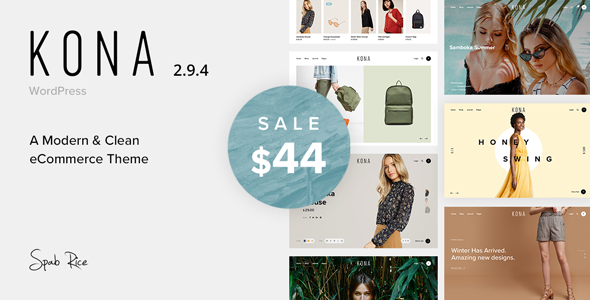
Stuck on your Kona WordPress theme? Let's fix it.
No endless back-and-forth. Just send us the details and we'll get it done.
No obligation · Replies within 1 hour · Quote within 1 day
Setup · Customization · Bug fixes · WooCommerce integration
About Kona WP Theme
Kona is a WordPress theme developed by SpabRice, built for creatives and small businesses that want a clean, image-forward layout without a lot of setup overhead. It uses a minimal grid structure that puts visual content first, making it a solid choice for photographers, designers, and portfolio-driven sites.
The theme follows a straightforward page-building approach with widget-based sections and customizer controls. It is lightweight by default, which helps with load times out of the box. Kona supports custom menus, featured images, and standard WooCommerce integration for those who want to sell products alongside their portfolio or content.
SpabRice has built Kona with a focus on visual clarity over feature bloat. That philosophy works well when the goal is a focused, professional presence rather than a feature-heavy marketing site.
Get matched with a Kona developer in under one day
Tell us about your Kona project. Small fixes, Kona theme customization, or a full website build, whatever you need, we've got it covered.
We'll connect you to the right Kona developers, define the scope, and get everything 100% clear.
You'll get one estimate, hire your preferred developer, and start collaborating.
Kona looks simple, but customizing it properly requires knowing where SpabRice made structural decisions that are not obvious from the customizer. A developer who has worked with Kona will know how to extend it without fighting the theme’s defaults. Through Codeable, you get matched with vetted WordPress developers who can take on your Kona project with a free estimate and no obligation to hire. Specific work gets done faster when the developer already knows the theme.
Pros
- Lightweight codebase loads fast with minimal configuration
- Clean grid layout works well for portfolio and photography sites
- WooCommerce compatible out of the box for simple shop setups
- Customizer controls cover the most common design adjustments without needing code
- Minimal design aesthetic ages better than feature-heavy themes
Cons
- Limited built-in layout options compared to page-builder-friendly themes
- Advanced typography control requires custom CSS or a plugin
- Sparse documentation makes troubleshooting harder without developer experience
- Footer and header customization is restricted without child theme work
- Not ideal for complex multi-layout sites or content-heavy blogs
Who is Kona for?
Photography Portfolio
Kona’s image-forward grid makes it a natural fit for photographers. Featured images display cleanly, and the minimal interface keeps the focus on the work rather than the site chrome. A developer can adjust column counts and add lightbox functionality to improve the gallery experience without altering the theme’s core feel.
Freelance Designer Site
Freelancers benefit from Kona’s clean presentation. The theme supports a portfolio grid alongside a simple contact form and about page without feeling cluttered. Custom typography and brand color adjustments help a freelance site feel personal rather than template-generic.
Small Online Shop
Kona’s WooCommerce support makes it workable for shops selling a focused product range. Product pages stay clean and load quickly. For shops needing custom product layouts, category filters, or complex checkout flows, a developer can extend Kona’s styling to match the rest of the site.
Creative Agency Presence
Small creative agencies use Kona to present work without the overhead of a full marketing theme. The grid handles case studies and project pages well. Adding a team section, custom service pages, and a contact hub are straightforward Kona customization tasks for an experienced developer.
Artist or Illustrator Site
Illustrators and artists get a clean stage for their work with Kona. The theme handles varied image dimensions reasonably well, and the minimal layout does not compete with the artwork. Custom shop integration through WooCommerce allows print or digital product sales alongside the portfolio.

Customizing Kona
Kona gives you a reasonable set of customizer options covering colors, typography, header layout, and homepage sections. For most straightforward sites, that is enough. But the moment you want something specific, like a custom post grid, altered footer structure, or modified mobile navigation behavior, you are looking at custom CSS or child theme work.
A Kona expert can handle those adjustments cleanly without breaking updates or introducing technical debt. Common customization requests include adjusting the portfolio grid columns, changing font pairings beyond the defaults, building out custom page templates, and integrating third-party plugins without layout conflicts.
If you want Kona to match a specific brand identity rather than a slightly modified default, working with a developer who knows the theme structure is the faster route.
Recommended plugins for Kona
Kona works well with standard WordPress plugins. WooCommerce integration is functional, though product page styling may need adjustment to match the theme’s minimal aesthetic. Yoast SEO and Rank Math both work without conflict. For performance, pairing Kona with a caching plugin and an image optimization tool is straightforward given the theme’s clean codebase.
If you want to push further, check out our WordPress performance service and SEO optimisation service to get more out of your Kona site beyond what the theme provides by default.
Not sure which plugins to use? This WordPress plugins directory covers the most popular options with reviews and setup guides.
Kona common issues
Kona theme portfolio grid not displaying correctly
Portfolio grid display issues in Kona are often caused by image size mismatches or a JavaScript conflict introduced by a plugin. Start by checking your media settings under Settings > Media to confirm thumbnail sizes match the theme’s expected dimensions. Regenerate thumbnails using a plugin like Regenerate Thumbnails. If the grid still breaks, deactivate plugins one at a time to identify a script conflict. A WordPress bug fixing specialist can isolate the cause quickly.
Kona WordPress theme mobile menu not working
Mobile menu failures in Kona usually trace back to a JavaScript error or a caching issue serving an outdated script. Clear your site cache first. Then open your browser’s developer console on mobile view and check for JS errors. If a plugin is enqueuing a conflicting script, that is likely the culprit. Updating the theme and all plugins resolves this in many cases. If the issue persists after those steps, a developer can identify the conflict in the theme’s navigation script.
WooCommerce product pages look broken on Kona theme
WooCommerce pages that look broken on Kona usually mean the theme’s stylesheet is not accounting for WooCommerce’s default markup. This is common after a WooCommerce major update. Check if SpabRice has released a theme update addressing compatibility. If not, targeted CSS fixes applied through a child theme will correct the layout without affecting the rest of the site. Avoid editing the parent theme files directly as updates will overwrite your changes.
Kona theme customizer changes not saving
Customizer changes not saving in Kona are typically a permissions issue, a caching problem, or a PHP error happening silently in the background. First, check your WordPress user role has full admin access. Clear all caches including server-side caching if your host provides it. Enable WP_DEBUG temporarily to surface any PHP errors. If the problem started after a plugin install, deactivate recent additions. Persistent save failures may indicate a server configuration issue worth escalating to your host.
Kona FAQ
Yes. Kona’s grid layout and minimal design work well for photography portfolios. Images display prominently without competing interface elements. For advanced gallery features like filterable categories, custom lightbox behavior, or client proofing, you will need a plugin or custom development work on top of the theme’s defaults.
Kona includes basic WooCommerce compatibility. Simple product listings and shop pages work without modification. More complex setups involving variable products, custom checkout flows, or heavily branded product pages will benefit from targeted CSS fixes and template customization applied through a child theme to avoid being overwritten by updates.
Create a new folder in your wp-content/themes directory, add a style.css file with the correct theme header referencing Kona as the parent, and a functions.php file to enqueue the parent stylesheet. Activate the child theme from the WordPress admin. All customizations go in the child theme so updates to Kona do not overwrite your work.
Gutenberg blocks work with Kona for standard content editing. Elementor can be used, but Kona’s styling may conflict with Elementor’s wrapper elements on certain page types. Some sections built by Kona’s customizer will not be editable inside Elementor. For full page builder control, a developer can adjust template hierarchy to separate Kona’s structure from Elementor-built pages.
Your content stays in the WordPress database regardless of theme changes, so posts and pages are safe. What changes is how that content is displayed. After switching to Kona, check all page templates, widget areas, and menu locations since these are theme-specific. For a smooth transition without losing layout work, see our WordPress migration service.
Hire a Kona WordPress Developer
Whether you need layout changes, custom templates, plugin integration, or a full Kona build from scratch, a specialist gets it done without guesswork. Post your project and get a free estimate within 24 hours. No commitment required.
Get a free estimate for your Kona project and see exactly what the work involves before you decide.
You'll need a free Codeable account so developers can ask questions and send their quotes.