Koncrete WordPress Theme
by RadiusTheme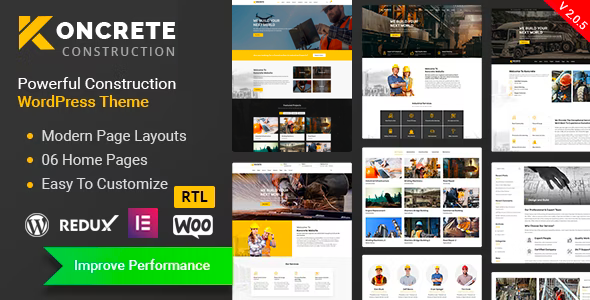
Stuck on your Koncrete WordPress theme? Let's fix it.
No endless back-and-forth. Just send us the details and we'll get it done.
No obligation · Replies within 1 hour · Quote within 1 day
Setup · Customization · Bug fixes · WooCommerce integration
About Koncrete WP Theme
Koncrete is a WordPress theme by RadiusTheme built for construction, architecture, and contracting businesses. It ships with a block-based page builder, multiple pre-built demos, and a layout focused on showcasing services, project portfolios, and team pages.
The theme is coded to work with the Gutenberg editor and supports popular plugins like Elementor. It includes custom post types for projects and testimonials, contact forms integration, and a header builder with sticky navigation options.
Koncrete targets small to mid-sized construction firms that need a professional site without hiring a full design team. It is translation-ready, WPML compatible, and built with clean HTML5 and CSS3. Regular updates from RadiusTheme mean it stays compatible with new WordPress releases.
Get matched with a Koncrete developer in under one day
Tell us about your Koncrete project. Small fixes, Koncrete theme customization, or a full website build, whatever you need, we've got it covered.
We'll connect you to the right Koncrete developers, define the scope, and get everything 100% clear.
You'll get one estimate, hire your preferred developer, and start collaborating.
Koncrete is well-structured, but getting it to look and work exactly the way your business needs takes more than dragging blocks around. Misconfigured templates, plugin conflicts, and slow load times from unoptimized images are common problems that cost you leads.
Working with a vetted WordPress developer through Codeable means you get someone who has handled these issues before. No guessing, no wasted hours. Just a developer who knows what they are doing and delivers on time.
Pros
- Multiple construction-focused demo sites included, covering general contracting, architecture, and renovation niches
- Compatible with both Gutenberg and Elementor, giving layout flexibility without being locked into one builder
- Custom project portfolio post type with category filtering built in from the start
- Header builder with sticky, transparent, and split header options without needing an extra plugin
- WPML and Polylang compatible for construction businesses targeting multilingual markets
Cons
- Demo content import can be unreliable on shared hosting environments with low PHP memory limits
- Some design elements feel dated compared to newer construction themes without additional customization
- The theme panel has many options but limited inline documentation, which creates a learning curve for non-developers
- WooCommerce styling requires custom CSS work since default WooCommerce pages are not fully styled out of the box
- Support response times from RadiusTheme can be slow during peak periods, with resolution sometimes taking several days
Who is Koncrete for?
General Contractors
Koncrete suits general contractors well. The project portfolio post type lets you organize past work by category, whether that is residential, commercial, or industrial builds. The service pages template handles multiple trade offerings cleanly. Pair it with a contact form and a quote calculator plugin and you have a functional lead generation site.
Architecture Firms
Architecture firms need to show work visually. Koncrete’s portfolio layouts support full-width images and project detail pages where you can list scope, materials, and timeline. The clean typography and whitespace in certain demo layouts translate well for firms that want a more design-forward presentation without building from scratch.
Interior Design Studios
Interior designers can adapt Koncrete’s project gallery templates to showcase room transformations and before-and-after work. The theme supports large hero images and grid-based portfolio layouts. Some additional CSS is needed to get the aesthetic right for design studios, but the structural foundation handles this use case without major rework.
Renovation and Remodeling Companies
Renovation companies benefit from Koncrete’s testimonials post type and project case study pages. Homeowners searching for remodelers want social proof and examples of past work. Koncrete lets you display both on organized pages without needing custom development, though a developer can extend these templates to add before-and-after sliders.
Civil Engineering Consultancies
Civil engineering consultancies need a professional, content-heavy site more than a visual portfolio. Koncrete handles service descriptions, team bios, and downloadable documents cleanly. The layout works for firms listing specializations like infrastructure, drainage, or structural assessment without the theme feeling too construction-trade focused.

Customizing Koncrete
Koncrete gives you a solid starting point, but most businesses need more than a demo import. Custom color schemes, typography changes, unique service page layouts, and portfolio filtering all require hands-on work inside the theme options and custom CSS.
If you need a custom header, specific project gallery behavior, or want to integrate a quote request form with conditional logic, that takes technical knowledge of how Koncrete is structured. A Koncrete expert can make those changes without breaking the existing layout or causing conflicts with plugins you already use.
More complex work like adding custom post type templates, modifying the theme’s archive pages, or connecting Koncrete to a CRM requires PHP-level customization that goes beyond what the theme panel offers out of the box.
Recommended plugins for Koncrete
Koncrete works with WooCommerce if you need to sell products or take deposits online. It supports Contact Form 7 and WPForms for lead capture, and integrates cleanly with Yoast SEO and Rank Math for on-page SEO optimization.
For speed, pairing Koncrete with a caching plugin and a CDN is recommended since construction sites with large project image galleries can slow down without proper configuration. See our WordPress performance services if load time is a concern.
The theme also supports Slider Revolution and Essential Grid for more advanced visual layouts on service or portfolio pages.
Not sure which plugins to use? This WordPress plugins directory covers the most popular options with reviews and setup guides.
Koncrete common issues
Koncrete theme demo import not working
Demo import failures in Koncrete are usually caused by low PHP memory limits or max execution time settings on the server. Before importing, set memory_limit to at least 256MB and max_execution_time to 300 in your php.ini or wp-config.php. Also confirm the required plugins listed by RadiusTheme are all installed and activated before starting the import. If the issue persists, a developer can import the demo content manually via XML and SQL.
Koncrete header not showing correctly on mobile
Mobile header issues in Koncrete typically come from conflicting CSS between the theme’s header builder settings and custom styles added via the customizer. Check the mobile header settings inside the Koncrete theme panel and make sure the mobile breakpoint is set correctly. If a child theme or third-party plugin is injecting styles, those can override the mobile menu display. Clear all caches after making changes. If the issue is complex, our WordPress bug fixing service can resolve it quickly.
Koncrete portfolio page not displaying projects
If the Koncrete portfolio page is blank or not showing projects, the most common cause is a permalink flush issue or a missing page template assignment. Go to Settings, then Permalinks, and save without making changes. Also check that the portfolio page is using the correct Koncrete page template from the page attributes panel. If projects still do not appear, check whether the project post type is assigned to the correct taxonomy terms that the portfolio widget is filtering by.
Koncrete slow loading after installing theme
Koncrete can load slowly when large uncompressed project images are used throughout the site. Start by running the site through Google PageSpeed Insights to identify specific bottlenecks. Install a caching plugin like WP Rocket or LiteSpeed Cache and compress images with ShortPixel or Imagify. Also check whether Slider Revolution or Essential Grid are loading scripts on pages where they are not used. For deeper performance work, see our WordPress performance optimization service.
Koncrete FAQ
Yes, Koncrete is compatible with Elementor. You can use Elementor’s drag-and-drop builder to create and edit pages while keeping the Koncrete header, footer, and global styles active. Some template parts built inside Koncrete’s own page builder may need to be rebuilt in Elementor if you switch your workflow, but the two work alongside each other without major conflicts on most setups.
Koncrete supports WooCommerce for basic store functionality. Product pages, cart, and checkout will work, but the default WooCommerce styling does not match the Koncrete design out of the box. You will likely need custom CSS to align the shop pages with the rest of your site. For construction businesses taking deposits or selling materials online, it is a workable solution with some additional development work.
Koncrete is built specifically for construction and trade industries. The demo content, icons, and post types all reflect that niche. You can adapt it for adjacent sectors like real estate, manufacturing, or facilities management, but expect to spend time replacing demo imagery and restructuring page templates. For an unrelated industry, a different theme will likely be a faster starting point.
Always use a child theme for any CSS or template customizations. This is the only way to safely update Koncrete without overwriting your changes. If you have edited parent theme files directly, you need to back those up, apply the update, then manually reapply your edits. Check RadiusTheme’s changelog before updating to confirm whether any template files you have customized have been changed in the new version.
Koncrete has clean HTML output and is compatible with Yoast SEO and Rank Math. It uses proper heading hierarchy and supports schema markup through SEO plugins. Page speed depends heavily on your hosting environment and how images are managed, which affects Core Web Vitals scores. The theme itself does not create technical SEO problems, but performance optimization is usually needed for competitive search rankings.
Hire a Koncrete Developer
Need a Koncrete developer who can customize your site, fix a layout issue, or build something the theme does not support out of the box? FoxyConcept matches you with vetted WordPress specialists through Codeable. You get a free estimate within 24 hours with no obligation to proceed.
Get your free estimate now and describe what you need. A qualified developer will review your project and come back with a clear plan and price.
You'll need a free Codeable account so developers can ask questions and send their quotes.