Kudos WordPress Theme
by Select-Themes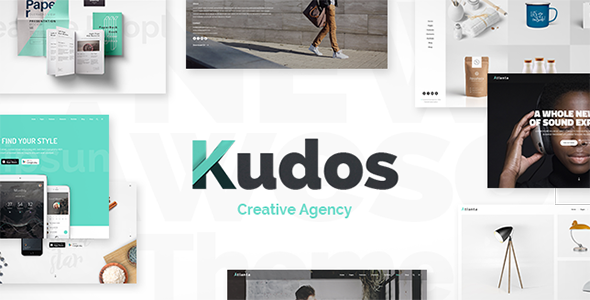
Stuck on your Kudos WordPress theme? Let's fix it.
No endless back-and-forth. Just send us the details and we'll get it done.
No obligation · Replies within 1 hour · Quote within 1 day
Setup · Customization · Bug fixes · WooCommerce integration
About Kudos WP Theme
Kudos is a WordPress theme by Select-Themes built for creative professionals and agencies who want a clean, portfolio-focused design without heavy page builder dependencies. It ships with a modular homepage, smooth scrolling sections, and support for custom post types that make showcasing work straightforward.
The theme follows a minimal aesthetic with well-spaced typography, full-width imagery options, and a sticky navigation bar. It works well for freelancers, design studios, and small agencies that want their work to speak for itself rather than drowning in visual noise.
Under the hood, Kudos uses the WordPress Customizer for most settings, keeping things accessible for non-technical users. It also integrates cleanly with WooCommerce if you need a shop, and the codebase is lean enough that performance scores stay reasonable out of the box.
Get matched with a Kudos developer in under one day
Tell us about your Kudos project. Small fixes, Kudos theme customization, or a full website build, whatever you need, we've got it covered.
We'll connect you to the right Kudos developers, define the scope, and get everything 100% clear.
You'll get one estimate, hire your preferred developer, and start collaborating.
Kudos looks straightforward until you start pushing it beyond its defaults. Template overrides, custom portfolio filters, and WooCommerce integration all require knowing where Select-Themes made non-standard decisions in the codebase.
Our developers have worked across the Select-Themes catalog and know exactly where Kudos can be extended cleanly and where workarounds cause problems later. Work is delivered through Codeable, which means you get a vetted developer, a clear estimate, and no risk if things do not go to plan. See our full WordPress development services for context on how we work.
Pros
- Clean minimal design that suits portfolios and agency sites without visual clutter
- Modular homepage sections make it easy to rearrange content without custom code
- Lightweight codebase keeps baseline performance scores reasonable on shared hosting
- WooCommerce compatible out of the box with minimal styling conflicts
- WordPress Customizer integration means non-technical users can handle basic changes
Cons
- Portfolio filtering requires custom code or a plugin since it is not built in natively
- Limited built-in typography options mean font customization usually needs extra CSS
- No Gutenberg block patterns included so the block editor experience feels bare
- Documentation from Select-Themes is thin and does not cover advanced use cases
- Updates from Select-Themes have slowed down, raising long-term compatibility questions
Who is Kudos for?
Freelance Designer Portfolio
Kudos works well for individual designers who want a portfolio that loads fast and does not compete with their work visually. The full-width project pages and clean typography let the images carry the page. With a few CSS tweaks, it can be made to feel entirely custom without touching the core theme files.
Creative Agency Website
Small agencies can use Kudos to present case studies, a team section, and a services overview within a single scrolling homepage. The modular layout means different team members can update content without breaking anything. A developer can add a filterable client portfolio section on top of the default setup.
Photography Studio Site
The full-width imagery support in Kudos makes it a natural fit for photography studios. Gallery plugins slot in cleanly, and the sticky nav keeps clients moving through a shoot portfolio without losing context. Lightbox integration and category filtering are the most common additions photographers request.
Small Product Shop
Kudos handles WooCommerce integration without heavy styling conflicts, making it a workable base for shops selling a focused product range. It suits stores with fewer than 50 products where clean presentation matters more than complex filtering. A developer can style the cart and checkout pages to match the rest of the theme.
Consultancy or Service Business
Consultancies and service businesses benefit from Kudos’s structured homepage sections for laying out offerings, testimonials, and a clear call to action. It avoids the overdesigned look that clutters many business themes. A contact form integration and a simple booking plugin round out what most service sites need.

Customizing Kudos
Customizing Kudos goes beyond tweaking colors in the Customizer. Getting the most out of it usually means editing template files, adjusting the grid for portfolio layouts, or wiring up custom fields to project post types. That is where things can get time-consuming if you are not comfortable with PHP and CSS.
Common customization requests include adding filterable portfolio categories, building out a custom services section, or integrating a contact form that matches the theme’s style. A Kudos expert can handle all of that without breaking the existing design.
If you want to extend the header layout, add animation effects, or wire Kudos into a specific plugin stack, working with someone who knows the theme’s structure saves a lot of trial and error. Small changes can cascade into layout issues if the child theme setup is not done correctly from the start.
Recommended plugins for Kudos
Kudos pairs well with several plugins that extend its core functionality. WooCommerce slots in cleanly for selling products or services. Contact Form 7 and WPForms both work without styling conflicts. For galleries and portfolios, Envira Gallery or FooGallery are solid choices.
On the performance side, Kudos benefits from proper image optimization and caching. Visit our WordPress performance service for more on that. If you are running Kudos on a client site that needs visibility, pairing it with structured SEO work matters. Our WordPress SEO service covers that end of things.
Not sure which plugins to use? This WordPress plugins directory covers the most popular options with reviews and setup guides.
Kudos common issues
Kudos theme portfolio layout broken after WordPress update
Portfolio layout breaks after a WordPress update usually trace back to a deprecated template function or a change in how custom post types are registered. Check the browser console for JavaScript errors first since Kudos’s grid relies on JS for masonry-style layouts. If the child theme is not set up correctly, core theme updates can overwrite template files directly. A WordPress bug fix can identify exactly which file changed and restore the layout without data loss.
Kudos theme custom fonts not loading correctly
Custom fonts failing to load in Kudos typically come down to one of three things: a Content Security Policy blocking external font URLs, a caching plugin serving a stale CSS file, or a typo in the Customizer font field. Start by clearing all caches and checking the browser network tab for blocked requests. If you are using a Google Fonts URL, verify it still resolves. For self-hosted fonts, confirm the file paths in your child theme stylesheet are correct relative to the CSS file location.
Kudos WooCommerce shop page styling not matching theme
WooCommerce shop pages inheriting Kudos’s default page template often look unstyled because the theme does not include dedicated WooCommerce template overrides. The fix is adding a woocommerce.css file in your child theme and declaring WooCommerce support in functions.php with add_theme_support('woocommerce'). Without that declaration, WooCommerce falls back to its own styles and ignores the theme. A developer can build out full WooCommerce template overrides that match the Kudos design properly.
Kudos theme mobile menu not working or not opening
A broken mobile menu in Kudos is almost always a JavaScript conflict. Another plugin loading its own version of jQuery or a script loading in the wrong order can prevent the toggle from firing. Open the browser console on a mobile viewport or using responsive mode in DevTools and look for JS errors on page load. Deactivate plugins one at a time to isolate the conflict. If the issue appeared after a theme update, check whether the child theme is enqueuing scripts that duplicate what the parent theme already loads.
Kudos FAQ
Select-Themes has slowed its update cadence on Kudos in recent years. The theme still functions on current WordPress versions but lacks full Site Editor and block theme support. If long-term vendor support matters to your project, factor that in before building a major site on it. A developer can maintain and extend Kudos independently of official updates if needed.
Kudos works with the Gutenberg block editor for basic content editing, but it does not ship with custom block patterns or full Site Editor support. You can use core blocks inside page content areas without issues. For layout-heavy pages, you will still be working mainly through the Customizer and template files rather than the block editor interface.
Kudos does not include native portfolio filtering. The most common approach is adding the Isotope JS library via a child theme and using category taxonomy terms to filter portfolio items. Alternatively, plugins like FooGallery or a custom widget can handle it. A developer can build a clean, accessible filter UI that fits the existing Kudos design without relying on heavy third-party plugins.
Yes, Kudos is WooCommerce compatible, but it does not include dedicated WooCommerce template overrides. Basic shop and product pages work without major conflicts. For a polished result, you will want custom WooCommerce templates added through a child theme so the cart, checkout, and product pages match the rest of the site’s visual style properly.
Create a child theme folder in wp-content/themes/ with a style.css that includes the Template: kudos header and a functions.php that enqueues the parent stylesheet. Always make customizations in the child theme, never in the parent. This protects your changes when Kudos updates and keeps the codebase clean. Our WordPress development team can set this up correctly from the start.
Hire a Kudos WordPress Developer
Whether you need layout changes, plugin integrations, performance fixes, or a full site build on Kudos, we can match you with a developer who knows the theme. Work is scoped clearly before anything starts, so you know exactly what you are getting.
Get a free estimate with no obligation. You will hear back within 24 hours with a clear breakdown of cost and timeline.
You'll need a free Codeable account so developers can ask questions and send their quotes.