KuteShop WordPress Theme
by kutethemes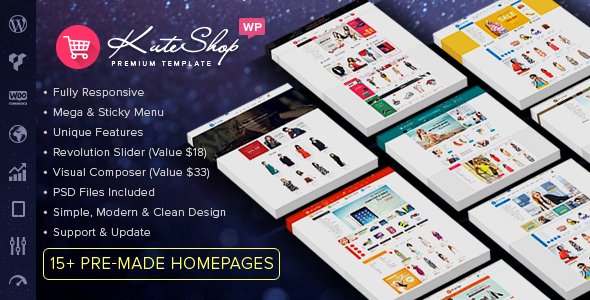
Stuck on your KuteShop WordPress theme? Let's fix it.
No endless back-and-forth. Just send us the details and we'll get it done.
No obligation · Replies within 1 hour · Quote within 1 day
Setup · Customization · Bug fixes · WooCommerce integration
About KuteShop WP Theme
KuteShop is a WooCommerce theme by KuteThemes built specifically for online stores. It ships with multiple pre-built demo layouts covering electronics, fashion, furniture, and multi-vendor shops. The theme integrates tightly with WooCommerce and supports popular plugins like WCFM Marketplace, Dokan, and WC Vendors out of the box.
Page speed is a focus. KuteShop uses lazy loading, optimized asset delivery, and a clean codebase aimed at keeping store pages fast. It also includes a built-in Ajax cart, product quick view, and wishlist functionality without requiring extra plugins. For stores that need a feature-rich starting point without heavy customization costs, KuteShop is a practical choice. That said, getting the most out of it typically requires a KuteShop specialist who knows the theme’s structure well.
Get matched with a KuteShop developer in under one day
Tell us about your KuteShop project. Small fixes, KuteShop theme customization, or a full website build, whatever you need, we've got it covered.
We'll connect you to the right KuteShop developers, define the scope, and get everything 100% clear.
You'll get one estimate, hire your preferred developer, and start collaborating.
KuteShop has enough moving parts that a general WordPress developer may struggle with its multi-vendor setup, custom headers, or WooCommerce template structure. Working with a vetted KuteShop developer through Codeable means you get someone who has handled these specifics before. Codeable only works with the top tier of WordPress freelancers, so you are not guessing at skill level. You post your project, get matched within 24 hours, and receive a free estimate before committing to anything.
Pros
- Built-in multi-vendor support for WCFM, Dokan, and WC Vendors without extra setup plugins
- Multiple niche-specific demo stores that can be imported in one click to speed up the build
- Ajax cart, quick view, and wishlist included natively, reducing reliance on third-party plugins
- Elementor compatibility makes front-end layout adjustments accessible without touching code
- Active development by KuteThemes with regular WooCommerce compatibility updates
Cons
- Documentation is sparse in places, making advanced customization harder to self-serve
- Demo content can be heavy to import and sometimes requires manual cleanup before it looks production-ready
- Some styling options are scattered between the Customizer and Elementor, which creates inconsistency
- Multi-vendor configuration requires careful setup and plugin version matching to avoid conflicts
- Support response times from KuteThemes can be slow during high-volume periods
Who is KuteShop for?
Electronics & Gadgets Store
KuteShop includes an electronics-specific demo with comparison tables, specification displays, and a layout built around high-SKU catalogs. A KuteShop developer can extend this with custom product filters, brand-level landing pages, and bundle pricing structures that suit how electronics buyers actually shop.
Fashion & Apparel Shop
The fashion demo in KuteShop handles variable products well, with swatches for color and size built into the theme. A KuteShop specialist can customize lookbook layouts, set up size guide popups, and configure AJAX filtering so shoppers can narrow down by fit, color, and collection without page reloads.
Multi-Vendor Marketplace
KuteShop is one of the few themes with genuine multi-vendor readiness. It supports Dokan and WCFM out of the box, including vendor storefronts and commission settings. A KuteShop expert can configure the vendor dashboard, set up payout rules, and customize the marketplace front end to match your brand identity.
Furniture & Home Décor Store
Large product images, room scene photography, and dimension-based filtering matter for furniture retail. KuteShop’s furniture demo accounts for this with full-width layouts and visual category navigation. A KuteShop developer can adapt the template for custom room builders or fabric and finish selectors.
Beauty & Cosmetics Shop
Beauty and cosmetics stores benefit from KuteShop’s clean product card design and support for ingredient or shade variation displays. A KuteShop specialist can build ingredient list sections, before and after galleries, and subscription product configurations suited to repeat-purchase beauty brands.

Customizing KuteShop
KuteShop customization goes well beyond switching colors and fonts. The theme uses a combination of the WordPress Customizer and Elementor, so store owners can adjust layouts, headers, product grids, and category pages visually. However, deeper changes, such as custom mega menus, modified checkout flows, or adjusted WooCommerce templates, require hands-on development work.
A KuteShop expert can reconfigure demo content to match your brand, set up multi-vendor functionality correctly, and build custom product page layouts that convert. If you are running a large catalog or a marketplace, getting a KuteShop developer involved early saves significant time debugging template conflicts and plugin compatibility issues later.
Recommended plugins for KuteShop
KuteShop works well with several WooCommerce extensions, but adding plugins without testing can slow your store down. A KuteShop specialist will audit which extensions are worth keeping and which are redundant given the theme’s built-in features.
For stores focused on growth, pairing KuteShop with a solid WordPress performance setup makes a measurable difference in load times and conversion rates. If organic search matters to your business, a proper WordPress SEO strategy built around your product catalog is worth investing in alongside the theme build.
Not sure which plugins to use? This WordPress plugins directory covers the most popular options with reviews and setup guides.
KuteShop common issues
KuteShop mega menu not working after update
Mega menu failures in KuteShop after an update usually come from a JavaScript conflict or a cached version of the menu markup. Start by clearing all caches and checking the browser console for JS errors. If the conflict points to a specific plugin, disable it and test. Theme updates sometimes reset custom menu walker settings. A WordPress bug fixing specialist can isolate the conflict quickly and restore menu functionality without breaking other parts of the theme.
KuteShop product page layout broken in Elementor
Broken product page layouts in Elementor are often caused by a version mismatch between KuteShop, Elementor, and WooCommerce. KuteShop uses custom Elementor widgets that can break when any of the three updates independently. Regenerate CSS under Elementor’s Tools panel first. If that does not resolve it, check whether the KuteShop child theme overrides are still intact. A WordPress bug fixing service can trace exactly which update caused the layout to break and restore it cleanly.
KuteShop Ajax cart not adding products correctly
Ajax cart problems in KuteShop usually trace back to a plugin conflict with a caching plugin or a security plugin blocking the WooCommerce Ajax endpoint. Check your browser network tab for failed requests to wp-admin/admin-ajax.php. Disable caching temporarily and test. If the issue started after adding a new plugin, that is the likely cause. Reviewing nonce verification settings in your security plugin often resolves it.
KuteShop slow loading on mobile
KuteShop can load slowly on mobile when demo content scripts and stylesheets are not pruned after setup. The theme loads several libraries by default that may not apply to your specific store. Auditing and dequeuing unused scripts, enabling lazy loading for images, and using a proper caching layer addresses most cases. A full WordPress performance review will identify exactly what is slowing down your mobile score.
KuteShop FAQ
Yes. KuteShop is one of the better-suited WooCommerce themes for multi-vendor setups. It has built-in compatibility with Dokan, WCFM Marketplace, and WC Vendors. That said, configuring commission structures, vendor storefronts, and payout settings correctly takes time. A KuteShop specialist familiar with these plugins will get it configured properly from the start.
KuteShop supports Elementor and includes custom Elementor widgets for WooCommerce elements. The integration works well but requires keeping KuteShop, Elementor, and WooCommerce versions in sync. Falling behind on updates is the most common cause of layout issues. A KuteShop developer can maintain that compatibility and extend the Elementor setup with custom sections.
KuteShop developer rates through Codeable typically depend on project scope. Small fixes and customizations start lower; full store builds with multi-vendor setup cost more. You get a free estimate before committing. Post your project at Codeable and receive a specific quote based on your actual requirements within 24 hours.
KuteShop works for single-product stores, though it is built with large catalogs in mind. You would disable unused demo sections and trim the navigation structure. A KuteShop expert can strip the theme back to a focused single-product layout and configure the checkout flow for a streamlined buying experience.
Yes, always use a child theme with KuteShop. Theme updates from KuteThemes will overwrite any direct edits made to the parent theme files. A child theme protects your customizations across updates. A KuteShop developer will set this up correctly at the start of any project and document what has been customized.
Hire a KuteShop Developer for Your WooCommerce Store
Whether you need a full KuteShop build, a specific customization, or help fixing something that broke, working with a dedicated KuteShop expert gets it done faster and cleaner. All developers are vetted, and estimates are free with no obligation to hire. Get a Free Estimate and describe your project. You’ll hear back within 24 hours.
You'll need a free Codeable account so developers can ask questions and send their quotes.