Lahanna WordPress Theme
by pixelwars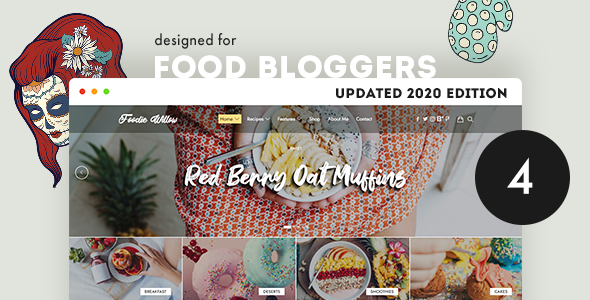
Stuck on your Lahanna WordPress theme? Let's fix it.
No endless back-and-forth. Just send us the details and we'll get it done.
No obligation · Replies within 1 hour · Quote within 1 day
Setup · Customization · Bug fixes · WooCommerce integration
About Lahanna WP Theme
Lahanna is a WordPress theme built by Pixelwars, designed for food bloggers, recipe creators, and lifestyle content publishers. It ships with a clean, editorial layout that puts photography front and center. The theme is built on a lightweight codebase, which means faster load times compared to bloated multipurpose themes.
Lahanna includes a built-in recipe card system, flexible homepage sections, and full compatibility with the block editor. Typography is carefully chosen to complement food and lifestyle photography without competing with it. It works well with WooCommerce if you want to sell cookbooks or digital products alongside your content.
Pixelwars has focused this theme on a specific audience, which is both its strength and its limitation. If your site fits the food or lifestyle niche, Lahanna gives you a polished starting point without needing to strip away irrelevant features from a generic theme.
Get matched with a Lahanna developer in under one day
Tell us about your Lahanna project. Small fixes, Lahanna theme customization, or a full website build, whatever you need, we've got it covered.
We'll connect you to the right Lahanna developers, define the scope, and get everything 100% clear.
You'll get one estimate, hire your preferred developer, and start collaborating.
Lahanna looks polished out of the box, but real-world sites always need adjustments that go beyond the Customizer. Custom post layouts, ad placement, membership integrations, speed optimization for image-heavy pages — these require hands-on development work.
FoxyConcept connects you with vetted Lahanna developers through Codeable, a platform where every developer is screened before they can take on client work. You get a fixed estimate before anything starts, and you only pay if you decide to move forward. No risk, no guesswork.
Pros
- Lightweight codebase loads faster than most multipurpose food blog themes
- Built-in recipe card support without needing a separate plugin
- Block editor compatible with clean block rendering across posts and pages
- Photography-first layout that works well for food, travel, and lifestyle niches
- WooCommerce compatible for selling digital or physical products alongside content
Cons
- Limited use outside food and lifestyle niches — general business sites will feel forced
- Customizer options are basic; advanced layout changes need code
- Smaller developer community compared to themes like Astra or GeneratePress
- Documentation from Pixelwars is thin in places, making troubleshooting slower
- No dedicated page builder integration, so drag-and-drop workflows are limited
Who is Lahanna for?
Food Blogging
Lahanna’s layout was built around food photography. Large featured images, clean post grids, and readable typography make it a strong fit for bloggers posting recipes, restaurant reviews, or food travel content. The homepage sections let you feature categories and recent posts without custom coding.
Recipe Publishing
The built-in recipe card display gives food sites a head start on structured content. Pair it with a dedicated recipe plugin to add cooking times, ingredient lists, and nutrition data in a format that Google can read for rich results. This setup works well for high-volume recipe publishers.
Lifestyle Magazine
Lahanna’s editorial grid layout suits lifestyle sites covering multiple content verticals like food, wellness, home, and travel. Category pages are clean, and the homepage can highlight different sections. It won’t replace a purpose-built magazine theme, but for smaller operations it handles the workload well.
Cookbook Sales
WooCommerce compatibility means you can sell cookbooks, meal plans, or digital recipe cards directly from your Lahanna site. Product pages inherit the theme’s clean aesthetic. You’ll want a developer to tune the checkout flow and product layout if sales volume is a priority.
Travel and Food Photography
Travel and food photographers benefit from Lahanna’s image-forward design. Full-width featured photos and gallery-friendly post layouts mean your images stay prominent. The theme handles portrait and landscape shots well across screen sizes, which matters for an audience browsing on mobile.

Customizing Lahanna
Lahanna is customizable through the native WordPress Customizer, where you can adjust colors, fonts, header layout, and homepage sections. Most visual changes are straightforward. However, if you want to go beyond the built-in options, things get more technical quickly.
Custom landing pages, restructured recipe card layouts, or integration with third-party plugins often require direct PHP or CSS work. A Lahanna expert can handle these changes without breaking the theme’s existing structure or introducing conflicts with future updates.
Child themes are the right approach for any deeper modifications. Working without one risks losing changes every time Pixelwars pushes an update. An experienced Lahanna developer will set up a proper child theme, document changes, and make sure your customizations survive updates cleanly.
Recommended plugins for Lahanna
Lahanna pairs well with several plugins. Tasty Recipes or WP Recipe Maker extend the built-in recipe functionality with structured data, which helps with Google Recipe rich results. For performance, combining Lahanna with a caching plugin and a CDN makes a measurable difference on image-heavy food blogs. Learn more on our WordPress performance page.
SEO plugins like Rank Math or Yoast work without conflicts. If you want to grow organic traffic from recipe searches, getting your schema markup right matters more than most on-page tweaks. See our WordPress SEO service for help with that.
Not sure which plugins to use? This WordPress plugins directory covers the most popular options with reviews and setup guides.
Lahanna common issues
Lahanna theme header not displaying correctly on mobile
Mobile header issues in Lahanna usually come from a CSS conflict with a plugin or a customization added outside a child theme. Open your browser’s developer tools, inspect the header element, and look for overriding styles. If you’ve added custom CSS directly in the Customizer, check whether any rule is targeting the wrong breakpoint. A developer can audit the conflict and apply a targeted fix without touching the core theme files.
Lahanna recipe card not showing structured data in Google Search Console
Lahanna’s built-in recipe cards do not always output schema markup in the format Google expects. If Search Console shows missing or invalid recipe structured data, you likely need a dedicated recipe plugin like Tasty Recipes or WP Recipe Maker. These plugins handle JSON-LD schema correctly. Removing the built-in card and migrating content to a plugin may require developer help if you have a large post library. Our bug fixing service can handle this migration cleanly.
Lahanna theme slow loading on image-heavy posts
Food blogs with large, unoptimized images will load slowly on any theme, but Lahanna’s full-width layouts make this more visible. Start by running images through a compression tool and enabling lazy loading. Add a caching plugin and connect to a CDN. If you’re already doing those things and pages are still slow, a developer should audit your hosting setup and plugin stack for further bottlenecks.
Lahanna child theme not inheriting parent styles after update
If your child theme stopped inheriting Lahanna’s parent styles after an update, check that your child theme’s stylesheet is correctly enqueuing the parent stylesheet via wp_enqueue_scripts in functions.php. Using @import in the child stylesheet is the older method and can cause issues. If the child theme was set up incorrectly from the start, a developer can rebuild it properly so future updates don’t cause the same problem. See our WordPress maintenance service for ongoing support.
Lahanna FAQ
Yes. Lahanna was built specifically for food bloggers and recipe creators. The layout, typography, and built-in recipe card support all point to that use case. If your site is primarily food or lifestyle content, it’s a strong fit. For general business or portfolio sites, you’d be working against the theme’s design intent rather than with it.
Lahanna is WooCommerce compatible. You can sell physical or digital products from the same site. The product and shop pages inherit the theme’s styling reasonably well, but checkout and cart pages may need CSS adjustments to match your brand. A developer can tune these pages without modifying core theme files.
Lahanna works with Elementor, but it wasn’t designed around it. Basic drag-and-drop editing works, but some theme sections may not render predictably inside Elementor’s canvas. If you want deep page builder integration, a theme like Hello or Astra is a better foundation. For Lahanna, the block editor is the more natural fit.
Custom fonts in Lahanna can be added through the Customizer if the theme supports Google Fonts selection. For self-hosted fonts or fonts outside that library, you’ll need to enqueue them in a child theme’s functions.php and reference them in your stylesheet. Editing the parent theme directly isn’t recommended because updates will overwrite your changes.
Pixelwars does push updates to Lahanna, but the release frequency is slower than larger theme shops. Before buying, check the theme’s changelog on its sales page for the date of the last update. If the theme hasn’t been updated in over a year, factor in potential compatibility gaps with newer versions of WordPress.
Hire a Lahanna Expert Developer
Whether you need a small CSS fix or a full custom build on top of Lahanna, FoxyConcept can match you with the right developer fast. Projects posted through our service get estimates within 24 hours. You only pay when you’re happy with the plan.
Get a free estimate and describe what you need. There’s no obligation to hire, and the estimate is always free.
You'll need a free Codeable account so developers can ask questions and send their quotes.