Larson WordPress Theme
by bslthemes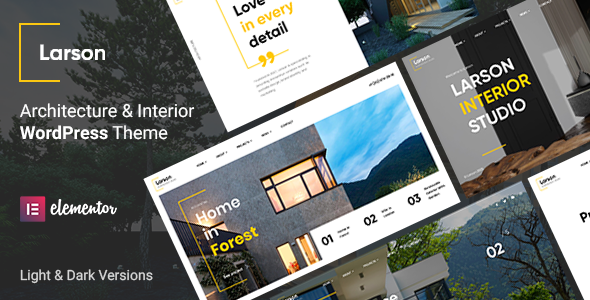
Stuck on your Larson WordPress theme? Let's fix it.
No endless back-and-forth. Just send us the details and we'll get it done.
No obligation · Replies within 1 hour · Quote within 1 day
Setup · Customization · Bug fixes · WooCommerce integration
About Larson WP Theme
Larson is a WordPress theme by BSLThemes built for creative agencies, portfolio sites, and digital studios. It ships with a clean, minimal design and a strong focus on visual presentation. The theme is built on Elementor, so pages are constructed visually without touching code.
Out of the box, Larson includes multiple homepage demos, portfolio layouts, and service page templates. It supports WooCommerce, making it usable for shops alongside agency or creative work. The typography is well-considered, with generous whitespace that lets project work breathe. Performance is reasonable for an Elementor-based theme, provided the demo content is trimmed back. Larson suits studios and freelancers who want a polished, design-forward site without building everything from scratch.
Get matched with a Larson developer in under one day
Tell us about your Larson project. Small fixes, Larson theme customization, or a full website build, whatever you need, we've got it covered.
We'll connect you to the right Larson developers, define the scope, and get everything 100% clear.
You'll get one estimate, hire your preferred developer, and start collaborating.
Larson looks straightforward until you need something the demos don’t cover. Custom post type layouts, conditional header logic, or WooCommerce template overrides all require hands-on theme knowledge. That’s where working with a vetted developer makes a real difference.
Through Codeable, you get access to experienced WordPress developers who have worked with Elementor-based themes like Larson across dozens of project types. No generalist freelancers. No guesswork on quality. Post your project, get a clear estimate, and move forward only when you’re confident. It’s the most reliable way to get Larson work done properly.
Pros
- Clean, minimal design that works well for agencies and creative portfolios without heavy visual clutter
- Built on Elementor, so non-technical users can edit layouts and content without a developer after initial setup
- Includes multiple pre-built demo layouts covering agency, portfolio, and studio use cases
- WooCommerce support is included out of the box, making it viable for hybrid shop and agency sites
- Well-structured typography defaults with consistent spacing that give project work room to stand out
Cons
- Elementor dependency means page performance requires extra optimization work compared to block-based themes
- Demo content is heavy on media assets, which new users sometimes import fully and then struggle to clean up
- Limited documentation for scenarios outside the provided demo templates
- Header and navigation customization beyond preset options requires custom CSS or developer involvement
- Theme updates from BSLThemes can occasionally break customizations made outside of the Customizer
Who is Larson for?
Creative Agency Website
Larson’s agency demo layout covers the core pages a creative studio needs: services, team, case studies, and a contact page. The whitespace-heavy design lets work examples take focus. A developer can extend this with custom portfolio categories and filterable project archives to match how the agency actually organizes its client work.
Freelance Designer Portfolio
For solo designers, Larson provides a clean canvas that keeps attention on the portfolio grid. The Elementor-based layout makes it manageable to maintain independently. A one-time setup with a Larson developer to configure the portfolio post types and filter logic means you can add new projects yourself going forward without touching layout code.
Digital Marketing Studio
Digital marketing studios need pages that explain services clearly and convert visitors. Larson’s section-based layouts work well for this. Service pages, case study sections, and lead capture forms all fit the existing template structure. WPForms or Gravity Forms slots in cleanly for contact and consultation request forms without custom styling work.
Photography Portfolio
Photography sites need fast-loading image grids and clean gallery presentation. Larson handles this reasonably well, though image optimization is essential given the volume of media. Pairing the theme with a proper image compression and lazy load setup keeps the portfolio responsive. A developer can configure this alongside the initial build to avoid performance problems later.
Small Product Shop with Agency Presence
Some studios sell digital products, prints, or branded merchandise alongside client services. Larson’s WooCommerce integration makes this viable without a separate shop theme. Product pages inherit the overall site styling with minimal adjustment. A developer can align the checkout flow with the site’s design so the shop doesn’t feel disconnected from the agency side.

Customizing Larson
Larson gives you control through the WordPress Customizer and Elementor’s visual editor. You can adjust header layout, colors, fonts, and footer structure without writing code. The theme includes global style options that keep changes consistent across pages.
For anything beyond surface-level changes, a Larson expert will save you significant time. Custom portfolio filters, modified service layouts, unique header behavior, or integrations with third-party tools all require working knowledge of how Larson structures its templates. BSLThemes provides documentation, but gaps exist when you move away from the included demos. A developer familiar with Larson knows where the theme’s defaults create friction and how to work around them cleanly, without breaking future updates.
Recommended plugins for Larson
Larson works with the standard Elementor widget library, so most page-building extensions slot in without conflict. WooCommerce integration is built in, meaning product and shop pages inherit the theme’s styling with minimal adjustment.
For contact and lead forms, WPForms and Gravity Forms both work reliably. If you plan to run the site long-term, pairing Larson with a caching plugin and an image optimization tool matters for load times. You can find specific guidance on that in our WordPress performance service. If organic search is a priority, combining Larson with Yoast or Rank Math is standard practice, and our WordPress SEO service covers that setup in detail.
Not sure which plugins to use? This WordPress plugins directory covers the most popular options with reviews and setup guides.
Larson common issues
Larson theme header not showing correctly after update
Header display problems after a Larson update are usually caused by cached styles conflicting with new theme files. Start by clearing your site cache, browser cache, and any server-level cache. If you use a CSS minification plugin, purge that too. If the layout is still broken, check for custom CSS in the Customizer that may target header classes that changed in the update. Our WordPress bug fixing service can diagnose and resolve this quickly.
Larson portfolio filter not working on category pages
Portfolio filter failures in Larson most often come down to a JavaScript conflict with another plugin, or incorrect category assignment on portfolio posts. Open the browser console and look for JS errors. If a conflict shows up, disable plugins one by one to isolate the source. Also confirm that portfolio items are assigned to the correct taxonomy that the filter widget is referencing. Misconfigured Elementor filter widgets are another common cause worth checking directly in the editor.
Larson theme slow loading with Elementor page builder
Larson loads Elementor’s full asset stack on every page, which adds weight. Start by enabling Elementor’s built-in asset loading improvements under Elementor > Settings > Performance. Install a caching plugin like WP Rocket or LiteSpeed Cache and configure lazy loading for images. Unused demo sections that remain in the page structure also add render weight, so removing hidden or inactive sections from page templates helps. See our WordPress performance service for a full audit approach.
Larson demo import failed or missing content after import
Larson demo imports fail most often due to PHP memory limits or upload size restrictions on the hosting server. Check that your host allows at least 256MB memory and a 64MB upload limit. Some hosts also block XML import requests. Try importing the demo content in stages if the one-click import tool fails completely. If content imports but images are missing, run the media regeneration tool or re-import attachments separately. Contact your host if server limits are the root cause.
Larson FAQ
BSLThemes actively maintains Larson and releases updates to keep it compatible with current WordPress versions. That said, compatibility also depends on your version of Elementor and any plugins you’re running. Always test updates on a staging site before applying them to a live build. Checking the BSLThemes changelog before major WordPress core updates is a reliable habit.
Yes. Larson includes built-in WooCommerce support. Shop, product, cart, and checkout pages inherit the theme’s styling with minimal configuration. Some adjustments to product page layout and typography may still be needed depending on your catalog structure, but the integration is functional without custom code for standard shop setups.
Larson’s demo templates and page layouts are built for Elementor. You can technically use the block editor for basic pages, but the pre-built layouts and visual structure of the demos won’t transfer. If you want to avoid Elementor dependency, Larson is not the right starting point. It’s designed as an Elementor theme.
Migrating to Larson from another theme involves exporting your content, installing Larson and its required plugins, then rebuilding pages using Larson’s Elementor templates. Your posts and custom post types carry over, but page layouts need to be rebuilt. Our WordPress migration service can handle this end to end with minimal downtime.
Larson’s code structure is clean enough for good SEO, but Elementor adds DOM weight that can affect Core Web Vitals scores. Using a proper SEO plugin like Yoast or Rank Math, optimizing images, and enabling caching covers the basics. Schema, structured data, and technical SEO improvements beyond that benefit from specialist input. See our WordPress SEO service for details.
Hire a Larson WordPress Developer
Whether you need a full Larson site built from one of the demos, a customized portfolio layout, or fixes to an existing build, working with a specialist gets it done faster and cleaner. Our developers know the theme’s structure, Elementor’s limitations, and how to deliver a site that performs well after launch.
Get a free estimate with no obligation. Describe your project and you’ll hear back within 24 hours through Codeable’s vetted developer network. 100% risk-free.
You'll need a free Codeable account so developers can ask questions and send their quotes.