Lekker WordPress Theme
by Mikado-Themes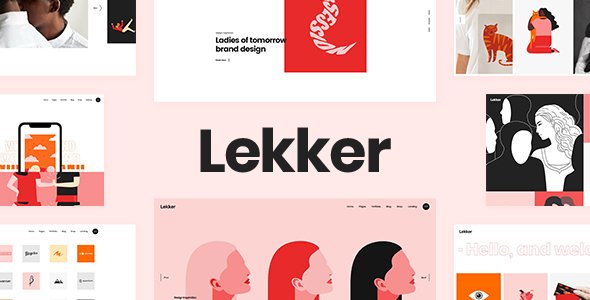
Stuck on your Lekker WordPress theme? Let's fix it.
No endless back-and-forth. Just send us the details and we'll get it done.
No obligation · Replies within 1 hour · Quote within 1 day
Setup · Customization · Bug fixes · WooCommerce integration
About Lekker WP Theme
Lekker is a multi-purpose WordPress theme by Mikado-Themes, built on their in-house Mikado framework. It ships with a large library of pre-built demos covering portfolios, agencies, shops, and blogs. The Elementor integration is solid, and the theme leans on custom Mikado widgets rather than relying entirely on third-party plugins.
Page load times are acceptable out of the box, though the demo content imports a lot of assets that need trimming for production. The theme supports WooCommerce, WPML, and custom post types for portfolios and team members. It is actively maintained, and updates from Mikado-Themes have been consistent. If you need a flexible base that covers a wide range of site types without switching themes, Lekker is a practical choice worth evaluating.
Get matched with a Lekker developer in under one day
Tell us about your Lekker project. Small fixes, Lekker theme customization, or a full website build, whatever you need, we've got it covered.
We'll connect you to the right Lekker developers, define the scope, and get everything 100% clear.
You'll get one estimate, hire your preferred developer, and start collaborating.
Mikado-Themes builds Lekker on a proprietary framework. That means standard WordPress documentation only gets you so far. When something breaks or a customization goes beyond the options panel, you need someone who knows the Mikado codebase specifically. Codeable connects you with vetted WordPress developers who have hands-on experience with themes like Lekker. You get a clear estimate before any work starts, and there is no obligation to proceed. For anything beyond basic setup, working with a specialist is the faster and safer path.
Pros
- Large library of polished pre-built demos covering agencies, shops, portfolios, and blogs
- Solid Elementor integration with additional Mikado widgets that extend native Elementor capabilities
- Detailed theme options panel with fine control over headers, typography, and color without custom code
- Active maintenance from Mikado-Themes with consistent updates and WordPress core compatibility
- WooCommerce and WPML support built in, making multilingual and ecommerce builds straightforward
Cons
- Proprietary Mikado framework increases dependency and makes switching themes without rebuilding difficult
- Demo imports are asset-heavy and require significant cleanup before a production site is performance-ready
- Custom shortcodes tie page content to the theme, creating portability issues if you migrate away later
- Support documentation is limited for edge cases outside standard demo configurations
- Header and footer customization beyond preset styles requires PHP template edits and child theme work
Who is Lekker for?
Creative Agency
Lekker’s agency demos come with portfolio grids, team sections, and animated counters that match typical agency site requirements. A Lekker developer can strip back the demo to just the sections you need, apply brand colors and fonts through the options panel, and configure custom project post types so the team can add work samples without touching page builders.
WooCommerce Store
The WooCommerce integration in Lekker covers product pages, cart, and checkout with Mikado-styled templates. A Lekker specialist can extend this with custom product layouts, filtered shop grids, and performance tuning to handle catalogue sizes without slowdowns. The theme handles variable products and basic shop pages cleanly without needing a separate WooCommerce theme layer.
Freelance Portfolio
For freelancers, Lekker’s portfolio post type and filterable grid layouts are the main draw. A Lekker expert can build a clean single-page or multi-page portfolio, configure case study layouts, and set up a contact form without overloading the site with plugins. The result is a fast, visually focused site that presents work clearly and loads without friction.
Corporate Business Site
Corporate builds benefit from Lekker’s structured header options, mega menu support, and service page templates. A Lekker developer can configure a multi-department site with clear navigation, WPML support for international audiences, and a consistent design system across pages. The theme handles the content structure well once the demo excess is removed and the build is tightened up.
Lifestyle or Magazine Blog
Lekker includes blog-specific demo layouts with editorial grids, featured post areas, and category filtering. A Lekker specialist can configure a clean reading experience, set up ad placement areas, and integrate newsletter tools without breaking the layout. The typography controls in the options panel make it easy to establish a readable and branded editorial style across all post types.

Customizing Lekker
Lekker gives you a detailed theme options panel built on the Mikado framework, covering typography, color schemes, header styles, and footer layouts. You can switch between several header types, control sticky behavior, and adjust logo sizing without touching code. Elementor handles most page-level layout work, while Mikado-specific shortcodes fill in the gaps for portfolio grids, counters, and carousels.
That said, deeper changes, such as custom post type modifications, WooCommerce template overrides, or non-standard header builds, require PHP knowledge and familiarity with Mikado’s template structure. A Lekker expert can get this done faster and without breaking future updates. Child theme setup is also recommended before any serious customization begins, and a Lekker developer will handle that as a baseline step.
Recommended plugins for Lekker
Lekker works well with caching plugins like WP Rocket or LiteSpeed Cache. Given the volume of scripts the Mikado framework loads, proper asset optimization matters. A focused WordPress performance audit can cut load times significantly by deferring scripts and removing unused demo assets.
For search visibility, Lekker is compatible with Yoast SEO and Rank Math. Schema markup and meta control work without conflicts. If you want to push further, a structured WordPress SEO setup layered on top of the theme will give you a stronger technical foundation than relying on the theme alone.
Not sure which plugins to use? This WordPress plugins directory covers the most popular options with reviews and setup guides.
Lekker common issues
Lekker theme demo import stuck or not completing
Demo imports in Lekker fail most often due to PHP memory limits or execution time limits being too low. Set memory_limit to at least 256MB and max_execution_time to 300 in your php.ini or wp-config.php. Also ensure the required plugins, Mikado Core and Elementor, are installed and activated before running the importer. Importing on a staging environment first is recommended to avoid disrupting an existing site.
Lekker header not showing correctly on mobile
Mobile header issues in Lekker usually trace back to conflicting CSS from a plugin or incorrect breakpoint settings in the Mikado options panel. Check the mobile header behavior setting under Appearance > Mikado Options > Header. If a custom header style is selected, test by switching to the default and confirming the issue persists. Plugin-injected CSS can also interfere, so deactivating plugins one at a time will isolate the source quickly.
Lekker portfolio grid not displaying posts
If the Lekker portfolio grid shows no posts, the most common cause is a missing category filter selection or the Mikado Core plugin being deactivated. The portfolio post type is registered by Mikado Core, not the theme itself. Confirm the plugin is active, then check the Elementor or shortcode settings for the grid element and ensure the correct portfolio categories are selected. Flushing permalinks under Settings > Permalinks often resolves display issues after plugin reactivation.
Lekker theme options not saving changes
When Lekker theme options fail to save, the issue is typically a PHP timeout during the options save request or a conflict with a caching plugin writing stale data. Increase max_input_vars to at least 5000 in your PHP configuration, as the Mikado options panel sends a large number of fields. Also clear all caching layers, including server cache, after saving. If the problem persists, check for JavaScript errors in the browser console that may be blocking the save action. For persistent issues, our WordPress bug fixing service can diagnose and resolve this quickly.
Lekker WooCommerce pages not using theme layout
Lekker applies its layout to WooCommerce pages through template overrides in the theme. If these pages revert to default WooCommerce styling, the theme’s WooCommerce template files may have been overwritten during an update or a plugin is loading its own WooCommerce templates at higher priority. Check that no WooCommerce-specific plugin is overriding templates, and verify the Lekker WooCommerce templates are present in the theme folder under woocommerce/.
Lekker slider showing broken images after migration
Broken slider images after a migration in Lekker are almost always caused by hardcoded URLs in the database still pointing to the old domain. Use a tool like Better Search Replace to update all instances of the old URL to the new domain across the database. Sliders built with Mikado shortcodes store image IDs, so also verify the media library attachments migrated correctly and the attachment URLs resolve to the new domain. Our WordPress bug fixing service handles post-migration cleanup efficiently.
Lekker custom fonts not loading on frontend
Custom fonts in Lekker failing to load on the frontend usually means the font files are not enqueued correctly or a caching plugin is serving a cached version of the stylesheet before the font was added. Clear all caches after adding a custom font in the Mikado options panel. If you are using a self-hosted font via the options panel upload field, confirm the file format is supported and the URL is accessible. Google Fonts selections should load automatically without additional configuration.
Lekker Elementor widgets missing after update
Missing Lekker Elementor widgets after an update indicate a version mismatch between the Mikado Core plugin and the theme. Lekker’s custom Elementor widgets are registered through Mikado Core, and if the plugin version lags behind the theme, widgets will disappear from the Elementor panel. Update both the theme and Mikado Core to the latest versions simultaneously. If widgets remain missing, deactivate and reactivate Mikado Core, then clear the Elementor cache under Elementor > Tools.
Lekker mega menu not working on hover
The Lekker mega menu requires both the Mikado Core plugin and the Mikado Menu metabox to be configured per menu item. If hover behavior is not triggering, check that the menu is assigned to the correct theme location and that the mega menu option is enabled at the menu item level, not just the top level. JavaScript conflicts from third-party plugins can also disable hover states. Test in a clean browser session with all non-Mikado plugins deactivated to confirm. WordPress bug fixing support can trace JS conflicts efficiently.
Lekker page builder content not rendering properly
If Lekker page builder content renders incorrectly, the most likely cause is the Mikado Core plugin being inactive or a shortcode conflict introduced by another plugin. Mikado shortcodes require the plugin to render output. Reactivate Mikado Core and check the frontend again. For Elementor-specific rendering issues, regenerate CSS under Elementor > Tools > Regenerate Files and clear all caches. If specific widgets show broken markup, updating Elementor and Mikado Core together typically resolves version-related rendering bugs.
Lekker FAQ
Yes, Lekker has built-in WooCommerce support with styled product pages, cart, and checkout templates. It handles variable products and basic catalogue layouts without requiring a separate plugin. For larger stores or custom product layouts, a Lekker developer can extend the default templates to match specific requirements without conflicts.
Lekker integrates directly with Elementor and adds custom Mikado widgets to the Elementor panel through the Mikado Core plugin. Most page layouts in the demos are built with Elementor. The integration is stable, though custom Mikado widgets require the Mikado Core plugin to remain active for them to render correctly on the frontend.
Download the theme zip from your ThemeForest account after purchase. Install it via Appearance > Themes > Add New > Upload Theme. After activation, you will be prompted to install required plugins including Mikado Core and Mikado Plugins. Install and activate all required plugins before attempting a demo import or starting page building.
Yes, Mikado Core is a required plugin for Lekker. It registers custom post types for portfolios and team members, adds Mikado shortcodes, and loads the custom Elementor widgets. Without it, significant portions of the theme will not function. Always keep Mikado Core updated alongside the theme to avoid version conflicts.
You can build from scratch without importing a demo. The Elementor page builder and Mikado widgets are available immediately after plugin installation. Demo imports are optional and mainly useful for replicating a specific layout style quickly. Building without a demo avoids the overhead of removing unused demo assets and media files later.
Lekker is listed as WPML compatible by Mikado-Themes. String translation, page translation, and language switcher integration all work with the standard WPML setup. For complex multilingual builds with custom post types like portfolios, a Lekker specialist can configure WPML correctly to avoid translation synchronization issues across post types.
Create a new folder in wp-content/themes/ with a style.css file that includes the Template: lekker header line pointing to the parent theme directory name. Add a functions.php that enqueues the parent stylesheet. Activate the child theme from Appearance > Themes. All customizations should go into the child theme to survive parent theme updates.
Demo imports pull in all media, widgets, and page content from the demo site, including assets you will not use. Scripts and stylesheets for every demo section also load by default. After import, delete unused pages and media, disable scripts tied to sections you removed, and run a caching plugin. A performance audit will identify the specific bottlenecks on your install.
Yes, Lekker sites can be migrated to a new host using standard WordPress migration methods. After migration, run a search and replace on the database to update hardcoded URLs to the new domain. Mikado shortcodes use image IDs rather than URLs, so the media library needs to migrate intact. For a smooth move, a WordPress migration service handles the full process without data loss.
Mikado-Themes provides support through their ThemeForest comments and a dedicated support portal for verified buyers. For customization work that goes beyond what the options panel offers, Mikado’s support team will not write custom code. That is where a Lekker specialist via Codeable is the right option. You get scoped development work rather than general troubleshooting guidance.
Hire a Lekker Developer for Custom Work
Whether you need a full Lekker build from a demo, a custom layout that goes beyond the options panel, WooCommerce integration, or a performance fix, a specialist gets it done without guesswork. Post your project and get a clear scoped estimate with no obligation to hire. Get a Free Estimate and describe what you need. A Lekker expert will review your project and come back with a realistic plan.
You'll need a free Codeable account so developers can ask questions and send their quotes.