Levain WordPress Theme
by ThimPress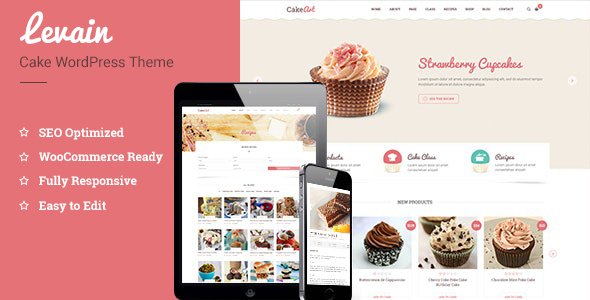
Stuck on your Levain WordPress theme? Let's fix it.
No endless back-and-forth. Just send us the details and we'll get it done.
No obligation · Replies within 1 hour · Quote within 1 day
Setup · Customization · Bug fixes · WooCommerce integration
About Levain WP Theme
Levain is a WordPress theme built by ThimPress, designed primarily for bakeries, cafes, and food-related businesses. It ships with Elementor page builder support, pre-built demo content, and WooCommerce integration for selling products directly from the site.
The theme focuses on warm, inviting visuals with clean typography and a layout that puts food photography front and center. ThimPress has a solid track record with themes like Eduma and Medzone, and Levain follows the same pattern: well-structured code, regular updates, and decent plugin compatibility.
Out of the box, Levain covers most needs for a small food business: menu pages, online ordering, contact sections, and blog support. It works with WPML for multilingual setups and performs reasonably well on standard shared hosting without heavy configuration.
Get matched with a Levain developer in under one day
Tell us about your Levain project. Small fixes, Levain theme customization, or a full website build, whatever you need, we've got it covered.
We'll connect you to the right Levain developers, define the scope, and get everything 100% clear.
You'll get one estimate, hire your preferred developer, and start collaborating.
ThimPress built Levain with standard WordPress conventions, which means a skilled developer can extend it without fighting the codebase. That said, knowing where the theme’s limits are matters. The developers at FoxyConcept work through Codeable, a vetted network of WordPress specialists. Every developer there has passed a strict vetting process, so you get someone who actually knows what they’re doing, not someone learning on your project.
Pros
- Designed specifically for food and bakery businesses with purpose-built layouts
- Elementor compatibility means visual editing without touching code
- Includes WooCommerce support for online ordering out of the box
- ThimPress provides regular updates and has an established support track record
- Pre-built demo content speeds up initial site setup considerably
Cons
- Demo import does not always replicate exactly what you see in the preview
- Mobile responsiveness on custom layouts often needs manual adjustment
- Limited built-in options for complex restaurant booking workflows
- Some advanced WooCommerce customisation requires overriding theme templates
- ThimPress support response times can be slow during peak periods
Who is Levain for?
Artisan Bakeries
Levain’s warm visual style fits artisan bakeries well. The theme handles product photography prominently, and WooCommerce lets you sell loaves, pastries, or subscription boxes directly. A developer can add custom order pickup scheduling or local delivery options to match how your bakery actually operates.
Coffee Shops and Cafes
For cafes, Levain works as a solid base for menus, opening hours, and location information. Add an online ordering plugin or a simple reservation form and you have a functional site without overcomplicating things. The Elementor integration lets you adjust the look to match your cafe’s atmosphere.
Specialty Food Retailers
Specialty food shops selling jams, sauces, or packaged goods benefit from Levain’s WooCommerce foundation. Product pages, category filtering, and checkout all work with minimal configuration. A developer can extend this with subscription billing or custom product bundles if your inventory model needs it.
Cooking Classes and Workshops
Levain can support cooking schools and workshop businesses with event listings, class schedules, and booking forms. Integrating a plugin like Amelia or The Events Calendar alongside Levain gives you a proper class management setup. Custom landing pages for each course are straightforward to build with Elementor.
Small Restaurant and Bistro Websites
Small restaurants and bistros need a site that shows the menu clearly, communicates the atmosphere, and makes reservations easy. Levain covers all three with the right setup. A developer can connect OpenTable or a custom booking form and make sure the site reflects the restaurant’s identity beyond the demo defaults.

Customizing Levain
Levain gives you a starting point, not a finished site. Most businesses need changes beyond what the demo provides: adjusted color palettes to match brand guidelines, custom header layouts, modified menu structures, or WooCommerce checkout tweaks.
Elementor handles surface-level changes well, but anything involving the theme’s core PHP templates, custom post types, or checkout flow requires proper developer knowledge. Getting Levain to behave exactly how you want, especially across mobile breakpoints, often takes more time than expected.
A Levain expert can restructure page templates, add custom functionality, integrate third-party booking or delivery plugins, and make sure the final result loads fast and looks right on every device. If you want the theme to actually fit your business rather than your business fitting the theme, working with someone who knows Levain properly is worth it.
Recommended plugins for Levain
Levain works with several plugins that extend what it can do. WooCommerce adds full online ordering and product management. WPForms or Gravity Forms handles reservations and contact workflows. For multilingual menus, WPML or Polylang integrate cleanly.
If you need better search rankings, pairing Levain with a proper SEO setup is worth doing from day one. You can also improve site performance significantly by optimising images, adding caching, and using a CDN, especially important for food sites with heavy photo content. Check out WordPress SEO optimisation if organic traffic matters to your business.
Not sure which plugins to use? This WordPress plugins directory covers the most popular options with reviews and setup guides.
Levain common issues
Levain theme demo content not importing correctly
Demo import failures with Levain usually come down to missing required plugins, PHP memory limits, or server timeouts during the import process. Make sure all ThimPress-recommended plugins are installed before importing. Increase WP_MEMORY_LIMIT in wp-config.php to at least 256MB. If the import still stalls, try importing content in sections rather than all at once. A WordPress bug fixing specialist can diagnose and resolve the specific error causing the failure.
Levain WooCommerce product pages not displaying properly
When Levain product pages show layout problems, the cause is usually a conflict between the theme’s WooCommerce templates and a plugin that modifies checkout or product display. Start by deactivating plugins one at a time to isolate the conflict. Check whether you have outdated WooCommerce template overrides in the theme folder. Updating both the theme and WooCommerce together sometimes introduces these conflicts, so checking the ThimPress changelog before updating is good practice.
Levain theme slow loading on mobile
Levain sites with lots of food photography often load slowly on mobile because images aren’t properly optimised or lazily loaded. Install a caching plugin, compress images to WebP format, and enable lazy loading. Check whether Elementor is loading unused CSS and scripts on pages that don’t need them. Google PageSpeed Insights will show you exactly where the bottlenecks are. For a thorough fix, WordPress performance optimisation covers all the key areas.
Levain header layout broken after plugin update
Header layout breaks after plugin updates in Levain are usually caused by a JavaScript conflict or a CSS override introduced by the updated plugin. Open the browser console and look for JS errors pointing to the conflicting file. Temporarily switch to a default WordPress theme to confirm the issue is Levain-specific. If the break appeared immediately after a specific update, rolling that plugin back to the previous version through the WordPress plugin repository is a quick temporary fix while you investigate properly.
Levain FAQ
Levain is a premium theme from ThimPress. It is available for purchase through ThemeForest or directly from ThimPress. There is no free version. Pricing follows standard ThemeForest single-license terms, which covers one site. Extended licenses are available if you plan to use it on a client site you’ll be handing over.
Yes, Levain is built with Elementor compatibility. You can use the Elementor page builder to edit layouts visually across most pages. Some theme-specific sections may need adjusting through the WordPress Customizer separately. Having both Elementor and the theme’s own settings can occasionally cause conflicts, so it’s worth testing changes carefully before pushing them live.
Levain supports WooCommerce, which makes it suitable for selling baked goods, packaged foods, or merchandise online. You get product pages, a shopping cart, and checkout without additional development. For more advanced setups like subscription boxes, local delivery areas, or time-slot ordering, you will need additional plugins and likely some custom development work.
After installing Levain and its required plugins, go to Appearance, then Import Demo Data from the ThimPress panel. Select the demo you want and follow the prompts. Make sure your hosting environment meets the PHP memory and execution time requirements listed in the theme documentation. If the import fails or is incomplete, your server’s resource limits are usually the cause.
Levain uses reasonably clean markup and supports standard SEO plugins like Yoast and Rank Math without conflicts. The theme itself doesn’t handle SEO beyond basic structure. Page speed, schema markup, and content optimisation all need to be handled separately. For food businesses targeting local search, proper SEO setup matters significantly on top of whatever the theme provides.
Hire a Levain Developer for Your WordPress Site
Whether you need a Levain setup from scratch, changes to an existing site, or help fixing something that’s broken, FoxyConcept can help. Work is delivered through Codeable, which means a free estimate with no obligation to hire. You only proceed if you’re happy with the plan and the price.
Get a free estimate today and find out exactly what your Levain project will take.
You'll need a free Codeable account so developers can ask questions and send their quotes.