Leven WordPress Theme
by LMPixels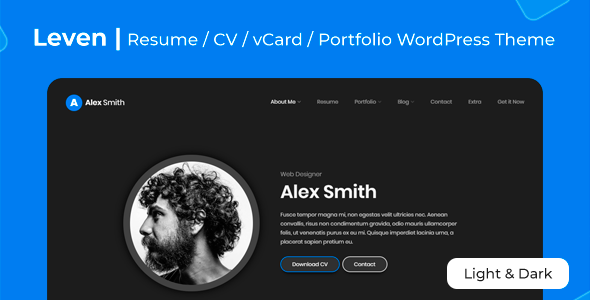
Stuck on your Leven WordPress theme? Let's fix it.
No endless back-and-forth. Just send us the details and we'll get it done.
No obligation · Replies within 1 hour · Quote within 1 day
Setup · Customization · Bug fixes · WooCommerce integration
About Leven WP Theme
Leven is a minimal, multipurpose WordPress theme developed by LMPixels. It targets creative professionals, agencies, and portfolio-focused businesses who want clean layouts without a heavy page builder dependency. The theme ships with multiple demo layouts, a drag-and-drop builder integration, and a solid set of typography options that keep the focus on content.
It works well on personal blogs, creative studios, and small agency sites. The codebase is reasonably lean, and the demo content installer makes initial setup fast. That said, getting Leven to look exactly like its demo, or adapting it beyond its default structure, often requires someone who knows the theme’s settings and underlying code. That’s where a dedicated Leven developer saves time and frustration.
Get matched with a Leven developer in under one day
Tell us about your Leven project. Small fixes, Leven theme customization, or a full website build, whatever you need, we've got it covered.
We'll connect you to the right Leven developers, define the scope, and get everything 100% clear.
You'll get one estimate, hire your preferred developer, and start collaborating.
Most Leven issues, whether a broken layout after an update, a Visual Composer conflict, or a customization that keeps reverting, have straightforward fixes when you know the theme. The developers on Codeable are vetted, have worked across dozens of LMPixels themes, and can give you a clear answer fast. No guesswork, no forums, no waiting. You post your project, get matched with a qualified Leven developer, and receive a free estimate before committing to anything.
Pros
- Clean, minimal design that loads fast without heavy customization
- Multiple pre-built demo layouts cover portfolio, blog, and agency use cases
- One-click demo importer speeds up initial setup significantly
- Strong typography options with Google Fonts integration built in
- WooCommerce compatible out of the box for simple shop setups
Cons
- Relies heavily on Visual Composer, which creates shortcode lock-in
- Portfolio and grid layouts can break after theme or plugin updates
- Limited documentation for advanced customization scenarios
- Some demo sections are difficult to replicate without the exact demo content
- Customer support from LMPixels can be slow on complex technical issues
Who is Leven for?
Creative Portfolio
Leven’s grid-based portfolio layouts are built for showcasing work visually. A Leven developer can set up custom portfolio categories, adjust hover effects, and build filterable project galleries that match your brand. The clean whitespace gives creative work room to breathe without the site design competing for attention.
Freelance Designer or Photographer
For solo creatives, Leven hits the right balance between personality and professionalism. A Leven specialist can configure a single-page layout with an about section, services list, and contact form that converts visitors into inquiries. The theme’s typography options make it easy to build a distinctive personal brand without custom development overhead.
Small Creative Agency
Agencies need a site that communicates capability quickly. Leven’s multi-section homepage layouts, case study portfolio structure, and team page templates are a solid foundation. A Leven expert can extend these with custom post types, client logo sliders, and service pages that go beyond what the default theme delivers out of the box.
Personal Blog
Leven’s blog layouts are clean and readable, with good support for featured images and category organization. A Leven developer can configure custom sidebar layouts, related post sections, and email opt-in placements that turn a standard blog into a proper content platform without needing a separate page builder setup.
Small Product Shop
With WooCommerce support built in, Leven handles small product catalogs well. A Leven specialist can style the shop pages to match the rest of the site, configure product gallery layouts, and set up a checkout flow that doesn’t look like an afterthought. Best suited for shops with a limited SKU count rather than large catalogs.

Customizing Leven
Leven uses a combination of the WordPress Customizer and its bundled Visual Composer integration for layout control. Surface-level changes like fonts, colors, and header styles are straightforward. Deeper customization, like modifying the portfolio grid, adjusting the mega menu, or building out a custom homepage that doesn’t rely on bundled shortcodes, takes real knowledge of how the theme is structured.
A Leven expert can work directly with child themes to keep your changes upgrade-safe, rewrite specific template files, and resolve conflicts between the theme and your plugins. If you’ve hit a wall trying to get Leven to match your design vision, or if the demo looks nothing like what you’ve built, working with a Leven specialist is the most direct path forward.
Recommended plugins for Leven
Leven integrates with WooCommerce for basic shop functionality and Visual Composer for page layout control. Both add weight to your page load if not configured carefully. A developer can strip unused VC elements and optimize asset loading to keep things fast. If you’re planning to grow organic traffic, pairing Leven with proper schema markup and on-page structure is worth doing early. See our WordPress performance service and WordPress SEO optimisation service for how we handle both alongside theme work.
Not sure which plugins to use? This WordPress plugins directory covers the most popular options with reviews and setup guides.
Leven common issues
Leven theme portfolio grid not displaying correctly after update
Portfolio grid breaks in Leven are usually caused by a JavaScript conflict introduced during a theme or plugin update. Start by deactivating all plugins except Visual Composer and checking whether the grid recovers. If it does, reactivate plugins one at a time to isolate the conflict. If the issue persists, the grid’s isotope script may be loading out of order. A developer can re-enqueue it correctly. For persistent layout issues after updates, our WordPress bug fixing service can diagnose and resolve it quickly.
Leven Visual Composer shortcodes showing as plain text on frontend
When Visual Composer shortcodes render as raw text, it usually means the plugin is deactivated, unlicensed, or the theme’s bundled version is out of sync with an independently installed copy. First, check whether VC is active and that you’re using the theme-bundled version rather than a separately purchased one. Conflicts between two VC instances cause this exact problem. Deactivate the standalone plugin and rely on the theme’s bundled version. If the issue continues, our WordPress bug fixing service can untangle the conflict.
Leven theme demo content not importing properly
Failed demo imports in Leven are most often caused by server memory limits or execution time limits being too low. Your host’s PHP configuration needs at least 256MB of memory and a 300-second max execution time for the importer to complete. Contact your host to raise these temporarily, then retry the import. If images are missing but the content structure imported, that points to a remote fetch timeout. Retry the import or upload the XML manually via Tools, then Import.
Leven header menu disappearing on mobile
Mobile menu disappearance in Leven is typically a CSS specificity conflict with another plugin adding styles that override the theme’s mobile navigation. Open your browser’s developer tools on mobile viewport and inspect the hamburger icon and nav container. Check whether they’re hidden via a conflicting display: none rule. A quick fix is adding a targeted CSS rule in the Customizer’s Additional CSS panel. If the issue reappears after updates, it needs a proper fix in a child theme.
Leven FAQ
LMPixels continues to maintain Leven with periodic updates. However, update frequency has slowed compared to earlier years. Before purchasing or building on Leven, check the ThemeForest changelog for the last update date. If you’re already running Leven and concerned about compatibility with current WordPress versions, a developer can audit the codebase and patch any issues directly.
Technically yes, but practically it’s difficult. Leven’s demo layouts are built almost entirely with Visual Composer shortcodes. Without it, most pre-built sections won’t render. You can use Leven’s Customizer settings and basic WordPress blocks for simpler pages, but you’ll lose access to the majority of the theme’s layout functionality without VC active.
After installing and activating the theme, a notification will appear offering to install required plugins including the demo importer. Install and activate those, then go to Appearance, then Import Demo Data. Choose your demo and click import. Make sure your server’s PHP memory limit is at least 256MB before starting. Low memory is the most common reason the import fails or stalls partway through.
Leven was built before Gutenberg was the default WordPress editor. It functions alongside Gutenberg but wasn’t designed for it. Block-based editing works for basic content, but the theme’s Visual Composer layouts and shortcodes sit outside the block editor. A Leven developer can improve Gutenberg compatibility if you prefer to move away from the classic editor workflow.
Cost depends on the scope of work. A single bug fix might take one to two hours. A custom page template or layout modification can range from three to eight hours. A full site build on Leven takes longer. Post your project on Codeable and get a free estimate from a vetted Leven specialist before committing. Rates vary by developer but are competitive for the quality of work delivered.
Hire a Leven Expert Developer
Whether you need a custom layout built in Leven, a bug fixed before a launch deadline, or a full site built on the theme from scratch, the right developer makes the difference. Our vetted Leven specialists work through Codeable, so you get quality work with full accountability. Get a free estimate and describe your project. No obligation, no risk, just a clear picture of what it takes to get it done.
You'll need a free Codeable account so developers can ask questions and send their quotes.