Lifeline WordPress Theme
by webinane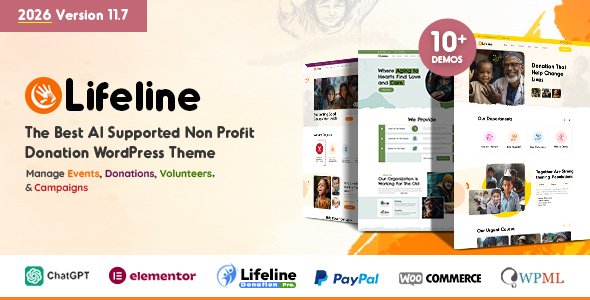
Stuck on your Lifeline WordPress theme? Let's fix it.
No endless back-and-forth. Just send us the details and we'll get it done.
No obligation · Replies within 1 hour · Quote within 1 day
Setup · Customization · Bug fixes · WooCommerce integration
About Lifeline WP Theme
Lifeline is a WordPress theme built by Webinane, designed specifically for non-profit organisations, charities, and fundraising campaigns. It ships with donation integration, campaign management features, and a layout system built around driving action from visitors.
The theme works with popular plugins like Give and WooCommerce, so fundraising pages can be set up without custom development. Pre-built page templates cover common sections: causes, events, volunteers, and donation counters.
Lifeline is a solid starting point for organisations that need a credible, mission-focused website fast. The design is clean, the typography is readable, and the built-in cause progress bars help communicate impact at a glance. It runs on Elementor, which keeps layout editing accessible for non-technical staff.
Get matched with a Lifeline developer in under one day
Tell us about your Lifeline project. Small fixes, Lifeline theme customization, or a full website build, whatever you need, we've got it covered.
We'll connect you to the right Lifeline developers, define the scope, and get everything 100% clear.
You'll get one estimate, hire your preferred developer, and start collaborating.
Most Lifeline sites need more than a demo import and some colour changes. Donation flows break, Give configurations get complicated, and campaign pages often need custom logic that Elementor alone cannot handle.
Working with a vetted Lifeline developer through Codeable means you get someone who has solved these problems before. No guesswork, no junior developers learning on your project. Post your project, get an estimate within 24 hours, and only move forward if it makes sense. Learn more about our WordPress development services.
Pros
- Built specifically for charities and non-profits, with donation and cause features included from the start
- Native Give plugin integration makes setting up one-time and recurring donation forms straightforward
- Elementor compatibility means non-technical staff can edit page layouts without touching code
- Campaign progress bars and donation counters are built in, no extra plugin needed
- Pre-built templates for causes, events, volunteers, and team pages reduce setup time significantly
Cons
- Demo import can conflict with existing content, requiring manual cleanup before building properly
- Some built-in shortcodes are poorly documented, making advanced customisation harder without developer help
- Theme updates have historically been slow, which can cause compatibility issues with newer WordPress versions
- Default mobile layouts for donation forms often need manual adjustment to work properly on small screens
- Heavy reliance on shortcodes in older page templates makes switching page builders difficult later
Who is Lifeline for?
Charity and Non-Profit Organisations
Lifeline was designed with charities in mind. The cause system, donation counters, and volunteer sign-up templates give non-profits a full web presence without needing custom development from scratch. It handles the basics well: who you are, what you do, and how people can give.
Fundraising Campaign Sites
Organisations running time-limited campaigns benefit from Lifeline’s built-in progress bars and campaign-specific page templates. A single campaign can have its own landing page with a donation target, deadline, and supporter count, all connected to Give without extra coding.
Religious Organisations
Churches and faith-based organisations use Lifeline to manage event listings, sermons, and donation appeals in one place. The event templates and giving features suit congregations that need a clean, credible site with regular content updates managed by non-technical staff.
Community and Social Causes
Local community groups and social campaigns benefit from Lifeline’s clean layout and cause-focused design. The theme supports petition-style pages, volunteer recruitment sections, and news updates, making it a practical choice for grassroots organisations with limited budgets.
NGOs and Aid Organisations
International NGOs and aid organisations need multi-language support and strong donation infrastructure. Lifeline pairs well with WPML for translations and Give for multi-currency donations, giving larger organisations the flexibility they need without a fully custom build.

Customizing Lifeline
Getting Lifeline set up out of the box is straightforward, but most organisations need more than a demo import. That is where a Lifeline expert makes a real difference.
Custom donation flows, conditional campaign pages, membership area integration, and payment gateway setup all require hands-on configuration. A Lifeline developer can also extend the theme with custom post types for campaigns, add multilingual support via WPML, and connect CRM tools like Salesforce or Mailchimp to donation forms.
Visual customisation through Elementor covers surface-level changes. For deeper work, like modifying how Give handles recurring donations or restricting content to registered volunteers, you need someone who knows both the theme structure and the WordPress plugin ecosystem well.
Recommended plugins for Lifeline
Lifeline works best when paired with the right plugins. Give handles one-time and recurring donations with solid reporting. WooCommerce can power merchandise or event ticket sales. WPML adds multilingual support for international charities.
For performance, image optimisation and caching are essential given the media-heavy layouts Lifeline uses. You can read more about that on the WordPress performance page. If organic reach matters to your cause, structured SEO work covered in our WordPress SEO service can significantly increase donation page visibility in search results.
Not sure which plugins to use? This WordPress plugins directory covers the most popular options with reviews and setup guides.
Lifeline common issues
Lifeline theme donation form not showing on page
This usually happens when the Give plugin is inactive or the donation form shortcode is placed incorrectly. First, check that Give is installed and activated under Plugins. Then confirm the form ID in the shortcode matches an existing form in Give. If the page is built with Elementor, the Give widget may need re-adding. Caching plugins can also suppress form output, so clear your cache and test in an incognito window before investigating further.
Lifeline WordPress theme not compatible with latest WordPress update
Lifeline updates have not always kept pace with WordPress core releases. If the theme breaks after a WordPress update, start by checking the Webinane changelog for a newer version. If none exists, a developer can audit the theme files for deprecated functions and patch them manually. Avoid updating WordPress core on a live site without testing in a staging environment first. Our WordPress bug fixing service can handle this quickly.
Lifeline theme cause progress bar not updating
Progress bars in Lifeline pull donation totals from Give. If the bar is static, the most common cause is a disconnected form ID in the cause settings, or a Give reporting issue caused by a plugin conflict. Go to Lifeline cause settings, verify the linked Give form, and check that Give’s payment logs are recording completed donations correctly. A stuck counter sometimes also points to an object cache that needs flushing.
Lifeline Elementor page builder not working after theme update
After some Lifeline updates, Elementor editor loads a blank screen or the page layout breaks. This is usually caused by a CSS conflict introduced in the update or an outdated Elementor version. Update Elementor and Elementor Pro to the latest versions first. Then regenerate CSS under Elementor Tools. If the issue persists, disable other plugins temporarily to isolate the conflict. A developer can also check whether the theme’s enqueued styles are overriding Elementor’s output.
Lifeline FAQ
Yes, Lifeline is built around Give. The theme includes dedicated cause pages that connect directly to Give forms, pulling in donation totals and displaying progress bars automatically. You will need Give installed and active for the donation features to work. Most advanced Give add-ons, like recurring donations and fee recovery, are also compatible with Lifeline’s layout.
For basic setup, yes. The demo import gives you a working starting point and Elementor handles page editing without code. However, configuring Give payment gateways, setting up email notifications, and customising donation flows often requires developer input. If you are running a serious fundraising operation, getting a Lifeline expert involved early saves significant time.
Recurring donations are not a Lifeline feature on their own. They are handled by the Give Recurring Donations add-on, which is a paid extension. Lifeline is compatible with it, meaning your donation forms can accept recurring payments, but you need to purchase and configure the Give add-on separately. A developer can set up the full recurring giving flow for you.
Migrating to Lifeline involves moving your content, reconfiguring your donation forms in Give, and rebuilding page layouts in the new theme. It is not a one-click process. A developer can handle content migration and make sure donation history, campaign data, and form settings are preserved. See our WordPress migration service for more detail on how this works.
Webinane continues to sell and update Lifeline, but update frequency has been inconsistent. The theme still works on current WordPress versions for most use cases, but some areas need manual fixes after major WordPress updates. If long-term maintenance is a concern, pairing Lifeline with a WordPress maintenance plan gives you someone watching for compatibility issues before they affect your site.
Hire a Lifeline WordPress Developer
Need a Lifeline developer to set up your donation system, fix a broken campaign page, or build a custom fundraising feature? Post your project and get a free, no-obligation estimate within 24 hours through our free estimate page. Work is handled by vetted WordPress developers with real experience in charity and non-profit sites. No risk, no upfront payment, no commitment until you are ready.
You'll need a free Codeable account so developers can ask questions and send their quotes.