Linguini WordPress Theme
by FORQY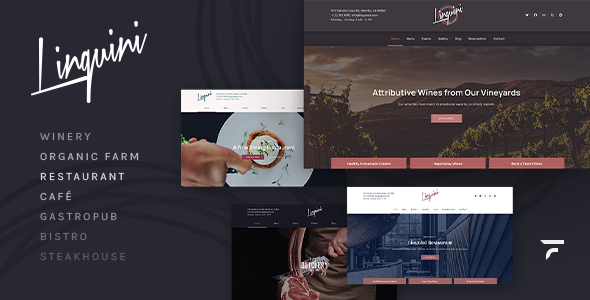
Stuck on your Linguini WordPress theme? Let's fix it.
No endless back-and-forth. Just send us the details and we'll get it done.
No obligation · Replies within 1 hour · Quote within 1 day
Setup · Customization · Bug fixes · WooCommerce integration
About Linguini WP Theme
Linguini is a WordPress theme by FORQY built for restaurants, cafes, and food-related businesses. It comes with a clean layout focused on showcasing menus, atmosphere, and booking information without clutter getting in the way.
The theme includes pre-built sections for food menus, opening hours, gallery displays, and reservation calls to action. It works with Elementor, which makes page editing straightforward for site owners who want control without touching code.
FORQY themes are known for tight design consistency and solid documentation. Linguini follows that pattern. It loads reasonably fast out of the box, supports WooCommerce for online ordering setups, and handles mobile layouts well. If you run a food business and want a site that looks polished without a custom build budget, Linguini is a practical starting point.
Get matched with a Linguini developer in under one day
Tell us about your Linguini project. Small fixes, Linguini theme customization, or a full website build, whatever you need, we've got it covered.
We'll connect you to the right Linguini developers, define the scope, and get everything 100% clear.
You'll get one estimate, hire your preferred developer, and start collaborating.
Linguini looks good in demos. Getting it to match your brand, work with your booking system, and load fast in production is different work. That requires someone who has built with the theme before, not just someone who is learning it on your project.
Through Codeable, you get matched with vetted WordPress developers who know themes like Linguini inside out. Post your project, get an estimate within 24 hours, and only hire if it makes sense. No commitment required upfront.
Pros
- Purpose-built for food businesses with restaurant-specific sections built in
- Elementor compatibility makes layout editing accessible without code
- WooCommerce support allows online ordering without a full custom build
- Clean mobile layouts with good handling of menu and gallery content
- FORQY provides reliable documentation and regular theme updates
Cons
- Design can look similar to other FORQY food themes without significant customisation
- Elementor dependency adds page load overhead if not properly optimised
- Advanced reservation workflows require third-party plugins that need developer setup
- Limited built-in typography variation outside what the Customizer exposes
- Switching away from Linguini later means rebuilding content tied to Elementor templates
Who is Linguini for?
Independent Restaurants
Linguini suits independent restaurants well. The built-in menu sections handle starters, mains, and desserts without plugin help. Combined with a booking integration and a strong gallery section, a restaurant owner gets a functional site that covers the key conversion points without needing a bespoke design budget.
Cafes and Coffee Shops
Cafes need a site that communicates atmosphere and menu quickly. Linguini’s image-forward layout works for that. A cafe can display seasonal menus, opening hours, and a simple contact form without heavy development work. Adding an Instagram feed integration through a plugin extends it further.
Food Delivery Services
Food delivery businesses can use Linguini alongside WooCommerce to take orders directly. Product pages work for individual dishes or meal bundles. A developer can configure delivery zones, time slots, and checkout flows on top of the theme without rebuilding the front end from scratch.
Catering Companies
Catering companies need to showcase packages, past events, and a clear enquiry path. Linguini’s flexible sections handle service listings and gallery content. Adding a custom quote request form or integrating a CRM for lead capture is straightforward for a developer familiar with the theme.
Private Dining and Events Venues
Private dining venues and event spaces benefit from Linguini’s clean presentation and booking-oriented layout. A Linguini developer can configure capacity-based reservation logic, add event calendar functionality, and build out a gallery section that shows the space effectively to prospective clients.

Customizing Linguini
Linguini gives you a solid foundation, but most food businesses need adjustments that go beyond what the theme panel allows. Custom menu layouts, reservation system integrations, branded typography, and unique homepage structures all require developer work.
A Linguini expert can modify section templates, add custom post types for seasonal menus, connect third-party booking plugins like OpenTable or Bookly, and extend the theme without breaking updates. If you want a colour scheme or layout that stands out from other Linguini sites, that takes hands-on work.
FORQY provides documentation, but customising Linguini properly means knowing how its template hierarchy is structured and where Elementor ends and theme files begin. Getting that wrong creates maintenance headaches later. Working with someone who knows the theme saves time and avoids rework.
Recommended plugins for Linguini
Linguini pairs well with several plugins depending on what your food business needs. WooCommerce adds online ordering. Bookly or Simply Schedule Appointments handles reservations. WP Booking System works for table bookings. For delivery, WooCommerce Delivery handles time slots cleanly.
On the performance side, pairing Linguini with a caching plugin and image optimisation is important, especially with gallery-heavy food sites. See our WordPress performance service for help there.
For restaurants targeting local search, structured data and on-page optimisation matter. Our WordPress SEO service covers schema markup for restaurants, menus, and opening hours specifically.
Not sure which plugins to use? This WordPress plugins directory covers the most popular options with reviews and setup guides.
Linguini common issues
Linguini theme menu not displaying correctly on mobile
Mobile menu display issues in Linguini usually come from a CSS conflict with a plugin or a custom style override that targets incorrect breakpoints. First, deactivate plugins one at a time to isolate the conflict. Check the Elementor responsive settings for the affected section. If the issue appeared after a theme update, compare your child theme CSS against the parent. Our WordPress bug fixing service can trace and resolve this cleanly.
Linguini Elementor sections not loading after WordPress update
After a WordPress or Elementor update, widget registration conflicts can cause sections to display as missing or broken. Regenerate Elementor CSS files under Elementor > Tools > Regenerate Files. If that does not resolve it, the issue may be a deprecated widget that needs a compatibility fix in the theme files. Avoid editing parent theme files directly. A developer can apply a targeted fix through a child theme.
Linguini WooCommerce shop page layout broken
WooCommerce layout breaks in Linguini typically happen when WooCommerce updates its template files and the theme’s bundled WooCommerce templates fall out of sync. Check WooCommerce > Status > System Status for outdated template warnings. Updating the overridden templates in the theme or child theme to match the current WooCommerce version usually fixes this. This is a recurring maintenance task on WooCommerce sites.
Linguini reservation form not sending email notifications
Reservation form email failures are almost always a server mail configuration issue, not a theme bug. WordPress uses PHP mail by default, which many hosts block. Install an SMTP plugin like WP Mail SMTP and connect it to a transactional email service such as Mailgun or SendGrid. Test the connection through the plugin’s diagnostic tool. If the form itself is not submitting, check for JavaScript errors in the browser console that may indicate a plugin conflict.
Linguini FAQ
Linguini is a premium WordPress theme sold by FORQY. It is not available for free in the WordPress theme directory. You purchase it through ThemeForest or directly from FORQY. The licence covers one site use, and updates are included for the period specified at purchase. Extended support can be added for an additional cost.
Yes, Linguini is built with Elementor compatibility in mind. Most of its demo content and pre-built sections are designed to work within Elementor’s page builder. You will need Elementor installed to replicate the demo layout. The free version of Elementor covers most use cases, though some layouts may benefit from Elementor Pro features.
Yes. Linguini supports WooCommerce, which means you can add product pages for dishes, configure a checkout, and handle payments. For delivery-specific features like time slot selection or postcode-based delivery zones, you will need additional WooCommerce extensions. A developer can configure these on top of the theme.
Linguini does not include a built-in reservation system. You add one through a plugin such as Bookly, Simply Schedule Appointments, or OpenTable’s embed code. The theme has designated sections where you can place these integrations. A Linguini developer can style the booking form to match the theme and configure email notifications correctly.
Yes, migrating an existing site to Linguini is possible but involves rebuilding your pages in Elementor to match the new theme structure. Content like posts and menus can be transferred directly. Layout work needs to be redone. If your current site has a lot of pages, factor that into the migration effort. See our WordPress migration service for help.
Hire a Linguini WordPress Expert
Whether you need a full Linguini setup, a specific customisation, or help fixing something that broke, working with an experienced developer makes the difference between a site that converts and one that just exists.
Post your project through FoxyConcept and get matched with a Linguini developer via Codeable. You’ll receive a clear estimate with no obligation to proceed. Get a free estimate today and have your project scoped within 24 hours.
You'll need a free Codeable account so developers can ask questions and send their quotes.