Litho WordPress Theme
by themezaa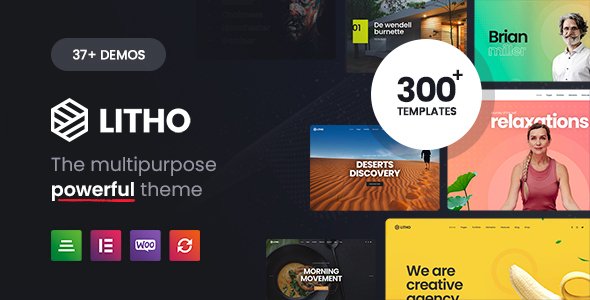
Stuck on your Litho WordPress theme? Let's fix it.
No endless back-and-forth. Just send us the details and we'll get it done.
No obligation · Replies within 1 hour · Quote within 1 day
Setup · Customization · Bug fixes · WooCommerce integration
About Litho WP Theme
Litho is a multipurpose WordPress theme built by Themezaa, designed around a deep integration with Elementor. It ships with over 30 pre-built demo sites spanning creative agencies, portfolios, photography, fitness, and more. Each demo is importable in one click.
The theme leans heavily on custom Elementor widgets, around 100 of them, covering sliders, counters, tabs, interactive showcases, and advanced typography controls. It supports WooCommerce, WPML, and RTL layouts out of the box.
Litho targets designers and agencies who want pixel-level control without writing code. The frontend output is clean, and the theme scores reasonably well on performance benchmarks when properly configured. It is actively maintained with regular updates from Themezaa.
Get matched with a Litho developer in under one day
Tell us about your Litho project. Small fixes, Litho theme customization, or a full website build, whatever you need, we've got it covered.
We'll connect you to the right Litho developers, define the scope, and get everything 100% clear.
You'll get one estimate, hire your preferred developer, and start collaborating.
Litho is feature-dense. That is its strength and the source of most support tickets. When the mega menu breaks after an update, or a custom Elementor widget stops rendering correctly, you need someone who knows the theme’s plugin architecture, not just WordPress in general.
Codeable connects you with vetted developers who have direct experience with Litho builds. Post your project, get matched within 24 hours, and receive a free estimate before committing to anything.
Pros
- Over 100 custom Elementor widgets included, covering most common creative layout needs
- 30+ one-click importable demos across multiple industries
- Built-in header and footer builder with multiple layout presets
- WooCommerce, WPML, and RTL support included without extra plugins
- Active development from Themezaa with consistent updates and changelog documentation
Cons
- Bundled plugins like Revolution Slider and Essential Grid increase page weight significantly
- Heavy dependency on the Litho Addons plugin means switching themes later is disruptive
- Default demo imports often require cleanup before they match the preview screenshots accurately
- Documentation is extensive but inconsistently detailed, some features are barely covered
- Customizer and Elementor settings can conflict, requiring developer intervention to resolve
Who is Litho for?
Creative Agencies
Litho ships with multiple agency demos featuring case study layouts, team sections, and animated service blocks. A Litho developer can strip the demo down to a clean foundation and rebuild it around a specific agency’s brand without starting from scratch. The mega menu and custom portfolio widgets handle client work showcases well.
Photography Portfolios
The photography demos in Litho include full-screen galleries, masonry layouts, and lightbox support through Essential Grid. A Litho specialist can configure these to load quickly and display correctly on mobile, which is where most photography sites lose visitors. Custom parallax headers add visual depth without heavy scripting.
Fitness and Wellness Studios
Litho includes a fitness demo with class schedule layouts, trainer profile sections, and pricing tables. A Litho expert can wire these up to booking plugins or membership systems. The bold typography and full-width video headers suit fitness branding well without needing custom design work from the ground up.
WooCommerce Fashion Stores
Litho’s WooCommerce integration supports custom product page layouts built in Elementor. A Litho developer can create lookbook-style shop pages, custom category headers, and styled cart flows that go beyond WooCommerce’s default templates. This works particularly well for fashion, accessories, and lifestyle product stores.
Freelance Designers
Freelancers use Litho’s portfolio demos as a starting point for personal branding sites. The single-page scroll layouts and animated section transitions perform well for individual showcase needs. A Litho specialist can configure the contact forms, social links, and project case study pages to match a personal style guide quickly.

Customizing Litho
Litho’s customization runs through two channels: the WordPress Customizer and Elementor’s page builder interface. The Customizer handles global settings like typography, header styles, footer layouts, and color palettes. Elementor handles everything at the page level.
The theme includes multiple header and footer builder options, sticky header variants, and a mega menu system. A Litho expert can unlock the full potential here, especially when combining custom widget styling with site-wide design tokens.
Where things get complex is in managing Litho’s custom Elementor extensions alongside third-party plugins. Getting them to work together without style conflicts or load order issues usually benefits from hands-on development work rather than trial and error in the settings panel.
Recommended plugins for Litho
Litho installs several bundled plugins: Revolution Slider, Essential Grid, and its own Litho Addons plugin that powers the custom Elementor widgets. These add functionality but also add page weight if not managed carefully.
For performance, disabling unused widgets and deferring non-critical scripts makes a measurable difference. See our WordPress performance service for a structured approach to this.
On the SEO side, Litho is compatible with Yoast and Rank Math, but schema markup and heading hierarchy need manual attention given how heavily the page builder structures content. Our WordPress SEO service covers those technical gaps.
Not sure which plugins to use? This WordPress plugins directory covers the most popular options with reviews and setup guides.
Litho common issues
Litho Elementor widgets not showing after update
This usually happens when the Litho Addons plugin version falls out of sync with the theme version after an update. Go to Appearance > Theme and check the installed version, then check Litho Addons under Plugins. Update both together. If widgets still don’t appear, deactivate and reactivate the Litho Addons plugin. Regenerating the Elementor CSS cache under Elementor > Tools often resolves display issues after this.
Litho demo import not working or stuck
Demo imports fail most often due to PHP memory limits or execution time settings on the server. Set memory_limit to at least 256MB and max_execution_time to 300 in your php.ini or wp-config.php. Also disable any security or caching plugins during the import. If the import completes but looks wrong, check that all required plugins were installed before importing. If the problem persists, our WordPress bug fixing service can handle this directly.
Litho header builder not saving changes
Litho’s header builder saves through Elementor, so unsaved changes often come from browser caching or a conflicting autosave. Click the Elementor save button explicitly rather than navigating away. If saved changes still don’t appear on the frontend, purge your caching plugin and check if a CDN is serving a stale version. Also confirm the correct header template is assigned under Litho Theme Options > Header.
Litho mega menu not displaying correctly on mobile
The mega menu relies on JavaScript that can conflict with minification plugins. Disable JS minification temporarily and test. On mobile, the mega menu switches to a different layout controlled by separate CSS. Inspect the element in browser DevTools to identify which CSS rule is collapsing the menu incorrectly. Often a z-index or overflow property on a parent container is the cause.
Litho Revolution Slider causing slow page load
Revolution Slider loads its scripts globally by default. Enable the Put JS to Body and No Conflict Mode options in the slider’s global settings. Also activate lazy loading for slides. If the slider only appears on one or two pages, restrict its scripts to those pages only using a plugin like Asset CleanUp. For a broader performance audit, see our WordPress performance service.
Litho WooCommerce product page layout broken
Broken WooCommerce product pages in Litho usually result from a mismatch between the WooCommerce version and the theme’s WooCommerce template files. Navigate to WooCommerce > Status > System Status and look for outdated template warnings. Update those templates through the Litho theme update process. If the layout is a custom Elementor template, regenerate the CSS under Elementor Tools and check for widget conflicts.
Litho sticky header overlapping page content
Sticky header overlap happens when the offset value doesn’t account for the header’s actual rendered height. In Litho Theme Options, find the sticky header offset setting and adjust it to match your header height in pixels. If the header height changes on different screen sizes, media query-specific overrides in the Additional CSS section are the cleanest fix. Avoid using negative margins on the first section as a workaround.
Litho custom fonts not loading on frontend
Custom fonts in Litho load through the Customizer’s typography settings or through Elementor’s global font manager. If they don’t appear on the frontend, check whether the font is being served correctly by inspecting the network tab in DevTools. Blocked third-party requests, GDPR cookie plugins blocking Google Fonts, or a CDN stripping font files are common causes. Self-hosting the fonts resolves most of these cases. Need help troubleshooting? Our WordPress bug fixing service covers this.
Litho contact form not sending emails
Litho uses Contact Form 7 or WPForms in most demos. Email delivery failures are rarely a theme issue; they are a server configuration issue. Your hosting provider’s mail server is likely rejecting outgoing mail. Install an SMTP plugin like WP Mail SMTP and configure it with a transactional email service like Mailgun or SendGrid. Test with the plugin’s built-in email test tool to confirm delivery before going live.
Litho site blank or white screen after plugin update
A white screen after a plugin update in Litho typically points to a PHP fatal error. Enable WP_DEBUG in wp-config.php to read the exact error message. The most common cause is a PHP version conflict with an updated plugin. Check your server’s PHP version under Tools > Site Health and compare it against the plugin’s requirements. If the site is completely inaccessible, deactivate all plugins via FTP by renaming the plugins folder. Our WordPress bug fixing service handles emergency recovery.
Litho FAQ
Litho has a learning curve. The Elementor integration is approachable, but managing the header builder, Theme Options panel, and bundled plugins simultaneously can overwhelm beginners. If you want a working site fast, starting from one of the demo imports and making targeted changes is the most practical route. A Litho developer can accelerate setup considerably.
Litho’s core features work with Elementor Free. The custom widgets are bundled in the Litho Addons plugin, so you get extended functionality without needing Elementor Pro. That said, some advanced features like custom conditions or the Theme Builder in Elementor Pro complement Litho well if you want full template control.
Litho is sold through ThemeForest under an Envato license. A Regular License covers one end product, meaning one site. If you need to use it on multiple client sites, you need a separate license for each or look into Envato’s extended licensing terms.
Yes. Litho includes WooCommerce support with custom shop, product, and cart page layouts built for Elementor. It handles standard store setups without extra plugins. More complex builds, like subscription products or custom checkout flows, typically need additional configuration from a Litho specialist.
Not practically. The Litho Addons plugin provides the custom Elementor widgets that most Litho layouts depend on. Disabling it would break the majority of demo-based pages. If you want a simpler Elementor setup without the proprietary widget dependency, a different theme would serve you better.
Litho updates come through the Envato Market plugin or manually via ThemeForest downloads. Install the Envato Market plugin, connect it to your API token, and updates appear in your WordPress dashboard like any standard plugin update. Always back up before updating and check the changelog for breaking changes first.
Yes, Litho is listed as WPML-compatible. Language switchers can be integrated into the header builder, and content translation works through WPML’s standard workflow. RTL language support is also included. Complex multilingual setups with custom post types may need a developer to configure correctly.
Migrating an existing WordPress site to Litho involves rebuilding page layouts in Elementor using Litho’s widgets, which is effectively a redesign rather than a migration. Your content, posts, and data transfer normally. If you’re coming from another page builder, expect significant manual work rebuilding templates. Our WordPress migration service can assist with the technical side.
Litho produces clean HTML and supports popular SEO plugins like Yoast and Rank Math. The main SEO risks are heading hierarchy issues common to page builder sites and render-blocking scripts from bundled plugins. Both are fixable with proper configuration. A technical SEO audit after launch is recommended.
Litho includes six months of support from Themezaa with the ThemeForest purchase, extendable to twelve months for an additional fee. Updates are included for the lifetime of the license. Support covers bugs and usage questions but not custom development. For ongoing maintenance, see our WordPress maintenance service.
Hire a Litho Developer for Your Project
Whether you need a Litho expert to build a site from a demo, customize headers and footers, fix a broken layout, or extend functionality with custom widgets, we can match you with the right developer fast.
Post your project through Codeable, get a free estimate, and only hire if you are satisfied with the match. No upfront cost, no obligation. Get a Free Estimate and get started today.
You'll need a free Codeable account so developers can ask questions and send their quotes.