Logistic WordPress Theme
by freevision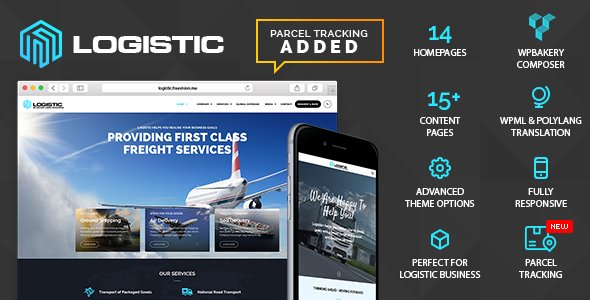
Stuck on your Logistic WordPress theme? Let's fix it.
No endless back-and-forth. Just send us the details and we'll get it done.
No obligation · Replies within 1 hour · Quote within 1 day
Setup · Customization · Bug fixes · WooCommerce integration
About Logistic WP Theme
Logistic is a WordPress theme by freevision built for freight, shipping, and transportation companies. It ships with a clean layout, service-focused page templates, and a visual style that suits businesses moving goods rather than selling them online.
The theme includes a homepage with a hero section, service blocks, team profiles, and a contact area. It works with standard page builders and uses a widgetized sidebar structure for easy layout adjustments. The design is straightforward: bold headings, icon sets, and a colour palette that reads as professional without being overbuilt.
It is a niche theme, which means the structure already matches what logistics and freight companies need. That reduces setup time significantly compared to starting with a generic multipurpose theme and stripping it back.
Get matched with a Logistic developer in under one day
Tell us about your Logistic project. Small fixes, Logistic theme customization, or a full website build, whatever you need, we've got it covered.
We'll connect you to the right Logistic developers, define the scope, and get everything 100% clear.
You'll get one estimate, hire your preferred developer, and start collaborating.
Logistic is a focused theme, but focused does not mean flexible by default. When your business needs something the theme does not do out of the box, you need a developer who knows WordPress at a code level, not just the customiser panel.
Codeable connects you with vetted WordPress developers who have worked on themes like Logistic before. Post your project, get a free estimate within 24 hours, and only move forward if the proposal fits. No auctions, no guesswork.
Pros
- Pre-built page templates match logistics and freight company needs without heavy rework
- Clean, professional layout that works for both B2B and B2C transport businesses
- Compatible with standard WordPress page builders for layout adjustments
- Includes service, team, and contact sections ready to populate with real content
- Lightweight compared to multipurpose themes, which helps with initial page speed
Cons
- Limited template variety means multiple service sub-pages can start looking repetitive
- No built-in booking or freight quote calculator, requires plugin or custom code
- Documentation from freevision is sparse, making advanced customisation harder to self-manage
- Update frequency is low, which can create compatibility issues with newer WordPress versions
- The icon set is fixed and dated, requiring custom SVGs or font icon replacements for a fresher look
Who is Logistic for?
Freight and Cargo Companies
The Logistic theme’s service block layout suits freight companies that need to list transport modes, routes, and cargo types clearly. You can present your fleet, explain your process, and drive enquiries through contact forms without needing a custom build from scratch.
Courier and Last-Mile Delivery Services
Courier services need a fast, readable site that answers two questions quickly: where you deliver and how to book. Logistic’s homepage structure can be adapted to show coverage areas, delivery tiers, and a prominent call to action without a full redesign.
Moving and Relocation Companies
Removal companies benefit from the Logistic theme’s team section and service listing pages. You can show the crew, explain what is included in a move, and collect quote requests. Adding a form plugin gives you a full lead generation setup without custom development.
Warehousing and Storage Businesses
Warehousing businesses often need to explain storage options, square footage, and security features. Logistic’s service templates handle this well. A Logistic developer can add custom fields for unit sizes or integrate a capacity availability display for larger operations.
Supply Chain Consultancies
Supply chain consultancies need a site that reads as credible and detailed. Logistic’s clean layout works well for case studies, service breakdowns, and team credentials. The theme gives you a professional starting point that a Logistic specialist can tailor to your positioning.

Customizing Logistic
Out of the box, Logistic gives you a working logistics site. But most clients need more than the defaults. Custom route calculators, quote request forms, fleet gallery pages, and service area maps all require additional development work.
A Logistic expert can extend the theme’s page templates, rework the header and footer structure, and integrate third-party tools like freight tracking APIs or booking systems. Font changes, custom colour schemes, and responsive fixes for tablet breakpoints are common requests too.
If you need the theme to behave differently from how freevision built it, working with a Logistic specialist saves time over trial and error. They know where the theme’s CSS is structured, how its template hierarchy works, and how to make changes without breaking updates.
Recommended plugins for Logistic
Logistic pairs well with plugins that handle forms, maps, and performance. WPForms or Gravity Forms work well for quote requests. Google Maps integration can be added to service area pages. For speed, image optimisation and caching are worth setting up early since logistics sites often carry a lot of visual content.
Check out the WordPress performance service if your Logistic site is loading slowly. For companies targeting regional freight keywords, the WordPress SEO optimisation service can help you rank for the searches that bring in actual leads.
Not sure which plugins to use? This WordPress plugins directory covers the most popular options with reviews and setup guides.
Logistic common issues
Logistic theme not showing homepage slider correctly
Homepage slider issues in Logistic are usually caused by a JavaScript conflict with another plugin or a missing slider library. Open your browser console and check for JS errors. Deactivate plugins one by one to isolate the conflict. If the slider relies on a bundled script, confirm it is enqueuing correctly in the theme’s functions.php file. A misconfigured slider settings panel can also cause blank output.
Logistic theme contact form not sending emails
If the Logistic contact form is not sending emails, the problem is almost always server-side email delivery, not the form itself. Install an SMTP plugin like WP Mail SMTP and connect it to a mail service like SendGrid or Mailgun. Also check that the form’s recipient address is correct and that spam filters are not blocking outgoing mail. Test with a simple mail log plugin first to confirm whether emails are being sent at all.
Logistic WordPress theme broken after update
A broken Logistic theme after a WordPress core update usually points to a deprecated function or a PHP version mismatch. Check your error log first. If the site is showing a white screen or layout collapse, enable WP_DEBUG to see the exact error. You may need a developer to patch the theme’s code for compatibility. For ongoing issues like this, the WordPress bug fixing service can resolve it quickly.
Logistic theme mobile menu not working
The Logistic theme mobile menu failing to open is typically a jQuery conflict or a missing toggle script. Check whether jQuery is loading correctly and not deferred in a way that breaks dependent scripts. Also confirm the hamburger menu element has the correct class tied to the toggle event in the theme’s JS file. Switching to a different jQuery loading order in your caching plugin settings sometimes resolves this without code changes.
Logistic theme logo not displaying in header
If your logo is not showing in the Logistic header, go to Appearance, then Customise, then Site Identity, and confirm a logo file is uploaded. If it is uploaded but not displaying, check for a CSS rule hiding the image or overriding its dimensions. Custom header code or a caching plugin serving a stale version of the page can also cause this. Clear all caches and check across browsers before digging deeper.
Logistic theme page builder content not saving
Page builder content not saving in Logistic is often caused by a low PHP memory limit or a post revision conflict. Increase the memory limit in wp-config.php and try saving again. If you are using a third-party builder like Elementor, check for known compatibility issues with your current theme and plugin versions. Disabling autosave temporarily can also help isolate whether the issue is with saving or with the editor rendering. Use the WordPress bug fixing service if the problem persists.
Logistic theme slow loading on mobile
Slow mobile loading on the Logistic theme is usually caused by unoptimised images or render-blocking scripts. Run the page through Google PageSpeed Insights to identify specific bottlenecks. Compress images with a plugin like ShortPixel, enable lazy loading, and check whether the theme is loading scripts that are not needed on mobile. Minifying CSS and JS through a caching plugin can also reduce load time noticeably.
Logistic theme service icons not showing
Missing service icons in Logistic usually means the icon font is not loading. Open browser developer tools and check the network tab for 404 errors on font files. The icon font path may be incorrect after a migration or server change. If the theme uses Font Awesome, confirm the library is enqueued and not blocked by a security plugin. Replacing broken icons with inline SVGs is a reliable long-term fix.
Logistic theme Google Maps not loading
Google Maps not loading in Logistic is almost always an API key issue. Google now requires a valid, billing-enabled API key for Maps to display. Go to the Google Cloud Console, create or retrieve your Maps JavaScript API key, and add it to the theme’s settings or the relevant plugin’s configuration. Also check that the key has the correct API permissions enabled and is not restricted to a domain that does not match your site URL. For persistent issues, the WordPress bug fixing service can help.
Logistic theme footer widgets not appearing
Footer widgets not appearing in Logistic usually means the widget areas are either not registered or not assigned. Go to Appearance, then Widgets, and check whether the footer widget areas are listed. If they are empty, add your widgets there. If the areas do not appear at all, the theme may have a registration issue in its functions.php file. Check for PHP errors that may be preventing the widget areas from initialising correctly.
Logistic FAQ
Yes, but with realistic expectations. The Logistic theme gives you a solid starting point with relevant page templates, but most freight companies will need additional customisation. A quote form, tracking integration, or route map will require either a plugin or a developer. The theme handles the visual foundation; everything functional beyond that needs to be added.
The Logistic theme is generally compatible with Elementor, but some built-in sections may conflict with Elementor’s full-width layouts. You may need to override certain theme styles to get Elementor pages to display correctly. Testing on a staging site before switching your live pages to Elementor is strongly recommended.
The Logistic theme does not include a built-in freight quote form. You can add one using WPForms, Gravity Forms, or Ninja Forms. For more complex quote calculators with pricing logic or cargo weight fields, a Logistic developer can build a custom solution that integrates cleanly with the theme’s existing layout.
The Logistic theme is not built for WooCommerce. It does not include shop templates or cart styling. If you need to sell services or products alongside logistics content, you would need a developer to build WooCommerce compatibility into the theme, which is doable but requires custom work.
Go to Appearance, then Customise in your WordPress admin. The Logistic theme exposes basic colour options there. For deeper changes like accent colours on specific components, you will need to add CSS either through the Additional CSS panel or through a child theme to avoid losing changes on updates.
Update frequency for the Logistic theme from freevision is low. Check the theme’s changelog on ThemeForest or wherever you purchased it. If the last update was more than a year ago, test carefully before upgrading WordPress core. Running an outdated theme without patches can create compatibility and security issues over time.
Yes, you can migrate your existing site to the Logistic theme. The process involves exporting your content, setting up the theme on the new site, and rebuilding page layouts to match Logistic’s templates. A WordPress migration handled by a developer will save you time and reduce the risk of losing data or breaking redirects.
Start with image optimisation and a caching plugin. Compress images before uploading, enable lazy loading, and use a plugin like WP Rocket or W3 Total Cache. Also check whether the theme is loading scripts or styles you are not using. For deeper performance work, the WordPress performance service covers more advanced optimisation.
You can hire a Logistic WordPress developer through Codeable, a vetted network of WordPress specialists. Post your project, get a free estimate within 24 hours, and only hire if the proposal fits your budget and needs. It is a straightforward way to find someone who knows the theme and can work to a brief.
Layout issues in the Logistic theme are usually caused by CSS conflicts with plugins or browser-specific rendering problems. Use browser developer tools to inspect the broken element and identify the conflicting rule. If the issue appeared after a plugin or WordPress update, deactivate recent changes one at a time to isolate the cause. Persistent layout bugs are worth handing to a developer.
Hire a Logistic Developer for Your WordPress Site
Whether you need a layout fix, a custom feature, or a full build on the Logistic theme, working with the right developer makes the difference. Our team delivers Logistic WordPress development through Codeable, so your project is handled by a vetted specialist with real experience. Get a free estimate and see what your project would cost before you commit to anything.
You'll need a free Codeable account so developers can ask questions and send their quotes.