Logistic Business WordPress Theme
by cmsmasters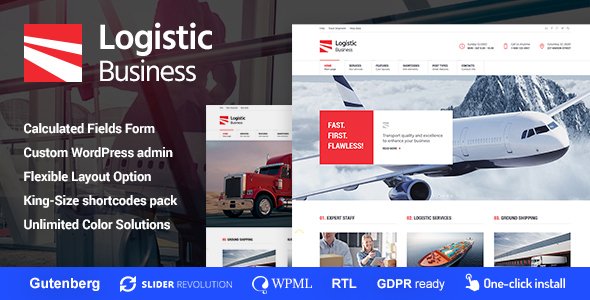
Stuck on your Logistic Business WordPress theme? Let's fix it.
No endless back-and-forth. Just send us the details and we'll get it done.
No obligation · Replies within 1 hour · Quote within 1 day
Setup · Customization · Bug fixes · WooCommerce integration
About Logistic Business WP Theme
Logistic Business is a WordPress theme built by cmsmasters for freight, shipping, and transport companies. It ships with a clean layout focused on service presentation, quote request forms, and fleet or route showcases. The design is structured around conversion, putting contact and inquiry forms front and center.
Built on the cmsmasters framework, it includes a drag-and-drop page builder, multiple header layouts, and a library of pre-built inner pages covering services, about, team, and contact. It supports WooCommerce for add-on services or parts sales. The theme is compatible with WPML for multilingual logistics operations serving international markets. If you run a trucking company, courier service, or supply chain business, this theme gives you a solid starting point without building from scratch.
Get matched with a Logistic Business developer in under one day
Tell us about your Logistic Business project. Small fixes, Logistic Business theme customization, or a full website build, whatever you need, we've got it covered.
We'll connect you to the right Logistic Business developers, define the scope, and get everything 100% clear.
You'll get one estimate, hire your preferred developer, and start collaborating.
Cmsmasters themes use a proprietary framework that behaves differently from Elementor or Divi builds. If you hire a generic WordPress developer, expect avoidable rework. A specialist who has worked with Logistic Business knows the theme options panel, the shortcode system, and where the builder creates conflicts with custom code.
Through Codeable, you get matched with vetted developers who have real project history. No bidding, no guessing. Post your project, get a clear estimate, and only hire if it makes sense for your budget.
Pros
- Pre-built pages for services, fleet, team, and contact reduce initial setup time significantly
- Includes a freight-specific homepage layout with quote form placement built in
- WPML compatible, making it usable for logistics companies operating across multiple languages
- WooCommerce support allows selling additional services, parts, or bookings directly from the site
- Multiple header styles give branding flexibility without requiring custom development from scratch
Cons
- The cmsmasters builder is not as widely supported as Elementor, meaning fewer third-party add-ons
- Theme options panel can feel dated compared to newer block-based or Elementor-driven themes
- No built-in shipment tracking functionality, which most logistics clients expect as standard
- Heavy reliance on shortcodes makes content harder to migrate if you switch themes later
- Documentation is limited, and cmsmasters support response times can be slow on complex issues
Who is Logistic Business for?
Freight and Trucking Companies
Trucking and freight operators need to display fleet specs, service routes, and cargo capabilities clearly. Logistic Business supports this with dedicated service pages and fleet showcase layouts. A developer can extend this with filterable fleet listings by vehicle type, payload, and availability, giving potential clients the information they need before making contact.
Courier and Last-Mile Delivery Services
Courier companies rely on fast quote requests and clear service area communication. The theme’s built-in inquiry forms and map integration support suit this well. With some customization, you can add delivery zone maps, time slot selectors, and live pricing calculators that connect to your dispatch system.
Supply Chain and 3PL Providers
Third-party logistics providers often manage complex service portfolios. Logistic Business can be structured to present warehousing, fulfillment, and distribution services separately with individual landing pages. Custom post types let you organize case studies and client results in a way that supports enterprise sales conversations.
Moving and Relocation Companies
Moving companies need strong local SEO, clear pricing communication, and simple booking flows. This theme handles the visual side well, and with a Gravity Forms integration tied to a CRM or email system, you can automate quote follow-ups. Location-specific landing pages built on the theme structure also support organic search traffic.
International Shipping and Customs Brokers
Customs brokers and international freight forwarders need to communicate trust, compliance, and process clarity. Logistic Business supports this through structured service pages and team profiles. A developer can add downloadable documentation sections, country-specific service filters, and multilingual support via WPML for international client acquisition.

Customizing Logistic Business
Out of the box, Logistic Business covers the basics. But most logistics companies need more than a template swap. You might need a custom freight calculator, a shipment tracking integration, a multi-step quote form tied to your CRM, or a fleet management section with filtering by vehicle type and capacity.
A Logistic Business expert can handle all of that. Whether you need to connect the theme to a third-party API like ShipStation or Salesforce, rebuild the header for a specific brand identity, or restructure the homepage to lead with a quote form, a developer who knows this theme knows where cmsmasters shortcuts create limitations and how to work around them cleanly. Custom post types, ACF field groups, and child theme development keep your changes update-safe.
Recommended plugins for Logistic Business
Logistic Business works with most major WordPress plugins. For lead generation, Gravity Forms or WPForms pair well with the existing inquiry sections. WooCommerce can handle service bookings or product sales. For maps and route visualization, Google Maps integration or WP Google Maps Pro are common additions.
If your site needs better loading times after adding plugins, a developer can optimize performance through caching, image compression, and script management. For companies targeting regional or national search traffic, structured SEO work on top of the theme helps significantly. These are worth addressing early, not after launch.
Not sure which plugins to use? This WordPress plugins directory covers the most popular options with reviews and setup guides.
Logistic Business common issues
Logistic Business theme page builder not working after WordPress update
Cmsmasters page builder conflicts with WordPress core updates happen when the theme or framework version hasn’t been updated to match. First, update the theme to its latest version and check the cmsmasters changelog for compatibility notes. If the builder still fails, disable all plugins and test in isolation. In persistent cases, a developer can replace the cmsmasters builder sections with Elementor widgets while preserving the theme’s visual style, giving you a more stable long-term setup.
Logistic Business theme contact form not sending emails
Missing emails from the Logistic Business contact form are almost always a mail delivery issue, not a form bug. WordPress uses PHP mail by default, which most hosting providers block. Install WP Mail SMTP and configure it with your email provider’s SMTP credentials or an API like SendGrid. Test the connection through the plugin’s diagnostics tool. If the form itself is broken rather than the mail, check for JavaScript errors in the browser console that may indicate a plugin conflict.
Logistic Business theme slow loading on mobile
Logistic Business loads several CSS files and scripts that can slow mobile performance. Start by running a PageSpeed Insights test to identify the specific bottlenecks. Common fixes include enabling a caching plugin like WP Rocket, serving images in WebP format, and deferring non-critical JavaScript. If the theme loads a heavy slider on mobile that isn’t needed, a developer can conditionally disable it for small screens without affecting desktop layout.
Logistic Business theme layout broken after plugin conflict
Layout breaks in Logistic Business after installing a plugin usually come from CSS conflicts or JavaScript errors introduced by the new plugin. Open your browser’s developer tools, check the console for errors, and identify which file is causing the issue. Deactivate the new plugin to confirm it’s the source. If you need both the plugin and the theme to work together, a developer can write targeted CSS overrides in a child theme to resolve the conflict cleanly without modifying core files.
Logistic Business FAQ
Logistic Business is built on the cmsmasters framework and uses its own page builder. Elementor can technically be installed alongside it, but conflicts between the two builders are common. Most developers either commit fully to the cmsmasters builder or migrate the site to Elementor within a child theme structure. Mixing both on the same pages is not recommended without careful testing.
Logistic Business does not include shipment tracking out of the box. You can add tracking functionality by integrating a third-party plugin or API. Solutions like AfterShip or carrier-specific APIs can be embedded into a custom tracking page. A developer familiar with the theme can build a dedicated tracking section that matches the existing design and connects to your logistics platform.
Yes, Logistic Business supports WooCommerce. You can use it to sell services, additional delivery options, or physical products. The theme applies basic WooCommerce styling, though the shop and product pages may need some CSS work to match the rest of the site’s design. A developer can align the WooCommerce templates with the theme’s visual language through a child theme.
Creating a child theme for Logistic Business follows the standard WordPress process. Create a new folder in wp-content/themes, add a style.css file with the Template header pointing to the parent theme folder name, and add a functions.php that enqueues the parent stylesheet. All customizations go in the child theme. This protects your changes when the parent theme updates.
Cmsmasters continues to release updates for their themes, but update frequency varies. Logistic Business is an older theme in their catalog, so major feature additions are unlikely. Security patches and WordPress compatibility fixes are the most common updates. Before purchasing or building on this theme, check the ThemeForest changelog for recent activity to confirm it is actively maintained.
Hire a Logistic Business WordPress Developer
Need help setting up, customizing, or fixing the Logistic Business theme? Whether it’s a new build, a redesign, or a specific feature that needs developing, working with someone who knows the theme saves time and avoids costly mistakes. Get a free estimate through Codeable. Describe your project, receive a clear quote within 24 hours, and decide with no obligation. Every developer on the platform is vetted and reviewed.
You'll need a free Codeable account so developers can ask questions and send their quotes.