Loquet WordPress Theme
by GloriaThemes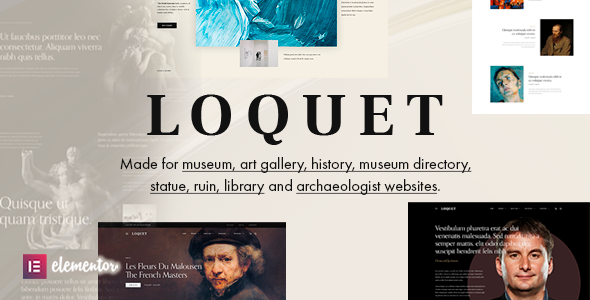
Stuck on your Loquet WordPress theme? Let's fix it.
No endless back-and-forth. Just send us the details and we'll get it done.
No obligation · Replies within 1 hour · Quote within 1 day
Setup · Customization · Bug fixes · WooCommerce integration
About Loquet WP Theme
Loquet is a WordPress theme built by GloriaThemes, designed primarily for photography portfolios, creative agencies, and visual-first websites. It ships with a clean grid-based layout, full-screen image support, and a minimal aesthetic that keeps the focus on your work.
The theme is built on a lightweight codebase and works with the WordPress block editor. GloriaThemes has a reputation for well-structured themes with readable code, which makes Loquet a reasonable choice if you plan to customize beyond the defaults.
Out of the box, Loquet supports custom menus, widgetized areas, and basic WooCommerce compatibility. It handles retina images well, which matters for photography and design portfolios. If you need something that looks polished without heavy plugin dependencies, Loquet is worth considering.
Get matched with a Loquet developer in under one day
Tell us about your Loquet project. Small fixes, Loquet theme customization, or a full website build, whatever you need, we've got it covered.
We'll connect you to the right Loquet developers, define the scope, and get everything 100% clear.
You'll get one estimate, hire your preferred developer, and start collaborating.
GloriaThemes builds clean themes, but no theme fits every project without some modification. If you need layout changes, plugin integrations, or custom post type setups that go beyond what the Customizer offers, working with a vetted developer saves time and avoids technical debt.
Through Codeable, you get matched with a developer who has already been screened for WordPress proficiency. No bidding, no guesswork. Post your project, get an estimate, and decide if you want to move forward. There is no obligation to hire.
Pros
- Clean, minimal codebase that loads fast without unnecessary scripts
- Full-screen image and video background support built into the theme
- Grid-based portfolio layout with filtering options included
- Compatible with the WordPress block editor without conflicts
- GloriaThemes provides regular updates and documentation
Cons
- Limited built-in page builder support compared to Elementor-first themes
- WooCommerce styling requires additional CSS work for a polished shop look
- Customizer options are solid but not as deep as premium multipurpose themes
- Some typography controls require manual CSS to override defaults
- Third-party plugin compatibility is not always documented or tested
Who is Loquet for?
Photography Portfolio
Loquet’s full-screen image support and clean grid layout make it a natural fit for photographers. You can display work in a filterable portfolio, organize by category, and link each project to a detailed case study page. The theme keeps visual clutter low so the images do the talking.
Creative Agency
Agencies needing a minimal presentation site with portfolio sections and service pages will find Loquet practical. The layout structure supports multiple content types without feeling overloaded. Adding a contact form and team section requires minimal effort with the right plugins in place.
Freelance Designer
For a solo designer wanting a personal site that loads quickly and looks sharp, Loquet delivers without requiring a page builder. You can build a portfolio, add a blog, and present your process clearly. The aesthetic suits branding, illustration, and UX portfolios well.
Boutique Hotel or Venue
Boutique hotels and event venues can use Loquet’s visual-first layout to showcase spaces and amenities. The full-screen section works well for hero photography, and the minimal navigation keeps the booking path clear. Some customization is needed to integrate booking plugins cleanly.
Art Gallery or Exhibition
Art galleries need a site that presents work without distraction. Loquet’s grid and full-screen options let each piece breathe. You can organize exhibitions by category, add artist bios, and build out collection pages using custom post types with a bit of developer help.

Customizing Loquet
Loquet gives you control over fonts, colors, header layout, and portfolio grid settings through the WordPress Customizer. That covers most surface-level changes without touching code.
For deeper work, like custom page templates, modified archive layouts, or integration with third-party plugins, you will need to edit PHP templates or add custom CSS. A Loquet expert can do this without breaking theme update compatibility by using a child theme properly.
Common customization requests include adjusting the portfolio filtering behavior, modifying the single project layout, and building out custom homepage sections. A skilled Loquet developer can also wire up Advanced Custom Fields to extend content types beyond what the theme supports by default.
Recommended plugins for Loquet
Loquet pairs well with several plugins that extend its core functionality. Contact Form 7 or WPForms handle inquiries. WPML adds multilingual support for international clients.
For performance, caching plugins like WP Rocket or LiteSpeed Cache work well given the theme’s clean output. Image optimization through Imagify or ShortPixel keeps load times fast, especially on photo-heavy pages. Learn more about WordPress performance optimization.
If SEO matters to you, Loquet’s structured markup is compatible with Yoast and Rank Math. Read about WordPress SEO optimization to get more from your existing content.
Not sure which plugins to use? This WordPress plugins directory covers the most popular options with reviews and setup guides.
Loquet common issues
Loquet portfolio grid not displaying correctly after update
Portfolio grid display issues after an update usually come from a CSS conflict with a recently updated plugin or a caching layer serving stale stylesheets. Start by clearing your site cache and any CDN cache. Then deactivate plugins one at a time to isolate a conflict. If you are using a child theme, check whether any custom CSS is overriding grid classes introduced in the update. Need help tracking it down? Visit our WordPress bug fixing service.
Loquet theme header menu not showing on mobile
A mobile menu that disappears after a Loquet update is often caused by a JavaScript conflict with another plugin loading its own script on the same page. Open your browser console and look for JS errors. Also check whether your active child theme or custom functions file is enqueuing scripts that interfere with the theme’s navigation toggle. Disabling minification temporarily in your caching plugin can confirm whether that is the cause.
Loquet full-screen background image not loading on homepage
If the full-screen background image is set in the Customizer but not rendering on the homepage, the most common cause is an incorrect image URL after a site migration or a permission issue with the uploads folder. Check the image path in your database using a plugin like Better Search Replace. Also verify the image dimensions meet the theme’s minimum requirements, as Loquet may silently skip images that are too small.
Loquet WooCommerce product pages look unstyled
Loquet includes basic WooCommerce support, but product pages often inherit generic WooCommerce styles that clash with the theme’s minimal aesthetic. This needs targeted CSS to fix. Start by adding custom styles to your child theme’s stylesheet targeting WooCommerce classes like .woocommerce-page and .single-product. A developer can also create a custom WooCommerce template override to align the layout with the rest of your site. See our bug fixing service for hands-on help.
Loquet FAQ
Loquet is not built specifically for Elementor and does not include Elementor-specific templates. It works with the WordPress block editor by default. You can install Elementor and use it on pages, but the theme’s full-screen and portfolio features are independent of Elementor and may require CSS adjustments to avoid layout conflicts when both are active.
Loquet declares WooCommerce support, which means it includes basic shop, cart, and product page templates. The styling is minimal and may not match the theme’s visual style out of the box. For a polished shop, you will need additional CSS or a custom WooCommerce template. It is functional for small stores but not optimized for large catalogs.
Yes. While Loquet is designed with portfolios in mind, its clean layout works for service sites, small business pages, and blogs. You can disable the portfolio post type if it is not needed. The page templates are flexible enough to build standard content layouts. Some structural adjustments help if the site has no visual portfolio focus.
Create a folder in /wp-content/themes/ named loquet-child. Add a style.css file with the required header including Template: loquet, then create a functions.php that enqueues both the parent and child stylesheets. Activate the child theme from Appearance > Themes. All customizations go into the child theme so updates do not overwrite your changes.
GloriaThemes has maintained an active update schedule across their theme catalog. Loquet receives updates for WordPress core compatibility and security fixes. Check the theme’s changelog on ThemeForest or the GloriaThemes site for the latest version history. If you are on an older version and seeing issues, updating to the current release is the first step before troubleshooting anything else.
Hire a Loquet Developer
Need help setting up Loquet, customizing a layout, or fixing something that is not working as expected? A vetted Loquet developer can handle it. Work is scoped clearly before anything starts, so you know exactly what you are paying for.
Get a free estimate through Codeable. No obligation, no commitment until you are ready. Most projects receive a response within 24 hours.
You'll need a free Codeable account so developers can ask questions and send their quotes.