Lusion WordPress Theme
by Arrow-Theme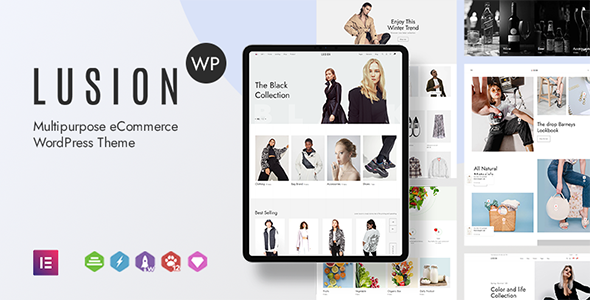
Stuck on your Lusion WordPress theme? Let's fix it.
No endless back-and-forth. Just send us the details and we'll get it done.
No obligation · Replies within 1 hour · Quote within 1 day
Setup · Customization · Bug fixes · WooCommerce integration
About Lusion WP Theme
Lusion is a premium WordPress theme by Arrow-Theme built for creative agencies, portfolios, and studios that want bold visual impact. It ships with a large library of pre-built demos, smooth scroll animations powered by Locomotive Scroll, and deep integration with Elementor and WPBakery. The design language is distinctly modern: full-screen layouts, kinetic typography, cursor effects, and heavy use of whitespace to let work breathe.
Under the hood, Lusion relies on GSAP for animation sequences and supports One Page and multi-page structures. It handles video backgrounds, image parallax, and portfolio grids without requiring third-party plugins for most effects. For creative professionals who want a site that feels hand-coded without actually writing code, Lusion is a strong starting point. Getting it configured properly, however, takes time and some technical patience.
Get matched with a Lusion developer in under one day
Tell us about your Lusion project. Small fixes, Lusion theme customization, or a full website build, whatever you need, we've got it covered.
We'll connect you to the right Lusion developers, define the scope, and get everything 100% clear.
You'll get one estimate, hire your preferred developer, and start collaborating.
Lusion has a steep learning curve for anything beyond a basic demo import. Animation conflicts, mobile layout breaks, and update-related regressions are common without someone who knows the theme’s architecture. Codeable connects you with vetted WordPress developers who have hands-on Lusion experience. Every project starts with a free estimate, there’s no obligation to hire, and the platform holds payment until work is approved. It’s a straightforward way to get a Lusion specialist without the risk of hiring blind.
Pros
- 40+ polished demo templates covering agencies, portfolios, studios, and product showcases
- GSAP and Locomotive Scroll built in, enabling smooth kinetic animations without custom coding
- Full Elementor integration with custom widgets specific to Lusion's layout system
- Supports One Page, multi-page, and portfolio-focused site structures in a single theme
- Active development from Arrow-Theme with regular updates and a responsive support forum
Cons
- Heavy JavaScript payload from GSAP and Locomotive Scroll can hurt Core Web Vitals scores without performance optimisation
- Demo import rarely produces a production-ready result; significant customisation is almost always required
- Mobile animation behaviour needs manual adjustment on most templates to avoid layout and interaction bugs
- Customisations made inside Elementor or theme options can break after major theme updates
- Limited documentation for advanced use cases like custom post types, ACF integration, or multilingual setups
Who is Lusion for?
Creative Agency Website
Lusion suits agencies that need a site to reflect the quality of their creative output. The full-screen hero sections, case study layouts, and scroll-triggered reveals give an agency site energy without overloading it with content. A Lusion developer can restructure service pages, wire up a custom enquiry flow, and make the site feel specific to the agency rather than template-generic.
Photographer or Videographer Portfolio
The portfolio grid system and lightbox integration make Lusion a practical choice for visual media professionals. Full-screen image and video backgrounds display work at maximum impact. A Lusion specialist can configure filterable portfolio archives, add password-protected client galleries, and ensure image-heavy pages load quickly without sacrificing visual quality.
Architecture or Interior Design Studio
Architecture and interior design studios need slow, deliberate visual pacing. Lusion’s parallax sections, horizontal scroll layouts, and minimal typography create that feel. A Lusion expert can adapt project pages to showcase floor plans, renderings, and photography in a way that matches how the studio presents work offline, with clean navigation and fast load times.
Branding or Motion Design Studio
Branding and motion studios rely on presentation as much as content. Lusion’s cursor effects, page transition animations, and kinetic text options signal craft before a visitor reads a single word. A Lusion developer can fine-tune animation timing, build a showreel section, and integrate a project enquiry process that fits the studio’s existing workflow.
Digital Product or SaaS Landing Page
SaaS and digital product companies use Lusion to build landing pages that look premium without a custom build. Feature sections, pricing blocks, and animated hero areas from the demo library give a strong foundation. A Lusion specialist can connect a product waitlist, integrate third-party tools, and optimise the page for conversion alongside the visual presentation.

Customizing Lusion
Lusion ships with over 40 demo templates, but out-of-the-box imports rarely match what a client actually needs. Matching brand fonts, adjusting animation timing, restructuring the header behaviour on mobile, or rebuilding a portfolio grid to reflect a specific content model all require hands-on work inside Elementor or the theme options panel.
A Lusion expert can handle the parts that slow most users down: custom cursor styling, scroll-triggered section reveals, per-page transition configs, and integrating WooCommerce or ACF into the existing layout logic. Arrow-Theme updates Lusion fairly regularly, so keeping customisations stable across updates is another area where a dedicated Lusion developer saves real time. If you want the theme to look purpose-built rather than templated, professional customisation is the practical route.
Recommended plugins for Lusion
Lusion pairs well with a focused plugin stack. For performance, lazy loading, critical CSS, and a proper caching layer matter because the theme’s animation libraries add page weight. A WordPress performance specialist can audit and optimise the asset loading order so GSAP and Locomotive Scroll don’t block render.
On the SEO side, Lusion’s JavaScript-heavy transitions can create crawling issues if structured data and canonical tags aren’t handled carefully. Pairing the theme with Rank Math or Yoast, then running a proper technical audit via a WordPress SEO service, closes those gaps. WooCommerce, WPML, and Slider Revolution also integrate cleanly when configured correctly.
Not sure which plugins to use? This WordPress plugins directory covers the most popular options with reviews and setup guides.
Lusion common issues
Lusion theme animations not working after update
Animation failures after an Arrow-Theme update usually come from a JavaScript conflict between the updated GSAP version bundled with Lusion and a plugin that loads its own version. Open the browser console and check for script errors pointing to a specific file. Temporarily deactivating plugins one by one isolates the conflict quickly. If the issue appeared after a theme update without changing plugins, the theme’s own JS may need a cache clear or a script enqueue order fix. A WordPress bug fixing specialist can trace the root cause and resolve it without breaking other functionality.
Lusion WordPress theme slow loading and failing Core Web Vitals
Lusion loads GSAP, Locomotive Scroll, and multiple CSS files by default. Without optimisation, Time to First Byte and Largest Contentful Paint scores suffer. Start by auditing which animation scripts are loading on pages that don’t use them. A caching plugin with CSS and JS minification helps, but defer and preload configurations need care around Lusion’s script dependencies. Server-side improvements like a CDN and image compression compound the gains. For a structured fix, a WordPress performance and bug fixing service can run a full audit and implement changes without breaking the animation sequences.
Lusion demo import not working or missing content
Lusion demo imports fail for a few common reasons: PHP memory limits too low, max execution time too short, or required plugins not activated before importing. Check that Elementor, WPBakery (if used), and the Revolution Slider plugin are active first. Increase memory_limit to at least 256MB and max_execution_time to 300 in your php.ini or via wp-config. If the import completes but images are missing, re-run the import with the media option checked, or use the Regenerate Thumbnails plugin to rebuild image sizes after the fact.
Lusion mobile layout broken or elements overlapping
Mobile layout issues in Lusion typically originate from fixed-width containers, animation transforms that don’t reset at breakpoints, or Elementor column settings configured only for desktop. Open the Elementor editor, switch to mobile view, and check padding, column stacking, and element widths on affected sections. Locomotive Scroll can also cause scroll hijacking problems on iOS, which requires a conditional script disable for touch devices. If overlapping elements persist after checking Elementor settings, a CSS specificity conflict from a child theme or plugin stylesheet is the next thing to investigate.
Lusion FAQ
Yes. Lusion has full Elementor integration and ships with custom Elementor widgets built specifically for its layout system. Most demo templates are built in Elementor. That said, some of Lusion’s animation features are tied to its own JS layer rather than Elementor’s built-in motion controls, so certain effects need to be configured in the theme options panel rather than the Elementor editor directly.
Before updating Lusion, back up your site fully including the database. If you’ve made changes directly to theme files, those changes will be overwritten. Use a child theme for any PHP or template overrides, and document Elementor global settings and theme options panel configurations beforehand. After updating, clear all caches and test animation behaviour and page transitions on both desktop and mobile before pushing to production.
Lusion includes WooCommerce support, but it’s not designed as a dedicated shop theme. Product pages, cart, and checkout are functional but minimal. For a straightforward portfolio site with a small shop, it works well. For a store-first site with complex product catalogues, custom filtering, or heavy checkout customisation, a theme built around WooCommerce is a more practical foundation.
Lusion is listed as WPML compatible by Arrow-Theme. In practice, string translation for animation labels and theme-specific options occasionally requires manual entries in the WPML String Translation panel. Elementor-based pages translate cleanly through WPML’s page duplication workflow. For sites with complex multilingual structures, having a Lusion specialist configure WPML alongside the theme avoids most compatibility edge cases. See also our WordPress migration service if you’re moving an existing multilingual site.
Lusion developer rates on Codeable typically range from $70 to $120 per hour depending on the complexity of the work and the developer’s experience level. Smaller tasks like fixing a specific layout issue or adjusting animation settings cost less than full builds or complex integrations. Every project on Codeable starts with a free estimate so you know the cost before committing to anything.
Hire a Lusion Developer or Lusion Expert
Whether you need a full Lusion build from a demo import, targeted customisation work, or help fixing something broken after an update, working with an experienced Lusion developer gets it done faster and with fewer compromises. Post your project, describe what you need, and receive a free estimate from a vetted WordPress specialist within 24 hours. No commitment required until you’re ready to move forward. Get a Free Estimate and see exactly what your project will take.
You'll need a free Codeable account so developers can ask questions and send their quotes.