LuxeDrive WordPress Theme
by Mikado-Themes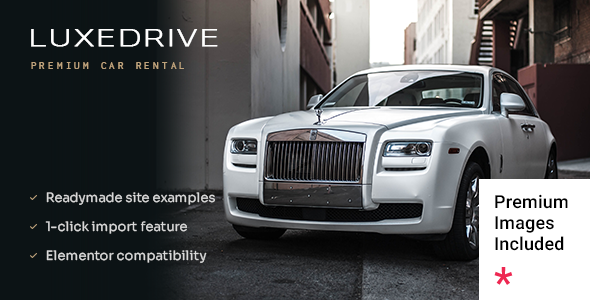
Stuck on your LuxeDrive WordPress theme? Let's fix it.
No endless back-and-forth. Just send us the details and we'll get it done.
No obligation · Replies within 1 hour · Quote within 1 day
Setup · Customization · Bug fixes · WooCommerce integration
About LuxeDrive WP Theme
LuxeDrive is a premium WordPress theme built by Mikado-Themes, designed specifically for car dealerships, automotive services, and vehicle rental businesses. It ships with a polished visual style, a dedicated vehicle listings layout, and a homepage builder that works out of the box without needing additional page builder plugins.
The theme includes pre-built demo content covering dealerships, repair shops, and car rental agencies. Import takes a few clicks. Typography, color palettes, and section layouts are all controllable through the WordPress Customizer. LuxeDrive is built on Mikado-Themes’ own framework, which means options are tightly integrated but do require some familiarity to get the most out of them. WooCommerce compatibility is included for shops selling parts or accessories alongside vehicle listings.
Get matched with a LuxeDrive developer in under one day
Tell us about your LuxeDrive project. Small fixes, LuxeDrive theme customization, or a full website build, whatever you need, we've got it covered.
We'll connect you to the right LuxeDrive developers, define the scope, and get everything 100% clear.
You'll get one estimate, hire your preferred developer, and start collaborating.
Mikado-Themes builds quality products, but their framework has its own conventions. If you haven’t worked inside it before, customisation takes longer than expected and mistakes are easy to make. A developer who knows LuxeDrive will move faster and produce cleaner code.
Through Codeable, every developer is vetted before they take client work. You post your project, get matched with a developer who has relevant experience, and receive a fixed estimate before any work begins. No guessing, no wasted time, no obligation to proceed if the estimate doesn’t suit you.
Pros
- Pre-built demos cover dealerships, repair shops, and car rentals — reducing initial setup time significantly
- Dedicated vehicle listing layouts with gallery, specs table, and inquiry form built in
- WooCommerce ready for selling parts, accessories, or service packages alongside listings
- Customizer-based options panel keeps branding changes accessible without touching code
- Backed by Mikado-Themes, who have a long track record and consistent update history
Cons
- Built on a proprietary Mikado framework that has a learning curve for developers not already familiar with it
- Demo import can bring in a lot of unused content and plugins that need manual cleanup
- Vehicle inventory features are limited without a dedicated listings plugin layered on top
- Page load times need active work on image-heavy builds — not optimised out of the box
- Theme options panel can feel overwhelming; many settings are buried and poorly documented
Who is LuxeDrive for?
Car Dealership
LuxeDrive was designed with dealerships in mind. The vehicle listing templates handle make, model, mileage, and price cleanly. Add a plugin like WP Car Manager for filterable inventory search and you have a functional dealership site. A developer can wire up inquiry forms directly to your CRM or DMS to keep lead management out of WordPress entirely.
Auto Repair Shop
Repair shops need booking, service menus, and trust signals. LuxeDrive’s service-focused demo covers the layout basics. Integrating a booking plugin like Bookly or Amelia alongside the theme gives customers a direct path to scheduling. The design works well for shops that want a professional appearance without a custom build from scratch.
Vehicle Rental Agency
Car rental agencies need availability calendars, pricing tables, and vehicle condition galleries. LuxeDrive’s listing layouts handle the visual side. A developer familiar with the theme can integrate a rental plugin like RentaPress or HBook to add real booking functionality. The result is a professional rental site without a full custom build.
Classic and Collector Car Sales
Classic car dealers have different needs than volume dealerships. High-quality image galleries, detailed spec sheets, and provenance documentation matter here. LuxeDrive’s listing templates support rich media and custom fields well. A developer can extend the post type to include fields specific to classic inventory, like chassis numbers, restoration history, and auction provenance.
Automotive Parts and Accessories Shop
LuxeDrive’s WooCommerce compatibility makes it usable for parts and accessories shops. Product categories map to vehicle makes and models with some custom taxonomy work. If your business sells both vehicles and parts, LuxeDrive handles both on one site without switching themes. A developer familiar with both LuxeDrive and WooCommerce can set up the taxonomy structure cleanly from the start.

Customizing LuxeDrive
LuxeDrive gives you a strong starting point, but most automotive businesses need changes that go beyond swapping colors. Vehicle listing filters, custom inquiry forms, financing calculator integrations, and location-based search all require hands-on development work.
A LuxeDrive expert understands the Mikado-Themes framework well enough to extend it cleanly without breaking theme updates. That means adding custom post types for inventory, modifying listing card layouts, or wiring up a third-party CRM to your contact forms. Getting this wrong creates technical debt that compounds over time. Working with someone who knows LuxeDrive specifically means the job gets done once, correctly, and stays stable as the theme receives updates from Mikado-Themes.
Recommended plugins for LuxeDrive
LuxeDrive pairs well with several plugins that expand what it does out of the box. Vehicles-specific plugins like Car Dealer or WP Car Manager slot in naturally alongside the theme’s listing templates. For contact and lead capture, Gravity Forms handles complex inquiry workflows cleanly.
If your dealership site needs to rank in local search, pairing LuxeDrive with solid on-page work matters more than the theme itself. Site speed also needs attention on image-heavy automotive sites. Both areas benefit from specialist input. See our WordPress performance service and WordPress SEO optimisation service for details.
Not sure which plugins to use? This WordPress plugins directory covers the most popular options with reviews and setup guides.
LuxeDrive common issues
LuxeDrive demo import not working
Demo import failures in LuxeDrive are usually caused by PHP memory limits or execution time limits on your server. Set memory_limit to at least 256MB and max_execution_time to 300 seconds in your php.ini or via your host’s control panel. If the import still fails, try importing XML content manually through WordPress’s native importer, then import widgets and theme options separately. If the problem persists, a WordPress bug fixing specialist can diagnose your server environment directly.
LuxeDrive vehicle listings not displaying correctly
Listing display issues in LuxeDrive are often caused by a plugin conflict with the vehicle listing post type or a missing required plugin that handles custom fields. First, check that all plugins bundled with the theme are installed and activated. If listings appear unstyled, a CSS conflict from another plugin is likely. Deactivate plugins one at a time to isolate it. Template override conflicts after a theme update are another common cause and usually require a developer to reconcile the changes.
LuxeDrive slow page load speed
LuxeDrive sites with large vehicle galleries load slowly without optimisation. Start by enabling lazy loading on images and compressing uploads before they go in. A caching plugin like WP Rocket reduces server load significantly. The Mikado framework loads a fair amount of CSS and JavaScript by default — a developer can audit and defer non-critical scripts. For a full audit, see our WordPress performance service for specifics on what to address first.
LuxeDrive mobile menu not working
Mobile menu failures in LuxeDrive usually trace back to a JavaScript conflict with another plugin, or a jQuery version mismatch introduced after a WordPress core update. Open browser developer tools on mobile or in responsive view and check the console for JS errors. Disabling other plugins temporarily will tell you if a conflict is the cause. If the issue appeared after a WordPress or theme update, the mobile menu script may need a targeted fix from someone familiar with the Mikado framework’s JS structure.
LuxeDrive FAQ
Yes, LuxeDrive is one of the more purpose-built options for car dealerships on ThemeForest. It includes vehicle listing templates, spec tables, inquiry forms, and dealership-focused demo content. For a full dealership site with filterable inventory and CRM integration, you will need a vehicle listings plugin alongside it and likely some developer help to connect everything properly.
Yes. LuxeDrive includes WooCommerce support, which lets you sell parts, accessories, or service packages through the same site as your vehicle listings. The styling is consistent across shop pages and listing pages. For complex product catalogues with vehicle-specific compatibility filters, some custom taxonomy work from a developer will give you a cleaner shopping experience than the default WooCommerce setup provides.
Basic setup and branding changes are manageable without code. The Customizer covers colors, fonts, and layout options. Demo import handles initial content. However, the Mikado options panel is dense, and anything beyond surface-level customisation — custom listing fields, booking integration, filter setup — will require developer input. Most dealership sites need at least some custom work to function the way the business actually operates.
LuxeDrive does not include a built-in vehicle search filter with make, model, year, and price range out of the box. You need a dedicated plugin like WP Car Manager or Car Dealer Plugin to handle that functionality. The plugin’s templates need to be styled to match LuxeDrive’s design. A developer familiar with both the theme and the plugin can set this up cleanly so filters work correctly and look like part of the original theme.
Yes, migrating an existing dealership site to LuxeDrive is possible. Content migration depends on how your current listings are structured. If they use a different custom post type or plugin, the data will need to be remapped to work with LuxeDrive’s expected structure. Design recreation on top of the new theme adds more time. See our WordPress migration service for how this process is handled end to end without data loss.
Hire a LuxeDrive WordPress Developer
Whether you need a full dealership build, a custom vehicle inventory system, or fixes to an existing LuxeDrive site, working with a specialist saves time and prevents costly mistakes. Post your project and get matched with a vetted LuxeDrive developer within 24 hours. Get a free estimate with no obligation to hire. 100% risk-free.
You'll need a free Codeable account so developers can ask questions and send their quotes.