Maag WordPress Theme
by codesupplyco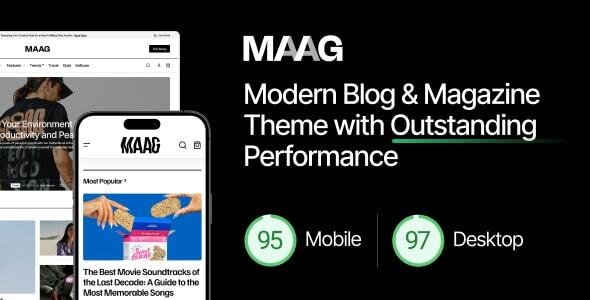
Stuck on your Maag WordPress theme? Let's fix it.
No endless back-and-forth. Just send us the details and we'll get it done.
No obligation · Replies within 1 hour · Quote within 1 day
Setup · Customization · Bug fixes · WooCommerce integration
About Maag WP Theme
Maag is a premium WordPress theme built by codesupplyco, designed for creative agencies, portfolios, and studios that want a minimal, typography-driven aesthetic. It ships with a clean grid layout, smooth page transitions, and a focus on whitespace that lets visual work breathe.
The theme is built on a custom framework and integrates tightly with Elementor, giving you drag-and-drop flexibility without sacrificing the refined look codesupplyco is known for. Maag includes multiple homepage demos, a project portfolio post type, and carefully crafted typography pairings out of the box.
It is a good fit for designers, photographers, architects, and brand studios who need a site that looks considered without spending weeks on setup. Performance is reasonable for a feature-rich theme, though image-heavy builds will need extra attention to load times.
Get matched with a Maag developer in under one day
Tell us about your Maag project. Small fixes, Maag theme customization, or a full website build, whatever you need, we've got it covered.
We'll connect you to the right Maag developers, define the scope, and get everything 100% clear.
You'll get one estimate, hire your preferred developer, and start collaborating.
Maag looks straightforward until you need it to do something specific. Custom post type adjustments, Elementor widget conflicts, header behavior on mobile, portfolio filtering logic — these issues take time to debug without knowing the theme internals.
FoxyConcept works with vetted Maag developers through Codeable, a curated network of WordPress specialists. You get an expert who has worked with codesupplyco themes before, not a generalist figuring it out as they go. The result is cleaner code, faster delivery, and fewer revisions.
Pros
- Typography-first design system that looks polished without heavy customization
- Tight Elementor integration with custom widgets built specifically for the theme
- Multiple portfolio layout options including grid, masonry, and fullscreen
- Smooth CSS page transitions included out of the box
- Clean, well-structured demo content that imports reliably
Cons
- Limited documentation makes custom development harder without prior codesupplyco experience
- Heavy reliance on Elementor means switching page builders later is a significant rebuild
- Portfolio filtering requires third-party plugins or custom code — not built in natively
- Mobile header customization options are thin in the default theme panel
- WooCommerce styling is not included and requires manual CSS work to match the theme
Who is Maag for?
Creative Agency Website
Maag suits agencies that want their site to reflect the quality of their work. The homepage layouts support case study previews, team sections, and service overviews without looking cluttered. A developer can wire up a custom project archive with filterable categories so visitors can browse by industry or service type.
Photography Portfolio
The fullscreen image layouts and minimal UI make Maag a strong base for photographers. Gallery pages load well when images are properly optimized. A Maag developer can build custom album structures, add password-protected client proofing pages, and adjust lightbox behavior to match your delivery workflow.
Architecture Studio
Architecture studios need project pages that let the work speak. Maag’s masonry and fullscreen portfolio layouts handle that well. With custom development, you can add project metadata fields like location, year, and program type, and build a filterable archive that clients and collaborators can actually use.
Brand Design Studio
Brand studios need a site that demonstrates visual thinking from the first scroll. Maag’s whitespace-heavy layouts and strong typographic hierarchy support that well. Custom work typically includes building out case study templates with before/after sections, process breakdowns, and inline video embeds.
Freelance Designer Portfolio
Freelancers using Maag get a professional portfolio without enterprise overhead. The theme imports quickly and the demo content is close enough to a real portfolio that setup time is short. Adding a custom contact form, testimonials section, and service pricing page rounds out a complete freelance presence.

Customizing Maag
Maag gives you a solid starting point, but most serious builds require custom work beyond what the demo provides. Adjusting the portfolio grid spacing, overriding typography scales, building custom Elementor templates, or wiring up a contact flow that matches your brand all take real development time.
A Maag expert can handle that work without breaking the theme’s underlying structure. Common customization requests include adding filterable portfolio categories, modifying the header scroll behavior, creating custom project detail layouts, and integrating third-party tools like HubSpot or Mailchimp.
If you want to extend Maag beyond its default demos while keeping the design coherent, working with someone who knows the theme saves significant time and avoids the trial-and-error that comes with digging through an unfamiliar codebase.
Recommended plugins for Maag
Maag works well alongside several plugins that extend its core functionality. WooCommerce can be added for shops, though you may need styling work to match the theme’s minimal look. WPML handles multilingual builds cleanly. For contact forms, WPForms or Gravity Forms both integrate without issues.
If load speed becomes a concern on image-heavy portfolio pages, a WordPress performance audit can identify bottlenecks specific to your Maag setup. For studios that want search visibility alongside strong design, pairing Maag with a solid WordPress SEO strategy ensures the site works as hard on Google as it does visually.
Not sure which plugins to use? This WordPress plugins directory covers the most popular options with reviews and setup guides.
Maag common issues
Maag theme page transitions not working after update
Page transition breaks in Maag are usually caused by a JavaScript conflict introduced after a plugin or theme update. Start by disabling plugins one at a time to identify the conflict. Caching plugins are a common culprit — clear all caches after each test. If the issue persists, a theme update may have changed the transition script. Check the codesupplyco changelog and compare against your current version. A WordPress bug fixing service can diagnose and resolve this faster than manual testing.
Maag Elementor widgets missing or broken
Missing Elementor widgets in Maag usually mean the theme’s companion plugin is either deactivated or out of sync with the current Elementor version. Go to Plugins, find the codesupplyco core or companion plugin, and make sure it is active and up to date. If widgets still do not appear, regenerate Elementor’s CSS cache under Elementor > Tools. A version mismatch between Elementor Pro and the theme plugin is the most common root cause here.
Maag portfolio grid not displaying correctly on mobile
Portfolio grid issues on mobile in Maag typically come from custom column settings in Elementor that override the theme’s responsive breakpoints. Open the affected section in Elementor, switch to mobile view, and check that column counts and gap settings are set explicitly for smaller screens. Also check whether a custom CSS rule is forcing fixed widths on grid items. Maag’s default grid is responsive, so the problem is almost always a layout override applied during customization.
Maag demo import fails or content missing after import
Failed demo imports in Maag are most often caused by memory limits, execution timeouts, or a missing required plugin. Before importing, make sure the codesupplyco companion plugin is installed and active, and that your hosting environment allows at least 256MB of PHP memory. Try importing in stages — content first, then widgets, then customizer settings. If images fail to import, use the Regenerate Thumbnails plugin after the import completes to rebuild missing image sizes.
Maag FAQ
Yes, Maag is built around Elementor and works with both the free and Pro versions. The theme includes its own custom Elementor widgets through a companion plugin. Some advanced layout features like the portfolio carousel and animated text widgets require the companion plugin to be active alongside Elementor.
Technically yes, but Maag is designed with Elementor in mind. The demo layouts are all Elementor-based, and the theme’s custom widgets only work within Elementor. Using it with the block editor is possible but you will lose most of the design functionality the theme was built to deliver. It is not a practical setup for most users.
Maag does not include built-in WooCommerce styles, so the shop pages will use WooCommerce’s default appearance unless you add custom CSS. Basic compatibility is there — products will display and checkout will function — but getting the shop to match Maag’s minimal aesthetic requires development work to override the default WooCommerce templates.
Maag uses a custom portfolio post type. Categories are added through WordPress’s built-in taxonomy system under the portfolio section in the dashboard. To make those categories filterable on the frontend, you will need either a plugin like Ajax Load More or custom JavaScript. The theme does not include native portfolio filtering as a built-in feature.
Maag produces clean HTML output and works with Yoast SEO and Rank Math without conflicts. Schema markup, page speed, and content structure still need attention — the theme alone does not handle SEO. For studios that rely on organic traffic, pairing Maag with a proper WordPress SEO setup makes a measurable difference.
Hire a Maag Developer
Whether you need a full Maag build from scratch, customizations on top of an existing setup, or help fixing something that has gone wrong, FoxyConcept can match you with the right developer fast. Work is scoped through Codeable, so you get a clear estimate before any work begins.
Get a free estimate — no obligation, no upfront payment, and you’ll hear back within 24 hours.
You'll need a free Codeable account so developers can ask questions and send their quotes.