Machic WordPress Theme
by KlbTheme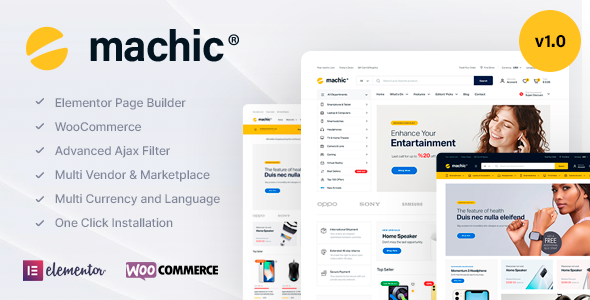
Stuck on your Machic WordPress theme? Let's fix it.
No endless back-and-forth. Just send us the details and we'll get it done.
No obligation · Replies within 1 hour · Quote within 1 day
Setup · Customization · Bug fixes · WooCommerce integration
About Machic WP Theme
Machic is a WooCommerce theme built by KlbTheme, aimed at electronics and tech product stores. It ships with a clean, product-first layout, Ajax-powered filtering, a multi-step checkout, and a configurable homepage builder. The theme leans on Elementor for page editing and includes pre-built demo templates you can import with one click.
Out of the box, Machic covers the core needs of a tech retail store: comparison tables, product video support, sticky add-to-cart bars, and a wishlist system. KlbTheme maintains the plugin ecosystem around it, including a companion plugin that handles most of the extended WooCommerce features. It runs on PHP 8.x and integrates with popular payment gateways without extra configuration.
It is a solid starting point for an electronics store, though getting the most out of it often requires some technical work beyond the default setup.
Get matched with a Machic developer in under one day
Tell us about your Machic project. Small fixes, Machic theme customization, or a full website build, whatever you need, we've got it covered.
We'll connect you to the right Machic developers, define the scope, and get everything 100% clear.
You'll get one estimate, hire your preferred developer, and start collaborating.
Machic has enough moving parts that small configuration mistakes compound quickly. The companion plugin, Elementor widgets, and WooCommerce hooks all interact, and a wrong setting in one can break behavior in another. A vetted Machic developer through Codeable brings hands-on experience with exactly these edge cases. You get a scoped estimate before any work starts, no retainers, and developers who have been through a rigorous vetting process. For setup, customization, or fixing something that went wrong, it is a faster path than trial and error.
Pros
- Ajax product filtering and live search work well out of the box for electronics catalogs
- Built-in product comparison table suited to spec-heavy tech products
- One-click demo import gives a realistic starting point for a tech store layout
- Sticky add-to-cart bar and quick-view modal reduce friction in the shopping flow
- Active update history from KlbTheme with WooCommerce compatibility maintained regularly
Cons
- Heavy reliance on the companion plugin means core features break if it is deactivated or outdated
- Elementor dependency adds page weight and limits flexibility if you want to move away from it later
- Demo content import can overwrite settings and requires cleanup before building a real store
- Limited documentation for advanced customizations like template overrides and hook usage
- Updates occasionally introduce CSS regressions that affect custom-styled sections
Who is Machic for?
Consumer Electronics Retail
Machic’s product comparison table and specification layout make it a practical fit for stores selling TVs, audio equipment, or cameras. A Machic developer can configure the comparison columns to match the spec fields that matter most to buyers in your product category, improving time on site and reducing pre-purchase support requests.
Computer and Component Store
Component stores benefit from Machic’s layered filtering, which lets customers narrow by socket type, RAM capacity, or GPU chipset. A Machic specialist can extend the filter taxonomy, add compatibility notes to product pages, and configure bundle pricing for builds, creating a shopping experience that matches how PC buyers actually research purchases.
Mobile Phone and Accessories Shop
Mobile accessory stores need fast filtering by phone model and category. Machic’s Ajax filter handles this well, and a developer can add a compatibility selector to the product page that narrows results dynamically. Combined with a streamlined checkout, this reduces cart abandonment for customers buying cases, chargers, or screen protectors.
Home Appliance Store
Appliance stores typically carry fewer SKUs but with detailed specs and multiple variants. Machic’s product layout supports long-form specification tables and video embeds, useful for demonstrating large appliances. A Machic expert can adjust the page structure so that key buying information appears above the fold without cluttering the layout.
Tech Gadget and Lifestyle Brand
Gadget brands selling items like smart home devices, wearables, or audio gear need landing pages that tell a product story before converting. A Machic developer can build these using Elementor sections on top of the WooCommerce product template, combining lifestyle imagery with add-to-cart functionality in a single scrollable page.

Customizing Machic
Machic gives you a visual starting point, but most stores need adjustments that go beyond drag-and-drop. Color schemes, typography, and layout spacing are handled through the WordPress Customizer and Elementor, but custom header layouts, mega menu configurations, and category page structures often require template overrides or targeted CSS.
A Machic expert can handle things like building a custom product comparison flow, adjusting the Ajax filter behavior for large catalogs, integrating third-party plugins without breaking the companion plugin, or restructuring checkout steps to match your conversion goals. KlbTheme’s update cycle can also introduce conflicts with customizations, so having a Machic specialist manage updates safely is worth considering if you’ve moved beyond the default templates.
Recommended plugins for Machic
Machic pairs well with performance and SEO tooling, but both need careful configuration to work around the theme’s companion plugin and Elementor dependency. Heavy JavaScript from the Ajax filter and product widgets can affect load times on larger catalogs. A developer can profile and optimize these through caching layers and script deferral, covered in more detail on the WordPress performance page.
For search visibility, structured data for products, breadcrumbs, and category pages needs to be set up correctly. Rank Math and Yoast both work with Machic, though schema output from the companion plugin may duplicate fields. See the WordPress SEO page for how this gets handled properly.
Not sure which plugins to use? This WordPress plugins directory covers the most popular options with reviews and setup guides.
Machic common issues
Machic companion plugin causing WooCommerce conflict after update
Conflicts between the Machic companion plugin and WooCommerce core usually surface after one is updated without the other. Check plugin and theme version compatibility in KlbTheme’s changelog first. If hooks are firing incorrectly, a temporary debug log will identify the exact conflict point. For persistent issues, a WordPress bug fixing specialist can isolate and patch the conflict without rolling back your store to a previous state.
Machic Ajax filter not working or returning no results
Ajax filter failures in Machic are commonly caused by permalink structure issues, a JavaScript conflict with another plugin, or a misconfigured product attribute taxonomy. Start by flushing permalinks under Settings > Permalinks, then disable other plugins temporarily to isolate a JS conflict. If the filter returns empty results despite products existing, check that the attribute terms are assigned correctly to products. A WordPress bug fixing service can diagnose this faster with access to server logs and the browser console.
Machic product page layout broken after Elementor update
Elementor updates sometimes change how widget containers render, which can shift or break Machic product page sections built with the page builder. Check the Elementor changelog for deprecated features used in the template. In many cases, a missing flex container setting or a changed spacing unit is the cause. Rebuild the affected section in the updated Elementor environment or revert Elementor to the previous stable version while a fix is applied.
Machic checkout page showing blank or not loading
A blank Machic checkout page usually points to a PHP error being suppressed, a WooCommerce session conflict, or a caching plugin serving a cached empty page state. Enable WP_DEBUG temporarily to surface any PHP errors. Clear all caching layers, including server-side, plugin, and CDN cache. If the issue only affects logged-out users or specific payment methods, narrow the scope from there before assuming it is a theme-level problem.
Machic FAQ
Machic is built specifically for electronics and tech product stores. It includes product comparison tables, Ajax filtering by specification attributes, sticky add-to-cart, and a structured product page layout suited to spec-heavy items. It is a reasonable choice for this niche, though a Machic specialist is often needed to configure it beyond the defaults for a production store.
Yes, Machic uses Elementor as its primary page builder. Most of the homepage sections, landing pages, and content blocks are built and edited through Elementor. The WooCommerce-specific pages like product, cart, and checkout are handled separately through the companion plugin and theme templates rather than Elementor widgets.
KlbTheme distributes a companion plugin alongside Machic that powers the theme’s extended WooCommerce features, including the wishlist, product comparison, Ajax filter, and multi-step checkout. It must be installed and kept in sync with the theme version. Deactivating it disables a significant portion of the theme’s functionality.
You can build a Machic store without importing demo content, but the theme’s default blank state requires manual configuration of widgets, header layout, and WooCommerce settings. Most developers import the demo into a staging environment and strip it back rather than starting from scratch, as it is faster to remove content than to recreate the structural setup manually.
The fastest way is to post your project on Codeable, where vetted Machic developers and WooCommerce specialists can review your requirements and provide a scoped estimate within 24 hours. There is no obligation to hire after receiving the estimate. You can also get a free estimate directly through FoxyConcept for Machic development work.
Hire a Machic Developer for Your Electronics Store
Whether you need a full Machic store setup, custom template work, plugin conflict resolution, or performance tuning, a specialist can scope and deliver it cleanly. Post your project, get a free estimate within 24 hours, and decide whether to move forward with no obligation. Get a Free Estimate and describe what you need.
You'll need a free Codeable account so developers can ask questions and send their quotes.