MagicBook WordPress Theme
by FocuxTheme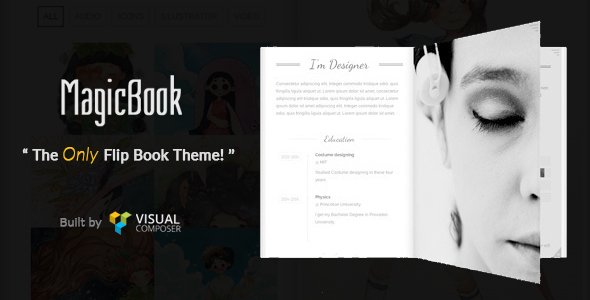
Stuck on your MagicBook WordPress theme? Let's fix it.
No endless back-and-forth. Just send us the details and we'll get it done.
No obligation · Replies within 1 hour · Quote within 1 day
Setup · Customization · Bug fixes · WooCommerce integration
About MagicBook WP Theme
MagicBook is a WordPress theme by FocuxTheme built for book authors, publishers, and literary websites. It comes with a clean reading-focused layout, pre-built sections for book showcases, author bios, and review displays. The design is minimal by default but structured enough to handle multiple titles, series pages, and promotional landing areas without custom coding.
Out of the box, MagicBook includes a homepage builder, widget-ready sidebars, and WooCommerce compatibility so you can sell books directly from your site. It works with Elementor, which makes page-level edits straightforward. FocuxTheme keeps the codebase relatively lightweight, which helps with load times on content-heavy author sites. If you need more than the defaults offer, there is room to extend it, but some configuration does require developer familiarity.
Get matched with a MagicBook developer in under one day
Tell us about your MagicBook project. Small fixes, MagicBook theme customization, or a full website build, whatever you need, we've got it covered.
We'll connect you to the right MagicBook developers, define the scope, and get everything 100% clear.
You'll get one estimate, hire your preferred developer, and start collaborating.
MagicBook looks approachable but has enough moving parts that small configuration mistakes cost time. FoxyConcept works through Codeable, a vetted network of WordPress specialists. Every developer there is screened, so you are not taking a chance on quality. Whether you need a full author site built from scratch or specific customizations on an existing MagicBook install, you get matched with someone who knows what they are doing. No guesswork, no back-and-forth on basic things.
Pros
- Pre-built book showcase layouts reduce setup time for author sites
- WooCommerce compatibility allows direct book sales without a separate plugin setup
- Elementor support makes page editing accessible without touching code
- Lightweight codebase keeps baseline load times reasonable on shared hosting
- Author bio and review sections are built in and structured for readability
Cons
- Advanced layout changes require template overrides that can break during theme updates
- Limited built-in options for series or multi-author setups without custom development
- Customizer controls are basic and lack granular typography or spacing settings
- Documentation from FocuxTheme is sparse on edge cases and developer-level customization
- No dedicated membership or reader community features without third-party plugins
Who is MagicBook for?
Fiction Authors
MagicBook suits fiction authors who need a clean homepage with a strong book cover display, an author bio section, and links to buy. The pre-built layouts handle series pages well when configured correctly. A developer can set up custom post types so each book gets its own structured page with synopsis, reviews, and purchase options.
Independent Publishers
Small publishers managing multiple authors and titles can use MagicBook as a catalog base. WooCommerce integration handles direct sales. With custom development, you can build filtered book listings by genre or author, which is not something the theme does out of the box but is achievable with modest custom work.
Book Bloggers and Reviewers
Book review sites benefit from MagicBook’s reading-focused layout and sidebar flexibility. You can configure a blog structure that highlights review posts, star ratings, and genre categories. The theme’s clean typography works well for long-form content. An SEO-focused setup helps review pages rank for title-specific searches.
Non-Fiction and Self-Help Authors
Non-fiction and self-help authors often need landing pages tied to a single book, with testimonials, chapter previews, and email opt-ins. MagicBook’s Elementor compatibility makes building those pages practical. A developer can connect an email marketing tool and set up conversion-focused layouts without rebuilding the whole site.
Children's Book Creators
Children’s book creators need visual-heavy layouts that showcase illustration styles and engage parents. MagicBook’s minimal base works as a starting point, but it needs color customization, larger image sections, and sometimes an age-range filter. A developer familiar with the theme can build those elements without introducing performance issues.

Customizing MagicBook
MagicBook gives you a decent starting point through the WordPress Customizer, covering fonts, colors, header layout, and basic homepage sections. For authors with a clear brand, those controls are enough to get something presentable. But if you want a custom book launch page, a membership area for readers, or a specific layout for a series, the built-in options run out quickly.
A MagicBook expert can set up custom post types for book titles, configure WooCommerce for digital and physical sales, and build out author tour or events sections that match your brand. Changes that look simple in the preview often involve template overrides and conditional logic. Working with someone who knows the theme avoids the trial-and-error cycle and keeps your site stable through updates.
Recommended plugins for MagicBook
MagicBook pairs well with WooCommerce for book sales, WPForms for reader contact and newsletter signup, and Elementor for custom page layouts. If you plan to run a book blog alongside your author site, a caching plugin and image optimization tool matter from day one.
For sites that grow into reader communities or content hubs, performance becomes a real concern. A well-configured setup can handle it, but it needs attention. You can also expand into SEO optimization to help your book pages rank, or look at performance tuning if the site slows down under heavier traffic.
Not sure which plugins to use? This WordPress plugins directory covers the most popular options with reviews and setup guides.
MagicBook common issues
MagicBook homepage layout not showing correctly after update
This usually happens when a theme update overwrites a customized template file. First, check if you are using a child theme. If not, your edits were likely lost. Compare the updated theme files against your changes and re-apply them inside a child theme. If the issue is with widget or homepage section order, reset the Customizer settings and reconfigure. For recurring layout problems, professional bug fixing is faster than repeated trial runs.
MagicBook WooCommerce product page styling broken
MagicBook’s WooCommerce styles can conflict after a WooCommerce major version update or if a caching plugin is serving old CSS. Start by clearing all caches and checking if the issue persists. If it does, inspect the product page template in your browser’s developer tools to identify which styles are overriding the theme defaults. Adding targeted CSS fixes to your child theme’s stylesheet is usually the cleanest resolution without touching core files.
MagicBook Elementor sections not saving changes
Elementor save failures with MagicBook often come down to a PHP memory limit or a JavaScript conflict with another plugin. Check your server’s PHP memory setting and raise it to at least 256MB if it is lower. Deactivate plugins one at a time to isolate a conflict. Also confirm that both MagicBook and Elementor are on their latest versions, as compatibility issues between specific releases are a known cause of this problem.
MagicBook theme slow to load on mobile
Slow mobile load on MagicBook is usually tied to unoptimized images, render-blocking scripts, or loading large slider assets on the homepage. Start with image compression and enable lazy loading. Check whether the theme is loading scripts on pages that do not need them. A proper caching setup and a CDN make a visible difference. For a full audit, the WordPress performance service covers all of these in one pass.
MagicBook FAQ
Yes. MagicBook includes WooCommerce compatibility, which means standard product pages, cart, and checkout work with the theme styling applied. It handles physical and digital book sales without major conflicts. For custom product layouts, bundle pricing, or subscription-based access to content, you will need additional configuration or a developer to extend the default setup.
MagicBook supports Elementor. Most page sections can be built or modified using Elementor’s drag-and-drop editor. The theme’s pre-built layouts can be imported and then edited inside Elementor. Some theme-specific sections like the book showcase or author bio are controlled through the Customizer rather than Elementor, so both tools end up being used depending on what you are editing.
MagicBook works for multi-author setups but not without some development work. The theme does not include a built-in author directory or per-author book listings out of the box. A developer can add custom post types and taxonomy filters to support multiple authors. For a larger publishing operation, you may also want to look at custom WordPress development to build the structure properly.
Creating a child theme for MagicBook follows the standard WordPress process. Create a new folder in your themes directory, add a style.css file with the correct header declaring MagicBook as the parent theme, and add a functions.php file that enqueues the parent stylesheet. Activate the child theme from the WordPress dashboard. All your customizations go into the child theme to survive parent theme updates.
FocuxTheme does push updates for MagicBook, but the release schedule is irregular compared to larger theme shops. Updates tend to follow major WordPress version releases and WooCommerce compatibility patches. It is worth monitoring the theme changelog before updating, particularly if you have made template-level customizations. Running regular WordPress maintenance helps catch compatibility issues before they affect your live site.
Hire a MagicBook Developer for Your Author Site
If your MagicBook site needs more than the theme defaults offer, working with a developer saves time and prevents broken layouts or plugin conflicts. FoxyConcept connects you with a vetted MagicBook expert through Codeable. You get a free estimate before any work starts, and there is no obligation to hire. Get your free estimate here and describe what you need. Most projects get matched within 24 hours.
You'll need a free Codeable account so developers can ask questions and send their quotes.