Mango WordPress Theme
by neuronthemes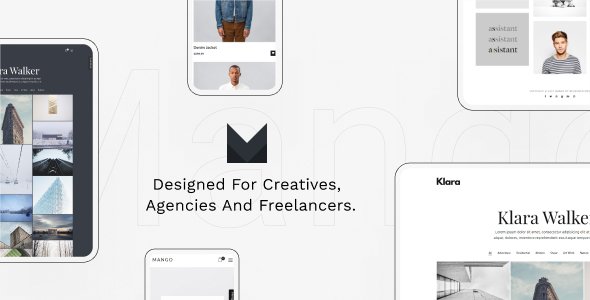
Stuck on your Mango WordPress theme? Let's fix it.
No endless back-and-forth. Just send us the details and we'll get it done.
No obligation · Replies within 1 hour · Quote within 1 day
Setup · Customization · Bug fixes · WooCommerce integration
About Mango WP Theme
Mango is a WordPress theme built by NeuronThemes, designed for creative agencies, portfolios, and business websites. It ships with a large library of pre-built demo sites you can import with one click, giving you a solid starting point without building from scratch.
The theme is built on Elementor, so most layout work happens in a visual drag-and-drop editor. It includes custom header and footer builders, mega menu support, and WooCommerce compatibility out of the box.
Mango targets designers and agencies who want pixel-level control without writing code. Performance is acceptable on a clean install, though adding multiple Elementor widgets and heavy demos can slow things down on shared hosting. Overall it is a capable, well-maintained theme with a strong demo library and regular updates from NeuronThemes.
Get matched with a Mango developer in under one day
Tell us about your Mango project. Small fixes, Mango theme customization, or a full website build, whatever you need, we've got it covered.
We'll connect you to the right Mango developers, define the scope, and get everything 100% clear.
You'll get one estimate, hire your preferred developer, and start collaborating.
Mango is flexible enough for a wide range of projects, but flexibility also means more decisions. Getting those decisions right from the start saves hours of rework later. Our developers on Codeable have hands-on experience with NeuronThemes products and know where Mango’s customization layer ends and where custom code needs to start. Whether you need a full build, a specific feature added, or something fixed that is not behaving as expected, you get a vetted developer with a clear scope and no guesswork.
Pros
- Large library of one-click demo imports covering agencies, portfolios, and eCommerce
- Built-in header and footer builder gives full layout control without extra plugins
- Native WooCommerce support with styled templates included
- Elementor-based editing means most changes are visual and do not require code
- Regular updates from NeuronThemes with active support documentation
Cons
- Heavy demo imports can significantly increase page weight and slow load times
- Deep dependency on Elementor makes switching page builders difficult later
- Some advanced layout options are only available through Elementor Pro, adding cost
- Theme options panel can feel cluttered and overwhelming for first-time users
- Limited community resources outside the official NeuronThemes support channels
Who is Mango for?
Creative Agency Website
Mango suits agencies well. The demo library includes multi-page agency layouts with service sections, team grids, and case study templates. The mega menu and header builder handle complex navigation without a separate plugin. A developer can extend these templates with custom post types for services or projects to make content management easier for the client.
Freelance Portfolio
Freelancers benefit from Mango’s portfolio templates. Grid and masonry layouts for work samples are included. The Elementor integration means you can adjust layouts without touching code. For a more unique presentation, a developer can build custom portfolio archive templates that go beyond the default Elementor widget output.
WooCommerce Store
Mango includes WooCommerce-specific page templates covering shop, product, cart, and checkout. The visual editor lets you customise product layouts. For stores needing custom filtering, subscription products, or checkout flow changes, a developer can integrate the right WooCommerce add-ons and adjust Mango’s templates to match your requirements.
Corporate Business Site
Corporate sites need reliable structure more than visual flair. Mango delivers that with pre-built business demos that include pricing tables, testimonial sections, and contact page layouts. For organisations needing a private intranet section, custom forms, or CRM integration, a developer can handle those additions within the Mango framework.
Photography or Visual Arts Site
Photographers get full-screen hero sections, gallery grids, and clean typography out of the box with Mango. The theme supports large image layouts without sacrificing structure. For client proofing galleries or password-protected albums, a developer can add the right plugin and adjust Mango’s templates to present images the way you actually want.

Customizing Mango
Mango gives you several layers of customization. The WordPress Customizer handles global typography, colors, and site identity. Inside Elementor, you can build and edit any section independently. The built-in header and footer builder means you are not locked into a fixed layout at the top or bottom of your pages.
Beyond the visual editor, a Mango expert can go further. Custom CSS, child theme overrides, and hook-based modifications let you change behavior that the visual builder cannot touch. Things like custom post type templates, conditional logic on layouts, or third-party plugin integration often need developer input.
If you want a site that matches a specific brand guide precisely or need functionality that goes beyond what the demo templates offer, working with a Mango expert saves time and avoids the trial-and-error approach most DIY builders run into.
Recommended plugins for Mango
Mango works well with the standard Elementor plugin ecosystem. You can add Elementor Pro for advanced widgets like forms, popups, and dynamic content. WooCommerce support is built in, and most WooCommerce add-ons integrate without conflicts.
For SEO, the theme outputs clean markup that works well with Yoast or Rank Math. If site speed is a concern, pairing Mango with a caching plugin and optimized hosting makes a measurable difference. See our WordPress performance service and WordPress SEO service for help getting more out of your setup.
Not sure which plugins to use? This WordPress plugins directory covers the most popular options with reviews and setup guides.
Mango common issues
Mango theme header not displaying correctly on mobile
Mobile header issues in Mango are usually caused by conflicting settings between the theme’s built-in header builder and Elementor’s mobile breakpoint controls. Check the header builder in Appearance and confirm mobile visibility settings are correct for each header element. Also verify that no custom CSS is overriding the responsive rules. If the problem persists across devices and clearing cache does not help, a developer can inspect the rendered output and identify the exact conflict. See our WordPress bug fixing service for help.
Mango WordPress theme demo import not working
Failed demo imports in Mango are almost always a server configuration issue. The import process requires a minimum PHP memory limit of 256MB, a max execution time of at least 300 seconds, and sufficient upload size allowances. Check these values in your hosting control panel or ask your host to increase them temporarily. If the import still fails, try importing the demo in sections rather than all at once. A developer can also import the demo manually via WP CLI if the automated process keeps timing out.
Elementor widgets not showing on Mango theme pages
If Elementor widgets are missing or not rendering on Mango pages, the first step is checking for plugin version conflicts. Mango requires both Elementor free and sometimes Elementor Pro for certain widgets. Make sure both the theme and Elementor are fully updated. Regenerate the Elementor CSS cache from the Elementor dashboard settings. If specific widgets have disappeared after an update, a developer can check for deprecated widget registrations or conflicts introduced by a recent Mango or Elementor release.
Mango theme WooCommerce shop page layout broken
A broken WooCommerce shop layout in Mango is often caused by missing WooCommerce template overrides or a conflict introduced after updating either the theme or WooCommerce. Go to WooCommerce, then Status, then System Status to check for outdated template files. If Mango’s templates are flagged as outdated, they need to be updated manually or through a child theme. A developer can audit the template files, update them correctly, and ensure customisations are preserved. Our bug fixing service covers this type of issue.
Mango FAQ
Yes. Mango is built around Elementor and works with Elementor Pro. Some of the more advanced features in the theme demos, such as popups, forms, and dynamic content loops, require Elementor Pro to function. The free version of Elementor covers basic layout work. If you want to replicate a demo fully, check which elements require the Pro version before purchasing.
Yes. Mango includes native WooCommerce support with styled templates for the shop, product, cart, and checkout pages. Basic store setups work well out of the box. More complex requirements like custom product builders, subscription flows, or wholesale pricing will need additional plugins and possibly developer configuration to integrate correctly with Mango’s templates.
Always use a child theme for customizations in Mango. If you have made changes directly to the parent theme files, those changes will be overwritten on update. With a child theme in place, you can update Mango safely. After updating, check WooCommerce template compatibility and test key pages. A developer can set up a proper child theme structure before you start customizing.
Mango outputs reasonably clean HTML and is compatible with Yoast SEO and Rank Math. The main SEO risk with Mango is page speed. Heavy demos with many Elementor widgets, large images, and unoptimized assets can hurt Core Web Vitals scores. A clean build with optimized images and a caching layer performs well. See our WordPress SEO service for more.
Yes, migrating to Mango is possible but involves more than a theme swap. Your existing content stays in WordPress, but page layouts built with another theme or page builder will not transfer automatically. You will need to rebuild templates in Elementor using Mango’s structure. For complex sites, this is a significant task. Our WordPress migration service can handle the transition cleanly.
Hire a Mango WordPress Developer
Need a Mango developer to build, customize, or fix something specific? Post your project and get matched with a vetted developer within 24 hours through our free estimate process. No obligation to hire, no upfront cost. You describe what you need, get a clear estimate, and decide if you want to move forward. It is that straightforward.
You'll need a free Codeable account so developers can ask questions and send their quotes.