Manufactura WordPress Theme
by BoldThemes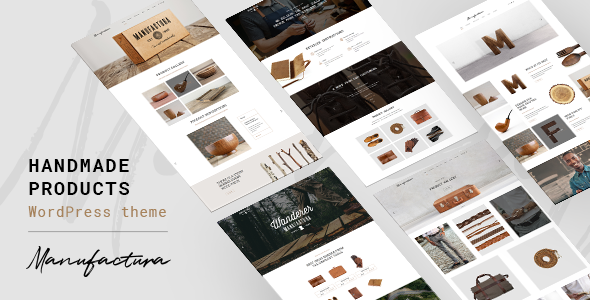
Stuck on your Manufactura WordPress theme? Let's fix it.
No endless back-and-forth. Just send us the details and we'll get it done.
No obligation · Replies within 1 hour · Quote within 1 day
Setup · Customization · Bug fixes · WooCommerce integration
About Manufactura WP Theme
Manufactura is a WordPress theme built by BoldThemes for industrial, manufacturing, and engineering businesses. It ships with a block-based layout system, pre-built demo pages, and a set of shortcodes tailored to factory and production-style content.
The theme is built on BoldThemes’ own framework, which means it includes a custom page builder, typography controls, and color scheme options without requiring third-party plugins. It supports WooCommerce for selling industrial parts or equipment online.
Out of the box, Manufactura looks professional for heavy industry niches. The dark and metallic visual style suits sectors like steel fabrication, automotive, construction, and logistics. Installation is straightforward, and the one-click demo import gets a site looking presentable quickly.
Get matched with a Manufactura developer in under one day
Tell us about your Manufactura project. Small fixes, Manufactura theme customization, or a full website build, whatever you need, we've got it covered.
We'll connect you to the right Manufactura developers, define the scope, and get everything 100% clear.
You'll get one estimate, hire your preferred developer, and start collaborating.
BoldThemes built Manufactura with their own proprietary framework. That is not a bad thing, but it does mean generic WordPress advice does not always apply. You need someone who has worked inside this specific system.
Through Codeable, FoxyConcept matches you with vetted developers who have hands-on experience with BoldThemes themes. No junior freelancers, no guesswork. You describe what you need, get a clear estimate, and only move forward if it makes sense for your project.
Pros
- Pre-built demos designed specifically for industrial and manufacturing niches, saving significant setup time
- WooCommerce support built in, making it practical for selling parts, equipment, or industrial services
- BoldThemes framework includes built-in shortcodes and page options without needing a separate page builder plugin
- WPML compatibility makes it usable for manufacturing companies with multilingual client bases
- Strong visual identity with metallic and dark styling that fits heavy industry without heavy customisation
Cons
- BoldThemes proprietary framework creates a learning curve that slows down customisation compared to Gutenberg-native themes
- Demo content import can overwrite settings and requires careful handling to avoid losing existing configuration
- Limited third-party documentation means troubleshooting often requires reading raw PHP rather than finding a quick answer
- Design flexibility beyond the built-in demos is restricted without writing custom CSS or modifying framework files
- Page load performance needs attention out of the box, especially on image-heavy industrial product pages
Who is Manufactura for?
Steel and Metal Fabrication
Manufactura’s heavy industrial aesthetic fits steel and metal fabrication businesses without needing to fight the design. Project galleries, team sections, and service pages map well to how fabrication companies present their capabilities. Adding custom fields for material specs or certifications is a common extension that a developer can wire in cleanly.
Industrial Equipment Supplier
Equipment suppliers often need a product catalogue with filtering and technical documentation. Manufactura’s WooCommerce support handles the catalogue side. A developer can extend product pages with spec sheets, downloadable PDFs, and enquiry forms suited to B2B purchasing decisions rather than standard retail checkout flows.
Construction and Engineering Firm
Construction and engineering firms need a site that projects credibility to large clients. Manufactura’s layout options support project case studies, team profiles, and service breakdowns. The theme’s structured demo gives a solid foundation that a developer can adapt to match specific branding and tender-ready content requirements.
Automotive Parts Manufacturer
Automotive parts manufacturers often serve both trade and retail buyers. Manufactura handles both audiences when set up correctly. WooCommerce manages the catalogue, while custom taxonomy filters help visitors find parts by vehicle make, model, or specification. This requires development work but the theme supports it without major conflicts.
Logistics and Warehousing Company
Logistics companies need clear service pages, contact forms, and location information. Manufactura provides the right visual tone and layout structure. Integrating Google Maps, custom quote request forms, and service area pages are all achievable extensions that complement the theme’s default capabilities.

Customizing Manufactura
Manufactura gives you a reasonable set of options inside the BoldThemes admin panel. You can change color schemes, switch header layouts, adjust typography, and toggle widget areas. But going further than the built-in controls requires PHP and CSS knowledge.
Custom post types, adding new section templates, or wiring up third-party integrations will take real development time. If you need a layout that does not match the existing demos, you will need to write custom code or modify the BoldThemes framework files carefully.
Hiring a Manufactura expert means you get someone who already knows the BoldThemes framework structure, so changes are made cleanly without breaking the theme on update. Modifications to shortcode output, custom fields for product specs, or a bespoke header are all common requests that benefit from experienced hands.
Recommended plugins for Manufactura
Manufactura works with WooCommerce for product catalogues and online orders. It also supports WPML for multilingual industrial sites serving international clients. Contact Form 7 and WPForms both integrate without conflicts.
For better site speed, pairing Manufactura with a caching plugin and optimised hosting makes a noticeable difference. You can read more about WordPress performance improvements that apply to any theme including Manufactura.
If your manufacturing site needs to rank for local or industry terms, structured content and clean markup matter. See how WordPress SEO work can help Manufactura sites get found.
Not sure which plugins to use? This WordPress plugins directory covers the most popular options with reviews and setup guides.
Manufactura common issues
Manufactura demo import not working
Demo import failures in Manufactura usually come from PHP memory limits or execution time limits set too low on the server. The import pulls in images, content, and settings simultaneously, which is resource-heavy. Set memory_limit to at least 256MB and max_execution_time to 300 in your php.ini or wp-config.php. If the problem persists, the WordPress bug fixing service can diagnose server-level conflicts.
Manufactura header layout not saving changes
Manufactura header settings not saving is almost always a caching conflict. Clear your server-side cache, browser cache, and any object cache after saving changes. If you use a caching plugin like W3 Total Cache or WP Rocket, purge the cache manually after each header change. If the issue continues after clearing all caches, check for JavaScript errors in the browser console that may be blocking the settings form submission.
Manufactura shortcodes showing broken output
Broken shortcode output in Manufactura typically means a required plugin is deactivated or the BoldThemes shortcode plugin was not installed alongside the theme. Check the Required Plugins notice in the WordPress dashboard and install any missing components. If shortcodes are rendering as raw text, also check for conflicts with a security plugin that may be stripping unrecognised HTML output from the content editor.
Manufactura theme slow page load speed
Manufactura loads several scripts and styles tied to the BoldThemes framework that are not always conditional. Use a plugin like Asset CleanUp to limit which scripts load on specific pages. Compress and lazy-load images on product and gallery pages. Switching to a faster hosting environment also makes a significant difference. For a full audit, see the WordPress performance service for a structured approach to speed improvements.
Manufactura FAQ
Yes, with the right setup. Manufactura is designed for industrial and manufacturing niches, so the visual style and demo content align well with those sectors. The built-in demos, WooCommerce support, and service page layouts cover most of what a manufacturing business needs. For anything beyond the demos, you will need a developer to extend it properly.
Yes. Manufactura includes WooCommerce support and works with standard product, shop, and cart templates. It is suited for selling industrial parts, equipment, or services. Complex product configurations, custom checkout flows, or B2B pricing rules will need development work on top of what the theme provides out of the box.
Manufactura is built on the BoldThemes framework with its own shortcode-based builder. It does not use Gutenberg blocks natively, and mixing it with Elementor can cause layout conflicts. Most customisation happens inside the BoldThemes panel and the classic editor. If you want a Gutenberg workflow, a different theme is a better starting point.
Before updating Manufactura, back up your site and check the BoldThemes changelog for breaking changes. Customisations made in child theme files are safe across updates. Changes made directly to parent theme files will be overwritten. Using a child theme from the start is the correct approach and avoids losing work every time a new version releases.
Yes, Manufactura migrates cleanly to a new host if the database, files, and URLs are handled correctly. The BoldThemes framework stores settings in the database, so a proper database export and import is required. A botched URL replacement or missed serialised data update is the most common cause of layout issues after migration. See the WordPress migration service for a clean transfer.
Hire a Manufactura WordPress Developer
Whether you need a full Manufactura build, a specific feature added, or a layout that does not exist in the demos, a specialist will get it done faster and cleaner than trial and error. FoxyConcept works through Codeable, so every developer is vetted and every project starts with a free estimate.
Get your free estimate and describe what you need. No obligation to hire, no upfront cost.
You'll need a free Codeable account so developers can ask questions and send their quotes.