Manufacturing WordPress Theme
by Mymoun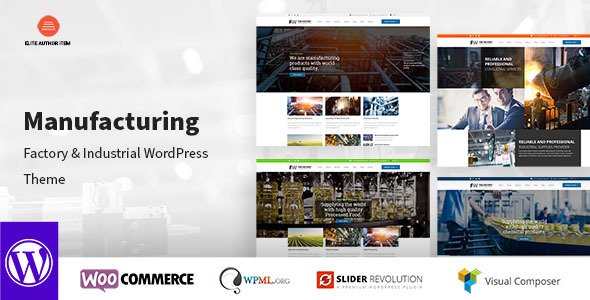
Stuck on your Manufacturing WordPress theme? Let's fix it.
No endless back-and-forth. Just send us the details and we'll get it done.
No obligation · Replies within 1 hour · Quote within 1 day
Setup · Customization · Bug fixes · WooCommerce integration
About Manufacturing WP Theme
Manufacturing is a WordPress theme built by Mymoun, designed for industrial businesses, factories, and production companies that need a clean, professional web presence. It ships with a structured layout that communicates trust and capability from the first page load.
The theme includes pre-built sections for services, company history, team profiles, and project showcases. It works well for businesses that need to display certifications, production capacity, or client portfolios without hiring a designer to build everything from scratch.
Built on a responsive framework, Manufacturing adapts across desktop and mobile. It supports standard WordPress page builders, making it easier to rearrange content without touching code. For industrial businesses that want a solid starting point rather than a blank canvas, this theme covers the basics effectively.
Get matched with a Manufacturing developer in under one day
Tell us about your Manufacturing project. Small fixes, Manufacturing theme customization, or a full website build, whatever you need, we've got it covered.
We'll connect you to the right Manufacturing developers, define the scope, and get everything 100% clear.
You'll get one estimate, hire your preferred developer, and start collaborating.
Getting the most from Manufacturing usually means working with a developer who knows the theme’s structure and the industrial sector’s specific requirements. FoxyConcept delivers that through Codeable, a vetted network of WordPress specialists.
You post your project, get matched with a qualified developer within 24 hours, and receive a free estimate before committing to anything. There’s no obligation to hire. If you want a Manufacturing site built properly, this is the lowest-risk way to get it done. See what’s available through our WordPress development services.
Pros
- Pre-built industrial page layouts save significant setup time for factory and production company sites
- Responsive design works reliably across desktop, tablet, and mobile without additional configuration
- Compatible with major page builders, making content edits straightforward for non-technical site owners
- Includes sections specifically suited to showcasing services, team members, and completed industrial projects
- Clean, professional visual style that fits manufacturing, engineering, and construction businesses well
Cons
- Default demo content is generic and requires substantial editing to reflect a real industrial business accurately
- Limited built-in support for product catalogs or quote request workflows without additional plugins
- Typography and color customization options are basic compared to premium industrial themes
- No built-in multilingual support, which is a gap for manufacturers serving international markets
- Documentation is sparse, making troubleshooting or advanced modifications harder without developer support
Who is Manufacturing for?
Metal Fabrication Companies
Metal fabrication shops need to show their capabilities, materials worked, and past projects clearly. Manufacturing’s portfolio and services sections handle this well. A developer can add custom project galleries with material specs, certifications, and lead time information to give procurement teams exactly what they need before making contact.
Industrial Equipment Suppliers
Equipment suppliers often need filterable product listings, downloadable spec sheets, and request-for-quote forms. Manufacturing provides the shell, but a WordPress developer can extend it with custom post types for equipment categories, PDF downloads, and form-to-CRM pipelines that match how your sales team actually works.
Construction and Contracting Firms
Construction and contracting businesses need to demonstrate project scale, safety credentials, and geographic reach. Manufacturing’s layout supports case study-style project pages well. With some customization, you can add before-and-after galleries, client testimonials with industry context, and location-specific service area pages for local SEO.
Chemical and Processing Plants
Processing and chemical plants have strict communication requirements around safety and compliance. Manufacturing’s clean structure works as a base, but you’ll likely need custom sections for safety data sheets, regulatory certifications, and facility information. A developer can build those in while keeping the site easy for your team to update.
Engineering and Consultancy Services
Engineering consultancies need to establish credibility fast. The theme’s team profiles, service descriptions, and case study sections support that goal. With targeted customization, you can add sector-specific service pages, downloadable whitepapers, and a project inquiry workflow that qualifies leads before they reach your inbox.

Customizing Manufacturing
Out of the box, Manufacturing gives you a working structure, but most industrial businesses have specific needs that go beyond the default setup. Custom color schemes, typography tied to brand guidelines, and rearranged page sections all require hands-on configuration.
A Manufacturing expert can take the theme further. That means custom post types for machinery or product lines, tailored contact and quote request forms, localized content sections for multiple plant locations, and integration with CRM or ERP tools your team already uses.
Mymoun built the theme with extensibility in mind, but getting full value from it means knowing where to push. A developer familiar with Manufacturing’s template structure can modify layouts, add custom fields, and wire up third-party services without breaking the theme’s core styling or update compatibility.
Recommended plugins for Manufacturing
Manufacturing pairs well with several plugin categories that industrial sites typically need. Quote request forms, product catalog builders, and staff directory plugins all slot in without major conflicts.
For businesses focused on search visibility, pairing the theme with proper technical SEO work can significantly improve rankings for location-based and industry-specific queries. You can explore WordPress SEO services to get that handled properly.
Site speed also matters for industrial buyers doing research on slower connections. Optimizing images, caching, and server configuration is worth doing early. See WordPress performance services for specifics on what that involves.
Not sure which plugins to use? This WordPress plugins directory covers the most popular options with reviews and setup guides.
Manufacturing common issues
Manufacturing theme homepage not displaying correctly after update
Homepage display issues after an update usually point to a conflict between the theme and a plugin, or a cached version of the old layout. Start by clearing your caching plugin and browser cache. If the problem persists, deactivate plugins one at a time to identify the conflict. A theme update may also have reset customizer settings. Check your header, slider, and section settings in the customizer and restore them. If you need hands-on help, our WordPress bug fixing service can diagnose and resolve this quickly.
Manufacturing WordPress theme contact form not sending emails
Email delivery failures are almost always a server-side issue, not a theme problem. Most shared hosting providers block default PHP mail functions. Install an SMTP plugin like WP Mail SMTP and connect it to a transactional email service such as SendGrid or Mailgun. Verify your form plugin settings match the SMTP configuration. Also check spam folders on the receiving end. If the form itself is broken rather than just email delivery, that’s a separate plugin or JavaScript conflict worth investigating. Our bug fixing service covers both scenarios.
Manufacturing theme slow to load on mobile devices
Slow mobile load times on Manufacturing sites typically come from uncompressed images, render-blocking scripts, or an unconfigured caching setup. Use a tool like Google PageSpeed Insights to identify the specific bottlenecks. Compress images before uploading, enable lazy loading, and use a caching plugin with mobile-specific settings. If the theme is loading large CSS or JavaScript files that aren’t needed on mobile, a developer can conditionally load those assets. See our WordPress performance services for a full site audit and fix.
Manufacturing theme page builder layout broken after plugin update
Broken layouts after a plugin update usually mean a conflict between the page builder version and the theme’s bundled scripts or custom CSS. First, check if the page builder has a dedicated update for the current WordPress version. Clear all caches. If specific sections are broken, open them in the builder editor and re-save. In some cases, the update changes shortcode structure or block output. A developer can patch the affected templates or migrate content to a stable layout format without rebuilding the entire page. Our WordPress bug fixing service handles this type of issue regularly.
Manufacturing FAQ
Manufacturing by Mymoun is available as a free theme through the WordPress theme repository. There is no premium version with additional features, so what you see in the repository is what you get. For extended functionality, you’ll rely on compatible plugins and developer customization rather than a paid upgrade path.
Yes. The Manufacturing theme’s layout suits construction companies well. The services section, project portfolio area, and team profiles all map cleanly to how construction and contracting firms need to present themselves. You’ll want to customize the demo content and possibly add project-specific fields, but the structure works without major changes.
The Manufacturing theme is not built with WooCommerce in mind. Basic WooCommerce functionality may work, but the shop, product, and cart pages will likely need styling work to match the theme’s design. If e-commerce is a core part of your site, discuss this with a developer before committing to Manufacturing as your base theme.
The Manufacturing theme does not include a built-in quote form. You’ll need a form plugin such as WPForms, Gravity Forms, or Ninja Forms. Create a quote form with the fields your business needs, then embed it on a dedicated page or within a service section. A developer can style the form to match the theme and connect submissions to your CRM or email workflow.
Your content, posts, and pages stay in the WordPress database when you switch themes, so text and media won’t disappear. However, layouts built with a different theme’s page builder or custom templates won’t transfer cleanly. You’ll need to rebuild page layouts within Manufacturing’s structure. For a smooth transition, consider using our WordPress migration service.
Hire a Manufacturing WordPress Developer
Whether you need the Manufacturing theme set up from scratch, customized to fit your brand, or extended with quote forms, product catalogs, or CRM integrations, a specialist can handle it cleanly. FoxyConcept connects you with vetted WordPress developers through Codeable. Post your project, get a free estimate within 24 hours, and only move forward when you’re confident. Get a free estimate now with no obligation to hire.
You'll need a free Codeable account so developers can ask questions and send their quotes.