Marriage WordPress Theme
by VegaThemes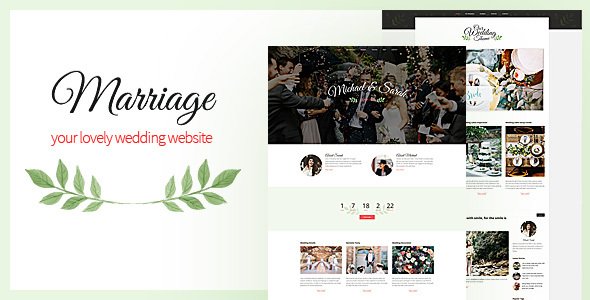
Stuck on your Marriage WordPress theme? Let's fix it.
No endless back-and-forth. Just send us the details and we'll get it done.
No obligation · Replies within 1 hour · Quote within 1 day
Setup · Customization · Bug fixes · WooCommerce integration
About Marriage WP Theme
Marriage is a WordPress theme by VegaThemes built for wedding planners, venues, photographers, and couples who want a polished online presence. It ships with a clean, elegant layout designed specifically for the wedding industry, covering everything from ceremony details to gallery showcases and vendor contact forms.
The theme uses a visual page builder, making it straightforward to swap out sections without touching code. It includes pre-built demo content for wedding planners, photographers, and venues, so you can get a working site up quickly. Retina-ready images, smooth scroll effects, and responsive layouts are all included out of the box. If you need something more tailored, a developer familiar with Marriage can take the demo foundation and build something that fits your brand precisely.
Get matched with a Marriage developer in under one day
Tell us about your Marriage project. Small fixes, Marriage theme customization, or a full website build, whatever you need, we've got it covered.
We'll connect you to the right Marriage developers, define the scope, and get everything 100% clear.
You'll get one estimate, hire your preferred developer, and start collaborating.
Marriage is well-built, but theme documentation only gets you so far. If you need custom functionality, a specific layout, or you have hit a wall trying to get something working, a vetted WordPress developer through Codeable can step in. Codeable only accepts developers who pass a strict vetting process, so you are not guessing at quality. You post your project, get matched within 24 hours, and receive a free estimate before committing to anything. No risk, no obligation.
Pros
- Pre-built demo content for wedding planners, photographers, and venues speeds up the initial setup significantly
- Built on Elementor, which gives both clients and developers a familiar, flexible editing environment
- Retina-ready and fully responsive, so gallery-heavy wedding sites look sharp on all screen sizes
- Clean typographic style that suits the wedding industry without needing heavy CSS overrides
- WooCommerce and WPML compatible, making it viable for businesses that sell packages or serve international markets
Cons
- Demo import can be slow and occasionally requires manual cleanup of placeholder content and images
- Limited built-in booking functionality means you will need a third-party plugin for any real appointment scheduling
- Theme updates from VegaThemes can be infrequent, which means you need to monitor plugin compatibility yourself
- Custom post types for packages or team members require developer work to set up properly
- Some sections feel templated and need design work to stand out from other Marriage-based sites
Who is Marriage for?
Wedding Planners
Wedding planners need a site that communicates professionalism and handles enquiries efficiently. Marriage gives planners a solid homepage layout with service breakdowns, testimonials, and a contact form. A developer can extend this with a custom package comparison table, a client portal, or a lead capture form connected to your CRM.
Wedding Photographers
Photographers live and die by their portfolio presentation. Marriage supports full-width gallery layouts and smooth scroll effects that work well for showcasing wedding shoots. Add Envira Gallery for client proofing or a lightbox gallery, and the theme becomes a strong platform for a photographer’s full commercial site.
Wedding Venues
Venues need to communicate capacity, atmosphere, and availability clearly. Marriage can be configured with custom sections for floor plans, photo galleries per space, and an enquiry form with date selection. A developer can also integrate a booking plugin to handle initial availability checks directly on the site.
Bridal Boutiques
Bridal boutiques need to showcase dress collections, display pricing clearly, and convert visitors into appointment bookings. Marriage combined with WooCommerce handles the product side, while a custom appointment booking plugin handles consultations. The theme’s clean aesthetic suits high-end bridal brands without much extra styling work.
Catering and Events Companies
Catering companies serving weddings need to present menus, highlight past events, and make it easy for couples to request quotes. Marriage can be adapted with a menu showcase section, event gallery, and a multi-step quote request form built in Gravity Forms. It is a practical base for a catering or events business targeting the wedding market.

Customizing Marriage
Marriage gives you a solid starting point, but most clients want changes that go beyond swapping colors and uploading photos. A Marriage expert can rework the homepage layout, add custom booking forms, integrate calendar plugins, build out a vendor directory, or connect the site to a CRM your business already uses.
VegaThemes builds Marriage with the Elementor page builder, which gives developers a lot of flexibility. Custom post types for testimonials, wedding packages, or team members can be added without breaking the theme structure. A Marriage WordPress developer can also handle child theme setup so your customizations survive future theme updates. Whether you need a small tweak or a full site build from the demo up, working with someone who knows this theme saves a lot of back-and-forth.
Recommended plugins for Marriage
Marriage works well with several popular plugins. WooCommerce can be added to sell packages or digital downloads. WPForms or Gravity Forms handle enquiry and booking forms. WPML support makes the theme suitable for multilingual wedding businesses serving international clients.
For galleries, Envira Gallery or FooGallery slot in cleanly with the theme’s existing styling. SEO plugins like Yoast integrate without conflicts. If site speed is a concern, pairing Marriage with a caching solution and optimized hosting makes a real difference. You can find more about WordPress performance improvements and WordPress SEO optimization to get more from your site after launch.
Not sure which plugins to use? This WordPress plugins directory covers the most popular options with reviews and setup guides.
Marriage common issues
Marriage theme demo import not working in WordPress
Demo import failures on Marriage usually come down to server limits. Check your PHP memory limit, max execution time, and upload file size in your hosting settings. Increase these values and try again. If the import still stalls, try importing the XML file manually through WordPress’s built-in importer, then install the required plugins separately. A developer can handle this cleanly if the server configuration is out of your control.
Marriage theme Elementor sections not displaying correctly
If Elementor sections in Marriage look broken, the most common causes are a plugin conflict or a mismatch between the installed Elementor version and the theme. Deactivate plugins one at a time to isolate the conflict. Also check that Elementor and Elementor Pro are both up to date. If the layout breaks only on the frontend, try regenerating the CSS files inside Elementor’s Tools settings. See our WordPress bug fixing service if the issue persists.
Contact form not sending emails on Marriage theme
Contact form emails failing on Marriage are almost never a theme issue. WordPress’s default PHP mail function is unreliable on most shared hosting. Install WP Mail SMTP and connect it to a transactional email service like Mailgun, SendGrid, or your Google Workspace account. Test the connection inside the plugin settings. If forms are still not sending after that, check your spam folder and verify the form’s recipient address is correct.
Marriage theme broken layout after WordPress update
A broken Marriage theme layout after a WordPress update is usually caused by a CSS or JavaScript conflict introduced by the update. Start by clearing your cache plugin and browser cache. Then check if the Elementor editor still loads correctly. If you made customizations directly in the theme files rather than a child theme, those changes may have been overwritten. A developer can audit what changed and restore the layout. Ongoing WordPress maintenance helps prevent this kind of disruption.
Marriage FAQ
Marriage by VegaThemes is a premium paid theme available through ThemeForest. It comes with a one-time purchase price and includes six months of support from VegaThemes. You can extend support to twelve months at checkout. Updates are included with the purchase and available through your ThemeForest account or the Envato Market plugin.
Yes. Marriage is built on Elementor, so the page builder is central to how the theme works. Most of the demo layouts and sections are Elementor-based. You will need Elementor installed to edit the pre-built pages properly. Some sections may also use Elementor Pro widgets, so check which version you need before purchasing.
Marriage does not include a native booking system, but it works with third-party plugins like Amelia, Bookly, or Simply Schedule Appointments. These can be installed alongside the theme and styled to match. A developer can integrate the booking plugin into the existing Elementor layout so it feels like part of the site rather than a bolt-on.
Always use a child theme for any code-level customizations. If you have made changes directly in the parent theme files, a theme update will overwrite them. Move your changes into a child theme before updating. Elementor-based content is stored in the database, so those changes are safe during updates. Back up your site before applying any theme update.
Marriage has a clean code structure that is compatible with major SEO plugins like Yoast and Rank Math. The theme uses proper heading hierarchy and outputs clean HTML. That said, theme SEO-friendliness is only part of the picture. You still need to handle page titles, meta descriptions, schema markup, and site speed separately. See our WordPress SEO service for full optimization.
Hire a Marriage WordPress Developer
Need a developer who knows the Marriage theme inside out? Whether you want a full site build from the demo, custom Elementor sections, booking form integration, or a fix for something that stopped working, FoxyConcept connects you with a specialist. All work is delivered through Codeable’s vetted network. Get a free estimate and describe your project. You will hear back within 24 hours with no obligation to proceed.
You'll need a free Codeable account so developers can ask questions and send their quotes.