MaxHost WordPress Theme
by Fluent-Themes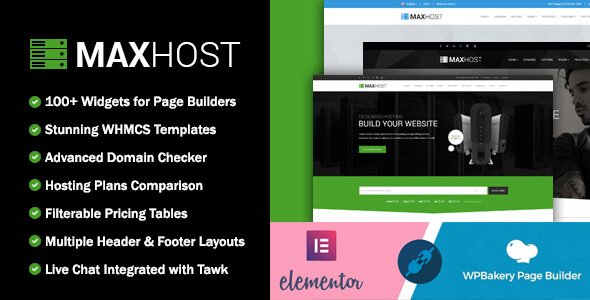
Stuck on your MaxHost WordPress theme? Let's fix it.
No endless back-and-forth. Just send us the details and we'll get it done.
No obligation · Replies within 1 hour · Quote within 1 day
Setup · Customization · Bug fixes · WooCommerce integration
About MaxHost WP Theme
MaxHost is a WordPress theme built by Fluent-Themes, designed specifically for web hosting companies, SAAS providers, and tech businesses. It ships with pre-built demo pages for hosting plans, domain registration, pricing tables, and support portals, covering most of what a hosting brand needs out of the box.
The theme integrates tightly with WooCommerce for selling hosting packages and WHMCS for client billing management. It also supports popular page builders, making layout changes accessible without touching code. The design is clean, with bold call-to-action sections and feature comparison tables that convert well for service-based pricing pages.
Performance is reasonable for a feature-heavy theme, though like most multipurpose options in this category, some optimization work is needed before going live. Overall, MaxHost is a solid starting point for hosting and tech service businesses that want a professional look without building from scratch.
Get matched with a MaxHost developer in under one day
Tell us about your MaxHost project. Small fixes, MaxHost theme customization, or a full website build, whatever you need, we've got it covered.
We'll connect you to the right MaxHost developers, define the scope, and get everything 100% clear.
You'll get one estimate, hire your preferred developer, and start collaborating.
MaxHost has enough moving parts that small configuration mistakes can affect sales. WHMCS integration, WooCommerce plan pages, and custom pricing layouts all need to work together without friction. Getting that right the first time saves real time and money.
FoxyConcept connects you with vetted MaxHost developers through Codeable, a platform built specifically for serious WordPress work. Every developer is screened, rated, and experienced. You get a free estimate before any commitment, and the work is guaranteed. No guesswork, no freelancer risk.
Pros
- Pre-built pages for hosting plans, pricing tables, and domain search save significant setup time
- Native WHMCS Bridge compatibility makes client billing integration straightforward
- WooCommerce support allows direct hosting plan sales without third-party dependencies
- Multiple homepage and inner page demos cover a range of hosting and SAAS layouts
- Pricing table module includes feature comparison rows, toggle billing cycles, and highlighted plans
Cons
- Heavy out-of-the-box scripts slow initial load times and require optimization before launch
- WHMCS integration requires a paid WHMCS license, adding to total setup cost
- WPBakery dependency on older versions creates friction for teams wanting Gutenberg-first workflows
- Child theme setup is not guided, and direct core edits risk being overwritten on updates
- Support documentation from Fluent-Themes is limited compared to larger theme marketplaces
Who is MaxHost for?
Web Hosting Companies
MaxHost was built for this market. Shared, VPS, and dedicated plan pages are included in the demos. Pricing tables with billing cycle toggles, feature comparison rows, and strong call-to-action placement make plan pages convert well. Combined with WooCommerce or WHMCS, a hosting company can go from demo import to a functional sales site quickly.
Cloud SAAS Providers
The theme’s clean feature block layouts and pricing sections work well for SAAS products. You can highlight plan tiers, list feature access per tier, and direct users to sign-up flows. The design style fits modern app marketing pages without heavy customization, though you will likely want to adjust fonts and colors to match your brand identity.
Domain Resellers
MaxHost includes domain search integration support, making it a practical choice for domain resellers running through WHMCS. The domain checker section can be placed on the homepage or a dedicated landing page. For resellers who also offer hosting bundles, the combined pricing and domain pages create a natural upsell flow for visitors arriving from search.
Managed WordPress Hosts
Managed WordPress hosting providers can use MaxHost to present plan tiers clearly, with feature lists that highlight support response times, backups, and staging environments. The theme’s support ticket and knowledge base page layouts also help position managed hosts as service-first businesses, which matters when competing against budget providers on price alone.
IT Service Businesses
IT service companies offering server management, network support, or infrastructure consulting can adapt MaxHost’s service block and team page layouts. The theme’s tech aesthetic fits IT branding well. With some layout adjustments and custom service pages, it works as a credibility-building site for B2B clients evaluating multiple providers before making contact.

Customizing MaxHost
MaxHost gives you a solid foundation, but most businesses need changes that go beyond what the theme options panel offers. Custom pricing table layouts, modified WHMCS integration flows, unique header designs, and brand-specific color schemes all require hands-on development work.
The Customizer covers basics like fonts, colors, and logo placement. For anything more specific, you will need to work with templates, hooks, or child theme files. A MaxHost expert can build those changes cleanly without breaking updates or creating technical debt.
Common customization requests include custom server plan comparison sections, modified homepage hero areas, unique feature blocks, and adjusted WooCommerce checkout flows. If your hosting business has specific conversion goals, working with someone who knows MaxHost well will get you there faster and with less risk to your existing setup.
Recommended plugins for MaxHost
MaxHost works well with several plugins that extend its core functionality. WHMCS Bridge connects your billing system directly into WordPress. WooCommerce handles plan purchases and upsells. Elementor or WPBakery can be used for page layout control, depending on which version you installed.
For performance, caching plugins like WP Rocket and image optimization tools make a real difference on feature-heavy hosting pages. You can read more on our WordPress performance service page. If organic traffic matters to your hosting business, structured SEO setup through a plugin like Rank Math pairs well with MaxHost, and our WordPress SEO service covers that in detail.
Not sure which plugins to use? This WordPress plugins directory covers the most popular options with reviews and setup guides.
MaxHost common issues
MaxHost WHMCS integration not working
WHMCS Bridge plugin configuration is usually the cause. Check that the WHMCS URL, API identifier, and API secret are entered correctly in the plugin settings. Also confirm your WHMCS installation allows API access from your WordPress server IP. If the connection passes but pages show blank, clear your WHMCS template cache and verify the iframe embed settings match your MaxHost layout. For persistent issues, our WordPress bug fixing service can diagnose it directly.
MaxHost pricing table not displaying correctly
Pricing table display issues in MaxHost are often caused by plugin conflicts with CSS or JavaScript, especially when running security plugins that strip inline styles. Start by testing with all plugins disabled except WPBakery or Elementor. Also check that the correct shortcode version is used for your installed MaxHost release, as table shortcodes changed between versions. If the layout breaks only on mobile, the issue is likely a responsive CSS conflict introduced by another active plugin or custom stylesheet.
MaxHost demo import failing or incomplete
MaxHost demo imports require the One Click Demo Import plugin plus all required plugins to be installed and activated before running the import. Missing plugins are the most common cause of incomplete imports. Also check your PHP memory limit, which should be at least 256MB. If the import stops partway through, increase the max execution time in your php.ini or wp-config.php. After a failed import, clear all post data and plugin data before retrying to avoid duplicate or broken content layers.
MaxHost page builder content not showing on frontend
When WPBakery content appears in the editor but not on the frontend, it usually means the WPBakery plugin is inactive or the license has lapsed. MaxHost bundles WPBakery, but updates sometimes deactivate it. Reactivate the plugin, then check whether the issue is isolated to specific pages. If content renders in the backend preview but breaks on the live URL, a caching plugin may be serving an outdated version. Purge all caches and test again in an incognito window before investigating further.
MaxHost FAQ
MaxHost receives periodic updates from Fluent-Themes, but version compatibility is not always immediate after major WordPress releases. Before updating WordPress core on a live MaxHost site, test on a staging environment first. If you are running an older MaxHost version, check the Fluent-Themes changelog to confirm the current release supports your WordPress version before updating either one.
MaxHost was originally built around WPBakery Page Builder. Newer versions have added some Elementor compatibility, but the full demo content and shortcode-based elements are designed for WPBakery. If you want to build primarily with Elementor, you can, but some MaxHost-specific layout components may not transfer directly and will need to be rebuilt using Elementor widgets.
Yes. WHMCS integration is optional. MaxHost works with WooCommerce for selling hosting plans without any WHMCS dependency. You can also build purely informational pages or use contact forms for lead generation. WHMCS is only needed if you want client billing, ticket management, and account management handled through a connected WHMCS installation.
Always use a child theme for any code-level customizations. If you edited the parent theme files directly, those changes will be overwritten when you update. Before updating, back up your site and test the update on a staging copy. Customizer settings and page builder content are stored in the database and survive theme updates, but template overrides made in the parent theme files will not.
MaxHost produces valid HTML and supports basic SEO practices, but the theme itself does not include advanced SEO features. Install a dedicated plugin like Rank Math or Yoast SEO for meta control, schema markup, and sitemap generation. The bigger SEO concern with MaxHost is page speed, as the theme loads more scripts than lightweight alternatives. Addressing that with caching and script optimization is important for search visibility.
Hire a MaxHost Developer
Whether you need a full MaxHost setup, a specific customization, or help fixing something that broke, we can match you with a developer who knows the theme. Work is handled through Codeable, so you get a transparent estimate, a vetted developer, and a money-back guarantee.
Get a free estimate and describe what you need. No obligation to hire, and the first step costs nothing.
You'll need a free Codeable account so developers can ask questions and send their quotes.