MaxShop WordPress Theme
by magentech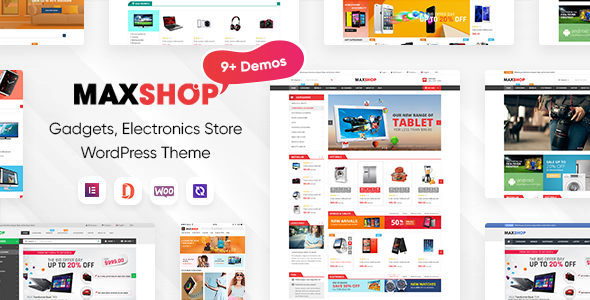
Stuck on your MaxShop WordPress theme? Let's fix it.
No endless back-and-forth. Just send us the details and we'll get it done.
No obligation · Replies within 1 hour · Quote within 1 day
Setup · Customization · Bug fixes · WooCommerce integration
About MaxShop WP Theme
MaxShop is a WooCommerce theme built by Magentech, a developer with a long catalog of storefront-focused themes. It targets online retailers who want a polished, feature-heavy shop without starting from scratch. The theme ships with multiple homepage layouts, Ajax product filtering, a mega menu builder, and a visual page builder integration that keeps things manageable for non-developers.
Built on a custom framework, MaxShop handles product-heavy catalogs reasonably well. It supports variable products, quick-view popups, wishlist functionality, and comparison tables out of the box. Magentech updates the theme regularly and provides documentation, though support response times can vary. If you run a mid-to-large WooCommerce store and want a pre-built design system rather than building one yourself, MaxShop is a solid starting point worth evaluating.
Get matched with a MaxShop developer in under one day
Tell us about your MaxShop project. Small fixes, MaxShop theme customization, or a full website build, whatever you need, we've got it covered.
We'll connect you to the right MaxShop developers, define the scope, and get everything 100% clear.
You'll get one estimate, hire your preferred developer, and start collaborating.
Most MaxShop issues are not theme bugs. They are integration problems, conflicting plugins, or customizations that were not built to survive updates. A developer who has worked inside Magentech themes knows where the framework is opinionated and where it gives you room to work. Through Codeable, you get matched with vetted WordPress developers who can handle MaxShop customization, troubleshooting, and performance work without a lengthy back-and-forth. Every project starts with a free estimate and no obligation to proceed.
Pros
- Ships with 15+ pre-built homepage demos covering fashion, electronics, furniture, and grocery niches
- Ajax product filtering and quick-view work without requiring additional plugins
- Mega menu builder is included and supports images, product grids, and custom columns
- WPBakery Page Builder is bundled, reducing upfront plugin costs
- Magentech maintains regular updates and keeps WooCommerce compatibility current
Cons
- Built on WPBakery rather than Gutenberg, which creates friction for editors used to the block editor
- Theme options panel is dense and poorly documented in places, with a steep learning curve for new users
- Page speed out of the box is mediocre due to heavy CSS and JS loading across all pages
- Support quality from Magentech is inconsistent, with some tickets taking days to receive a useful response
- Customizing beyond the options panel requires understanding Magentech's non-standard framework structure
Who is MaxShop for?
Fashion and Apparel Stores
MaxShop includes fashion-specific demo layouts with lookbook-style grids, size filter support, and hover-effect product cards. The wishlist and comparison features work well for shoppers browsing apparel. With a custom color palette and adjusted typography, a fashion store can look distinct without a full rebuild from scratch.
Electronics and Gadget Retailers
The electronics demo layout puts spec-heavy products front and center, with comparison tables and category mega menus that handle large inventories. Ajax filtering by brand, price, and feature keeps navigation clean. Stores selling phones, laptops, or peripherals will find the structure fits their catalog well with moderate customization.
Home Furniture and Decor Shops
MaxShop’s furniture demo uses wide image sections, room-scene product photography layouts, and a clean grid that lets large product images carry the design. The page builder makes it straightforward to add editorial content between product sections, which works well for lifestyle-focused home decor brands wanting more than a standard catalog layout.
Multi-Category Marketplace Sites
For stores spanning multiple product categories, MaxShop’s mega menu and tabbed product sections let you surface different departments without overwhelming visitors. The homepage can be built out with category-specific rows, featured brand sections, and promotional banners, making it workable as a lightweight marketplace-style front end.
Grocery and Food Delivery Stores
The grocery demo layout includes product quantity selectors, category sidebar navigation, and a layout optimized for high-SKU environments. Paired with a delivery or pickup plugin, MaxShop can handle a local grocery or food delivery front end reasonably well. Custom checkout fields and delivery time slots require additional development work.

Customizing MaxShop
MaxShop ships with a Theme Options panel and WPBakery Page Builder support, giving you control over layouts, colors, typography, and header styles without touching code. That covers the basics, but most store owners hit a ceiling quickly. Custom product page layouts, conditional header logic, advanced filter behavior, and third-party plugin conflicts all require hands-on PHP or CSS work.
A MaxShop expert understands the theme’s framework structure, hook system, and how Magentech organizes child theme overrides. That matters when you need to extend functionality without breaking future updates. Whether you need a custom homepage section, a restructured checkout flow, or a header that behaves differently on mobile, working with someone who knows this theme specifically saves time and avoids rework. Get a free estimate to see what’s possible.
Recommended plugins for MaxShop
MaxShop integrates with the standard WooCommerce plugin ecosystem. Common additions include WooCommerce Subscriptions, WPML for multilingual stores, Yith plugins for wishlists and product bundles, and contact form solutions like WPForms. Ajax search and filtering are partially built in, but stores with large catalogs often add FiboSearch or Filter Everything for better performance.
If your store needs speed improvements, structured data fixes, or better Core Web Vitals scores, those require work beyond what the theme handles alone. See our WordPress performance service for that. For search visibility, our WordPress SEO service covers on-page and technical SEO tailored to WooCommerce stores running MaxShop.
Not sure which plugins to use? This WordPress plugins directory covers the most popular options with reviews and setup guides.
MaxShop common issues
MaxShop mega menu not showing on mobile
Mobile mega menu failures in MaxShop usually come down to a JavaScript conflict with another plugin or a CSS breakpoint override in a child theme. First, disable plugins one by one to isolate the conflict. If the menu works with all plugins off, re-enable them in groups to find the culprit. If the problem persists, the issue is likely in the theme’s responsive scripts. A developer can patch the menu behavior without overriding the entire navigation file. See our WordPress bug fixing service if you need this resolved quickly.
MaxShop Ajax filter not working after WooCommerce update
MaxShop’s built-in Ajax filtering uses hooks that WooCommerce occasionally moves or renames between major versions. After a WooCommerce update, check whether the filter widget still loads in the sidebar and whether the URL parameters are updating correctly. Clear all caches first, including server-side and object cache layers. If filters return no results or stop refreshing the product grid, the filter template files likely need updating to match the current WooCommerce template structure. This is a known maintenance issue after major WooCommerce releases. Our WordPress maintenance service covers this type of compatibility work.
MaxShop homepage layout broken after plugin update
WPBakery-based layouts in MaxShop can break when a plugin that registers a custom element is updated or deactivated. The page builder may display shortcode strings instead of rendered content. Start by checking whether the WPBakery plugin itself is up to date and compatible with your current WordPress version. If a third-party element is missing, the plugin that registered it may have been deactivated. Rebuilding a broken section in the page builder usually takes less time than debugging the shortcode output directly. Back up before making changes.
MaxShop slow loading speed on product pages
MaxShop loads a significant amount of CSS and JavaScript globally, including styles for features that may not be active on every page. Product pages are often the slowest because they stack WooCommerce scripts on top of the theme’s own assets. Start by enabling asset minification and combining files through a caching plugin. Defer non-critical JavaScript and remove unused CSS through a performance plugin. If Core Web Vitals scores are still poor, a developer can audit which scripts are loading unnecessarily. Visit our WordPress performance service for a structured audit.
MaxShop FAQ
Magentech updates MaxShop to maintain WooCommerce compatibility, but there is often a short gap after major WooCommerce releases before the theme catches up. Always check the Magentech changelog before updating WooCommerce on a live store. If you are running an older version of MaxShop, update the theme first. Running mismatched versions is the most common cause of broken product pages and filter failures.
MaxShop is built around WPBakery and its shortcode system. Elementor can be installed alongside it, but the two builders do not share layouts, and mixing them on the same site creates maintenance problems. If you want to use Elementor as your primary editor, MaxShop is not the right choice. A theme built specifically for Elementor will give you a cleaner setup and better performance.
Yes, MaxShop is listed as WPML compatible. The theme’s text strings can be translated through WPML’s string translation tool, and product pages work within WPML’s standard WooCommerce multilingual workflow. Some custom sections built in WPBakery may need additional translation configuration. Testing translations on a staging site before going live is strongly recommended.
MaxShop’s one-click demo import replaces your homepage and widget settings, but it should not delete existing posts or products. That said, always take a full backup before importing any demo. Use a staging environment if possible. The demo import installs placeholder media and sets up menus, which can conflict with existing navigation. Review menu assignments and widget areas after import before pushing changes to production.
MaxShop handles large catalogs adequately if you invest in performance optimization. Out of the box, it is not optimized for stores with thousands of SKUs. Ajax filtering helps, but database-heavy filter queries on large inventories will slow things down without proper caching and query optimization. A dedicated search plugin like FiboSearch improves the experience significantly. For very large catalogs, server-level caching is also necessary.
Hire a MaxShop Developer
Whether you need a single bug fixed, a custom layout built, or a full store setup on MaxShop, working with a developer who knows the theme prevents costly mistakes. Through FoxyConcept and Codeable, you get access to vetted WordPress and WooCommerce developers who can scope your project and get started fast. Post your project and get a free estimate with no obligation to hire. Most projects are matched within 24 hours.
You'll need a free Codeable account so developers can ask questions and send their quotes.