Maya WordPress Theme
by unCommons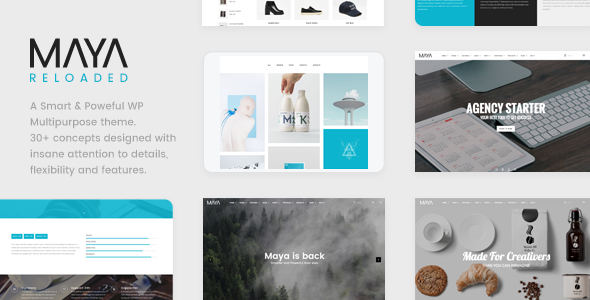
Stuck on your Maya WordPress theme? Let's fix it.
No endless back-and-forth. Just send us the details and we'll get it done.
No obligation · Replies within 1 hour · Quote within 1 day
Setup · Customization · Bug fixes · WooCommerce integration
About Maya WP Theme
Maya is a WordPress theme built by unCommons, designed for creative professionals and portfolio-driven websites. It leans heavily on clean typography, generous whitespace, and a minimal grid layout that keeps the focus on images and work samples.
The theme is built on a solid foundation with full-site editing (FSE) support, meaning you control headers, footers, and templates directly from the WordPress Site Editor. It ships with multiple starter patterns and pre-built page layouts, so you can get a site looking sharp without writing a line of code.
Maya suits photographers, designers, agencies, and anyone who wants a polished online presence without visual noise. It is lightweight, translation-ready, and works well with major page builders if you prefer a drag-and-drop workflow over block editing.
Get matched with a Maya developer in under one day
Tell us about your Maya project. Small fixes, Maya theme customization, or a full website build, whatever you need, we've got it covered.
We'll connect you to the right Maya developers, define the scope, and get everything 100% clear.
You'll get one estimate, hire your preferred developer, and start collaborating.
Maya is straightforward for basic setups, but custom layouts, plugin conflicts, and FSE template logic can get complicated fast. A specialist who has worked with Maya and the unCommons codebase will spot issues that take a generalist hours to debug.
Through Codeable, every developer is vetted and reviewed. You post your project, get matched with a Maya-experienced WordPress developer, and receive a free estimate before committing. No risk, no obligation.
Pros
- Full-site editing support gives complete control over templates without needing a child theme
- Minimal, image-forward design works out of the box for portfolios and creative agencies
- Lightweight codebase keeps page load times fast without heavy optimization plugins
- Multiple pre-built starter patterns speed up initial setup considerably
- Clean semantic HTML makes it easy for SEO plugins to do their job properly
Cons
- FSE workflow has a learning curve for users familiar with classic Customizer-based themes
- Limited built-in WooCommerce styling for complex shop layouts beyond a basic product grid
- Fewer third-party tutorials and community resources compared to larger theme frameworks
- Some advanced layout options require custom CSS or developer input to achieve
- Plugin compatibility edge cases can surface since Maya is not as widely tested as themes with millions of installs
Who is Maya for?
Photographer Portfolio
Maya’s full-width image support and clean grid layouts make it a natural fit for photographers. Gallery templates load fast, and the whitespace-heavy design keeps attention on the images rather than surrounding UI. You can set up project archives, client galleries, and a contact page without needing any additional page builder plugins.
Freelance Designer Website
Freelance designers need a site that looks considered without being overbuilt. Maya delivers exactly that. The typography defaults are strong, the layout is flexible enough for case studies and process pages, and the minimal aesthetic communicates professionalism without getting in the way of the actual work being showcased.
Creative Agency Site
Agencies often need to show range across multiple service areas while keeping a cohesive visual identity. Maya’s Global Styles system makes it easy to define a brand-consistent color and type system, then apply it across varied page templates for services, team bios, and project showcases without inconsistency creeping in.
Small Product Shop with Portfolio
If your business combines a creative portfolio with a small product line, Maya handles both reasonably well. WooCommerce integrates without breaking the theme’s visual style, and you can run a shop alongside a portfolio without needing a separate theme or heavy customization to avoid layout conflicts between the two sections.
Architect or Interior Designer Showcase
Architecture and interior design work depends on large, high-quality imagery presented with restraint. Maya’s grid system and full-width section options suit project showcases where the visual impact of the work needs to carry the page. Clean project archive templates make it easy to organize work by type or year.

Customizing Maya
Customizing Maya goes beyond swapping colors and fonts. The theme exposes a solid set of Global Styles options inside the Site Editor, letting you adjust typography scales, spacing presets, and color palettes site-wide from one place.
For deeper work, a Maya expert can modify block templates, create custom post type layouts, or build out a unique section grid that matches your brand without touching a child theme. Custom CSS is clean to add, and the theme hooks are well-documented for developers who want to extend functionality programmatically.
If you need a heavily modified version of Maya, whether that means a custom header behavior, a filtered portfolio grid, or a unique homepage layout, working with a developer who knows the theme saves significant time and avoids layout conflicts down the line.
Recommended plugins for Maya
Maya pairs well with several WordPress plugins. WooCommerce integration works without major styling conflicts, making it a viable option for small shops alongside a portfolio. Contact Form 7 and WPForms both slot in cleanly.
For SEO, the theme outputs clean semantic HTML that works well with plugins like Yoast or Rank Math. If you want to push further, our WordPress SEO service covers technical and on-page optimization on top of what the theme provides.
Performance is strong out of the box, but for high-traffic sites or image-heavy portfolios, pairing Maya with proper caching and image optimization is worth the effort. See our WordPress performance service for details.
Not sure which plugins to use? This WordPress plugins directory covers the most popular options with reviews and setup guides.
Maya common issues
Maya theme header not showing correctly after WordPress update
Header display issues after a WordPress update usually come from FSE template conflicts. Open the Site Editor, navigate to Templates, and check if the header template has been reset or flagged as modified. Clearing the template override and re-applying your customizations often resolves it. If a plugin update triggered the conflict, deactivating plugins one at a time will identify the source. For persistent issues, our WordPress bug fixing service can diagnose and resolve it quickly.
Maya portfolio grid layout broken on mobile
A broken portfolio grid on mobile in Maya typically points to a custom column block setting that ignores responsive breakpoints. Check the block settings for your grid section and confirm column counts are set to stack on smaller screens. If you have added custom CSS for the grid, conflicting rules may be overriding the theme’s responsive defaults. Removing or scoping the custom CSS usually restores correct behavior. Test with browser dev tools to pinpoint which rule is causing the issue.
Custom fonts not loading in Maya WordPress theme
Custom fonts failing to load in Maya can have a few causes. If you are using a Google Fonts plugin, check that it is outputting in the document head rather than the footer. If you have added fonts via Global Styles, verify the font files are properly enqueued and the correct font family name is referenced. Caching plugins sometimes serve a stale stylesheet without the new font reference, so clearing all cache layers after making font changes is an important step before assuming something is broken.
Maya theme Site Editor changes not saving
Site Editor changes not saving in Maya usually come down to a REST API error blocking the save request. Check your browser console for 401 or 403 errors. Common causes include a security plugin blocking REST API access, a misconfigured permalink structure, or a caching layer serving stale responses. Temporarily disabling your security plugin and flushing permalinks from Settings > Permalinks often clears the issue. If it persists, check server error logs for the specific REST route that is failing.
Maya FAQ
Maya by unCommons is available in both a free version and a premium version with extended features. The free version is available from the WordPress theme directory and covers the core layout and design options. The premium version typically adds additional starter templates, extended Global Styles options, and priority support from unCommons directly.
Maya supports Elementor, though as an FSE theme its native workflow is the WordPress block editor and Site Editor. Using Elementor is possible but you may encounter styling overlaps between the page builder’s output and Maya’s block styles. Most users working with Maya are better served staying within the block editor for a cleaner, more predictable result without compatibility friction.
Yes, Maya is compatible with WooCommerce. Basic shop, product, and cart pages work without requiring custom styling. For complex shop layouts or heavily branded product pages, some additional CSS or developer customization will be needed. Maya is not a dedicated WooCommerce theme, so it suits small shops better than large catalogues with advanced filtering and product variation layouts.
For FSE themes like Maya, a traditional child theme is less necessary than with classic themes. You can customize templates, styles, and patterns directly in the Site Editor. If you need PHP-level customizations, create a child theme by adding a new theme folder with a style.css referencing Maya as the parent and a functions.php for your hooks. This keeps your changes safe from theme updates.
Maya outputs clean, semantic HTML which is a solid starting point for SEO. It is compatible with Yoast SEO and Rank Math without conflicts. Page speed is good out of the box given the lightweight codebase. That said, the theme handles structure and markup. On-page content, internal linking, and technical SEO still require deliberate work beyond what any theme provides automatically.
Hire a Maya WordPress Developer
Whether you need a full Maya build, a specific customization, or help fixing something that broke, our WordPress developers have you covered. Post your project and get a free estimate within 24 hours. Get your free estimate here — no commitment required.
Work is delivered through Codeable, so every developer you work with is vetted, reviewed, and accountable. It is the safest way to hire WordPress talent.
You'll need a free Codeable account so developers can ask questions and send their quotes.