Media Consult WordPress Theme
by CelestialThemes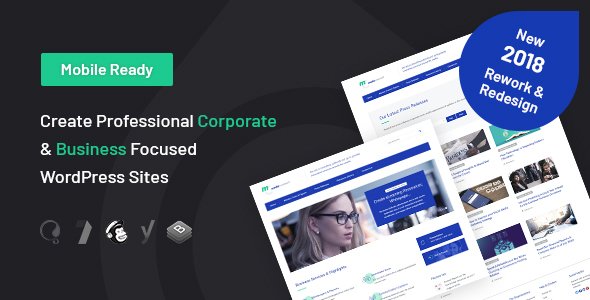
Stuck on your Media Consult WordPress theme? Let's fix it.
No endless back-and-forth. Just send us the details and we'll get it done.
No obligation · Replies within 1 hour · Quote within 1 day
Setup · Customization · Bug fixes · WooCommerce integration
About Media Consult WP Theme
Media Consult is a WordPress theme built by CelestialThemes for news agencies, media companies, online magazines, and consulting firms that need a clean, content-heavy layout without sacrificing speed. It ships with multiple homepage layouts, a structured post grid system, and widget-ready sidebars that suit editorial teams managing high article volumes.
The theme follows a professional visual style with clear typographic hierarchy, making it easy for readers to scan headlines and navigate categories. Built on a responsive framework, it renders well across desktop, tablet, and mobile. Integration with popular plugins like WooCommerce and contact form tools means it can handle more than just publishing. For media brands or consultancies that need a polished web presence quickly, Media Consult gives a solid structural foundation to build on.
Get matched with a Media Consult developer in under one day
Tell us about your Media Consult project. Small fixes, Media Consult theme customization, or a full website build, whatever you need, we've got it covered.
We'll connect you to the right Media Consult developers, define the scope, and get everything 100% clear.
You'll get one estimate, hire your preferred developer, and start collaborating.
Media Consult has enough structural complexity that customization mistakes are easy to make and time-consuming to undo. A vetted Media Consult developer on Codeable has handled these builds before and can scope your project accurately before any work begins. Codeable matches you with specialists within 24 hours, provides a free estimate upfront, and carries no obligation to hire. For media brands or consultancies that cannot afford downtime or broken layouts, that process matters.
Pros
- Multiple pre-built homepage layouts reduce initial setup time for news and media sites
- Clear typographic hierarchy makes high article volume easier for readers to navigate
- Widget-ready sidebar and footer areas give editorial teams flexible content placement
- Responsive design handles mobile and tablet layouts without separate configuration
- WooCommerce compatibility allows media brands to sell subscriptions or digital products
Cons
- Theme options panel lacks granular control over grid spacing and column widths
- Default font choices are generic and typically need replacing for strong brand identity
- No built-in mega menu, which limits navigation for sites with many content categories
- Page builder compatibility is inconsistent, particularly with newer Gutenberg block patterns
- Limited documentation from CelestialThemes makes troubleshooting non-obvious issues slower
Who is Media Consult for?
Online News Portals
Media Consult handles the post volume and category structure that news portals depend on. The grid-based homepage lets editors surface breaking stories and evergreen content simultaneously. A Media Consult developer can extend this with custom taxonomies, author profile pages, and ad placement zones that fit a real editorial workflow.
Management Consulting Firms
Consulting firms need credibility on the page before a visitor reads a single word. Media Consult’s clean layout and service-oriented structure support that well. A specialist can add case study post types, team bios, and lead capture forms that turn the theme into a proper business development tool rather than a generic brochure site.
Digital Magazines
Magazines running multiple verticals need section-specific layouts and strong visual differentiation between categories. Media Consult supports this with its template system, but a Media Consult expert can push it further with custom category headers, issue archives, and subscriber-only content gating using membership plugins.
PR and Communications Agencies
PR agencies publish press releases, thought leadership pieces, and client news regularly. Media Consult’s editorial structure suits this well. With the right developer, you can add client portals, media kit download sections, and press inquiry forms that make the site functional for journalist outreach as well as brand building.
Financial Advisory Sites
Financial advisory sites need structured content presentation and strong trust signals. Media Consult handles both with its headline-forward layout and widget areas for disclaimers, contact details, and credentials. A developer can integrate calculators, gated reports, and compliance-friendly content structures that a standard theme setup cannot deliver alone.

Customizing Media Consult
Out of the box, Media Consult covers the basics, but most serious media or consulting sites need more than default settings. Custom color schemes, branded typography, unique header layouts, and category-specific page templates often require direct theme file edits or child theme development.
A Media Consult expert can reconfigure the homepage grid to prioritize featured stories, restructure the sidebar logic, or integrate advertising placements cleanly without breaking the layout. Custom post types for case studies, team profiles, or service pages are common requests that go beyond what the theme options panel handles natively.
Whether you need a refined visual identity or specific layout modifications, working with a Media Consult specialist means changes are done properly, with a child theme, so updates do not wipe out your work.
Recommended plugins for Media Consult
Media Consult pairs well with several plugin categories that extend its core functionality. SEO plugins like Yoast or Rank Math work cleanly with its post structure, but schema markup and technical optimizations often need attention. Read more about WordPress SEO optimisation to see what is typically involved.
Performance is a frequent concern for news-style themes that load multiple post thumbnails and widget areas per page. Caching, image optimization, and script management all make a measurable difference. See the WordPress performance service for specifics. Plugins for ad management, breaking news tickers, and newsletter integration also slot naturally into Media Consult-based builds.
Not sure which plugins to use? This WordPress plugins directory covers the most popular options with reviews and setup guides.
Media Consult common issues
Media Consult homepage layout broken after WordPress update
Core WordPress updates occasionally conflict with older theme templates, especially if you are running the parent theme without a child theme. Check the browser console for JavaScript errors first, then compare your theme files against the latest version from CelestialThemes. If custom edits were made directly to theme files, they may have been overwritten. A WordPress bug fixing service can audit the conflict, restore functionality, and move any customizations into a child theme to prevent recurrence.
Media Consult featured image not displaying correctly in post grid
Incorrect image dimensions in Media Consult are usually caused by a mismatch between the registered thumbnail sizes in the theme and the images uploaded before those sizes were set. Run a thumbnail regeneration tool after confirming your image size settings in the theme options. If the grid layout is also distorted, CSS overrides may be interfering. A WordPress bug fixing specialist can identify whether the issue is template-level or stylesheet-level and fix it without disrupting other layout areas.
Media Consult theme slow to load on mobile
News-style themes like Media Consult often load several post thumbnails, multiple widget areas, and unoptimized scripts on a single page. Start by testing with a tool like PageSpeed Insights to identify the largest contributors to load time. Common fixes include lazy loading images, deferring non-critical JavaScript, and enabling server-side caching. If the theme is enqueueing scripts inefficiently, that may need code-level adjustment rather than a plugin fix.
Media Consult sidebar widgets not showing on category pages
If sidebars appear on single posts but not category archive pages, the category template in Media Consult may be calling a different sidebar than the one you configured. Check which sidebar is registered in the category.php template file and ensure the correct widgets are assigned to it in Appearance > Widgets. If the template is missing or was overwritten, restoring it from a clean theme copy and reapplying widget assignments usually resolves the issue.
Media Consult FAQ
CelestialThemes has released updates for Media Consult, but support response times vary. If you are running an older version, check the ThemeForest changelog for the latest release notes. For sites where active support is critical, having a developer on retainer is often more reliable than depending on theme author support alone. A WordPress maintenance plan can cover ongoing compatibility checks.
Yes, Media Consult’s clean layout and structured content areas work well for consulting firms. It handles service pages, team profiles, and blog-style thought leadership content. You will likely need custom post types and layout adjustments to match a professional consulting brand, which a Media Consult specialist can handle efficiently.
Create a new folder in your wp-content/themes directory, add a style.css file with a Template header pointing to the Media Consult parent theme, and include a functions.php that enqueues both the parent and child stylesheets. Activate the child theme from the WordPress dashboard. Any template overrides go in the child theme folder using the same file structure as the parent.
Media Consult has partial compatibility with Elementor, but some template areas conflict with the theme’s own layout system. Full-page Elementor builds tend to work better than hybrid setups. WPBakery compatibility depends on the theme version. Testing on a staging environment before committing to a specific page builder is strongly recommended to avoid layout conflicts.
Cost depends on the scope. Minor fixes or small customizations typically run a few hundred dollars. Full custom builds on top of Media Consult can range higher depending on functionality requirements. The most accurate way to get a number is to describe your project and request a scoped estimate. Get a Free Estimate from a vetted Media Consult developer before committing.
Hire a Media Consult Developer
If you need layout changes, plugin integration, performance work, or a full custom build on top of Media Consult, working with a specialist is faster and safer than trial and error. Describe your project and get matched with a verified Media Consult developer who can give you an accurate scope before committing to anything. Get a Free Estimate and have a clear plan in place before work starts.
You'll need a free Codeable account so developers can ask questions and send their quotes.