MediaCenter WordPress Theme
by MadrasThemes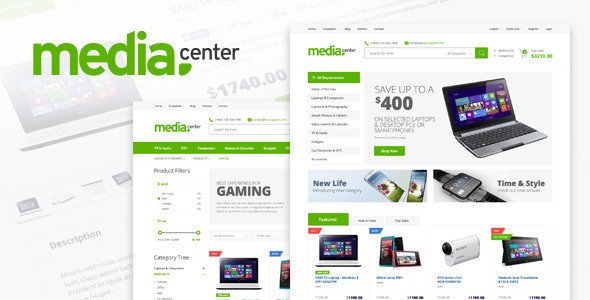
Stuck on your MediaCenter WordPress theme? Let's fix it.
No endless back-and-forth. Just send us the details and we'll get it done.
No obligation · Replies within 1 hour · Quote within 1 day
Setup · Customization · Bug fixes · WooCommerce integration
About MediaCenter WP Theme
MediaCenter is a WordPress theme built by MadrasThemes, designed specifically for online stores selling digital media products like movies, music, games, and software. It pairs WooCommerce with a clean, content-heavy layout that puts product covers and metadata front and center.
The theme ships with multiple homepage layouts, a built-in mega menu, Ajax-powered filtering, and a product page structure that mirrors what users expect from established media storefronts. It supports digital downloads, variable products, and affiliate links out of the box.
MadrasThemes has kept MediaCenter actively maintained, with updates addressing WooCommerce compatibility and PHP version support. If you run a media-focused eCommerce site and want a purpose-built starting point rather than a generic shop theme, MediaCenter is one of the more focused options on ThemeForest.
Get matched with a MediaCenter developer in under one day
Tell us about your MediaCenter project. Small fixes, MediaCenter theme customization, or a full website build, whatever you need, we've got it covered.
We'll connect you to the right MediaCenter developers, define the scope, and get everything 100% clear.
You'll get one estimate, hire your preferred developer, and start collaborating.
MediaCenter is purpose-built, but purpose-built themes still need proper setup. WooCommerce configuration, payment gateway testing, digital delivery settings, and performance tuning all take time to get right. A developer who knows the theme skips the trial and error.
Through Codeable, you get matched with vetted WordPress developers who have hands-on experience with WooCommerce storefronts and themes like MediaCenter. Fixed pricing, no bidding, and a developer assigned within 24 hours. Explore our WordPress development services to see what’s possible.
Pros
- Purpose-built for media storefronts selling movies, music, games, and software
- Ships with multiple homepage layouts suited to large product catalogs
- Ajax-powered filtering and search keep the browsing experience fast without page reloads
- Built-in mega menu handles deep category structures without extra plugins
- Actively maintained by MadrasThemes with regular WooCommerce compatibility updates
Cons
- Setup complexity is higher than general-purpose shop themes, especially for first-time users
- Default design feels dated compared to headless or block-based modern storefronts
- Deep customization requires editing PHP template files, not just the options panel
- Performance needs attention out of the box, particularly with large image-heavy catalogs
- Limited community resources compared to themes like Flatsome or Astra, so troubleshooting can be slower
Who is MediaCenter for?
Digital Movie Store
MediaCenter’s product layout mirrors what customers expect from established movie storefronts. Cover art, genre tags, format options, and cast metadata all display cleanly. Combined with WooCommerce digital downloads, you can sell DRM-free files or redirect buyers to hosted content with no extra plugin overhead.
Music Download Shop
The theme handles album artwork and track listings well. You can structure products by artist, genre, or format using WooCommerce categories and attributes, then let the built-in Ajax filtering do the browsing work. Pair it with a digital delivery plugin and the purchase-to-download flow stays simple for buyers.
Video Game Retail Site
Game stores benefit from MediaCenter’s dense grid layouts and filtering by platform, genre, or release year. Variable products handle editions and bundles. The mega menu works well for large catalogs split across console, PC, and retro categories without cluttering the navigation.
Software License Store
Selling software licenses requires clear product pages, license key delivery, and reliable checkout. MediaCenter’s structured layout gives each product enough room for feature lists and system requirements. Combined with WooCommerce Software Add-On or similar plugins, license delivery after purchase is straightforward to configure.
Streaming Membership Site
If you sell access to a media library rather than individual products, MediaCenter works with WooCommerce Memberships or Subscriptions. Gate content by plan, display a public catalog with locked previews, and let the theme’s category structure organize what members see after login. Requires developer setup to configure properly.

Customizing MediaCenter
MediaCenter gives you a decent set of options through its theme settings panel, but meaningful customization usually requires going deeper. Changing the homepage layout, adjusting the product grid density, or modifying how categories display often involves editing template files or adding custom CSS.
If you want a MediaCenter expert to set up the theme properly, integrate it with plugins like YITH WooCommerce or WP Rocket, or build out a custom child theme, working with a developer saves time and avoids breaking things. Custom work might include tailored product page layouts, a specific filtering setup, or a branded color scheme that goes beyond what the panel offers.
Getting the configuration right from the start means less troubleshooting later, especially with WooCommerce updates that can shift template behavior unexpectedly.
Recommended plugins for MediaCenter
MediaCenter works well with several plugin categories worth considering. For search and filtering, FacetWP or AJAX Product Filters give customers a fast way to sort large catalogs by genre, format, or platform.
On the performance side, pairing MediaCenter with a caching layer and image optimization is worth doing early. A poorly optimized media store with large cover images will slow down fast. See our WordPress performance service for options.
For visibility, structured data for products and proper XML sitemaps matter. Our WordPress SEO service covers that ground. WooCommerce extensions like Subscriptions or Memberships also integrate cleanly if you sell access rather than individual downloads.
Not sure which plugins to use? This WordPress plugins directory covers the most popular options with reviews and setup guides.
MediaCenter common issues
MediaCenter homepage layout not displaying correctly after WooCommerce update
WooCommerce template changes between major versions often break theme template overrides. MediaCenter includes its own WooCommerce template files, and if they fall out of sync with the installed WooCommerce version, layouts break. Check the WooCommerce system status for outdated templates, then update the theme to the latest version from ThemeForest. If the issue persists, a developer can manually reconcile the template differences. Our WordPress bug fixing service covers this type of conflict.
MediaCenter Ajax filter not working or returning no results
Ajax filter failures in MediaCenter usually trace back to a JavaScript conflict with another plugin, an incorrect permalink structure, or a caching layer intercepting the Ajax request. Start by clearing all caches and testing in a clean browser session. Disable plugins one by one to find conflicts. If you’re using a proxy or CDN, check that Ajax requests to wp-admin/admin-ajax.php are not being cached. Persistent issues often need a developer to trace the request in browser dev tools.
MediaCenter product page missing add to cart button
A missing add to cart button on MediaCenter product pages usually means a template file conflict or a product set to the wrong type. Confirm the product is set to Simple or Variable in WooCommerce, not External or Grouped unintentionally. If the product type is correct, the issue is likely a custom template override that hasn’t been updated after a WooCommerce upgrade. Replacing the outdated template file with the current version from WooCommerce typically fixes it.
MediaCenter theme slow loading with large product catalog
MediaCenter loads a lot of cover images and product data, which adds up quickly on large catalogs. Start with image compression using a plugin like ShortPixel, then add a page caching layer. Check whether the theme is loading unused scripts on non-store pages. A developer can audit enqueued assets and trim load time significantly. For a full review, see our WordPress performance service.
MediaCenter FAQ
Yes, MediaCenter is built specifically for digital media products. It works with WooCommerce’s digital download delivery system, supports downloadable and virtual product types, and its product page layout is well suited to movies, music, games, and software. You can combine it with plugins like Easy Digital Downloads alternatives or WooCommerce’s built-in delivery for a complete setup.
MadrasThemes updates MediaCenter regularly to maintain WooCommerce compatibility. That said, major WooCommerce releases sometimes break template overrides before the theme catches up. Always test updates on a staging site before applying them to production. If you’re running a version gap between MediaCenter and WooCommerce, check the ThemeForest changelog and update the theme first.
MediaCenter doesn’t include membership or subscription features natively, but it works alongside WooCommerce Memberships and WooCommerce Subscriptions. You can restrict catalog access by membership tier and bill customers on a recurring schedule. The configuration requires careful setup to make the theme’s category and filtering logic align with membership rules. A developer familiar with WooCommerce extensions is useful here.
Download the theme ZIP file from your ThemeForest account after purchase. In WordPress, go to Appearance, then Themes, click Add New, and upload the ZIP. Activate the theme, then install the required plugins it prompts you to add, including WooCommerce and any MadrasThemes companion plugins. Import the demo content if you want to start from the sample layout rather than a blank slate.
MediaCenter is responsive and adjusts for mobile and tablet screens. The product grid stacks correctly on smaller viewports and the navigation collapses to a mobile menu. That said, dense media storefronts can feel cramped on phones if the layout isn’t adjusted. Testing across real devices after setup is recommended, and some CSS tweaks may be needed depending on your specific configuration.
Hire a MediaCenter Developer
Whether you need MediaCenter installed and configured, a custom child theme built, or WooCommerce integrated properly with digital downloads, a developer gets it done without the back-and-forth of DIY. Get a free estimate through Codeable. You describe the project, get a fixed quote, and decide with no obligation. The process takes minutes and you hear back within 24 hours.
You'll need a free Codeable account so developers can ask questions and send their quotes.