Medical Clinic WordPress Theme
by cmsmasters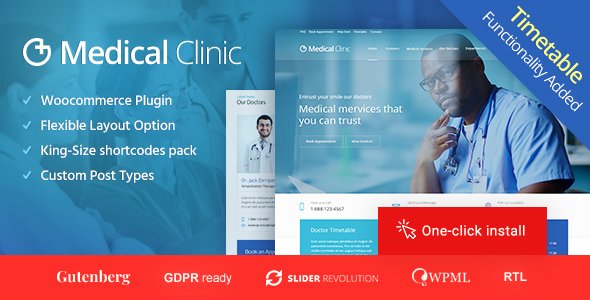
Stuck on your Medical Clinic WordPress theme? Let's fix it.
No endless back-and-forth. Just send us the details and we'll get it done.
No obligation · Replies within 1 hour · Quote within 1 day
Setup · Customization · Bug fixes · WooCommerce integration
About Medical Clinic WP Theme
Medical Clinic is a WordPress theme by cmsmasters built specifically for healthcare practices. It ships with pre-built page templates for services, doctors, appointments, and contact pages, giving clinics a structured starting point without building from scratch.
The theme uses the cmsmasters framework, which adds custom post types for staff profiles, departments, and testimonials. It supports WooCommerce for selling health products or online consultations, and integrates with popular appointment booking plugins.
Design-wise, it leans clean and clinical, with blue-toned colour schemes, icon sets suited to medical content, and a layout structure that puts contact information and booking CTAs front and centre. It’s a practical choice for GPs, specialists, dental clinics, and allied health providers who want a professional site without a custom build.
Get matched with a Medical Clinic developer in under one day
Tell us about your Medical Clinic project. Small fixes, Medical Clinic theme customization, or a full website build, whatever you need, we've got it covered.
We'll connect you to the right Medical Clinic developers, define the scope, and get everything 100% clear.
You'll get one estimate, hire your preferred developer, and start collaborating.
cmsmasters themes use a proprietary framework that behaves differently from Elementor or Gutenberg-based themes. Finding someone who knows Medical Clinic specifically saves time and avoids trial-and-error fixes.
Through Codeable, you’re matched with vetted WordPress developers who have real experience with cmsmasters themes. Post your project, get a free estimate within 24 hours, and only proceed if the scope and price work for you. No obligation, no risk.
Pros
- Pre-built templates for doctors, departments, and services reduce setup time significantly
- Custom post types for staff profiles and testimonials are already structured for medical practices
- WooCommerce support allows clinics to sell products or paid consultation slots
- Appointment booking plugin compatibility built into the theme's design logic
- Clean, clinically-styled default design requires minimal visual adjustment for most practices
Cons
- cmsmasters framework updates can conflict with customisations made outside the options panel
- Shortcode-heavy content structure makes switching themes later difficult without content loss
- No native Gutenberg block support; the editor experience feels dated compared to block-based themes
- Limited documentation for advanced customisation scenarios beyond the options panel
- Default page speed scores are average and typically require optimisation work before going live
Who is Medical Clinic for?
General Practice Clinics
GP clinics need clear service listings, doctor profiles, and a visible booking call to action. Medical Clinic’s pre-built templates cover all three. A Medical Clinic developer can configure the appointment booking integration and add Medicare or bulk-billing information sections without restructuring the theme’s layout.
Dental Clinics
Dental practices benefit from the theme’s services and before/after gallery capabilities. A Medical Clinic specialist can extend the default layout to include treatment-specific landing pages, pricing tables for common procedures, and an FAQ structure tailored to patient concerns about dental work.
Specialist Medical Centres
Cardiology, orthopaedic, and other specialist centres often need department-level pages with individual doctor profiles attached. The cmsmasters custom post types handle this well when configured properly. A Medical Clinic expert can build filterable department directories and link them to booking flows.
Allied Health Providers
Physiotherapists, psychologists, and occupational therapists have different content needs than GPs. Medical Clinic’s flexible layout system can be adapted for service-specific landing pages, practitioner bios, and patient resource sections with help from a Medical Clinic developer familiar with the framework.
Private Hospitals and Health Groups
Larger health groups with multiple locations and dozens of practitioners need more structural work. A Medical Clinic specialist can build multi-location templates, department directories with filtering, and staff profile archives that scale without the site becoming difficult to maintain.

Customizing Medical Clinic
Out of the box, Medical Clinic covers the basics. But most practices need adjustments: custom colour palettes to match branding, modified doctor profile layouts, department-specific landing pages, or tighter integration with third-party booking systems like Calendly, Setmore, or Bookly.
The cmsmasters framework has its own options panel, which is powerful but has a learning curve. If you want to extend shortcodes, build custom templates, or modify the theme’s PHP without breaking updates, you’ll need a Medical Clinic expert who knows how cmsmasters themes are structured.
A Medical Clinic specialist can also handle child theme setup, custom post type extensions, and layout modifications that go beyond what the theme options panel allows, keeping your site maintainable long-term.
Recommended plugins for Medical Clinic
Medical Clinic pairs well with several plugin categories. For appointment booking, Bookly and Simply Schedule Appointments both integrate cleanly. For patient forms, WPForms or Gravity Forms handle intake and contact workflows reliably.
If your clinic relies on search traffic, a Medical Clinic developer can configure WordPress SEO properly, including schema markup for medical practices, which improves how your pages appear in Google results.
For sites with heavy image use, doctor galleries, or video content, investing in WordPress performance optimisation keeps load times acceptable on both desktop and mobile.
Not sure which plugins to use? This WordPress plugins directory covers the most popular options with reviews and setup guides.
Medical Clinic common issues
Medical Clinic theme appointment booking plugin not working
Booking plugin conflicts in Medical Clinic usually come down to JavaScript errors or CSS clashes between the theme and the plugin. Start by checking the browser console for JS errors on the booking page. If the theme is enqueuing scripts that conflict, a child theme fix or selective script dequeuing typically resolves it. For persistent issues, a WordPress bug fixing specialist can isolate the conflict and apply a clean fix without breaking other theme functionality.
Medical Clinic doctor profiles not displaying correctly on mobile
Doctor profile layout problems on mobile are often caused by the cmsmasters grid system not stacking columns correctly at smaller breakpoints. Check the theme’s responsive settings in the options panel first. If those don’t resolve it, targeted CSS in a child theme stylesheet is the reliable fix. A WordPress bug fixing service can audit all affected templates and apply consistent responsive fixes across profile and team pages.
Medical Clinic theme slow loading on homepage
Medical Clinic’s homepage often loads multiple sliders, icon blocks, and custom shortcode sections, all of which add render-blocking scripts and unoptimised images. Start with image compression and lazy loading, then audit which scripts are loading on the homepage. Caching via WP Rocket or similar, combined with a CDN, usually produces measurable improvements without requiring theme modifications.
Medical Clinic cmsmasters options panel changes not saving
The cmsmasters options panel saving issue is typically caused by a PHP max input vars limit set too low on the server. The panel submits a large number of fields, and if the server limit is under 3000, data gets truncated silently. Add max_input_vars = 5000 to your php.ini or contact your host to increase the limit. Clear any object cache after making the change.
Medical Clinic FAQ
cmsmasters has continued releasing updates for Medical Clinic, but the update frequency is slower than page builder-based themes. Always check the ThemeForest changelog before purchasing. If you’re already using it, keeping WordPress core, plugins, and the theme in sync is important. A WordPress maintenance plan can handle this automatically.
Medical Clinic was built around the cmsmasters framework and its own shortcode system. It doesn’t natively support Gutenberg blocks. Elementor can be used alongside it, but layout conflicts are common and usually require a developer to resolve. For a fully block-based workflow, a different theme may be a better fit.
HIPAA compliance depends on your hosting environment and form handling, not the theme itself. Medical Clinic doesn’t include HIPAA-compliant forms out of the box. You’d need a compliant hosting provider and a form plugin or service specifically designed for protected health information. A Medical Clinic specialist can advise on the correct plugin stack for your jurisdiction.
Medical Clinic uses a custom post type called Team Members managed through the cmsmasters framework. Go to your WordPress dashboard, find the Team section, and add a new entry. You can assign a speciality, photo, contact details, and a bio. Templates pull this data automatically into doctor listing and profile pages without manual shortcode entry.
Medical Clinic doesn’t include multi-location functionality natively. It can be extended with plugins like Location Manager or custom taxonomy setups, but this requires development work. A Medical Clinic developer can build location-based filtering, separate landing pages per clinic, and shared doctor profiles across locations without duplicating content.
Hire a Medical Clinic Developer for Your WordPress Site
Whether you need a Medical Clinic expert for a one-off customisation, a full site build, or ongoing support, working with someone who knows the cmsmasters framework makes a real difference. Describe your project, get matched with a specialist, and receive a free estimate before committing to anything. Get a Free Estimate and see exactly what your project will involve.
You'll need a free Codeable account so developers can ask questions and send their quotes.