Medigroup WordPress Theme
by Mikado-Themes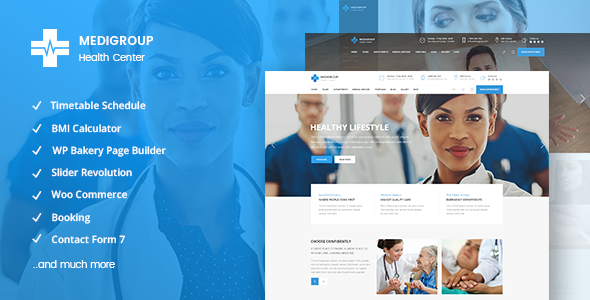
Stuck on your Medigroup WordPress theme? Let's fix it.
No endless back-and-forth. Just send us the details and we'll get it done.
No obligation · Replies within 1 hour · Quote within 1 day
Setup · Customization · Bug fixes · WooCommerce integration
About Medigroup WP Theme
Medigroup is a WordPress theme built by Mikado-Themes, designed specifically for medical clinics, hospitals, private practices, and healthcare professionals. It ships with a purpose-built set of demo layouts covering everything from general practice to dental and cosmetic surgery sites.
The theme runs on Mikado’s own page builder alongside WPBakery, giving you drag-and-drop control over layouts without touching code. Key built-in features include appointment booking integration, doctor profile listings, department pages, and a dedicated services section.
Mikado-Themes has a strong track record with niche-specific themes, and Medigroup reflects that. The design is clean, clinical, and professional out of the box. It also ships with Revolution Slider and several premium plugins bundled at no extra cost, which represents solid value for a medical site build.
Get matched with a Medigroup developer in under one day
Tell us about your Medigroup project. Small fixes, Medigroup theme customization, or a full website build, whatever you need, we've got it covered.
We'll connect you to the right Medigroup developers, define the scope, and get everything 100% clear.
You'll get one estimate, hire your preferred developer, and start collaborating.
Medigroup is a feature-heavy theme and getting it production-ready for a real medical practice takes more than running the demo importer. Booking systems need testing. Doctor profiles need custom fields. Mobile layouts need checking across devices.
FoxyConcept connects you with vetted Medigroup developers through Codeable, a platform exclusively for experienced WordPress professionals. Every developer is screened before they can take projects. You get a free estimate with no obligation, and work is guaranteed. No marketplaces, no bidding wars, no junior developers learning on your project.
Pros
- Ships with 10+ medical demo layouts covering clinics, dental, and cosmetic surgery niches
- Doctor profiles and department post types are built in, no plugin needed
- Revolution Slider and several premium plugins included at no extra cost
- Dedicated appointment booking section with support for third-party booking plugins
- Clean, clinical design that works well for both private practices and larger clinic groups
Cons
- Mikado's custom page builder adds theme lock-in, switching themes later requires a rebuild
- Options panel is very large and can be confusing for non-technical site owners
- Demo content import does not always bring in all sample pages cleanly on shared hosting
- Default performance is average due to bundled scripts, requires optimization for fast load times
- Support from Mikado-Themes can be slow during busy periods, documentation is not always current
Who is Medigroup for?
Private Medical Clinic
Medigroup is a natural fit for private clinics needing to list doctors, specialties, and services in one place. The built-in doctor profile post type handles bio, qualifications, and working hours cleanly. Combined with a booking plugin, a clinic can take appointments directly from the site without relying on phone calls or third-party platforms.
Dental Practice
Dental practices need before-and-after galleries, service pricing pages, and clear calls to book appointments. Medigroup handles all three. The theme’s visual structure works well for procedure pages, and the clean layout builds the kind of trust patients expect before choosing a dentist they found online.
Cosmetic Surgery Center
Cosmetic surgery sites need strong visual presentation alongside detailed procedure information. Medigroup’s portfolio-style layouts and flexible page builder make it straightforward to build procedure pages with photo galleries, FAQs, and consultation booking forms that guide prospective patients through the decision process.
Physiotherapy and Rehabilitation
Physio and rehabilitation clinics benefit from Medigroup’s team and services structure. Listing therapists with specializations, injury types treated, and session types is simple using the built-in post types. An online booking form integrated with a scheduling plugin removes friction for patients booking initial assessments.
Multi-Location Hospital Group
Larger hospital groups with multiple locations need consistent branding across many pages. Medigroup supports this through department pages, location listings, and a scalable page structure. A developer can extend the theme with custom post types for each branch, making it manageable for marketing teams to update content without touching code.

Customizing Medigroup
Medigroup gives you a solid starting point, but most medical sites need adjustments that go beyond swapping colors and uploading a logo. Appointment booking flows, custom doctor profile fields, insurance information pages, and patient portal links all require hands-on configuration.
A Medigroup expert can set up the theme exactly the way your practice needs it. That means configuring department and doctor post types, integrating a booking plugin like Amelia or Bookly, and making sure contact forms route correctly to the right staff.
Mikado’s options panel is detailed but can feel overwhelming. An experienced developer knows which settings matter and which ones to leave alone. If you want a medical website that works from day one without spending weeks in the backend, working with someone who knows the theme structure well saves significant time and avoids costly mistakes later.
Recommended plugins for Medigroup
Medigroup works well with several tools that extend what the theme does by default. Amelia and Bookly both integrate cleanly for appointment scheduling. WPML adds multilingual support if you serve patients across language groups.
For search visibility, pairing Medigroup with a solid SEO setup helps healthcare sites rank for local and specialty terms. See our WordPress SEO service for details. Page load speed also matters for patient trust and Google rankings, and Medigroup sites can be tuned significantly. Our WordPress performance service covers image optimization, caching, and server-side improvements specific to theme-heavy builds like this one.
Not sure which plugins to use? This WordPress plugins directory covers the most popular options with reviews and setup guides.
Medigroup common issues
Medigroup appointment booking not working
Booking issues in Medigroup are usually plugin conflicts or incorrect form configuration rather than a core theme fault. First, check that your booking plugin (Amelia, Bookly, or similar) is running the latest version compatible with your WordPress install. Then verify the form shortcode is placed correctly on the page. If the booking page returns a blank screen, check for JavaScript errors in the browser console. A WordPress bug fixing service can isolate the conflict quickly.
Medigroup demo import fails or is incomplete
Medigroup’s demo import requires adequate server memory and execution time. On shared hosting, imports often time out before completing. Increase max_execution_time and memory_limit in your php.ini or wp-config.php. If importing through the Mikado panel fails repeatedly, try importing XML content manually via WordPress Tools, then configure theme settings separately. Missing images are often due to server-side fetch limits, not a theme bug.
Medigroup pages look broken after update
Broken layouts after a Medigroup or WPBakery update usually mean a version mismatch between the bundled WPBakery and the standalone plugin if both are active. Deactivate any standalone WPBakery plugin and rely on the bundled version that ships with the theme. Also clear all caching layers after updates. If layout blocks show raw shortcode text, regenerate the page builder content from the WPBakery settings panel.
Medigroup site loading slowly
Medigroup loads several scripts and stylesheets by default, many of which are not needed on every page. Start by enabling CSS and JS minification through a caching plugin like WP Rocket. Defer non-critical scripts and lazy load images. Revolution Slider is a known performance bottleneck when configured with autoplay video slides. Optimize or replace heavy sliders on key landing pages. See our WordPress performance service for a full audit approach.
Medigroup FAQ
Mikado-Themes updates Medigroup periodically to maintain WordPress compatibility. Before updating WordPress core, check the Mikado changelog to confirm the current theme version supports it. Running an outdated version of Medigroup on a recent WordPress release can cause layout and functionality issues. Always test updates on a staging site first. If compatibility problems appear after an update, a bug fix service can resolve them quickly.
Medigroup is built around WPBakery and Mikado’s own page builder. It does not officially support Elementor, and mixing builders on the same theme creates conflicts. If you prefer Elementor, you would need a different base theme or a custom build. Rebuilding Medigroup content in Elementor is possible but requires significant development work and is not a straightforward switch.
Medigroup includes a booking section in its design, but it does not ship with a standalone booking engine. You need to integrate a third-party plugin like Amelia, Bookly, or Simply Schedule Appointments. The theme provides the visual framework and shortcode placement areas. Actual scheduling logic, calendar management, and email notifications come from whichever booking plugin you install and configure.
Medigroup registers a custom post type for doctors. In your WordPress dashboard, look for a Doctors or Team Members menu item added by the theme. Create a new entry, fill in the name, specialty, bio, and photo fields, then assign them to a department if that taxonomy is set up. The doctor will appear in any page that uses the doctor listing element in WPBakery or Mikado’s builder.
Yes. Medigroup is WPML compatible, which is the most reliable way to build a multilingual medical site on WordPress. The theme’s text strings can also be translated using Loco Translate if you only need a single-language switch rather than a full multilingual setup. For patient-facing sites serving non-English speakers, WPML with a professional translation workflow is the recommended approach.
Hire a Medigroup Developer
Need help setting up, customizing, or fixing a Medigroup site? FoxyConcept works with vetted WordPress developers who know Mikado themes well. Whether you need a full build from scratch or changes to an existing site, you can get a free estimate with no obligation to hire. Projects are matched within 24 hours, and all work is covered by Codeable’s satisfaction guarantee. It is 100% risk-free.
You'll need a free Codeable account so developers can ask questions and send their quotes.