Medik WordPress Theme
by designthemes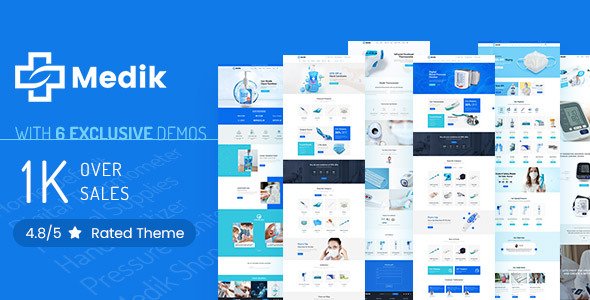
Stuck on your Medik WordPress theme? Let's fix it.
No endless back-and-forth. Just send us the details and we'll get it done.
No obligation · Replies within 1 hour · Quote within 1 day
Setup · Customization · Bug fixes · WooCommerce integration
About Medik WP Theme
Medik is a medical WordPress theme built by Designthemes, aimed at clinics, hospitals, private practices, and healthcare professionals who need a clean, trustworthy online presence. It ships with multiple homepage layouts, appointment booking support, and department and doctor profile pages built in.
The theme is built on Designthemes’ own framework and works alongside popular plugins like WPBakery Page Builder and Revolution Slider. You get doctor listings, service pages, and a timetable feature without needing to build them from scratch. For any medical practice that wants a professional site without starting from zero, Medik covers the core requirements. That said, getting it configured correctly to match your brand and workflow takes more than hitting install.
Get matched with a Medik developer in under one day
Tell us about your Medik project. Small fixes, Medik theme customization, or a full website build, whatever you need, we've got it covered.
We'll connect you to the right Medik developers, define the scope, and get everything 100% clear.
You'll get one estimate, hire your preferred developer, and start collaborating.
Medik is not a simple theme to configure. Designthemes’ custom framework behaves differently from themes built on standard foundations, and the WPBakery integration adds another layer of complexity. Mistakes during setup can cause layout issues, slow load times, or booking flows that do not work correctly.
Getting a qualified Medik developer through Codeable means you work with someone vetted specifically for WordPress. You get a free estimate first, no commitment required, and the work is backed by Codeable’s satisfaction guarantee.
Pros
- Built-in doctor and department profile pages save significant setup time for medical sites
- Appointment timetable feature works without a separate third-party plugin
- Multiple homepage demo layouts cover clinics, hospitals, and private practices
- WPBakery Page Builder included, so layout editing does not require code
- Designthemes provides dedicated support and regular theme updates
Cons
- Designthemes' proprietary framework makes it harder to swap themes later without rebuilding content
- WPBakery shortcodes create page builder lock-in across all pages
- Default load speed needs optimisation work before going live
- Limited Gutenberg support means the editing experience feels dated compared to block-based themes
- Some bundled plugins like Revolution Slider add weight even when not actively used
Who is Medik for?
General Medical Clinic
Medik suits multi-doctor clinics well. The department and staff profile system lets you list every GP or specialist clearly. Patients can find the right doctor, check availability through the timetable, and book an appointment without leaving your site. The layout options give general practices enough flexibility to reflect their specific setup.
Dental Practice
Dental practices benefit from Medik’s service page structure and before/after gallery options. You can list treatments, introduce the team, and display opening hours without custom development. The clean design keeps focus on trust signals, which matter for new patients deciding between practices in the same area.
Private Hospital
Larger hospital sites need multiple departments, many doctors, and clear navigation. Medik’s built-in hierarchy for departments and specialties handles this better than most medical themes. It requires careful configuration to scale correctly, but the underlying structure supports the complexity a hospital site demands.
Specialist Consultant
Independent consultants, surgeons, or specialists working privately can use Medik’s single-doctor layout options. The theme makes it easy to present credentials, list areas of expertise, and give patients a clear way to make contact or request a referral. A focused single-page setup works well for this use case.
Allied Health Practice
Physiotherapy clinics, psychology practices, and allied health providers need service clarity and booking access. Medik covers both. Its flexible service page layouts let you explain treatments in plain language, and the timetable feature gives patients visibility over appointment availability without requiring a complex external booking system.

Customizing Medik
Out of the box, Medik gives you colour controls, font options, and layout settings through its theme panel. But most clinics need more than the defaults. Customising the appointment booking flow, adjusting the doctor profile layout, integrating with a specific booking plugin, or restructuring the timetable to match how your practice actually operates all require hands-on work.
A Medik expert knows where Designthemes’ framework limits you and how to work around those limits without breaking updates. Whether you need custom department filtering, a specific contact form tied to a booking system, or a completely restyled patient-facing layout, working with someone who has built on Medik before saves significant time and avoids common mistakes that general WordPress developers run into with this theme.
Recommended plugins for Medik
Medik works with WPBakery Page Builder for layout editing and supports Revolution Slider for hero sections. For appointment booking, it integrates with plugins like Booked and Appointment Hour Booking. You can extend it further with WooCommerce if you sell products or consultations online.
If site speed is a concern, optimising Medik requires specific attention to how the Designthemes framework loads assets. A proper WordPress performance setup makes a measurable difference. For practices targeting local search, pairing Medik with a solid WordPress SEO strategy helps patients find you before competitors.
Not sure which plugins to use? This WordPress plugins directory covers the most popular options with reviews and setup guides.
Medik common issues
Medik theme appointment booking not working
Booking issues in Medik usually come down to a plugin conflict or a configuration step that was missed during setup. Check that your chosen booking plugin is fully compatible with the version of Medik you are running. If you are using the bundled Booked integration, confirm the shortcode is placed correctly and that the timetable has been populated. Persistent issues often need a developer to trace the conflict. A WordPress bug fixing service can identify the root cause quickly.
Medik WordPress theme slow loading on mobile
Medik loads several scripts and stylesheets by default, including those tied to Revolution Slider and WPBakery, even on pages that do not use them. Start by enabling script and style conditionals through a caching or optimisation plugin. Minify and combine CSS and JS where possible. Lazy load images, especially on the homepage. If you need structured performance work rather than plugin tweaks, a WordPress performance optimisation review covers Medik-specific bottlenecks properly.
Medik theme layout broken after update
Layout breaks after a Medik update are often caused by changes to Designthemes’ framework conflicting with child theme CSS or custom WPBakery elements. Start by checking your child theme against the updated parent files. Clear all caches before drawing conclusions. If you are not using a child theme and edited the parent directly, the update will have overwritten those changes. Rebuilding with a child theme prevents this from recurring. A developer can restore the layout and set things up correctly going forward.
Medik doctor profile page not displaying correctly
If doctor profile pages are not displaying as expected, the most common cause is incomplete data entry in the custom fields Designthemes uses for staff profiles. Check that all required fields are filled in, including the speciality assignment and department link. Display issues can also come from a WPBakery element not rendering the profile template correctly. Deactivating conflicting plugins and testing in a staging environment helps isolate the cause. If the issue persists, a WordPress bug fix is the fastest resolution.
Medik FAQ
Medik has limited Gutenberg support. The theme was built primarily around WPBakery Page Builder, and most of its templates and shortcodes are designed for that editor. You can use the block editor for basic post and page content, but the specialised medical layouts and custom elements rely on WPBakery. Expecting a full Gutenberg experience with Medik will lead to frustration.
Medik does not officially bundle Bookly or Amelia, but both can be integrated with some development work. You would typically embed booking forms via shortcode into the relevant pages. The challenge is making the booking UI match Medik’s visual style and ensuring there are no script conflicts. A developer familiar with Medik can handle this integration cleanly without it looking bolted on.
Designthemes lists WPML compatibility for Medik, and most users running multilingual medical sites use this combination. The key is registering all custom fields and strings for translation, which requires setup time inside WPML’s String Translation module. Some Medik-specific elements need manual registration. Testing thoroughly on a staging site before going live is essential.
Migrating an existing medical site to Medik involves more than switching the active theme. Your content structure needs to map to Medik’s custom post types for doctors, departments, and services. Posts and pages migrate cleanly, but specialist content needs rebuilding inside Medik’s framework. A WordPress migration service that includes theme setup will handle this properly and avoid content loss.
Designthemes has continued to release updates for Medik, and the theme is still available on ThemeForest with active support. That said, update frequency has slowed compared to earlier years. Before purchasing or building on Medik, check the ThemeForest changelog for recent activity and review the support forum response times. Ongoing maintenance is worth planning for. A WordPress maintenance plan keeps your installation secure and current.
Hire a Medik Developer
Whether you need a full Medik setup, a customisation that has not gone to plan, or ongoing support for your medical practice website, a vetted developer can help. Work is matched and delivered through Codeable, so you are not guessing at quality. Get a free estimate with no obligation to hire. Most clients receive a response within 24 hours.
You'll need a free Codeable account so developers can ask questions and send their quotes.