Medizco WordPress Theme
by XpeedStudio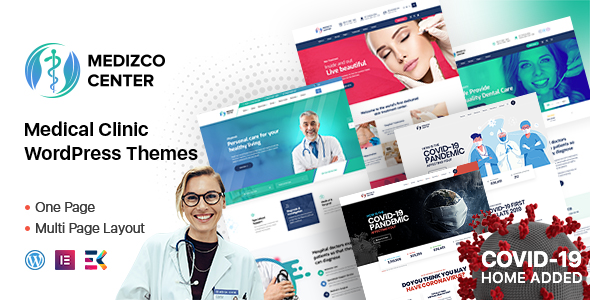
Stuck on your Medizco WordPress theme? Let's fix it.
No endless back-and-forth. Just send us the details and we'll get it done.
No obligation · Replies within 1 hour · Quote within 1 day
Setup · Customization · Bug fixes · WooCommerce integration
About Medizco WP Theme
Medizco is a medical WordPress theme built by XpeedStudio, designed specifically for clinics, hospitals, doctors, and healthcare providers. It ships with Elementor page builder support, pre-built demo templates, and purpose-built sections for services, doctors, appointments, and patient testimonials.
The theme includes built-in appointment booking functionality, department pages, and doctor profile layouts — features that most general themes require multiple plugins to replicate. XpeedStudio has focused the design on trust signals: clean typography, structured service pages, and clear calls to action for booking.
Medizco is a solid starting point for any healthcare site that needs to look professional quickly. It works with popular plugins like WPForms, and the demo content imports in a few clicks, which saves meaningful setup time compared to building from scratch.
Get matched with a Medizco developer in under one day
Tell us about your Medizco project. Small fixes, Medizco theme customization, or a full website build, whatever you need, we've got it covered.
We'll connect you to the right Medizco developers, define the scope, and get everything 100% clear.
You'll get one estimate, hire your preferred developer, and start collaborating.
XpeedStudio builds themes with a lot of moving parts. Medizco is no exception — between the custom post types, Elementor widget dependencies, and appointment booking integration, things can break or behave unexpectedly during setup or after updates.
Working with a vetted Medizco developer through Codeable means you get someone who knows this theme specifically, not a generalist guessing through documentation. Projects are scoped clearly, estimates are free, and you only move forward if the plan makes sense for your site.
Pros
- Built-in doctor profile and department archive templates save significant setup time for clinic sites
- Native Elementor support means most layout changes require no coding knowledge
- Pre-built demo templates cover hospitals, single practices, and dental clinics with one-click import
- Appointment booking section is included in the theme structure without needing a separate layout plugin
- XpeedStudio provides regular updates and maintains compatibility with current WordPress versions
Cons
- Heavily dependent on Elementor — switching page builders later requires rebuilding most pages
- Default appointment form is basic; real booking workflows require a third-party plugin like Amelia or Bookly
- Demo import can bring in a large volume of sample content that needs manual cleanup
- Some advanced styling options are locked behind the premium version, which is not always clear upfront
- Documentation is functional but thin on edge cases, making complex customizations harder to self-resolve
Who is Medizco for?
Medical Clinics
Medizco’s department pages and doctor listing templates are built exactly for multi-service clinics. You can organize services by specialty, display doctor profiles per department, and connect each section to a booking form. It handles the information architecture that clinic patients actually need when choosing a provider.
Dental Practices
Dental practices benefit from Medizco’s service page structure and before/after gallery support. The theme’s clean layout works well for displaying treatment options, team bios, and patient reviews — all trust signals that convert first-time visitors into booked appointments.
Private Hospitals
Larger hospital sites can use Medizco’s department archive and doctor search features to handle scale. With the right plugins added, you can build patient portals, department-level contact forms, and location pages. It needs developer input at this scale, but the theme foundation supports it.
Individual Doctors and Specialists
Solo practitioners get a professional online presence quickly with Medizco’s single-doctor layout options. The theme supports biography pages, credential displays, consultation booking, and testimonials — everything a specialist needs to build credibility with new patients searching online.
Mental Health and Therapy Practices
Therapy and mental health practices need a calm, trust-focused design. Medizco’s typography and layout options support that tone. You can highlight session types, therapist profiles, and intake form links without the site feeling clinical or cold — an important distinction in this niche.

Customizing Medizco
Medizco’s Elementor integration means most layout changes happen in the visual editor without touching code. You can adjust colors, fonts, header styles, and section layouts through the Customizer and Elementor widgets. The theme includes a dedicated doctor listing widget, appointment form styling, and department archive templates that are harder to modify without knowing the theme structure.
Deeper customization — custom post type changes, WooCommerce integration for paid consultations, or complex booking workflows — typically requires a Medizco expert who understands how XpeedStudio built the theme’s underlying structure.
Child theme setup is recommended before making any code-level edits. Without it, updates from XpeedStudio will overwrite your changes. A Medizco expert can configure this correctly from the start and build on top of the theme cleanly.
Recommended plugins for Medizco
Medizco works alongside several plugins that extend its core features. The most common additions include appointment booking plugins like Bookly or Amelia, WooCommerce for paid services, and WPML for multilingual clinic sites.
For site speed, Medizco can be paired with caching and optimization tools — see our WordPress performance services for that. If you need organic search visibility for your clinic or practice, structured SEO work matters as much as the theme design — our WordPress SEO service covers that side specifically.
Not sure which plugins to use? This WordPress plugins directory covers the most popular options with reviews and setup guides.
Medizco common issues
Medizco appointment form not working after update
This usually happens when a plugin conflict or WordPress update disrupts the form handler. First, check that your contact or booking plugin is updated and active. Deactivate other plugins one by one to isolate a conflict. If the form was built with Elementor’s form widget, confirm the widget itself is still loading. For persistent issues, our WordPress bug fixing service can diagnose and resolve this without guesswork.
Medizco Elementor widgets missing or broken
Missing Elementor widgets in Medizco are typically caused by a version mismatch between the theme and Elementor, or a failed update that left the theme in a partial state. Start by updating both the theme and Elementor to their latest versions. If widgets still don’t appear, deactivate caching plugins and clear all caches. A corrupted theme file can also cause this — reinstalling the theme (with a child theme in place) often fixes it.
Medizco demo import failed or incomplete
Demo import failures in Medizco are usually caused by server memory limits or a timeout during the XML import process. Increase PHP memory limit to at least 256MB and max execution time to 300 seconds in your hosting settings. If the import completes but images are missing, re-run the import or use the WordPress image regeneration tool. Contact your host if server limits can’t be adjusted from the dashboard.
Medizco doctor listing page not displaying correctly
Doctor listing display problems are often caused by a pagination setting conflict, a missing template file after an update, or a custom query being overridden by another plugin. Check that the doctor custom post type is still registered by going to the post type settings or deactivating conflicting plugins. If your child theme has a modified archive template, compare it against the updated parent theme file to check for structural changes that need to be carried over.
Medizco FAQ
Medizco has both a free version available on the WordPress theme directory and a premium version sold through XpeedStudio. The free version covers basic layouts and limited template options. The premium version unlocks additional demo templates, advanced widgets, and priority support. Most professional clinic sites will need the premium version to access the full feature set.
Yes, Medizco is compatible with WooCommerce. This is commonly used to sell paid consultations, health products, or online session packages directly from the site. Some styling adjustments are needed to make WooCommerce pages match the Medizco design, as the theme doesn’t include custom WooCommerce templates out of the box.
Technically yes, but most of Medizco’s pre-built layouts are built with Elementor. Without it, you lose access to the doctor listing widgets, department templates, and most demo page designs. You can use the WordPress block editor for basic pages, but you’ll be rebuilding a lot of the functionality that makes Medizco useful for healthcare sites.
Medizco includes a basic appointment section, but real booking functionality requires a dedicated plugin. Amelia and Bookly are the most common choices — both integrate well with Medizco’s layout. You can embed booking forms into doctor profile pages or service pages using Elementor widgets. Configuration takes time to get right, especially for multi-provider or multi-location setups.
Yes, migrating an existing healthcare site to Medizco is possible. Posts, pages, and media transfer cleanly. The main work involves rebuilding page layouts inside Elementor using Medizco’s templates, and mapping existing content into the theme’s custom post types for doctors and departments. For a smooth transition, our WordPress migration service handles the technical side without downtime.
Hire a Medizco Expert Developer
Whether you need Medizco set up from scratch, customized beyond its default options, or fixed after an update broke something, the right developer makes a measurable difference. Our Medizco developers on Codeable have handled clinic sites, multi-location practices, and complex booking integrations with this theme.
Get a free estimate — no obligation, no upfront payment. Describe your project and get matched with a qualified developer within 24 hours.
You'll need a free Codeable account so developers can ask questions and send their quotes.