Mega Project WordPress Theme
by GoodLayers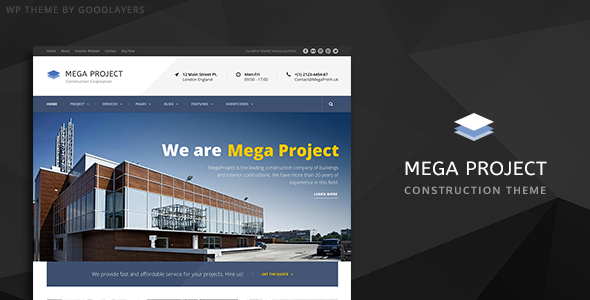
Stuck on your Mega Project WordPress theme? Let's fix it.
No endless back-and-forth. Just send us the details and we'll get it done.
No obligation · Replies within 1 hour · Quote within 1 day
Setup · Customization · Bug fixes · WooCommerce integration
About Mega Project WP Theme
Mega Project is a multipurpose WordPress theme built by GoodLayers, a developer known for clean page builder implementations and business-focused designs. The theme ships with the GoodLayers page builder, giving you drag-and-drop layout control without needing a third-party plugin.
It targets agencies, creative studios, and corporate businesses that want a polished site without starting from scratch. You get a library of pre-built demos, portfolio layouts, blog templates, and service pages. Each demo installs with one click.
Under the hood, Mega Project supports WPML for multilingual sites, WooCommerce for light e-commerce, and custom post types for portfolio and team sections. It is translation-ready and includes RTL stylesheet support. The theme has been maintained across several WordPress versions, though some users report the page builder has a learning curve compared to Elementor or Beaver Builder.
Get matched with a Mega Project developer in under one day
Tell us about your Mega Project project. Small fixes, Mega Project theme customization, or a full website build, whatever you need, we've got it covered.
We'll connect you to the right Mega Project developers, define the scope, and get everything 100% clear.
You'll get one estimate, hire your preferred developer, and start collaborating.
GoodLayers themes have their own conventions. The page builder, theme options panel, and shortcode library all work differently from standard WordPress patterns. A developer who has not worked with Mega Project before will spend time just mapping how things connect.
On Codeable, you get access to vetted WordPress developers who have worked with multipurpose themes like Mega Project. They know where the edge cases are. Whether you need a custom layout, a bug fixed, or a full site built from a demo, the right expert saves you hours of trial and error. Get a free estimate and see who is available for your project.
Pros
- Bundled GoodLayers page builder removes the need for a paid third-party builder
- Large demo library with one-click import covers agencies, portfolios, and corporate layouts
- Built-in mega menu builder handles complex navigation without extra plugins
- Revolution Slider included at no extra cost, saving the standalone license fee
- WPML compatibility makes multilingual site builds straightforward
Cons
- GoodLayers page builder is less intuitive than Elementor or Beaver Builder for new users
- Theme options panel has a large number of settings, which can be overwhelming to configure correctly
- Page builder output adds extra markup that can slow load times without optimization
- Documentation is limited compared to larger theme frameworks, making troubleshooting harder
- Switching away from the theme later means rebuilding all page builder content from scratch
Who is Mega Project for?
Creative Agency
Mega Project’s portfolio post type and filterable grid layouts make it a solid fit for creative agencies. You can display client work by category, add case study pages, and use the page builder to build service and about pages without writing a line of code. The mega menu handles deep navigation for large service lists cleanly.
Architecture and Interior Design Studio
The theme’s full-width image support and clean grid layouts suit architecture and interior design studios well. Gallery sections display project photography without clutter. A developer can configure the portfolio filtering to sort by project type, location, or scale, giving visitors a clear way to browse the work.
Freelance Portfolio
For freelancers, Mega Project provides portfolio templates, a blog, and a contact section without needing multiple plugins. The one-click demo import gives a working starting point in minutes. Customizing colors, fonts, and layout sections through the theme panel keeps the process manageable even for non-developers with some WordPress experience.
Corporate Business Website
Corporate sites need reliable structure. Mega Project covers team member pages, service listings, testimonials, and a clear contact setup. The page builder handles homepage sections like feature columns, stats counters, and client logo strips. Combined with WooCommerce, it also works for companies selling products or subscriptions alongside their service pages.
Digital Marketing Agency
Digital marketing agencies need to present results and services clearly. Mega Project’s pre-built sections for case studies, pricing tables, and team profiles map directly to that need. Adding a blog for content marketing is straightforward with the built-in post templates. A developer can extend this with custom landing page templates for campaign traffic.

Customizing Mega Project
Customizing Mega Project goes beyond swapping colors in the WordPress Customizer. GoodLayers built a dedicated theme options panel where you control typography, header layouts, footer columns, sidebar positions, and color schemes from one place.
For deeper work, a Mega Project expert can modify the built-in page builder row and column settings, create custom shortcodes, or override template files using child theme structure. Portfolio filtering, custom mega menus, and sticky header behavior all need configuration inside the theme panel rather than the Customizer.
If you need a layout that does not exist in the demo library, custom page templates are the right approach. A developer familiar with the GoodLayers framework can add them without breaking theme update compatibility. Working inside a child theme keeps your changes safe when GoodLayers releases updates.
Recommended plugins for Mega Project
Mega Project connects with WooCommerce for product listings, cart, and checkout pages, with basic styling included out of the box. The theme also works with WPML and Polylang for multilingual builds.
For forms, Contact Form 7 and Gravity Forms both integrate cleanly. Revolution Slider is bundled, which handles hero sections and animated banners. bbPress support is included for community or forum features.
If you want to extend site speed, pairing Mega Project with a caching plugin and image optimization is worth doing early. You can also improve organic visibility with proper WordPress SEO configuration. For heavier traffic, WordPress performance optimization ensures the page builder output stays fast.
Not sure which plugins to use? This WordPress plugins directory covers the most popular options with reviews and setup guides.
Mega Project common issues
Mega Project page builder content not showing after update
This usually happens when a theme or WordPress update changes how the GoodLayers shortcodes are parsed. First, check whether the page builder plugin is active and up to date separately from the theme. Clear your cache after the update. If content still shows raw shortcode text, the page builder plugin may have been deactivated during the update. Reactivating it typically restores the display. If the issue persists, a WordPress bug fix can identify what broke in the update chain.
Mega Project demo import fails or stops halfway
Demo import failures in Mega Project are often caused by server timeout limits or insufficient PHP memory. Increase max_execution_time to 300 and memory_limit to at least 256MB in your PHP configuration. Some hosting environments also block external HTTP requests, which prevents the demo content from downloading. Try importing on a local environment first, or ask your host to whitelist GoodLayers demo URLs. If problems continue, a developer can import demo files manually.
Mega Project mega menu not working on mobile
The Mega Project mega menu relies on JavaScript for its mobile toggle behavior. If mobile navigation breaks, check for JavaScript conflicts with other plugins first by disabling them one at a time. Also verify the mobile menu breakpoint is set correctly in the theme options panel under the header settings. Some child theme CSS changes accidentally hide the mobile menu trigger. Clearing cache and checking for console errors in the browser developer tools usually points to the exact conflict.
Mega Project slow loading speed with page builder layouts
GoodLayers page builder generates nested div structures with inline styles that add page weight. Start by enabling a caching plugin and serving static HTML. Minify CSS and JavaScript through a performance plugin, but test carefully as some GoodLayers scripts break when combined aggressively. Lazy load images, especially in portfolio grids. For larger sites, WordPress performance optimization done by a developer will produce more consistent gains than plugin-only solutions.
Mega Project FAQ
GoodLayers has released updates for Mega Project over the years, but update frequency is slower than larger theme providers like Envato market leaders. Before purchasing or building on the theme, check the ThemeForest changelog to confirm recent activity. For existing sites, keep the theme updated alongside WordPress core to avoid compatibility issues with newer PHP versions.
Technically yes, you can install Elementor on a Mega Project site, but mixing two page builders creates conflicts. The GoodLayers builder and Elementor both add their own scripts and styles, which increases page weight and can break layouts. Most developers recommend picking one and sticking with it. If you prefer Elementor, starting with an Elementor-native theme is a cleaner approach.
Yes. Mega Project includes basic WooCommerce styling for shop, product, cart, and checkout pages. It handles standard product listings cleanly. For advanced WooCommerce customization, a developer may need to override WooCommerce templates inside a child theme. The built-in styling works best with simple shop setups rather than heavily customized stores.
Create a child theme folder inside wp-content/themes/, add a style.css with the correct Template: megaproject header, and enqueue the parent theme stylesheet in functions.php. Activate the child theme in the WordPress admin. All your custom CSS and template overrides go into the child theme, keeping them safe when the parent theme updates.
Migrating away from Mega Project means losing all GoodLayers page builder layouts. The shortcodes are theme-specific and will not transfer to another theme. Your content, images, and posts remain intact, but page layouts need to be rebuilt in the new theme’s system. For a structured WordPress migration, a developer can help preserve content and rebuild pages efficiently in the destination theme.
Hire a Mega Project Developer
Need help building or customizing your Mega Project WordPress site? Whether you are starting from a demo or rebuilding an existing layout, a specialist gets it done without guesswork. Our developers on Codeable are vetted, rated, and experienced with GoodLayers themes. Post your project and get matched within 24 hours. No obligation, no risk. Get your free estimate today and move your project forward.
You'll need a free Codeable account so developers can ask questions and send their quotes.