Megazine WordPress Theme
by GoodLayers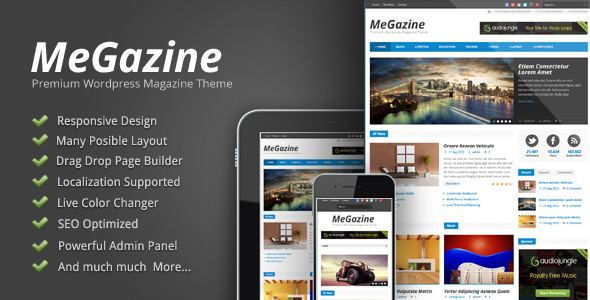
Stuck on your Megazine WordPress theme? Let's fix it.
No endless back-and-forth. Just send us the details and we'll get it done.
No obligation · Replies within 1 hour · Quote within 1 day
Setup · Customization · Bug fixes · WooCommerce integration
About Megazine WP Theme
Megazine is a WordPress magazine theme built by GoodLayers. It ships with a drag-and-drop page builder, multiple pre-built demo layouts, and a post format system designed for high-volume editorial publishing. You get grid layouts, slider modules, category filters, and ad placement zones built directly into the theme options panel.
GoodLayers has been building WordPress themes since 2012. Megazine reflects that experience. The theme handles everything from breaking news sites to niche hobby blogs. It supports WooCommerce for subscription or product pages, integrates with popular SEO plugins, and keeps page structure clean enough for editors who just want to publish without touching code.
If you run a content-heavy site and need layout control without hiring a developer for every change, Megazine covers most of it out of the box.
Get matched with a Megazine developer in under one day
Tell us about your Megazine project. Small fixes, Megazine theme customization, or a full website build, whatever you need, we've got it covered.
We'll connect you to the right Megazine developers, define the scope, and get everything 100% clear.
You'll get one estimate, hire your preferred developer, and start collaborating.
Megazine has a lot of moving parts. The GoodLayers page builder, the theme options panel, post formats, widget areas, and child theme structure all interact in ways that are not obvious until something breaks or a layout refuses to behave.
Working with a vetted Megazine developer through Codeable means you get someone who has already solved these problems on other sites. No onboarding time wasted on basics. You describe what you need, get a clear estimate, and the work gets done to a professional standard. That is a faster path than posting in a forum and hoping someone responds.
Pros
- Includes a visual page builder with magazine-specific modules like sliders, post grids, and featured boxes
- Multiple pre-built demo layouts that can be imported in one click to speed up initial setup
- Built-in ad placement zones across header, sidebar, and within post content without extra plugins
- Post format support for video, gallery, audio, and standard articles keeps editorial workflow clean
- WooCommerce compatible out of the box, useful for selling subscriptions, digital downloads, or merchandise
Cons
- The GoodLayers page builder is proprietary, so migrating to another theme means rebuilding page layouts from scratch
- Theme options panel is large and can be overwhelming for non-technical site owners managing it alone
- Default markup produces some redundant CSS and JavaScript that needs cleanup to hit good Core Web Vitals scores
- Documentation is sparse for advanced customization, especially around child theme hooks and filter usage
- Update frequency has slowed compared to earlier years, so compatibility with newer WordPress versions should be tested before major updates
Who is Megazine for?
Online News Magazine
Megazine handles breaking news formats well. The grid and list layout options let editors control story prominence without touching templates. Multiple category sections on a single homepage keep different beats organized. The built-in ad zones mean monetization infrastructure is already in place when traffic picks up.
Niche Hobby Blog
For a hobby site covering a single topic in depth, Megazine provides enough layout variety to keep long archives browsable. Category filters and featured post modules let you surface evergreen content alongside new posts. The post format support means tutorials, video embeds, and photo galleries all display correctly without custom code.
Entertainment and Pop Culture Site
Entertainment sites need fast image-heavy layouts that stay readable. Megazine’s slider modules and masonry grids work well for trailers, reviews, and photo roundups. The theme handles high post frequency without the homepage becoming cluttered, provided the layout is configured with clear category separation from the start.
Tech Review Publication
Tech reviewers benefit from Megazine’s structured article templates and sidebar widget areas. You can surface related reviews, affiliate links, and comparison tables without fighting the layout. The WooCommerce integration is useful if you sell any digital products or affiliate-linked items directly through the site.
Food and Lifestyle Blog
Food and lifestyle content is visual. Megazine’s full-width featured image options and recipe-friendly grid layouts display that content without heavy customization. The theme handles seasonal content surfacing through featured categories, and the clean sidebar structure works well for email signup forms and social media modules.

Customizing Megazine
Megazine gives you a lot of built-in options, but most serious sites eventually need changes the theme panel cannot handle. Custom post layouts, modified ad zones, adjusted typography hierarchies, or a homepage that does not match any of the included demos all require direct theme work.
A Megazine expert knows where GoodLayers stores its framework logic, how the page builder outputs markup, and which child theme hooks give you clean overrides without breaking on updates. That knowledge saves hours of trial and error.
Common customization requests include custom category landing pages, modified article templates, sidebar logic based on post tags, and header layouts built around specific branding. Getting these right without touching the parent theme files requires someone who has worked with Megazine before, not just WordPress in general.
Recommended plugins for Megazine
Megazine works well with a focused set of plugins. WooCommerce adds a subscription or merchandise layer. WPForms or Gravity Forms handles reader submissions and contact pages. A caching plugin like WP Rocket or LiteSpeed Cache is almost mandatory for news sites with high post volume. Pair that with a CDN and image optimization to keep load times under control.
For ad management, Advanced Ads or Ad Inserter give you more placement control than the built-in theme zones. If organic traffic matters, connecting Megazine to a well-configured SEO setup improves how category and tag archives are indexed. For sites scaling past shared hosting, WordPress performance optimization and SEO configuration are worth doing properly.
Not sure which plugins to use? This WordPress plugins directory covers the most popular options with reviews and setup guides.
Megazine common issues
Megazine theme slider not showing on homepage
Slider display failures in Megazine usually come down to one of three things: the slider post query is filtering out posts due to category or date settings, a JavaScript conflict with another plugin is preventing initialization, or a recent theme update changed the slider module’s markup. Check the slider settings panel first, then deactivate plugins one by one to isolate a conflict. If the issue appeared after an update, a bug fixing specialist can identify the breaking change faster than manual debugging.
Megazine page builder content disappeared after update
GoodLayers page builder content is stored as custom post meta. If content appears blank after an update, the most common causes are a failed database migration, a PHP version incompatibility, or a plugin conflict with another builder. Do not re-save pages without backing up the database first, as this can overwrite recoverable data. Restore from a recent backup, then update incrementally. If no backup exists, a developer can often recover the data directly from the database tables.
Megazine theme loading slowly on mobile
Megazine loads multiple scripts and stylesheets by default, which affects mobile performance. Start by enabling a caching plugin and deferring non-critical JavaScript. Check whether the theme is loading Google Fonts via multiple requests rather than a combined request. Large featured images without proper sizing also slow mobile loads significantly. Run the site through PageSpeed Insights to identify the specific bottlenecks. For persistent issues, WordPress performance optimization addresses these systematically rather than one fix at a time.
Megazine custom fonts not applying to headings
Custom fonts failing to apply to headings in Megazine usually means a CSS specificity conflict. The theme’s default heading styles may be loading after your custom font rules and overriding them. Use browser developer tools to check which stylesheet is winning on h1 through h4 elements. Add font rules in a child theme stylesheet with increased specificity, or use the theme’s typography panel to set the font directly. Avoid editing the parent theme’s style.css as updates will overwrite those changes.
Megazine FAQ
GoodLayers continues to release updates for Megazine, though the pace has slowed compared to earlier years. The theme remains compatible with current WordPress versions, but you should test updates on a staging site before applying them to a live publication. Major WordPress core releases occasionally break theme functionality that GoodLayers patches in follow-up updates.
Megazine uses the GoodLayers page builder for its layout modules. Elementor can be installed and used on standard pages, but the theme’s magazine-specific homepage and category layouts are built around the GoodLayers system. Mixing both builders on the same site creates maintenance complexity and is generally not recommended unless you have a developer managing the setup.
Yes. Megazine is translation-ready and compatible with WPML and Polylang for multilingual sites. The theme’s text strings can be translated using a .po file editor. RTL language support is included. If you are running a fully multilingual editorial site with WPML, some layout configuration may need developer input to handle translated category pages correctly.
Migrating a Megazine site involves moving files, the database, and reconfiguring domain settings on the new host. The GoodLayers page builder stores layout data in the database, so the database transfer needs to be complete and the URLs updated using a search-replace tool. A broken migration can corrupt builder data. Using a WordPress migration service avoids the most common failure points.
Megazine’s structure is broadly SEO-friendly: clean heading hierarchy, schema-compatible post formats, and compatibility with Yoast SEO and Rank Math. The main issue is page speed. Out of the box, the theme loads more resources than necessary, which affects Core Web Vitals scores. Pairing Megazine with proper caching, image optimization, and an SEO configuration gives you a much stronger baseline.
Hire a Megazine Developer
Whether you need a full site build, a specific layout change, or a persistent bug fixed, working with a specialist saves time. Our Megazine developers have hands-on experience with GoodLayers themes and understand the framework well enough to work efficiently. Post your project and get a free estimate with no obligation to proceed. Get a free estimate today and have a developer matched to your project within 24 hours.
You'll need a free Codeable account so developers can ask questions and send their quotes.