Meni WordPress Theme
by designthemes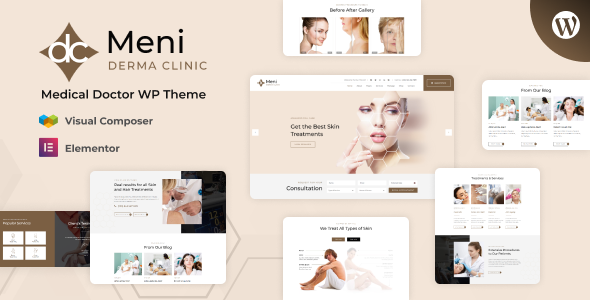
Stuck on your Meni WordPress theme? Let's fix it.
No endless back-and-forth. Just send us the details and we'll get it done.
No obligation · Replies within 1 hour · Quote within 1 day
Setup · Customization · Bug fixes · WooCommerce integration
About Meni WP Theme
Meni is a restaurant and food-focused WordPress theme built by Designthemes. It ships with a dedicated menu builder, reservation forms, and a layout style designed specifically for cafes, bistros, and fine dining establishments. The theme runs on Designthemes’ Visual Composer-based page builder and includes multiple homepage demos you can import with one click.
Out of the box, Meni handles the core needs of a food business site: displaying dishes by category, showcasing ambience through full-width galleries, and converting visitors with booking integrations. It supports WooCommerce for online ordering and is translation-ready, making it a workable base for restaurant owners who want a polished site without building from scratch.
Get matched with a Meni developer in under one day
Tell us about your Meni project. Small fixes, Meni theme customization, or a full website build, whatever you need, we've got it covered.
We'll connect you to the right Meni developers, define the scope, and get everything 100% clear.
You'll get one estimate, hire your preferred developer, and start collaborating.
Meni has its own framework quirks, shortcode patterns, and demo structure. A generalist developer will spend time learning how Designthemes organises things before writing a single line of useful code. A developer who has worked inside Meni already knows where to look.
Through Codeable, you get matched with vetted WordPress developers who have hands-on theme experience. No job boards, no guesswork. Post your project and receive an estimate from someone who can actually deliver what a restaurant site needs, on time and without back-and-forth over basics.
Pros
- Dedicated restaurant menu builder with category filtering built into the theme
- Multiple one-click demo imports covering cafes, fine dining, and food delivery layouts
- WooCommerce compatible for online ordering and table deposit payments
- Translation-ready with WPML support for multilingual restaurant sites
- Full-width gallery and parallax sections suit food photography presentation
Cons
- Page builder is tightly coupled to Designthemes' own system, making migration to Gutenberg or Elementor complex
- Demo import can bring in bloated content and unused plugins that need manual cleanup
- Theme updates have historically been infrequent, which creates compatibility risks with newer WordPress versions
- Limited documentation for advanced customisation beyond the basic Customizer options
- Child theme setup is necessary for any serious customisation but not clearly guided in official resources
Who is Meni for?
Independent Restaurants
Meni covers the core needs of a standalone restaurant: digital menus by course or category, a reservation form, chef profiles, and a gallery. The theme’s layout handles both casual and upscale branding depending on the demo you start from and the typography choices you make.
Cafes and Coffee Shops
Cafe owners benefit from Meni’s compact menu display and warm visual style. You can list seasonal drinks, display daily specials, and embed a Google Map for directions. The WooCommerce integration handles merchandise or bag sales without needing a separate shop theme.
Food Delivery Businesses
With WooCommerce active, Meni can support a basic online ordering setup. Product categories map to food categories, checkout handles delivery notes, and the visual style keeps the food-forward branding intact. A developer can extend this further with delivery zone plugins.
Private Dining and Event Venues
Private dining venues and event spaces need enquiry forms, gallery sections, and capacity information displayed clearly. Meni’s reservation form and full-width imagery sections work well for this. Custom form logic and deposit payments can be added by a developer.
Bakeries and Patisseries
Bakeries need to showcase products visually and handle pre-orders or local pickup. Meni’s grid layouts display pastries and seasonal items well. Paired with WooCommerce and a pickup scheduling plugin, it covers most of what a small bakery operation requires online.

Customizing Meni
Meni gives you control over fonts, colours, header layouts, and section ordering through the WordPress Customizer. You can swap demo content, adjust the menu grid layout, and modify the reservation form styling without touching code. That said, deeper changes, like custom post type restructuring, WooCommerce checkout redesigns, or integrating third-party booking systems like OpenTable, will need developer input.
A Meni expert understands how Designthemes structures its theme framework, where shortcodes are stored, and how child theming works within this setup. That knowledge saves hours compared to hiring a generalist. If you need tailored functionality or want the site to look nothing like the demo, working with someone who knows Meni specifically makes the difference between a quick build and a frustrating one.
Recommended plugins for Meni
Meni pairs well with several plugins that extend what the theme does natively. WooCommerce adds online ordering and table deposits. WPForms or Gravity Forms handle custom reservation flows. WPML covers multilingual menus for international restaurants.
For technical performance, image optimisation, caching, and hosting configuration all matter on media-heavy restaurant sites. You can explore WordPress performance services to keep load times low. If organic traffic matters to your restaurant, pairing Meni with proper structured data and on-page work covered under WordPress SEO services helps search engines surface your menu and location correctly.
Not sure which plugins to use? This WordPress plugins directory covers the most popular options with reviews and setup guides.
Meni common issues
Meni theme menu not displaying correctly after WordPress update
Menu display issues after a WordPress update usually point to a shortcode rendering conflict or a Visual Composer version mismatch. Start by checking if the Designthemes plugin bundled with Meni needs updating. If the menu post type is missing from the admin, deactivating and reactivating the theme’s companion plugin often restores it. For persistent issues, WordPress bug fixing can diagnose the root cause quickly.
Meni reservation form not sending emails
Email delivery failures on reservation forms are rarely a theme problem. The issue is almost always server-level email configuration. Install WP Mail SMTP, connect it to a transactional mail service like SendGrid or Mailgun, and test the form again. If the form itself is not submitting at all, check for JavaScript console errors that might indicate a plugin conflict blocking the form script.
Meni theme demo import failing or incomplete
Demo imports fail when server memory limits are too low or execution time is cut short. Set max_execution_time to 300 and memory_limit to 256M in your php.ini or wp-config.php. If the import completes but images are missing, run the regenerate thumbnails tool. Importing on a staging site first prevents broken content from appearing on a live domain.
Meni theme slow loading on mobile
Meni ships with large demo images and several render-blocking scripts that hurt mobile scores. Compress all images through ShortPixel or Imagify, enable lazy loading, and defer non-critical JavaScript. The theme’s parallax sections are particularly heavy on mobile. Disabling parallax for small screens via a child theme stylesheet is a practical fix that improves performance without changing the desktop experience.
Meni FAQ
Designthemes continues to sell Meni but update frequency is slower than major theme shops. Before purchasing or building on Meni, check the ThemeForest comments tab for the date of the last update and whether the developer responds to support queries. If you are running an existing Meni site, keeping WordPress core and all plugins current reduces the risk of compatibility issues between updates.
Meni is built around Designthemes’ own Visual Composer implementation, not Elementor. You can install Elementor on any WordPress site, but it will conflict with the theme’s existing page builder on pages built with that system. A developer can selectively enable Elementor on specific pages or rebuild the site using Elementor as the primary builder, effectively replacing the default page construction approach.
Yes. Meni supports WooCommerce and the visual style carries through to product pages reasonably well. For basic online ordering, food products are set up as WooCommerce variable products with size or option variants. Delivery management, scheduling, and order tracking require additional plugins. A developer familiar with both Meni and WooCommerce can wire this up cleanly.
Meni includes a built-in reservation form, but it is basic. For table management, real-time availability, or integration with OpenTable and Resy, you need a dedicated booking plugin. OpenTable has an embeddable widget. Plugins like Restaurant Reservations or BirchPress offer native WordPress solutions. A developer can style these to match Meni’s design so the booking flow feels consistent with the rest of the site.
Migrating away from Meni means rebuilding pages, since content created with Designthemes’ page builder uses proprietary shortcodes that will not transfer cleanly to another theme. Your posts, images, and core settings move fine. The layout and design work needs to be redone in the new theme. A WordPress migration service can handle the technical side while a developer rebuilds the templates.
Hire a Meni WordPress Developer
Whether you need a full Meni build, a layout fix, or a custom feature added on top of what the theme provides, working with the right developer matters. FoxyConcept connects you with Meni-experienced WordPress developers through Codeable’s vetted network. You get a free estimate before committing to anything. Get your free estimate here and have a developer matched to your project within 24 hours, no obligation to hire.
You'll need a free Codeable account so developers can ask questions and send their quotes.