Merchandiser WordPress Theme
by getbowtied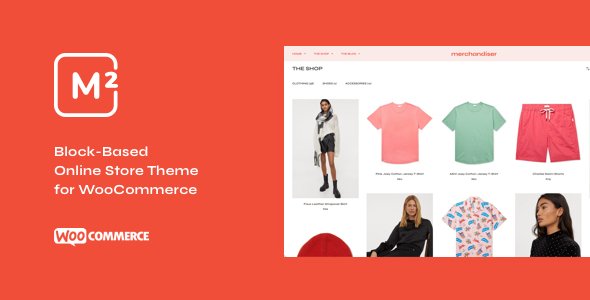
Stuck on your Merchandiser WordPress theme? Let's fix it.
No endless back-and-forth. Just send us the details and we'll get it done.
No obligation · Replies within 1 hour · Quote within 1 day
Setup · Customization · Bug fixes · WooCommerce integration
About Merchandiser WP Theme
Merchandiser is a free WooCommerce theme by GetBowtied, built specifically for online stores. It strips away the bloat and focuses on product presentation: clean grid layouts, prominent category sections, and a checkout flow that doesn’t get in the way of conversions.
The theme works well out of the box for small to mid-size shops selling physical products. It supports WooCommerce fully, including variable products, product galleries, and cart widgets. GetBowtied maintains it actively, so core compatibility isn’t a common problem.
Where Merchandiser stands out is its homepage flexibility. Drag-and-drop sections let you feature categories, bestsellers, and promotions without touching code. For store owners who want a straightforward WooCommerce setup without paying for a premium theme, Merchandiser is a practical starting point.
Get matched with a Merchandiser developer in under one day
Tell us about your Merchandiser project. Small fixes, Merchandiser theme customization, or a full website build, whatever you need, we've got it covered.
We'll connect you to the right Merchandiser developers, define the scope, and get everything 100% clear.
You'll get one estimate, hire your preferred developer, and start collaborating.
Merchandiser is approachable for beginners but its limitations show fast when you need a store that performs and converts. A specialist who knows GetBowtied themes, WooCommerce architecture, and how the two interact can save you weeks of trial and error. Through Codeable, you get access to vetted WordPress developers who have worked on WooCommerce stores at every scale. Post your project, get a free estimate within 24 hours, and only hire if it makes sense. No commitment required.
Pros
- Free theme with no upsell pressure for core ecommerce features
- Actively maintained by GetBowtied with consistent WooCommerce compatibility updates
- Clean product grid layouts that load fast with minimal styling overhead
- Homepage sections are easy to rearrange without a page builder
- Works well with GetBowtied's own plugin ecosystem for extended store features
Cons
- Advanced layout customization requires a child theme and PHP knowledge
- Typography and color controls are limited compared to premium WooCommerce themes
- No built-in mega menu, which is a problem for stores with large category trees
- Elementor and other page builder compatibility can be inconsistent on inner pages
- Limited built-in demo content makes initial setup slower for new users
Who is Merchandiser for?
Fashion and Apparel Stores
Merchandiser’s clean grid layouts suit fashion stores well. Variable products with size and color swatches display clearly, and the category-first homepage structure works for seasonal collections. A Merchandiser specialist can add lookbook-style layouts and custom swatches that go beyond the default WooCommerce variable product display.
Home Goods and Furniture Shops
Home goods stores benefit from Merchandiser’s wide product image support and category section blocks. Furniture retailers need large visuals and clear filtering by room or material. A Merchandiser developer can set up layered navigation, custom product tabs for dimensions and materials, and a layout that handles high-resolution images without slowing the page.
Electronics and Gadget Retailers
Electronics shops need comparison-friendly layouts and spec-heavy product pages. Merchandiser gives you a solid base, but a Merchandiser expert can add custom product data tables, compatibility filters, and structured data markup that helps products appear in Google Shopping results and rich snippets.
Health and Beauty Brands
Health and beauty brands need strong visual hierarchy and trust signals near the add-to-cart button. Merchandiser’s product page structure is clean but minimal. A developer can add ingredient lists, before/after sections, review highlights, and bundle upsells in a way that fits the brand without cluttering the layout.
Niche Hobby and Collectibles Shops
Hobby and collectibles shops often have irregular inventory, custom taxonomies, and very specific filtering needs. Merchandiser handles standard WooCommerce taxonomies well. A Merchandiser specialist can build custom product attributes, set up advanced filtering with Ajax, and structure category pages around how collectors actually browse.

Customizing Merchandiser
Out-of-the-box Merchandiser covers the basics, but most store owners hit limits quickly. Custom product layouts, brand-specific typography, non-standard header structures, and unique category page designs all require code-level work or careful use of child themes.
A Merchandiser expert can rebuild your homepage sections to match your brand, restructure category and product archive pages, and wire up custom WooCommerce hooks without breaking updates. If you need a sticky cart, a custom size guide, or a branded checkout page, that work goes beyond what the native customizer handles.
GetBowtied’s companion plugins extend Merchandiser further, but integrating them cleanly with third-party tools like subscription plugins or loyalty systems usually needs a developer who knows both the theme’s structure and WooCommerce internals.
Recommended plugins for Merchandiser
Merchandiser pairs well with GetBowtied’s own plugins, including Product Blocks and WooBeWoo extensions, which add filtering, wishlists, and enhanced product displays. Page builders like Elementor work alongside it, though you’ll want a developer to handle conflicts carefully.
For store growth, speed and discoverability matter. A slow Merchandiser store loses sales at checkout. Pairing the theme with proper caching, image optimization, and a CDN makes a measurable difference. See our WordPress performance service for specifics. If organic traffic is the goal, structured product data and on-page optimization handled through our WordPress SEO service can move the needle for competitive product categories.
Not sure which plugins to use? This WordPress plugins directory covers the most popular options with reviews and setup guides.
Merchandiser common issues
Merchandiser theme homepage sections not saving in customizer
This usually comes down to a JavaScript conflict with another plugin loading on the customizer screen, or a caching layer writing a stale version of your customizer settings. Start by deactivating plugins one at a time while in the customizer to isolate the conflict. Clear all caches after each change. If the issue persists, it may be a PHP error silently blocking the save request. Check your error logs. For persistent or hard-to-trace issues, our WordPress bug fixing service can diagnose and resolve it without disrupting your live store.
Merchandiser WooCommerce product images not displaying correctly
Merchandiser relies on WooCommerce’s image size settings, which are set under Appearance > Customize > WooCommerce > Product Images. If you changed themes or updated WooCommerce recently, your stored image sizes may no longer match what the theme expects. Run a thumbnail regeneration using a plugin like Regenerate Thumbnails. If images are still cropped oddly or missing, check that your uploads folder has correct permissions and that no CDN is serving cached versions of the old sizes. Our bug fixing service covers image and media issues like this.
Merchandiser theme broken after WordPress or WooCommerce update
GetBowtied updates Merchandiser regularly, but sometimes a WooCommerce major version introduces template changes that override theme templates you’ve customized. Check if you’re running a child theme. If not, any direct theme file edits were wiped by the update. Going forward, always use a child theme for customizations. To recover, compare your current template files against the previous version in GetBowtied’s changelog and reapply your changes to the updated templates.
Merchandiser checkout page layout looks wrong on mobile
Checkout layout issues on mobile with Merchandiser are often caused by a third-party checkout plugin or custom CSS that wasn’t written with small screens in mind. Open browser dev tools on a mobile viewport and look for elements with fixed widths or overflow issues. Merchandiser’s default checkout is responsive, so the problem is usually an added plugin or custom styles. Check your active WooCommerce extensions and disable them one by one to find the source.
Merchandiser FAQ
Merchandiser is a free theme available on WordPress.org and developed by GetBowtied. There is no official premium upgrade for Merchandiser itself. GetBowtied sells separate premium plugins that extend its functionality, such as advanced product blocks and filtering tools, but the core theme carries no licensing cost.
Elementor works with Merchandiser, but compatibility on WooCommerce-specific pages like the shop, cart, and checkout can be uneven. Elementor Pro’s WooCommerce builder replaces those templates, which sometimes conflicts with Merchandiser’s own styling. Testing on a staging site before pushing changes live is strongly recommended. A Merchandiser developer can resolve most integration issues cleanly.
Merchandiser is well-suited for small to mid-size stores. Very large catalogs with hundreds of categories and complex filtering needs may require additional plugins and custom development work to perform well. The theme’s code is lean, so performance isn’t the limiting factor. Catalog organization and server configuration matter more at scale.
Create a child theme folder in wp-content/themes/, add a style.css with the correct Template: merchandiser header, and a functions.php that enqueues the parent theme’s styles. Activate the child theme from the dashboard. Any template overrides or custom CSS go in the child theme, keeping your changes safe through Merchandiser updates.
Merchandiser is WooCommerce-compatible, so plugins like WooCommerce Subscriptions and WooCommerce Bookings will function. However, the theme doesn’t include specific styling for those plugins’ front-end templates. Checkout and account pages may need custom CSS or template adjustments to display correctly. A Merchandiser specialist can handle that integration work without breaking the core theme.
Hire a Merchandiser Developer
Whether you need a full Merchandiser store build, custom layout work, WooCommerce integration, or a fix for something that broke after an update, a dedicated Merchandiser developer can handle it without guesswork. Work is scoped clearly, delivered through Codeable’s vetted network, and backed by a satisfaction guarantee. Get a free estimate and describe your project. No obligation to hire.
You'll need a free Codeable account so developers can ask questions and send their quotes.