Mercina WordPress Theme
by Pirenko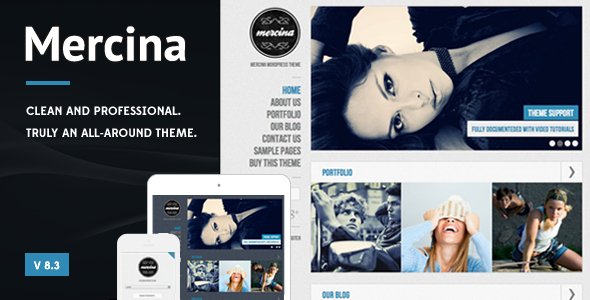
Stuck on your Mercina WordPress theme? Let's fix it.
No endless back-and-forth. Just send us the details and we'll get it done.
No obligation · Replies within 1 hour · Quote within 1 day
Setup · Customization · Bug fixes · WooCommerce integration
About Mercina WP Theme
Mercina is a WordPress theme built by Pirenko, a developer known for clean, visually driven designs. The theme targets creative professionals and agencies who want a portfolio or business site with strong typography and a minimal aesthetic.
It ships with multiple demo layouts, smooth scrolling effects, and a well-structured page builder integration. Pirenko themes tend to prioritise front-end polish, and Mercina is no exception. The demo content is realistic and import is straightforward.
Under the hood, Mercina uses a custom options panel for theme settings, which keeps things organised but does mean some settings are outside the WordPress customizer. It is suited to designers, photographers, studios, and small agencies who want a polished site without building from scratch.
Get matched with a Mercina developer in under one day
Tell us about your Mercina project. Small fixes, Mercina theme customization, or a full website build, whatever you need, we've got it covered.
We'll connect you to the right Mercina developers, define the scope, and get everything 100% clear.
You'll get one estimate, hire your preferred developer, and start collaborating.
Pirenko builds themes with a strong visual direction, and Mercina reflects that. But theme options only go so far. When you need custom functionality, layout changes, or integration with third-party services, you need a developer who understands both WordPress and Pirenko’s approach to theming.
FoxyConcept works through Codeable, a vetted network of WordPress specialists. Every developer there has been screened, so you are not hiring blind. You post your project, get matched, and receive an estimate with no obligation to proceed.
Pros
- Strong visual design out of the box, particularly for portfolio and agency use cases
- Multiple homepage and inner page demos included, covering different layout directions
- Pirenko has an active track record on ThemeForest with consistent update history
- Clean typography defaults that work well for creative and studio brands
- Portfolio filtering and project display are well-implemented without requiring extra plugins
Cons
- Custom options panel sits outside the native WordPress customizer, which can confuse non-technical clients
- WooCommerce styling requires extra CSS work to match the Mercina aesthetic properly
- Some layout options rely on shortcodes that can become problematic if you ever switch themes
- Demo import can occasionally fail or produce layout shifts depending on the hosting environment
- Documentation covers basics well but thinner on advanced customisation and edge cases
Who is Mercina for?
Creative Agency
Mercina suits agencies that want to show client work cleanly without a cluttered interface. The portfolio grid and filtering options let you organise projects by category, and the multiple homepage layouts give you starting points for different brand directions without building from scratch.
Freelance Photographer
Photographers get a lot from Mercina’s image-forward layouts and full-width display options. The theme handles large images well, and the minimal UI keeps attention on the work. You can organise shoots by type using the portfolio taxonomy and link gallery pages from the main navigation cleanly.
Graphic Design Studio
Design studios need a site that reflects their craft. Mercina’s typography and whitespace defaults give studio sites a polished baseline without needing heavy customisation. Showing case studies, process work, and client logos all fit within what the theme handles natively.
Architect or Interior Designer
Architects and interior designers work with strong imagery and need layouts that do not compete with the visuals. Mercina’s full-screen sections and grid-based project pages work well here. You can document projects with before and after images, floor plans, and client details in a structured way.
Digital Product Studio
Studios shipping digital products, tools, or SaaS products can use Mercina as a marketing site foundation. The landing page layouts support feature sections, pricing tables via plugins, and team pages. It works better for product marketing than for app documentation, but the base is solid.

Customizing Mercina
Customising Mercina goes beyond swapping colours and fonts. The theme includes layout variations, header styles, and portfolio filtering options that require some familiarity with the options panel Pirenko ships with it.
For straightforward changes, the built-in settings cover most bases. For deeper work, including custom post type modifications, WooCommerce integration, or layout changes that deviate from the demo, you will need PHP and CSS knowledge.
Working with a Mercina expert saves time here. FoxyConcept connects you with developers who have built on Pirenko themes before and know where the theme’s structure can be pushed and where it is better to work around it rather than override core files.
Recommended plugins for Mercina
Mercina works well with a focused plugin stack. Adding a contact form plugin, a lightweight SEO plugin, and a caching solution covers most site needs without bloating the theme.
For sites that need more, WooCommerce can be added with some styling work to match the Mercina aesthetic. If you plan to extend performance further, WordPress performance optimisation is worth doing once the site is built. For visibility, pairing Mercina with a proper WordPress SEO setup will get better results than relying on defaults alone.
Not sure which plugins to use? This WordPress plugins directory covers the most popular options with reviews and setup guides.
Mercina common issues
Mercina demo import not working
Demo import failures in Mercina usually come down to server memory limits or max upload size restrictions on the hosting environment. Check that your php.ini allows at least 256MB memory and a 64MB upload limit. If the import stalls partway through, try importing XML content manually via WordPress Tools, then importing widget settings separately. Clearing any caching plugins before import also helps avoid partial content conflicts.
Mercina portfolio grid not displaying correctly
Portfolio grid issues in Mercina are often caused by a missing or conflicting JavaScript file, usually triggered by a plugin adding its own jQuery version. Open browser dev tools and check the console for JS errors. Isotope, which handles the filtering, can break if jQuery loads twice. Disable plugins one at a time to isolate the conflict. If the issue persists, our WordPress bug fixing service can track it down quickly.
Mercina header options not saving
If Mercina’s header settings are not saving, the most common cause is a nonce conflict or a security plugin blocking admin AJAX requests. Check your security plugin’s settings and whitelist the theme options page. Also confirm your WordPress URL and site URL match exactly in Settings. Inconsistencies between HTTP and HTTPS can prevent options from persisting after save.
Mercina slow loading after adding images
Large unoptimised images are the most common cause of slow Mercina sites. The theme does not enforce image compression or lazy loading by default. Install a plugin like Imagify or ShortPixel to compress existing uploads, and enable lazy loading for images below the fold. Combining this with a caching plugin and a CDN typically cuts load times significantly. For a full audit, see our WordPress performance service.
Mercina FAQ
Mercina is not built as an Elementor-native theme. It has its own page builder integration and layout system. You can install Elementor alongside it, but you may run into styling conflicts on pages that mix both systems. If you want to build primarily with Elementor, a theme designed around it would be a cleaner starting point. For Mercina specifically, using its native page options gives more predictable results.
Mercina does support WooCommerce, but the default WooCommerce templates will not automatically inherit Mercina’s design. You will need additional CSS to style product pages, carts, and checkout screens to match the rest of the site. For a simple shop with a small product catalogue, this is manageable. For a full ecommerce build, budget time for that styling work or hire a developer to handle it properly.
Never edit Mercina’s core theme files directly. Use a child theme for any PHP or CSS customisations. This way, when Pirenko releases an update, your changes stay intact and you can update the parent theme safely. If you have made direct edits to the theme, those will be overwritten on update. Setting up a child theme before you customise is the right order of operations.
Mercina is compatible with WPML and Polylang, the two most widely used multilingual plugins for WordPress. The theme strings can be registered and translated through WPML’s theme localisation tool. Portfolio items and custom post types will need their translation settings configured separately. If you are building a multilingual site on Mercina, testing the language switcher placement in the header is worth doing early in the build.
Mercina’s code is reasonably clean, which gives it a decent SEO baseline. But the theme itself does not handle SEO. You will need a dedicated plugin like Yoast or Rank Math for meta tags, sitemaps, and structured data. Page speed also affects SEO, and Mercina’s default setup benefits from performance optimisation. A proper WordPress SEO setup will make a bigger difference than the theme choice alone.
Hire a Mercina Developer
Need help setting up Mercina, fixing a layout issue, or building something custom on top of it? FoxyConcept delivers WordPress development through Codeable, where all developers are pre-vetted and projects are fully managed.
Post your project and get a free estimate within 24 hours. No commitment required. Get your free estimate here and describe what you need. A Mercina developer will review it and come back to you with a clear scope and price.
You'll need a free Codeable account so developers can ask questions and send their quotes.