Merto WordPress Theme
by skygroup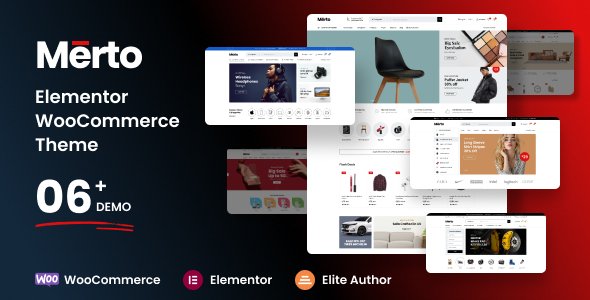
Stuck on your Merto WordPress theme? Let's fix it.
No endless back-and-forth. Just send us the details and we'll get it done.
No obligation · Replies within 1 hour · Quote within 1 day
Setup · Customization · Bug fixes · WooCommerce integration
About Merto WP Theme
Merto is a WordPress theme developed by skygroup, built for urban lifestyle, magazine, and blog-style websites. It ships with a clean grid layout, multiple homepage demos, and a header builder that gives you real control over the top of your site without touching code.
The theme works with Elementor and includes custom widgets for post grids, featured sliders, and category filtering. It handles typography well out of the box, with Google Fonts integration and readable default spacing.
Merto suits content-heavy sites that need a structured, editorial feel. If you run a city guide, a lifestyle publication, or a niche blog with multiple post categories, Merto gives you the structural pieces to organise content clearly without a bloated page builder workflow.
Get matched with a Merto developer in under one day
Tell us about your Merto project. Small fixes, Merto theme customization, or a full website build, whatever you need, we've got it covered.
We'll connect you to the right Merto developers, define the scope, and get everything 100% clear.
You'll get one estimate, hire your preferred developer, and start collaborating.
Merto looks straightforward until you need something it does not do by default. Custom archive layouts, non-standard header behaviour, or integrating a third-party plugin cleanly all take time and specific knowledge of the theme’s structure.
FoxyConcept connects you with vetted WordPress developers through Codeable. Every developer on the platform has passed a strict vetting process. You get a fixed estimate before any work starts, and you only pay if you decide to move forward. No risk, no guesswork.
Pros
- Clean grid-based layout works well for magazine and blog content out of the box
- Elementor compatibility with custom widgets for post grids and category sliders
- Header builder allows meaningful layout control without custom code
- Supports boxed and full-width layouts switchable from the Customizer
- Readable typography defaults with Google Fonts integration built in
Cons
- WooCommerce support is basic and product pages need custom styling work
- No built-in dark mode, requires manual CSS to implement
- Some Elementor widgets load extra scripts that affect page speed if not optimised
- Demo import can be unreliable and may not bring in all images or settings correctly
- Documentation is sparse in areas, particularly around template hierarchy and hooks
Who is Merto for?
City and Urban Lifestyle Blog
Merto’s grid layout and category filtering make it a natural fit for city lifestyle content. You can separate content by neighbourhood, topic, or event type with clean visual hierarchy. The featured slider works well for highlighting local stories or weekly roundups without the page looking cluttered.
Online Magazine
Multi-category publications benefit from Merto’s homepage section builder. You can stack different post grid styles for different editorial sections, keeping content organised and readable. The header builder handles navigation for sites with large category menus without collapsing into a messy dropdown.
Travel Blog
Travel blogs need strong visual presentation and clear post organisation by destination. Merto handles both with its grid layouts and featured image handling. Pair it with a gallery plugin and you have a solid foundation for destination guides, trip reports, and photo-heavy itinerary posts.
Food and Recipe Site
Recipe sites need readable single post layouts and good category browsing. Merto’s sidebar options and typography defaults support long-form recipe content well. You can add a recipe plugin like WP Recipe Maker and style it to match the theme without major conflicts in most cases.
Niche News Publication
For niche news sites covering a specific industry or topic, Merto’s editorial structure gives you the tools to present breaking posts, feature columns, and archive pages clearly. The theme handles high post volume without the homepage becoming visually overwhelming, which matters as your archive grows.

Customizing Merto
Merto exposes most of its settings through the WordPress Customizer, covering layout width, header styles, sidebar positions, footer columns, and colour schemes. You can switch between boxed and full-width layouts without touching a stylesheet.
Beyond the defaults, a Merto expert can push the theme further. Custom post templates, unique category page layouts, conditional sidebars, and tweaked Elementor widget styles all require knowing where Merto stores its template hierarchy and how its custom hooks work.
Child theme setup is strongly recommended before any custom CSS or PHP edits. Without it, theme updates will overwrite your changes. A developer familiar with Merto will set this up correctly from the start and build modifications that survive future updates cleanly.
Recommended plugins for Merto
Merto works well with WooCommerce if you want to add a shop section to a lifestyle or magazine site. The theme includes basic WooCommerce compatibility, though custom product page styling will need extra work.
For performance, pairing Merto with a caching plugin and optimising its bundled scripts reduces load time noticeably. See our WordPress performance service for details. If organic traffic matters to you, structured data and proper meta handling covered in our WordPress SEO service will help Merto-based sites rank better.
Not sure which plugins to use? This WordPress plugins directory covers the most popular options with reviews and setup guides.
Merto common issues
Merto theme header not saving changes
Header changes not saving in Merto usually come down to a caching issue or a conflict with a caching plugin that is serving a stored version of the page. Clear your site cache and browser cache after saving. If the problem continues, a JavaScript conflict from another plugin may be blocking the Customizer save action. Disable plugins one at a time to identify the conflict. Persistent issues may need a developer to inspect the console for errors. See our WordPress bug fixing service if you need hands-on help.
Merto demo import not working
Merto’s demo import fails most often because of server memory limits or a timeout during the import process. Check that your PHP memory limit is at least 256MB and that max execution time is set to 300 seconds or higher. If you are on shared hosting, these limits may be set too low. A failed import can also leave orphaned data, so it is worth resetting WordPress before trying again. If demo content keeps failing, importing page templates manually via XML is a more reliable fallback.
Merto Elementor widgets not showing on page
If Merto’s custom Elementor widgets are missing from the Elementor panel, the most common cause is that the theme’s widget registration is not firing correctly. This happens after a theme update without a proper child theme, or when Elementor’s version changes break theme compatibility. Check that both Merto and Elementor are on their latest versions. If widgets still do not appear, deactivate and reactivate the theme, then clear Elementor’s cache from the Elementor menu in the dashboard.
Merto theme slow loading on mobile
Slow mobile performance with Merto often comes from unoptimised images, render-blocking scripts, and Elementor’s default asset loading. Start by enabling Elementor’s improved asset loading option under Elementor settings. Compress images before uploading and use a caching plugin with CSS and JS minification. Merto loads several custom scripts that can be deferred safely. If load time is still poor after these steps, a performance audit will identify which specific files are causing the most delay. Visit our WordPress performance service for a full review.
Merto FAQ
Yes. Merto is built with Elementor compatibility in mind and includes custom Elementor widgets for post grids, sliders, and category displays. Most page building works directly in Elementor. Some advanced layout options still live in the Customizer rather than Elementor, so you will move between the two depending on what you are editing.
Merto includes basic WooCommerce support, meaning shop and product pages will display without breaking the layout. However, the default WooCommerce styles and Merto’s design do not match closely. Product pages, cart, and checkout will likely need custom CSS or a developer to style them properly if visual consistency with the rest of the site matters to you.
Create a new folder in your themes directory named merto-child. Add a style.css file with the correct template header referencing Merto as the parent theme, then add a functions.php file that enqueues the parent theme stylesheet. Activate the child theme from the WordPress dashboard. Any custom CSS or PHP changes go into the child theme, not the parent, so updates do not wipe your work.
Yes. Merto is designed with magazine and news-style publishing in mind. It handles multiple post categories, featured content areas, and editorial grid layouts well. For high-volume news sites, you may need additional performance tuning and a solid caching setup to keep page speed acceptable as your content library grows.
Support for Merto is provided through the skygroup author page on ThemeForest or wherever you purchased the theme. Response times and support quality vary. If you need faster or more technical help, such as custom modifications, bug fixes, or performance work, a freelance WordPress developer familiar with Merto is a more reliable route. Our WordPress bug fixing service covers theme-related issues.
Hire a Merto Developer
If your Merto site needs custom layouts, plugin integrations, speed improvements, or anything the theme settings cannot handle, a specialist will get it done faster and cleaner than trial and error.
Post your project and get a free estimate from a vetted Merto developer within 24 hours. No obligation to hire. Get your free estimate here.
You'll need a free Codeable account so developers can ask questions and send their quotes.