Metro – Minimal WooCommerce WordPress Theme WordPress Theme
by RadiusTheme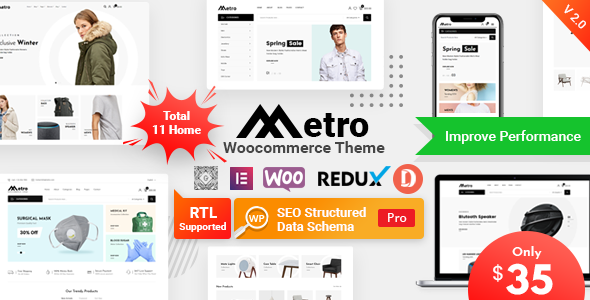
Stuck on your Metro – Minimal WooCommerce WordPress Theme WordPress theme? Let's fix it.
No endless back-and-forth. Just send us the details and we'll get it done.
No obligation · Replies within 1 hour · Quote within 1 day
Setup · Customization · Bug fixes · WooCommerce integration
About Metro – Minimal WooCommerce WordPress Theme WP Theme
Metro is a minimal WooCommerce WordPress theme by RadiusTheme, built for online stores that want a clean, distraction-free shopping experience. It ships with Elementor compatibility, a range of pre-built demo layouts, and a product display structure focused on conversion. The theme is lightweight by design, which helps stores load fast without sacrificing visual quality.
Metro supports WPML for multilingual stores, WooCommerce Wishlist, and Ajax cart functionality out of the box. It uses a modular layout system, so product pages, category pages, and headers can be configured without writing code. RadiusTheme provides regular updates and documentation, making Metro a practical choice for store owners who want control without complexity. The theme suits fashion, electronics, furniture, and general merchandise stores.
Get matched with a Metro – Minimal WooCommerce WordPress Theme developer in under one day
Tell us about your Metro – Minimal WooCommerce WordPress Theme project. Small fixes, Metro – Minimal WooCommerce WordPress Theme theme customization, or a full website build, whatever you need, we've got it covered.
We'll connect you to the right Metro – Minimal WooCommerce WordPress Theme developers, define the scope, and get everything 100% clear.
You'll get one estimate, hire your preferred developer, and start collaborating.
Metro looks simple, but WooCommerce stores built on it have real moving parts: cart logic, product templates, checkout customization, third-party integrations, and performance tuning. When something breaks or needs to be built correctly the first time, you need a developer who knows the theme, not just WordPress in general.
Codeable connects you with vetted WordPress specialists who have worked on WooCommerce stores across every niche. Post a project, get a transparent estimate, and only move forward if it makes sense. No bidding wars, no guesswork.
Pros
- Minimal design keeps the focus on products rather than decorative elements
- Ships with multiple pre-built WooCommerce demo layouts ready to import
- Elementor compatibility makes page building accessible without coding
- Ajax cart and wishlist functionality included without extra plugins
- WPML compatible, suitable for multilingual and multi-currency stores
Cons
- Some advanced WooCommerce template overrides require developer knowledge to implement cleanly
- Demo import can occasionally miss assets if server timeout limits are low
- Deep customization of the checkout page still requires custom CSS or a developer
- The Elementor dependency adds page weight if not configured carefully
- Documentation covers basics well but lacks detail on advanced WooCommerce scenarios
Who is Metro – Minimal WooCommerce WordPress Theme for?
Fashion and Apparel Stores
Metro’s clean grid layouts and large product image support make it a strong fit for clothing and accessories stores. A Metro developer can set up size guide modals, variation swatches, and lookbook-style category pages that display garments clearly and encourage browsing without cluttering the interface.
Electronics and Gadgets Retailers
Electronics stores benefit from Metro’s structured product page layout, which handles specification tables and multiple product images well. A Metro – Minimal WooCommerce WordPress Theme specialist can configure comparison features, tabbed product descriptions, and structured data markup to help product pages appear correctly in search results.
Home Furniture and Decor Shops
Furniture stores need large imagery and room scene presentation. Metro’s wide layout options support this well. A developer can build custom product galleries, configure room-style category banners, and set up Ajax filtering by material, color, and dimension so customers can narrow down products without full page reloads.
Health and Beauty Brands
Health and beauty brands running on Metro benefit from its minimal aesthetic, which communicates cleanliness and trust. A Metro expert can build ingredient or feature highlight sections using Elementor, configure bundle product displays, and integrate subscription plugins for repeat-purchase products like skincare or supplements.
Multi-Category General Merchandise Stores
General merchandise stores with multiple categories need flexible navigation and reliable filtering. Metro handles this through its header mega menu and category widget options. A Metro – Minimal WooCommerce WordPress Theme developer can extend this with custom category landing pages, dynamic product feeds, and performance tuning to keep large catalogs loading quickly.

Customizing Metro – Minimal WooCommerce WordPress Theme
Metro’s customization layer runs through the WordPress Customizer and Elementor, covering typography, color palettes, header layouts, footer structure, and product card styles. You can switch between multiple pre-built demos and adjust them to match your brand without touching a stylesheet.
For deeper work, a Metro – Minimal WooCommerce WordPress Theme expert can modify WooCommerce templates, build custom Elementor sections, set up conditional product layouts, or wire in third-party plugins without breaking the theme’s minimal aesthetic. Custom checkout flows, branded category pages, and performance-tuned product archives all require developer-level knowledge of how Metro structures its template hierarchy. That is where hiring a specialist makes the difference between a store that looks good and one that actually converts.
Recommended plugins for Metro – Minimal WooCommerce WordPress Theme
Metro works well with a focused set of extensions. For product filtering, FiboSearch or YITH WooCommerce Ajax Product Filter slot in cleanly. WooCommerce Subscriptions and Bookings are both compatible. For reviews and social proof, Judge.me integrates without conflict.
Performance matters most in WooCommerce stores. A developer familiar with Metro can configure caching, image optimization, and script loading correctly so extensions do not slow the store down. See the WordPress performance service for details on how that work is handled. On the visibility side, Yoast SEO and Rank Math both work with Metro’s schema output, and pairing them with structured WordPress SEO optimisation work gives product pages a real ranking advantage.
Not sure which plugins to use? This WordPress plugins directory covers the most popular options with reviews and setup guides.
Metro – Minimal WooCommerce WordPress Theme common issues
Metro theme WooCommerce product page layout broken
Product page layout breaks in Metro usually come from a plugin conflict, a failed WooCommerce template override, or a theme update that changed template file structure. Check the WooCommerce system status for outdated template files first. If templates are flagged, the Metro template files need to be refreshed. A developer can audit the override files and restore the correct layout without data loss. For persistent issues, the WordPress bug fixing service covers this type of fix.
Metro theme demo import not working or incomplete
Demo import failures in Metro often happen because the XML or JSON file exceeds server execution time or memory limits. Increase max_execution_time and memory_limit in your PHP configuration before retrying. If the import completes but images are missing, run the media regeneration tool. If specific sections are missing, import individual page templates manually through the Elementor template library rather than re-running the full demo import.
Metro WooCommerce Ajax cart not functioning
Ajax cart failures in Metro are usually caused by a JavaScript conflict with another plugin or a caching layer that is serving stale page fragments. Start by disabling caching plugins and testing. Then deactivate plugins one by one to identify conflicts. Check the browser console for JS errors pointing to the source. If your hosting uses a server-side cache like Varnish, make sure cart and checkout endpoints are excluded from caching rules.
Metro theme slow loading on WooCommerce shop page
Shop page slowness on Metro is commonly caused by unoptimized product images, multiple render-blocking scripts from Elementor or plugins, or unindexed database queries on large catalogs. Use Query Monitor to identify slow queries. Compress images with a tool like ShortPixel. Configure a caching plugin to exclude WooCommerce cart and account pages. A full performance audit through the WordPress performance service will address these systematically.
Metro theme header menu not displaying correctly on mobile
Mobile header issues in Metro are usually CSS-related, triggered by a child theme style that overrides breakpoint rules, or a custom header builder setting that does not translate correctly to smaller screens. Open browser dev tools at mobile viewport width and inspect the header container. Check for conflicting z-index or display values in custom CSS. If the issue appeared after an update, compare the current header template with the previous version in the RadiusTheme changelog.
Metro theme product image not showing on category page
Missing category page images in Metro can stem from incorrectly set featured images, a thumbnail size that has not been regenerated after a theme switch, or a caching issue serving placeholder images. Run the Regenerate Thumbnails plugin to rebuild image sizes. Confirm each product has a featured image assigned. If images show in the product editor but not on the frontend, check whether your CDN or caching layer is serving old versions. WordPress bug fixing can resolve this quickly.
Metro WooCommerce checkout page styling broken
Checkout page styling breaks in Metro typically occur when a WooCommerce update changes block-based checkout markup that the theme’s CSS does not account for. Check whether you are using the classic checkout shortcode or the new WooCommerce block checkout. Metro’s styles target the shortcode version by default. If you switched to the block checkout, you will need custom CSS or a developer to align the block styles with Metro’s design system.
Metro theme Elementor sections not saving properly
Elementor sections not saving in Metro are usually a server resource issue rather than a theme problem. Increase memory_limit to at least 256MB and set max_input_vars to 10000 or higher in your PHP configuration. Clear Elementor’s cache after making changes. If the issue persists, check for plugin conflicts by switching to a default theme temporarily. If it only happens with Metro active, a Meta Box or custom field conflict may be interfering with the Elementor save process.
Metro theme variation swatches not working
Variation swatches not working in Metro are almost always caused by a missing or conflicting plugin. Metro’s swatch display depends on a compatible variation plugin such as Variation Swatches for WooCommerce. Confirm the plugin is active and updated. If swatches show in the backend but not on the frontend, check whether the Metro theme’s product template is overriding the default variable product loop and not including the swatch hook. A child theme fix or template edit will resolve this.
Metro theme update broke the store layout
Layout breaks after a Metro theme update usually mean a customization was made directly to the parent theme files rather than through a child theme. Updates overwrite those changes. Restore the previous version from your backup, move all customizations into a child theme, then reapply the update. Going forward, always use a child theme for any Metro customization. If you do not have a backup, a developer can reconstruct the changes from your live site’s current state before updating.
Metro – Minimal WooCommerce WordPress Theme FAQ
Metro handles moderate to large catalogs well when configured correctly. Ajax filtering and lazy loading help on category pages. For very large stores with thousands of SKUs, a Metro specialist should configure database query caching and review the product loop template for performance. Without optimization, shop pages can slow down significantly as the catalog grows.
RadiusTheme updates Metro regularly to maintain compatibility with WooCommerce releases. Always check the changelog before updating either the theme or WooCommerce on a live store. Running updates on a staging site first is the safest approach. If you are several versions behind on either, a developer can handle the upgrade process with proper testing.
Metro is built with Elementor as its primary page builder. Most demo layouts and inner page templates depend on Elementor. You can use the theme without Elementor, but you will lose access to the pre-built page layouts. Basic WooCommerce shop, product, and archive pages function without it, but customizing them will require custom templates or another builder.
Yes, Metro is WPML compatible. You can run a multilingual WooCommerce store using the theme alongside WPML and WooCommerce Multilingual. Language switchers can be added to the header. For stores targeting multiple currencies as well, WooCommerce Multilingual’s currency switcher integrates cleanly with Metro’s header layout.
Metro supports variation swatches through compatible third-party plugins. Variation Swatches for WooCommerce by RadiusTheme works directly with the theme. The swatches display on product and archive pages. Styling can be adjusted through the Customizer. If swatches are not showing after plugin installation, a Metro developer can check the template hook configuration.
To install Metro demo content, go to Appearance, then Import Demo Data after activating the theme and required plugins. Select your preferred demo and click import. The process requires adequate PHP memory and execution time. If the import times out or misses content, increase server limits or contact your host. Some demo images are placeholder assets and need to be replaced with your own.
Metro is fully responsive and adjusts across mobile, tablet, and desktop breakpoints. The mobile header includes a hamburger menu and touch-friendly navigation. Product grids reflow to single or two-column layouts on small screens. If you have added custom CSS or Elementor sections, those should be tested across breakpoints to confirm they respond correctly.
Yes. A Metro – Minimal WooCommerce WordPress Theme developer can handle customizations, builds, bug fixes, and integrations. FoxyConcept delivers this work through Codeable’s vetted network. You post a project, receive a transparent estimate, and decide whether to proceed. There is no obligation. Visit Get a Free Estimate to start.
WooCommerce Subscriptions is compatible with Metro. The subscription product type displays through the standard product template, and the theme does not interfere with the plugin’s checkout or account page logic. Styling the subscription details section to match Metro’s minimal design may require small CSS adjustments, which a developer can handle quickly.
Start with image compression, a caching plugin configured to exclude WooCommerce endpoints, and a CDN for static assets. Disable unused plugins and scripts on shop pages. Use Query Monitor to find slow database queries. For deeper work, a Metro developer can configure server-level caching, lazy loading, and script deferral. The WordPress performance service covers all of this in a structured audit.
Hire a Metro – Minimal WooCommerce WordPress Theme Developer
Whether you need a Metro – Minimal WooCommerce WordPress Theme expert for a full store build, a specific customization, or an ongoing fix, FoxyConcept delivers the work through Codeable’s vetted developer network. Projects are scoped clearly, priced transparently, and completed by developers who know WooCommerce inside out. Get a Free Estimate and describe what you need. There is no obligation to hire.
You'll need a free Codeable account so developers can ask questions and send their quotes.