Modave WordPress Theme
by PressLayouts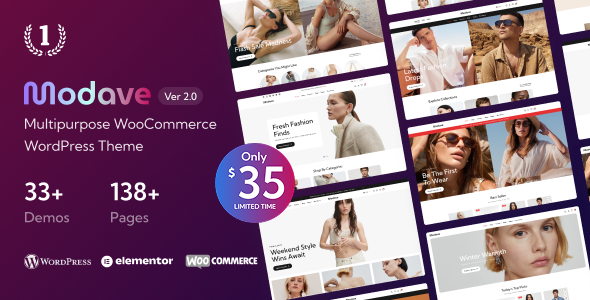
Stuck on your Modave WordPress theme? Let's fix it.
No endless back-and-forth. Just send us the details and we'll get it done.
No obligation · Replies within 1 hour · Quote within 1 day
Setup · Customization · Bug fixes · WooCommerce integration
About Modave WP Theme
Modave is a WordPress theme by PressLayouts built for creative agencies, portfolios, and business websites. It ships with a clean grid-based layout, smooth scroll animations, and full compatibility with Elementor, making it accessible to both developers and site owners who prefer visual editing.
The theme is built on a lightweight foundation with attention to typography and white space. It supports full-width headers, custom widgets, and WooCommerce out of the box. PressLayouts keeps Modave updated regularly, which matters for long-term compatibility with WordPress core and popular plugins.
If you want a modern, minimal starting point that doesn’t require stripping out bloated features before you can build, Modave is a solid pick. It works especially well for studios, freelancers, and small agencies presenting work to clients.
Get matched with a Modave developer in under one day
Tell us about your Modave project. Small fixes, Modave theme customization, or a full website build, whatever you need, we've got it covered.
We'll connect you to the right Modave developers, define the scope, and get everything 100% clear.
You'll get one estimate, hire your preferred developer, and start collaborating.
Modave gives you a strong visual foundation, but getting it to match a specific design or business requirement takes real WordPress knowledge. A developer who has worked with PressLayouts themes understands the template hierarchy, hook system, and where the theme’s default styles need to be overridden cleanly.
Through Codeable, you get access to vetted WordPress developers who can handle everything from small Modave tweaks to full custom builds. No generalist freelancers, no guesswork on quality. Every developer on the platform has been screened and reviewed.
Pros
- Lightweight codebase with no unnecessary bloat out of the box
- Full Elementor compatibility for visual page building
- WooCommerce ready without additional configuration
- Clean typography defaults that work well for portfolio and agency sites
- Regular updates from PressLayouts for ongoing WordPress compatibility
Cons
- Limited pre-built demo content compared to larger theme frameworks
- Advanced layout changes require PHP knowledge and child theme setup
- Documentation is thin on edge cases and developer-level customization
- No built-in mega menu support without a third-party plugin
- Header layout options are limited without custom code or Elementor Pro
Who is Modave for?
Creative Agency Website
Modave handles agency use cases well. The grid layouts and animation options give project showcases a professional feel. You can build separate pages for services, case studies, and team members without fighting the theme’s defaults. Elementor compatibility means your team can update content independently after launch.
Freelance Portfolio
For freelancers, Modave’s minimal aesthetic keeps the focus on the work itself. Portfolio grids are easy to set up, and the theme’s typography defaults are clean enough to use without heavy modification. Adding a contact form and a simple about page takes less than an hour with the right setup.
Small Business Service Site
Service-based businesses benefit from Modave’s structured layout options. You can build clear service pages, add testimonials, and connect a contact form without installing a page builder if you prefer. The theme handles multi-section landing pages without performance issues on standard hosting.
Digital Product Store
Modave’s WooCommerce compatibility makes it a practical choice for selling digital products. Shop pages render cleanly, and the theme’s minimal styling doesn’t interfere with product presentation. You’ll want to configure a payment gateway and review checkout styling, but the base setup requires minimal work.
Photography Studio
Full-width image support and clean grid layouts make Modave a strong fit for photography studios. Gallery pages look sharp without additional plugins. The theme handles large image files reasonably well, though pairing it with an image optimization plugin is recommended for sites with extensive portfolios.

Customizing Modave
Modave customization typically starts in the WordPress Customizer, where you can adjust colors, fonts, header layout, and footer columns without touching code. Elementor users get additional flexibility through drag-and-drop page building that works cleanly with the theme’s existing styles.
For deeper changes, things get more technical. Custom post types, loop modifications, or structural template changes require PHP knowledge and a proper child theme setup. Skipping the child theme step is the most common mistake people make with Modave, and it leads to lost changes after every update.
If your project needs go beyond what the Customizer offers, working with a Modave expert saves a significant amount of time. A developer who knows PressLayouts themes can scope the work accurately and avoid common pitfalls.
Recommended plugins for Modave
Modave pairs well with several plugins that extend its core functionality. WooCommerce works without additional configuration for basic stores. For SEO, the theme outputs clean HTML that plays nicely with Yoast or Rank Math.
Performance-wise, Modave is compatible with caching plugins like WP Rocket and image optimization tools. If you need additional speed gains, WordPress performance optimization can help reduce load times further. For search visibility, pairing the theme with a proper WordPress SEO setup gives you a measurable edge. Contact Form 7 and WPForms both integrate without styling conflicts.
Not sure which plugins to use? This WordPress plugins directory covers the most popular options with reviews and setup guides.
Modave common issues
Modave theme not loading custom fonts correctly
Custom font issues in Modave usually come down to one of two things: the font stack isn’t being applied to the right selectors, or a caching plugin is serving an old stylesheet. Start by clearing all caches and checking the Customizer font settings. If you’re using a custom font via a plugin, confirm the font is enqueued after the theme stylesheet. Adding CSS specificity rules in your child theme’s style.css often resolves conflicts. If the issue persists, WordPress bug fixing can pinpoint the exact cause.
Modave header layout broken after WordPress update
A broken Modave header after a WordPress update almost always means a template file was overridden in a child theme and is now out of sync with the parent theme’s updated version. Check your child theme for any header.php or header template parts and compare them against the updated parent theme files. Merge the changes manually. If you weren’t using a child theme, you may have lost customizations entirely. Going forward, always use a child theme for any file-level edits.
Modave Elementor sections not displaying on mobile
Elementor sections that display correctly on desktop but break on mobile in Modave are usually caused by conflicting CSS between the theme and Elementor’s responsive breakpoints. Open the affected section in Elementor, switch to mobile view, and check for padding, column width, or visibility settings that override the default layout. Also verify that Elementor’s mobile breakpoint settings align with Modave’s media queries in the theme stylesheet. A bug fix service can resolve complex cases faster.
Modave footer widgets not showing on all pages
Footer widgets missing on specific pages in Modave typically means the page template selected for those pages doesn’t include the footer widget area. Go to the page editor and check which template is assigned. Some full-width or landing page templates intentionally exclude the standard footer. If you need widgets on those pages, either switch to the default template or add the widget area call to a child theme template file that matches the page structure you need.
Modave FAQ
Modave is a premium WordPress theme sold by PressLayouts. Pricing and licensing details are available on their official website. A valid license includes theme updates and access to PressLayouts support. Using a nulled or unlicensed version means no updates, which creates security and compatibility risks over time.
Yes, Modave is built to work with Elementor. Most of the theme’s layout options can be extended or replaced using Elementor’s page builder. For advanced features, Elementor Pro adds more widget options and theme builder functionality that works cleanly alongside Modave’s existing styles.
Create a new folder in wp-content/themes/ named something like modave-child. Inside it, add a style.css file with the required header that references Modave as the template, and a functions.php file that enqueues the parent theme stylesheet. Activate the child theme from the WordPress dashboard before making any edits.
Modave supports WooCommerce without additional configuration for basic store setups. Shop pages, product pages, and the cart and checkout pages all render using the theme’s styles. You may want to adjust product grid columns or button styles, which can be done through the Customizer or with small CSS additions in a child theme.
Migrating an existing site to Modave involves exporting content, setting up a fresh WordPress install with the theme, and rebuilding page layouts to match Modave’s structure. It’s not a one-click process. A proper WordPress migration ensures your content, SEO settings, and redirects transfer without issues or downtime.
Hire a Modave Developer
Whether you need a single layout adjusted or a complete Modave build from scratch, working with an experienced developer gets the job done right the first time. No wasted hours in forums or risky trial-and-error edits on a live site.
Post your project and get matched with a qualified Modave developer within 24 hours. Get a free estimate with no obligation to hire. The process is straightforward and risk-free.
You'll need a free Codeable account so developers can ask questions and send their quotes.