Modus WordPress Theme
by Arrow-Theme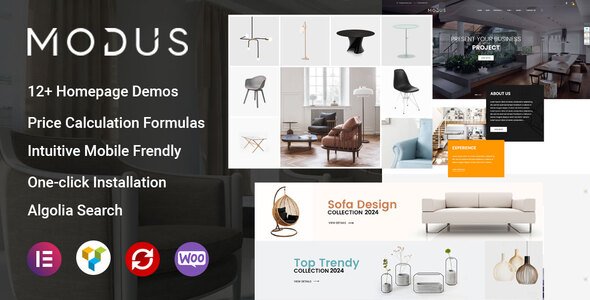
Stuck on your Modus WordPress theme? Let's fix it.
No endless back-and-forth. Just send us the details and we'll get it done.
No obligation · Replies within 1 hour · Quote within 1 day
Setup · Customization · Bug fixes · WooCommerce integration
About Modus WP Theme
Modus is a WordPress theme built by Arrow-Theme, designed around a clean grid-based layout that suits portfolio sites, agencies, and creative businesses. It ships with the WPBakery Page Builder, giving you drag-and-drop control over page structure without writing code.
The theme leans heavily on whitespace and typography. Navigation is minimal, load times are reasonable out of the box, and the demo content covers a range of creative industries. Arrow-Theme maintains the product actively, with updates pushing compatibility fixes for newer WordPress versions and third-party plugins.
Modus works best for studios, photographers, and small agencies that want a polished front end without a custom build. It handles single-page layouts well and supports full-width sections, video backgrounds, and parallax scrolling through its built-in options panel.
Get matched with a Modus developer in under one day
Tell us about your Modus project. Small fixes, Modus theme customization, or a full website build, whatever you need, we've got it covered.
We'll connect you to the right Modus developers, define the scope, and get everything 100% clear.
You'll get one estimate, hire your preferred developer, and start collaborating.
Modus looks straightforward until you need it to do something outside its default setup. Custom layouts, portfolio filtering logic, WooCommerce restyling, or performance work all require someone who knows the theme’s structure well.
FoxyConcept connects you with vetted Modus developers through Codeable. You post your project, get matched with a specialist within 24 hours, and receive a free estimate before any commitment. No guesswork, no generalist freelancers. Explore WordPress development services to see what’s possible.
Pros
- Clean grid-based layout works well for portfolio and agency sites without heavy customisation
- WPBakery Page Builder is included, so non-technical users can build pages visually
- Redux Framework options panel covers typography, colours, and header layout in one place
- Arrow-Theme maintains active updates with WordPress core and plugin compatibility fixes
- Built-in support for full-width sections, video backgrounds, and parallax scrolling
Cons
- WPBakery shortcodes lock content to the theme, making future migrations harder
- Deep customisation of the portfolio post type requires PHP and template knowledge
- WooCommerce styling is basic and needs CSS work to match the default Modus design closely
- Page builder nesting slows down the editor on complex pages with many rows and columns
- Redux Framework options panel can be limiting if you need granular control over individual templates
Who is Modus for?
Creative Agencies
Modus suits agency sites that want a polished front end without a fully custom build. The portfolio post type handles case studies well, and the full-width layout options give enough flexibility to present client work cleanly. Agencies that need custom project filtering or a client portal will need developer support to extend beyond defaults.
Photography Studios
Photography studios benefit from Modus’s whitespace-heavy design and full-width image support. Gallery pages render cleanly, and the minimal navigation keeps focus on the work. For studios needing client proofing, password-protected galleries, or print ordering via WooCommerce, some custom development is required to tie those features together.
Freelance Designers
Freelancers can set up a Modus portfolio site quickly using demo content as a starting point. The single-page layout option works well for condensed personal sites. Designers who want a unique look beyond the default styling will need CSS work or a child theme to differentiate from other Modus sites in the wild.
Architecture Firms
Architecture firms get a lot of value from Modus’s project grid and large image support. Presenting building projects with full-width photography and clean typography is straightforward. Firms needing multilingual support, custom project filtering by building type, or an integrated contact system will need a developer to configure those features properly.
Small eCommerce Shops
Modus supports WooCommerce for shops with a limited product range. The base styling covers the main shop pages adequately. Stores needing custom product layouts, advanced filtering, or a heavily branded checkout experience will need a developer to rework the WooCommerce templates to sit properly within the Modus design system.

Customizing Modus
Modus ships with a theme options panel built on the Redux Framework. You can control typography, color schemes, header layout, and footer columns from a single screen. WPBakery handles page-level layout, though working inside it can slow down once a page has many nested rows and columns.
For deeper changes, child theme work is recommended. Customizing the Modus portfolio post type, adding custom fields, or modifying how project archives display requires PHP knowledge. A Modus expert can restructure templates, hook into Arrow-Theme’s custom functions, and extend the theme without breaking update compatibility.
If your build needs custom post types beyond the built-in portfolio, ACF integration, or a modified WooCommerce setup, hiring a developer familiar with Modus saves significant time.
Recommended plugins for Modus
Modus integrates with WooCommerce for basic shop setups. The styling covers product pages, cart, and checkout, though the default WooCommerce blocks need CSS adjustments to sit cleanly inside the Modus grid.
Contact Form 7 and Gravity Forms both work without issues. For SEO, Modus outputs clean heading structure, and pairing it with a dedicated plugin gives you full control over meta and schema. Performance-wise, the WPBakery shortcode markup adds page weight, so a proper caching and optimisation setup matters. If speed is a priority, review WordPress performance options or consider SEO optimisation as part of your project scope.
Not sure which plugins to use? This WordPress plugins directory covers the most popular options with reviews and setup guides.
Modus common issues
Modus theme portfolio grid not displaying correctly after update
Portfolio grid display issues after a Modus update usually trace back to a CSS conflict or a changed template file. First, check if you’re running a child theme. If changes were made directly to parent theme files, an update will overwrite them. Clear your site cache, then inspect the grid markup in your browser’s dev tools to identify broken classes. If the grid worked before the update, compare the changelog. A developer can resolve template conflicts quickly through the WordPress bug fixing service.
WPBakery elements not loading on Modus theme pages
If WPBakery elements stop loading in Modus, the most common causes are a WPBakery version mismatch with the bundled copy in the theme, a JavaScript conflict with another plugin, or a failed asset load. Open your browser console and look for JS errors. Try deactivating other plugins one by one to isolate the conflict. Make sure the WPBakery version bundled with Modus is updated through the theme’s update mechanism, not the standalone plugin. A developer can diagnose this faster through bug fixing support.
Modus theme header logo not showing on mobile
Mobile header logo issues in Modus usually come from the logo image dimensions or a CSS rule targeting the mobile breakpoint. Check the Modus theme options panel under Header settings and confirm separate logo fields for standard and retina displays are filled correctly. Then inspect the mobile header in dev tools at a small viewport to find any display:none or max-height rules hiding the image. If a custom header was built with WPBakery, the mobile visibility toggle on that row may be switched off.
Modus theme slow loading on pages with parallax sections
Parallax sections add load weight in Modus because they rely on JavaScript scroll listeners and large background images. Start by compressing the background images used in parallax rows. Then check if the Modus parallax script is loading on every page or only where used. A caching plugin with proper JS deferral settings helps. For persistent speed issues, consider reviewing your full setup through WordPress performance optimisation to identify bottlenecks beyond the theme itself.
Modus FAQ
Arrow-Theme releases updates to keep Modus compatible with current WordPress versions. Check the theme’s changelog on ThemeForest for the latest tested version. If you’re running an older copy of Modus, test any WordPress core update on a staging site first. Compatibility issues are more common when both the theme and WPBakery are outdated at the same time.
Modus is built around WPBakery and its options panel ties into that page builder. Switching to Elementor is possible but requires rebuilding all pages in the new editor. WPBakery shortcodes do not convert automatically. If you want to move away from WPBakery, a developer can help plan the migration and rebuild key templates without losing your content structure.
Create a new folder in your themes directory named modus-child. Add a style.css file with the correct theme header referencing Modus as the parent, then add a functions.php file that enqueues the parent stylesheet. Activate the child theme from the WordPress dashboard. Any template overrides or custom CSS should go in the child theme to survive Modus updates safely.
Modus includes basic WooCommerce support. Product pages, the shop archive, cart, and checkout all have default styling. The integration covers standard WooCommerce functionality. Complex shop requirements, custom product layouts, or branded checkout flows will need additional CSS and template work to look polished within the Modus design.
Migrating away from Modus means losing WPBakery-built layouts since the shortcodes are page builder specific. Your posts, pages, and media carry over cleanly, but page layouts need rebuilding in the new theme. Plan for significant rebuild time on any page that used WPBakery rows and columns. A developer can manage the WordPress migration and rebuild templates efficiently.
Hire a Modus WordPress Expert
Whether you need a layout built from scratch, a bug fixed, or an existing Modus site extended, FoxyConcept matches you with a developer who knows this theme. Work is delivered through Codeable’s vetted network. Get a free estimate with no obligation to hire. You describe the project, a Modus developer reviews it, and you decide if you want to proceed. The process takes less than 24 hours to get a quote.
You'll need a free Codeable account so developers can ask questions and send their quotes.